

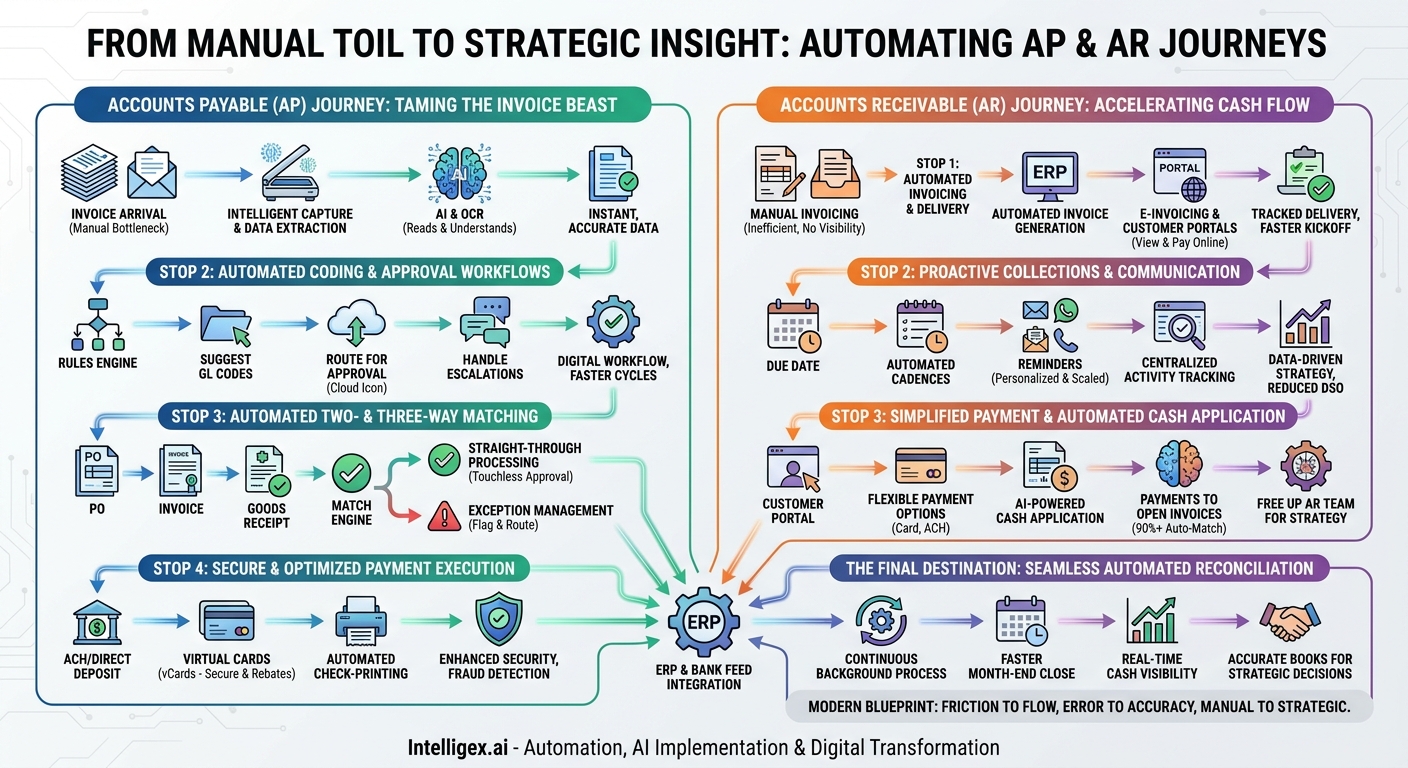
The back office of any thriving business is a complex ecosystem of financial transactions. At its heart lie two critical, interconnected functions: Accounts Payable (AP) and Accounts Receivable (AR). Traditionally, these departments have been buried under mountains of paper, manual data entry, and time-consuming follow-ups. The journey from an invoice’s arrival to its final payment and reconciliation was a winding, inefficient path fraught with potential for error, delay, and fraud. Today, however, a new map exists—one drawn by the power of automation. This digital map transforms the financial back office from a cost center into a strategic hub of efficiency, insight, and control.
Embarking on this automation journey requires a clear understanding of the key stops along the way. We will explore this map in two parts: first, navigating the automated AP process from invoice receipt to payment, and second, charting the automated AR course from invoice creation to cash collection. Finally, we’ll see how these two paths converge at the ultimate destination: seamless, automated reconciliation.
The Accounts Payable (AP) Journey: Taming the Invoice Beast
The goal of AP automation is to create a touchless, transparent, and efficient process for handling supplier invoices. It’s about paying the right amount to the right vendor at the right time, every time, with minimal human intervention. Let’s trace the steps on our automation map.
Stop 1: Intelligent Invoice Capture and Data Extraction
The journey begins the moment an invoice arrives, whether as a paper document, a PDF attachment in an email, or through an electronic data interchange (EDI). In a manual world, this is where the bottleneck starts, with AP clerks keying in data line by line—a tedious and error-prone task.
Automation redraws this first step entirely. Instead of manual entry, we use Intelligent Data Capture. Here’s how it works:
- Optical Character Recognition (OCR): This technology scans the invoice document (paper or digital) and converts the text into machine-readable data. Early OCR was a good start, but it often struggled with complex formats and required templates for each vendor.
- Artificial Intelligence (AI) and Machine Learning (ML): Modern solutions go far beyond basic OCR. AI-powered platforms don’t just read the text; they understand it. They can identify key fields like invoice number, date, PO number, line-item details, and totals, regardless of the invoice layout. With each invoice it processes, the system learns and becomes more accurate, effectively eliminating the need for manual data entry and validation for the majority of invoices.
The result is data that is captured instantly and accurately, ready for the next stage of the journey without a human ever touching a keyboard.
Stop 2: Automated Coding and Approval Workflows
Once the data is in the system, the invoice needs to be coded to the correct General Ledger (GL) account and approved by the appropriate budget holder. Manually, this involves physically routing invoices, sending countless follow-up emails, and hoping documents don’t get lost on someone’s desk.
Automation transforms this chaotic chase into a streamlined, digital workflow. The system uses pre-configured rules to:
- Suggest GL Codes: Based on historical data, vendor information, or PO details, the AI can suggest the correct GL codes, saving time and reducing coding errors.
- Handle Escalations: If an approver is out of office or fails to respond within a set timeframe, the system can automatically escalate the invoice to an alternate approver, ensuring the process never stalls.
– Route for Approval: The invoice is automatically routed to the designated approver(s) based on rules you define (e.g., by department, amount, or project). Approvers are notified via email or a mobile app and can review and approve invoices with a single click, from anywhere.
This digital workflow provides complete visibility into where every invoice is in the approval process, eliminating guesswork and accelerating approval cycles from weeks to days, or even hours.
Stop 3: Automated Two- and Three-Way Matching
For businesses that use Purchase Orders (POs), matching the invoice against the PO and the goods receipt note is a critical control step. A two-way match compares the invoice to the PO, while a three-way match adds the goods receipt to confirm that the items were received. Manually, this is a painstaking, line-by-line comparison.
An automated matching engine performs this task in seconds. The system instantly compares the captured invoice data against the PO and receiving data stored in your ERP.
- Straight-Through Processing: If all three documents match within pre-set tolerances, the invoice is approved for payment without any human review. This is the definition of a “touchless” process.
- Exception Management: If there’s a mismatch (e.g., a price difference or quantity discrepancy), the system automatically flags the invoice as an exception and routes it to the appropriate person (e.g., the procurement department) with all the relevant documents attached. This allows your AP team to focus their valuable time only on the invoices that truly require their attention.
Stop 4: Secure and Optimized Payment Execution
The final step in the AP journey is making the payment. Manual payment processes, especially cutting paper checks, are expensive, slow, and highly susceptible to fraud.
Payment automation centralizes and secures this entire function. An integrated payment solution allows you to pay suppliers through a variety of methods from a single platform:
- ACH/Direct Deposit: A cost-effective and efficient electronic payment method.
- Virtual Cards (vCards): A highly secure method where a unique, single-use card number is generated for a specific payment amount. This eliminates the risk of exposing bank account details and can often generate cash-back rebates, turning your AP department into a revenue generator.
- Automated Check-Printing and Mailing: For vendors who still require checks, the service can print and mail them on your behalf, freeing your team from the check-run process.
This automated approach not only streamlines the payment run but also enhances security with built-in fraud detection, dual-approval workflows for payments, and a complete audit trail.
The Accounts Receivable (AR) Journey: Accelerating Cash Flow
On the other side of the ledger, AR automation focuses on getting cash in the door faster. It’s about streamlining invoice creation, simplifying the payment process for customers, and proactively managing collections to reduce Days Sales Outstanding (DSO).
Stop 1: Automated Invoicing and Delivery
The AR cycle begins with sending an invoice to the customer. Manually creating invoices, attaching them to emails, and tracking their delivery is inefficient and provides no visibility into whether the customer has even received or opened it.
Automation standardizes and accelerates this kickoff step:
- Automated Invoice Generation: The system pulls data directly from your ERP or sales system to generate accurate, professional invoices in batches, eliminating manual creation.
- E-invoicing and Customer Portals: Instead of just emailing a PDF, invoices are delivered electronically through a secure customer portal. This portal allows customers to view, download, and pay their invoices online. It also provides you with a delivery receipt, confirming the customer has received it and removing the “I never got the invoice” excuse.
Stop 2: Proactive Collections and Communication
Traditionally, collections is a reactive process. An AR specialist runs an aging report, identifies overdue accounts, and begins the manual process of making phone calls and sending emails. This approach is inconsistent and difficult to scale.
AR automation transforms collections into a proactive, data-driven strategy:
- Automated Communication Cadences: You can set up automated reminder workflows based on invoice due dates. For example, a gentle reminder can be sent a few days before the due date, a more direct notice on the due date, and a series of escalating overdue notices thereafter.
- Personalization at Scale: These automated communications can be personalized with the customer’s name, specific invoice numbers, and outstanding amounts, maintaining a professional and customer-centric tone without the manual effort.
- Centralized Activity Tracking: All communications—automated and manual—are logged in a central system, providing a complete history of interactions for each customer account.
Stop 3: Simplified Payment and Automated Cash Application
This is often the most painful part of the manual AR process. A customer sends a single payment covering multiple invoices, or a payment arrives with no remittance information. Your AR team then has to play detective, trying to figure out which invoices to close out. This is known as cash application.
Automation solves this complex puzzle:
- Flexible Payment Options: The customer portal allows clients to pay via credit card, ACH, or other digital methods, making it easier and more convenient for them to pay you on time.
- AI-Powered Cash Application: This is the game-changer. The system ingests remittance data from any source—email attachments, EDI, or customer portal entries—and uses AI to automatically match payments to open invoices. It can handle complex scenarios like bundled payments, short payments, and credit memos with incredible accuracy. This can automate over 90% of cash application, freeing up your AR team for more strategic tasks like credit analysis and customer relationship management.
The Final Destination: Automated Reconciliation
Both the AP and AR journeys lead to this crucial final stop. Reconciliation is the process of ensuring the transactions recorded in your general ledger match the transactions in your bank statements. Done manually at the end of each month, this is a stressful, time-consuming process of ticking and tying.
With AP and AR automation, reconciliation becomes a continuous, automated background process. The data from your automated AP payments and AR cash application flows directly and accurately into your ERP. The system can then use bank feeds to automatically match cleared payments and deposits to the corresponding entries in your ledger.
The benefits are profound: a dramatically faster month-end close, real-time visibility into your cash position, and a highly accurate set of books you can trust to make critical business decisions. Your finance team is no longer bogged down in a historical reporting exercise; they are equipped with up-to-the-minute data to provide forward-looking strategic guidance.
This automation map—from intelligent capture to touchless processing to seamless reconciliation—is the modern blueprint for a world-class finance function. It’s a journey that replaces friction with flow, error with accuracy, and manual toil with strategic insight. By navigating this map, businesses can unlock newfound efficiency, strengthen financial controls, and ultimately fuel sustainable growth.
Related Posts
Get a FREE
Proof of Concept
& Consultation
No Cost, No Commitment!
