

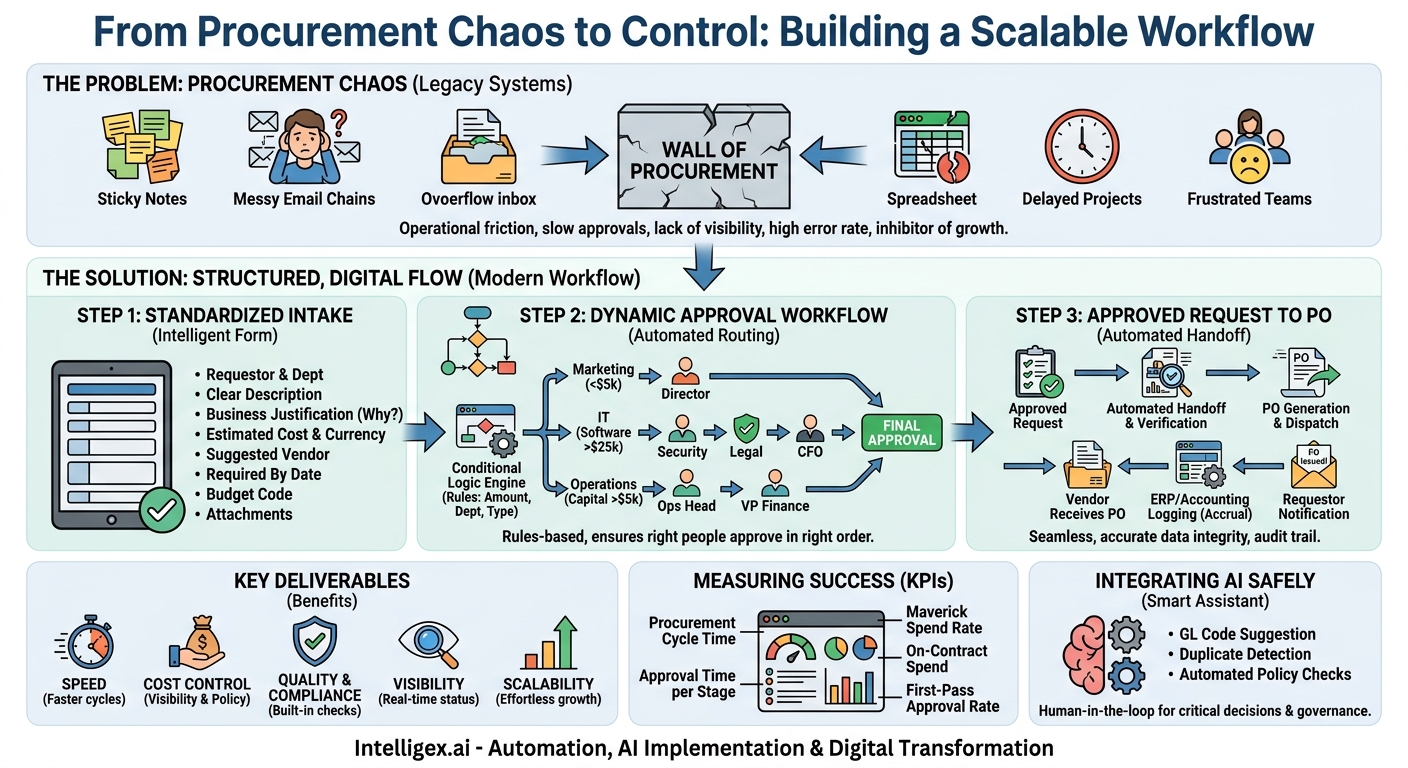
Every growing business eventually hits a wall. It’s not a wall of sales or marketing, but an internal one built from sticky notes, messy email chains, and confusing spreadsheets. This is the wall of procurement. A simple request for new software, a marketing budget increase, or even a set of office chairs can get lost in a maze of approvals, delaying projects and frustrating your most productive teams. This operational friction isn’t just an annoyance; it’s a direct inhibitor of growth, tying up resources and slowing down the entire organization.
Fixing the flow from a procurement request to a final approval isn’t about adding more rules. It’s about creating a clear, predictable, and efficient pathway that serves the business instead of slowing it down. By structuring this process, you give teams the speed they need to execute while providing leadership with the visibility required for smart financial governance. It’s a foundational element of digital transformation that unlocks agility, controls costs, and allows your company to scale without chaos.
What a Modern Procurement Flow Delivers
Many organizations still run procurement on a legacy system of emails and manual tracking. A manager emails a request to their director, who forwards it to finance, who then has to track down the original requestor for a missing budget code. Each step introduces delay, creates an opportunity for human error, and leaves everyone wondering, “What’s the status of my request?”
A modern, structured procurement flow transforms this chaotic process into a streamlined, digital assembly line. It’s a single, defined system that handles everything from the initial request to the final purchase order. The value this creates touches every corner of the business.
- Speed: When a sales team needs a new demo tool to close a major deal, they can’t afford to wait two weeks for approvals. A streamlined process with automated routing gets requests to the right people instantly, drastically cutting down cycle times.
- Cost Control: Centralized requests provide a complete picture of company-wide spending. This visibility allows finance and procurement teams to identify redundant software subscriptions, negotiate volume discounts, and enforce budget policies before money is spent, not after.
- Quality and Compliance: A structured flow ensures that all necessary checks are completed. This includes security reviews for new software, legal review for contracts, and verification that vendors meet company standards. It builds compliance directly into the process.
- Visibility: Anyone involved in a request, from the original submitter to the CFO, can see its status in real time. This eliminates the need for constant follow-up emails and provides a clear audit trail for every single purchase.
- Scalability: A process based on email and spreadsheets breaks under pressure as a company grows. A well-designed digital workflow scales effortlessly, handling ten requests or ten thousand requests with the same efficiency and control.
Step 1: Standardizing the Request Intake
The entire procurement process begins with a single action: someone needs something. The single most effective way to improve your entire workflow is to standardize how that need is captured. A messy, incomplete request creates rework for everyone downstream. The goal is to get all the necessary information, in the right format, from the very beginning.
This means replacing email, instant messages, and hallway conversations with a single, intelligent intake form. This form is the official front door for all purchase requests, ensuring that every submission is complete and ready for review. It acts as a checklist for the requestor, guiding them to provide the details that approvers and finance teams will inevitably ask for later.
Key Fields for Your Purchase Request Form
Your form can be customized, but a strong starting point includes these essential fields. Each one serves a specific purpose in preventing delays and enabling better decision-making.
- Requestor and Department: Who is asking and where do they sit? This is fundamental for routing and budget allocation.
- Clear Item or Service Description: Avoid vague entries like “new software.” Instead, encourage specifics like “10 user licenses for Project Management Tool X, Pro Tier.”
- Business Justification: This is the most critical field. It answers the “why.” How will this purchase help the team achieve its goals? A good justification connects the spend to a business outcome, such as “to reduce manual reporting time by 10 hours per week” or “to support the Q4 lead generation campaign.”
- Estimated Cost and Currency: This is the primary data point for routing. A $500 request should follow a different path than a $50,000 request.
- Suggested Vendor (if known): If the requestor has already researched a vendor, capture that information. Include fields for the vendor website and a contact person.
- Required By Date: This helps with prioritization. A critical, time-sensitive need should be flagged differently than a “nice-to-have” for next quarter.
- Budget Code or Cost Center: Tying the request to a specific budget from the start saves the finance team from having to chase down this information later.
- Attachments: A dedicated place to upload vendor quotes, Statements of Work (SOWs), or security questionnaires.
Step 2: Designing a Dynamic Approval Workflow
Once you have standardized request data, you can build an intelligent approval workflow. A one-size-fits-all approval chain is inefficient. The VP of Engineering shouldn’t have to approve the purchase of a new mouse, and a department manager shouldn’t be the final approver on a six-figure software contract. The key is to use the data from the intake form to route the request to the right people, in the right order.
This is achieved through conditional logic. The workflow system automatically adjusts the approval path based on rules you define, such as the request amount, the department, or the type of purchase (e.g., software, hardware, professional services).
Example Approval Chains for Different Teams
Let’s look at a few practical scenarios:
- A Marketing Team Request: An employee requests a $2,000 sponsorship for a local industry event.
- Rule: If the request is from the Marketing department and under $5,000.
- Workflow: The request goes directly to the Director of Marketing for a single approval. Once approved, Finance is notified to process the payment.
- An IT Team Request: A manager requests a new enterprise-level cybersecurity platform for $60,000 per year.
- Rule: If the request is for software, over $25,000, and involves customer data.
- Workflow:
- First, it goes to the Head of IT for functional approval.
- Next, it is routed to the Information Security team for a mandatory review.
- Then, it goes to the legal team to review the vendor’s Master Service Agreement (MSA).
- Finally, it is sent to the CFO for financial approval.
- An Operations Team Request: The facilities manager requests a $7,500 order for new ergonomic chairs for the engineering team.
- Rule: If the request is for a capital expenditure and over $5,000.
- Workflow: The request goes to the Head of Operations, then to the VP of Finance for budget confirmation.
In each case, the process is clear, logical, and automated. No one wastes time reviewing irrelevant requests, and all necessary stakeholders are included without manual intervention.
Step 3: From Approved Request to Purchase Order
An approved request isn’t the end of the process. It’s the trigger for the next critical phase: creating a formal Purchase Order (PO). This is the official document that authorizes the purchase and, once accepted by the vendor, becomes a legally binding contract. Automating this handoff is crucial for maintaining speed and accuracy.
A manual process, where an approver forwards an email to finance to “please create a PO for this,” is slow and prone to error. Critical data can be mistyped or omitted. A modern workflow connects these steps seamlessly.
- Automated Handoff: As soon as the final approver clicks “Approve,” the system automatically creates a task for the procurement or finance team. The task includes all the original request details, attachments, and the full approval history.
- Verification and Enrichment: The procurement specialist reviews the information. They ensure the vendor is set up correctly in the financial system, confirm the tax and shipping details, and apply any pre-negotiated contract terms or discounts.
- PO Generation: With a single click, the system generates a numbered Purchase Order, populating it directly from the approved request data. This eliminates manual data entry, a common source of costly mistakes. The PO is saved in a central location, linked back to the original request.
- Vendor Dispatch and Logging: The finalized PO is sent to the vendor. Simultaneously, the PO details are automatically pushed to the company’s accounting or ERP system (like NetSuite or SAP), creating an accrual and ensuring the books are always up to date.
- Requestor Notification: The system sends an automated notification back to the original requestor, letting them know the PO has been issued and providing the PO number for their records. The loop is closed.
This automated flow ensures data integrity from start to finish, creates a perfect audit trail, and gives the finance team the real-time data they need to manage cash flow and forecast expenses accurately.
Measuring Success: KPIs for Your Procurement Flow
How do you know if your new process is working? You need to measure it. By tracking a few key performance indicators (KPIs), you can quantify the impact of your new workflow, identify remaining bottlenecks, and continuously improve the process over time.
Key Performance Indicators to Watch
- Procurement Cycle Time: This is the most important metric for speed. It measures the average time from the moment a request is submitted to the moment a PO is issued. Your goal is to consistently drive this number down. You can also measure the cycle time for different categories, for example, software versus hardware.
- Approval Time per Stage: If your overall cycle time is high, this metric helps you pinpoint the cause. Is a specific department head or legal reviewer consistently taking a long time to approve requests? This data allows you to have a constructive conversation backed by facts, not feelings.
- Maverick Spend Rate: This is the percentage of spending that happens outside of the official procurement process (e.g., on personal credit cards). A high maverick spend rate indicates that your process might be too slow or cumbersome. As you improve the official flow, you should see this metric decrease.
- On-Contract vs. Off-Contract Spend: Track how much you are spending with pre-vetted, approved vendors who have master agreements in place. A well-managed process steers employees towards these preferred vendors, maximizing your negotiating power and reducing risk.
- First-Pass Approval Rate: This measures the percentage of requests that are approved without being sent back to the requestor for more information. A high rate indicates that your intake form is effective and that employees are trained well on the process.
Integrating AI Safely and Effectively
Artificial intelligence can add a powerful layer of efficiency to your procurement workflow, but it’s important to approach it practically, not as a magic solution. The best applications of AI in this context are focused on automating repetitive, data-driven tasks to free up your team for more strategic work.
Instead of thinking about “AI taking over,” think of it as an intelligent assistant that makes the process smarter and faster for everyone involved.
- Automated GL Code Suggestion: Based on the item description and department, an AI model can analyze past requests to suggest the correct General Ledger (GL) code. This significantly reduces miscategorization errors that finance teams spend hours fixing at the end of each month.
- Duplicate Request Detection: Before a request for new software is even routed, the system can scan existing records and active requests to flag potential duplicates. It can alert the requestor that another team already has a license, preventing redundant spending.
- Automated Policy Checks: The system can be taught your company’s procurement policies. For instance, if an employee requests a laptop model that is more expensive than the standard-issue device, the system can automatically flag it or route it for additional approval, ensuring policies are enforced consistently.
A Note on Governance and Human Oversight
As you introduce automation and AI, governance becomes paramount. The goal is to assist human decision-making, not replace it entirely. Always maintain a “human-in-the-loop” approach for critical decisions, especially large or unusual purchases. An AI can suggest a GL code, but a finance professional should always have the ability to review and override it.
Furthermore, ensure your system has robust access controls. An individual contributor should be able to see the status of their own requests, but they shouldn’t be able to see the details of a sensitive contract being reviewed by the legal team. Data privacy is also critical, particularly when SOWs or other documents containing sensitive information are attached to a request. Your platform must be secure and configured to protect this information.
Your Path to a Streamlined Process: Next Steps
Transforming your procurement process from a chaotic mess to a strategic asset is an achievable goal. It doesn’t require a massive, multi-year overhaul. You can get there by taking a series of deliberate, incremental steps. Here is a practical action plan to get you started.
- Map Your Current State: Before you build anything new, you must understand what you have today. Get stakeholders from different departments in a room (or a virtual whiteboard) and map out the current process for a few common request types. Be honest about all the exceptions, workarounds, and pain points.
- Define Your Ideal “Happy Path”: Design the simple, standardized flow you want to achieve. Focus on the 80% of requests that should follow a standard process. Don’t get bogged down by every possible edge case at this stage. Your goal is to create a strong foundation.
- Choose the Right Tools: Look for modern procurement or workflow automation platforms. The key features you need are highly customizable intake forms, a visual workflow builder with conditional logic, and robust integration capabilities with your core systems, such as your accounting software and communication tools like Slack or Microsoft Teams.
- Pilot with One Department: Don’t try to boil the ocean. Roll out the new process with a single, tech-friendly department, like IT or Marketing. This allows you to test the workflow, gather real user feedback, and make adjustments in a controlled environment. Their success story will become your best asset for driving adoption across the rest of the company.
By following this path, you can systematically replace operational friction with streamlined efficiency, empowering your teams to move faster and enabling your business to grow smarter.
Your Next Read:
Get a FREE
Proof of Concept
& Consultation
No Cost, No Commitment!
