

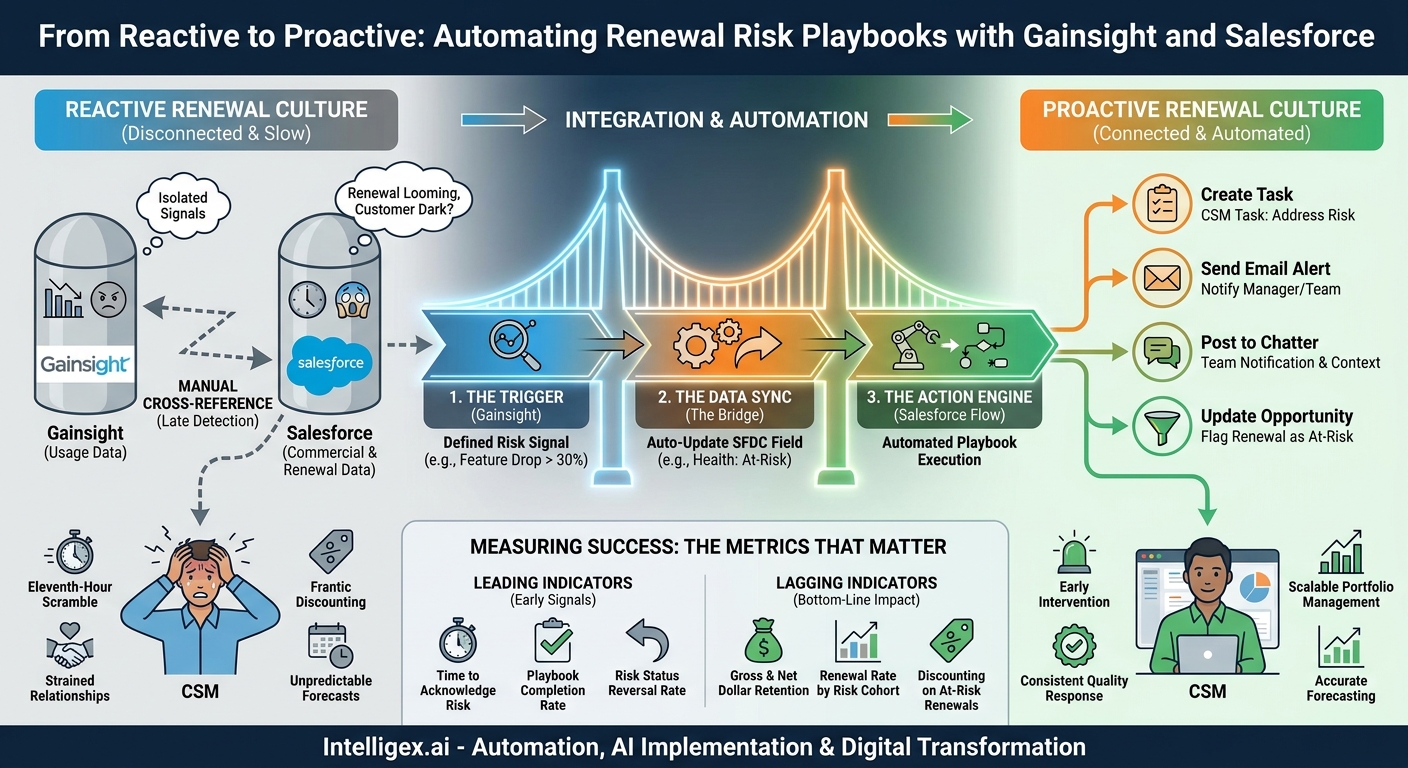
Your Customer Success Managers (CSMs) are your first line of defense against churn. Yet, too often, they are forced to be reactive. They discover a critical renewal is at risk only when the customer goes dark or the renewal opportunity is just weeks away. This eleventh-hour scramble leads to frantic discounting, strained customer relationships, and unpredictable revenue forecasts. The root of the problem is a disconnect between how a customer is using your product and what your commercial teams know about the account.
Valuable usage data, which is the strongest leading indicator of renewal health, often lives isolated in a Customer Success platform like Gainsight. Meanwhile, the contractual and commercial data, along with the renewal opportunity itself, sits in your CRM, like Salesforce. By the time a CSM manually cross-references declining usage with an upcoming renewal date, precious time has been lost. To shift from a reactive to a proactive renewal culture, you must bridge this gap. Automating the flow of information between these two systems allows you to turn a subtle drop in product usage into an immediate, actionable playbook for your revenue teams.
The Business Case: Connecting Usage Data to Commercial Action
Integrating Salesforce and Gainsight is not just a technical exercise for your IT or RevOps teams. It is a strategic move that delivers tangible business value across the organization by creating a single, automated feedback loop between customer health and commercial activity. When these platforms operate in silos, you create information latency, which directly translates to business risk.
Consider the typical scenario. A customer’s key feature adoption drops significantly. In Gainsight, this might trigger a low health score. But how does that information reach the account executive or CSM in a way that prompts immediate action within their primary workflow tool, Salesforce? Without integration, it relies on a CSM noticing the score, looking up the renewal date, and then manually creating a task or logging a call in Salesforce. This process is slow, prone to human error, and impossible to scale.
By connecting them, you create a system that acts on your behalf. A change in a Gainsight health score can automatically update a field on the Salesforce Account, trigger a series of tasks for the CSM, and flag the renewal opportunity for review by sales leadership. This delivers value in several key areas:
- Speed: The time between detecting a risk signal and taking the first corrective action shrinks from days or weeks to mere minutes. This allows CSMs to intervene while the problem is still small and solvable.
- Visibility: Sales, success, and finance leaders get a real-time view of renewal risk directly within Salesforce reports and dashboards. Forecasting becomes more accurate because it is grounded in actual customer behavior, not just optimistic estimates.
- Scalability: As your customer base grows, you cannot simply hire more CSMs to watch every account manually. Automation allows one CSM to manage a larger portfolio effectively by focusing their attention only on the accounts that need it most, precisely when they need it.
- Quality: Standardized playbooks ensure a consistent, high-quality response to common risk scenarios. Every CSM follows best practices, from sending the right discovery email to scheduling an executive business review, improving the chances of a successful renewal.
Architecting the Integration: Key Components and Data Flow
Before building any workflows, it is crucial to understand the high-level architecture. A successful integration between Salesforce and Gainsight for this purpose relies on three core components: a defined trigger, a reliable data sync, and an automated action engine.
1. The Trigger (Gainsight)
The entire process begins with a clear, measurable signal of risk. This is defined within Gainsight’s Rules Engine. It is not enough to simply say “low usage.” You must be specific. Your trigger could be a combination of factors, creating a nuanced health score that reflects true risk.
Examples of effective triggers:
- Feature Adoption Drop: The number of active users for a critical, sticky feature declines by more than 30% over a 14-day period.
- Login Frequency Decrease: The average number of weekly logins per user falls below a predetermined threshold for an account in the “Adoption” stage.
- Support Ticket Spike: An account logs more than five high-priority support tickets in a single month, indicating user frustration.
- Executive Sponsor Change: A CTA (Call to Action) is logged in Gainsight when a key contact, marked as an “Executive Sponsor,” leaves the company.
The goal is to move beyond simple lagging indicators (like a low NPS score) and focus on leading indicators based on actual product interaction.
2. The Data Sync (The Bridge)
Once a trigger fires in Gainsight, that information needs to get to Salesforce. This is typically handled by native connectors like Gainsight‘s Salesforce Connector. The key is to map the risk signal to a specific field on a Salesforce object, usually the Account or Opportunity object.
You might create a custom picklist field in Salesforce on the Account object called “Gainsight Health” with values like “Healthy,” “Concern,” and “At-Risk.” The Gainsight rule would be configured to update this field directly whenever the customer’s health score crosses a certain threshold. This Salesforce field becomes the lynchpin for your entire automation.
3. The Action Engine (Salesforce)
With the risk signal now living natively in Salesforce, you can use powerful native automation tools to orchestrate the response. The primary tool for this is Salesforce Flow. A record-triggered Flow can be configured to “listen” for changes to your custom “Gainsight Health” field. When the field is updated to “At-Risk,” the Flow executes a pre-defined series of actions known as a playbook.
Step-by-Step: Building Your First Automated Renewal Playbook
Let’s translate the architecture into a practical, step-by-step process. This guide assumes you have both Salesforce and Gainsight admin permissions or are working closely with those who do. The goal is to build a simple but effective playbook that triggers when a customer’s usage of a key feature drops.
- Define and Create the Risk Field in Salesforce: In Salesforce Setup, navigate to Object Manager and select the Account object. Create a new custom field. A picklist field named “Usage Health Status” with values like “Healthy,” “Low Adoption,” and “Critical Risk” is a great start. This is the field Gainsight will update.
- Configure the Risk Rule in Gainsight: Go to the Gainsight Rules Engine. Create a new rule that analyzes usage data for your chosen key feature over a relevant period (e.g., 30 days). Set the criteria to identify accounts where adoption has fallen below your defined threshold.
- Set Up the “Load to SFDC” Action: In the rule’s action setup, choose “Load to SFDC Object.” Select the Account object and map your rule’s output to the “Usage Health Status” field you created in Salesforce. For example, if the criteria for risk are met, set the Salesforce field to “Critical Risk.” Schedule this rule to run daily.
- Build the Automation Trigger in Salesforce Flow: In Salesforce Setup, create a new record-triggered Flow. Set it to run when an Account record is “updated” and the “Usage Health Status” field equals “Critical Risk.” This ensures the playbook only runs when the status changes to a risk state.
- Define the Playbook Actions within the Flow: This is where you orchestrate the response. Drag and drop elements onto the Flow canvas to build your playbook. A strong initial playbook should include:
- Create Task: Automatically generate a task for the Account Owner (the CSM or AE) with a clear subject like “Urgent: Address Critical Usage Risk.” Set a due date for 2 business days and pre-populate the description with context from the account.
- Send Email Alert: Notify the CSM’s manager or a distribution list for your Customer Success leadership team that a high-value account has been flagged.
- Post to Chatter: Post an update to the Account’s Chatter feed, tagging the account team to ensure immediate visibility for everyone involved. The post could read: “@[CSM Name] and @[AE Name], this account has been automatically flagged for critical usage risk. The renewal playbook has been initiated. Please see the new task for next steps.”
- Update Renewal Opportunity: If a related open renewal opportunity exists, use the Flow to update a custom field on it to “Renewal At Risk,” immediately signaling the issue in all sales pipeline reporting.
- Activate and Monitor: Activate your Flow. For the first few weeks, closely monitor the accounts being flagged. Work with your CSMs to ensure the triggers are meaningful and the playbook tasks are helpful, not just noise. Be prepared to tune the sensitivity of your Gainsight rule based on real-world feedback.
Measuring Success: The Metrics That Matter
Implementing this automation is only half the battle. You must measure its impact to justify the investment and refine your strategy. Avoid vanity metrics and focus on quantifiable business outcomes. Your reporting, built within Salesforce dashboards, should track both leading and lagging indicators.
Leading Indicators (Early Signals of Success)
- Time to Acknowledge Risk: Measure the time between the “Usage Health Status” field changing to “At-Risk” and the completion of the first task by the CSM. Your goal is to drive this down from days to hours.
- Playbook Completion Rate: What percentage of triggered playbooks are completed by the CSMs? A low rate may indicate the tasks are irrelevant or the workload is too high.
- Risk Status Reversal Rate: Of all accounts that enter a “Critical Risk” state, what percentage are returned to “Healthy” within 30 or 60 days? This directly measures the effectiveness of your intervention playbook.
Lagging Indicators (Bottom-Line Business Impact)
- Gross and Net Dollar Retention: The ultimate measure of success. Over time, you should see an improvement in your retention rates, as you are saving accounts that might have otherwise churned silently.
- Renewal Rate by Risk Cohort: Compare the final renewal rates for accounts that were flagged as “At-Risk” and went through a playbook versus those that were not. This helps isolate the impact of your program.
- Discounting on At-Risk Renewals: Track the average discount percentage given to at-risk accounts. A successful proactive strategy should reduce the need for last-minute, high-cost concessions.
Common Pitfalls and How to Avoid Them
While powerful, this integration is not a magic bullet. Several common mistakes can undermine its effectiveness. Being aware of them from the start will save you significant rework and frustration.
- Pitfall: Using Noisy or Unreliable Triggers. If your usage risk rule is too sensitive, it will flood your CSMs with false positives. They will quickly learn to ignore the alerts, defeating the purpose of the automation.
Solution: Start with a very specific, high-confidence trigger. Focus on a single key feature or activity that you know is strongly correlated with customer health. Involve your most experienced CSMs in defining these triggers. - Pitfall: Creating a “Black Box.” If the account team does not understand why a playbook was triggered, they will not trust the system. An alert without context is just noise.
Solution: Ensure your automation provides context. The task description in Salesforce should state exactly which metric triggered the alert (e.g., “Monthly Active Users dropped from 50 to 15”). Link back to a relevant Gainsight C360 dashboard for deeper analysis. - Pitfall: Forgetting the Human Element. The goal is to augment, not replace, your CSMs. A rigid, fully-automated process that tries to solve a complex relationship problem with a templated email is doomed to fail.
Solution: Design your playbooks to empower human connection. The automation should handle the administrative work (creating tasks, flagging records) so the CSM can spend their time on high-value activities like talking to the customer, understanding their new business goals, and providing strategic guidance.
A Note on Governance and Safe Implementation
Whenever you automate processes that touch customer data and trigger actions, establishing clear governance is essential. This ensures the system is reliable, secure, and used responsibly.
First, apply the principle of least privilege to the integration user. The Salesforce account used by Gainsight to sync data should only have permission to read and write to the specific fields and objects required for the process. It should not have a full system administrator profile. This limits the potential impact of any configuration errors or security issues.
Second, be mindful of data privacy. Before syncing customer usage metrics into Salesforce, confirm that this practice aligns with your company’s privacy policy and any applicable regulations. While most usage data is aggregated and anonymized, it is a critical checkpoint for your legal and compliance teams.
Finally, build a human-in-the-loop review process. The automation should flag problems and suggest actions, but the CSM must be the ultimate decision-maker. They have the relationship context that the system lacks. The playbook should guide them, not command them, allowing them to use their professional judgment to tailor the response to each unique customer situation.
Your Next Steps to Proactive Renewals
Moving from a reactive to a proactive renewal culture is a journey, but you can start today with a few focused actions. Instead of trying to build a perfect, all-encompassing system at once, start small, prove value, and iterate.
- Audit Your Current Process: Map out how your team currently identifies and acts on renewal risk. Identify the biggest gaps and sources of delay. Where does information get stuck?
- Identify One High-Impact Trigger: Work with your product and success teams to define a single, unambiguous usage metric that strongly correlates with churn. This will be the focus of your pilot program.
- Scope a Pilot Project: Choose a small group of CSMs and their accounts to test your first automated playbook. This controlled environment makes it easier to gather feedback and measure the initial impact.
- Engage Your Operations Team: Bring your Salesforce and Gainsight administrators into the conversation early. They are your key partners in building the technical connections and ensuring the data flows reliably.
By integrating customer usage insights directly into your commercial workflows, you empower your teams to act with speed and intelligence. You stop guessing about account health and start making data-driven decisions that protect your most valuable asset: your existing customer base.
Your Next Read:
Get a FREE
Proof of Concept
& Consultation
No Cost, No Commitment!
