

Artificial intelligence is no longer a futuristic concept; it’s a practical tool actively reshaping business operations. AI-powered automation can process data, classify information, and execute routine tasks at a scale and speed humans simply can’t match. Yet, anyone who has implemented automation knows its limits. AI models can struggle with ambiguity, misinterpret nuance, or fail when faced with an unfamiliar edge case. This is where the pursuit of 100% automation often becomes counterproductive.
A more pragmatic and powerful approach is Human-in-the-Loop (HITL) automation. This isn’t a step backward or a temporary fix for a “bad” model. It is a strategic design choice that combines the raw processing power of machines with the nuanced judgment, contextual awareness, and ethical reasoning of human experts. By intelligently inserting people at critical points in an automated workflow, businesses can achieve higher accuracy, reduce risk, and build systems that learn and improve over time. The goal is not to replace people, but to augment them, freeing them from repetitive work to focus on the complex, high-value decisions that drive the business forward.
What is Human-in-the-Loop (and What Isn’t It?)
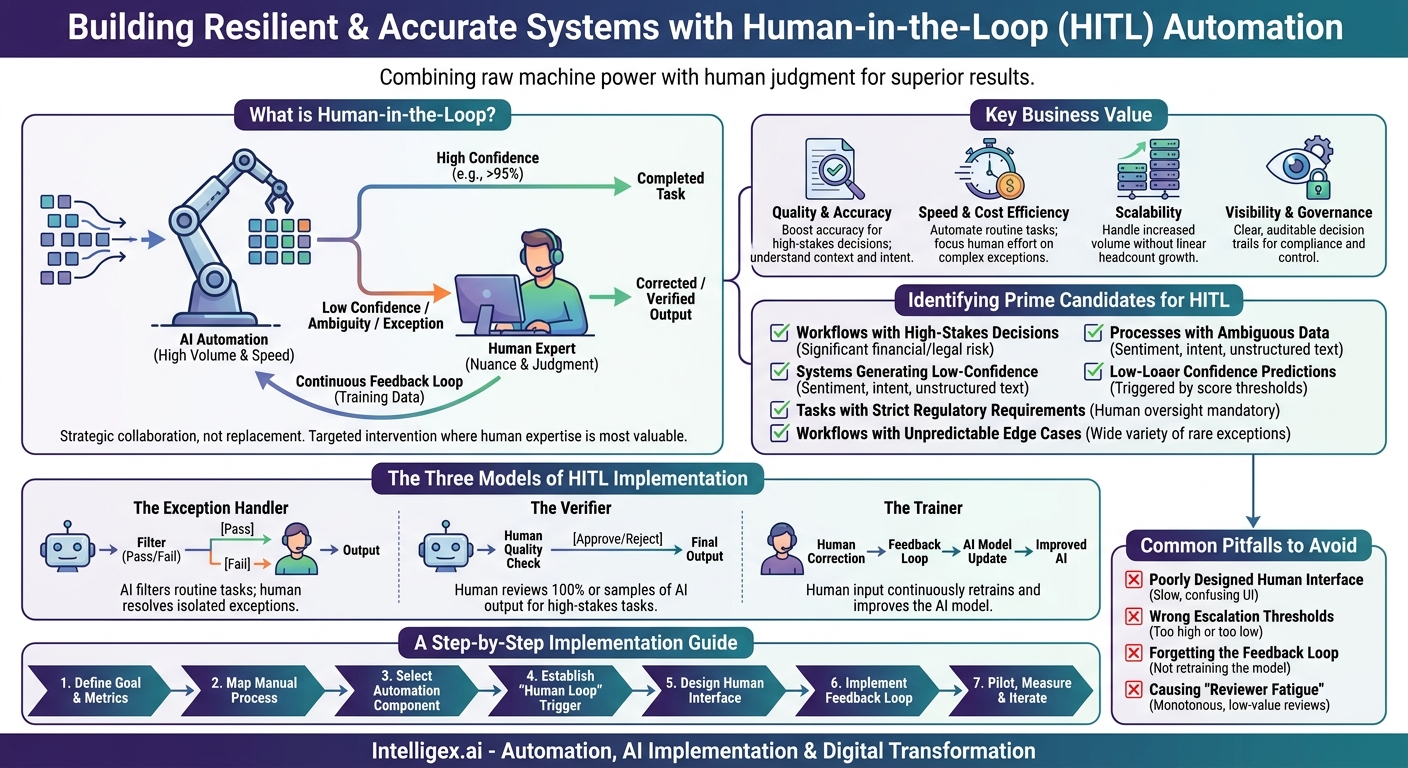
At its core, a Human-in-the-Loop system is a process where an AI model and a human expert collaborate to complete a task. The model handles the majority of the work, but it is programmed to recognize the limits of its own capabilities. When it encounters a situation it cannot handle with a high degree of confidence, it intelligently escalates the problem to a human for review, correction, or a final decision.
It’s important to distinguish what HITL is from what it isn’t. It is not simply having a team manually review every single output from an AI. That would negate the speed and cost benefits of automation. Instead, HITL is about targeted intervention. It is a systematic, pre-defined workflow where human expertise is applied only where it is most needed and most valuable.
This strategic blend delivers tangible business value across several key areas:
- Quality and Accuracy: Humans excel at understanding context, sarcasm, and intent, especially in unstructured data like text or images. For high-stakes decisions, like financial approvals or medical data analysis, a human verifier can prevent costly or harmful AI errors, pushing accuracy rates from 95% to over 99%.
- Speed and Cost Efficiency: An automated system might handle 90% of invoices, customer tickets, or sales leads instantly. This frees up your skilled team to focus their time on the complex 10% that truly requires their attention. This dramatically reduces the cost per transaction and accelerates the entire process without sacrificing quality.
- Scalability: With an HITL system, you can handle a 3x increase in volume without tripling your headcount. The AI absorbs the bulk of the new work, while the number of exceptions escalated to your human team grows at a much slower, more manageable rate.
- Visibility and Governance: HITL creates a clear and auditable decision-making trail. When a human intervenes, their action is logged. This provides crucial transparency for compliance, quality control, and regulatory requirements, showing exactly why a particular decision was made.
Identifying Prime Candidates for HITL in Your Business
The first step toward leveraging HITL is to identify the right workflows. Not every process is a good fit. The best candidates are typically those that are mostly standardized but have a “long tail” of exceptions, or where the cost of a single error is unacceptably high. You can perform a workflow audit across your departments to spot these opportunities.
Use this checklist to find processes ripe for HITL implementation:
- Workflows with High-Stakes Decisions. Any process where an error could lead to significant financial loss, legal liability, or reputational damage is a prime candidate. The cost of a mistake far outweighs the cost of a quick human review.
- Example (Finance): An AI system for flagging potentially fraudulent transactions. The system can automatically clear low-risk transactions and block high-risk ones, but it refers medium-risk, ambiguous cases to a fraud analyst for a final decision.
- Processes Involving Ambiguous or Subjective Data. AI models are trained on data, but they can lack real-world context. When tasks involve interpreting human language, sentiment, or intent, a human check is invaluable.
- Example (Marketing): An AI tool analyzes social media comments for brand sentiment. It can easily classify “I love this product” as positive and “This is broken” as negative. But a sarcastic comment like “Great, another feature I’ll never use” might be flagged for a human community manager to interpret correctly.
- Systems Generating Low-Confidence Predictions. Many AI models can output a “confidence score” along with their prediction. This is a built-in trigger for HITL. You can set a simple rule: if the confidence is below a certain threshold (e.g., 90%), send it to a person.
- Example (Operations): A system that automatically categorizes incoming customer support tickets. If it classifies a ticket as a “Billing Inquiry” with 98% confidence, it routes it directly. If the confidence is only 65%, it sends it to a support queue for a human to categorize properly.
- Tasks with Strict Regulatory or Compliance Requirements. In many industries, regulations demand human oversight for certain decisions. HITL builds this oversight directly into the workflow in an efficient way.
- Example (HR): An AI scans resumes to screen for basic qualifications. However, a human recruiter must make the final decision on which candidates to interview to ensure fair hiring practices and compliance with employment laws.
- Workflows with Frequent and Unpredictable Edge Cases. These are processes that are 95% routine but have a wide variety of rare exceptions that are impossible to program for in advance.
- Example (Supply Chain): An automated system processes standard shipping orders. However, an order with special handling instructions, a non-standard delivery address, or a customs requirement for a new country is automatically flagged for a logistics coordinator to manage.
The Three Models of HITL Implementation
Human-in-the-Loop systems are not one-size-fits-all. They can be designed in several ways depending on the specific needs of the workflow. Most implementations fall into one of three common models.
1. The Exception Handler
This is the most common HITL pattern. The AI system acts as a filter, successfully processing the vast majority of transactions on its own. It is programmed to identify and isolate only the items it cannot process, either because the data is malformed, a prediction is below a confidence threshold, or it detects a rare anomaly. These exceptions are then routed to a queue for a human expert to resolve.
Business Example: An Accounts Payable automation platform uses Optical Character Recognition (OCR) and AI to extract data from vendor invoices. It successfully processes 90% of invoices from known vendors with standard layouts. However, when it receives an invoice with a new format, a blurry scan, or a line item it doesn’t recognize, it places the invoice in a verification queue for an AP clerk. The clerk quickly corrects the data, and the system continues processing.
Best for: High-volume, repeatable processes where the exceptions are a small but critical minority.
2. The Verifier
In this model, the AI completes 100% of the tasks, but its output is then passed to a human for a final quality check and approval before it is finalized or sent to an external party. This approach is used when the cost of any single error is extremely high, or when maintaining a specific standard of quality (like a brand voice) is paramount. The review can be applied to every single item or to a statistical random sample for ongoing quality assurance.
Business Example: A legal tech company uses a generative AI to create first drafts of standard contracts based on a set of parameters. Before the contract is sent to a client, a paralegal or lawyer must review it to ensure all clauses are correct, legally sound, and tailored to the specific client’s needs. The AI does 80% of the drafting work in seconds, allowing the legal expert to focus on high-level review and strategy.
Best for: High-stakes tasks where accuracy must approach 100%, or creative work that requires human polish.
3. The Trainer
This model is a continuous feedback loop designed to make the AI smarter over time. Every time a human corrects an AI’s mistake, that correction is fed back into the system as new training data. This active learning process allows the model to adapt to new patterns, products, or terminology, reducing its error rate and the need for future human intervention.
Business Example: A sales team uses an AI tool to score incoming leads from their website, predicting which ones are most likely to convert. When the AI scores a lead as “hot” but a sales development representative (SDR) discovers the lead is actually a student doing research, the SDR re-labels the lead as “unqualified.” This feedback helps the AI learn the difference between a real prospect and a researcher, making its future predictions more accurate for everyone.
Best for: Dynamic environments where the data is constantly changing, and continuous improvement of the AI model is a key objective.
A Step-by-Step Guide to Implementing an HITL Workflow
Putting a Human-in-the-Loop workflow into practice requires a structured approach. Let’s walk through the process using a common business scenario: automating the initial triage of IT support tickets.
- Define the Goal and Success Metrics. Start with a clear business objective. A vague goal like “improve IT support” isn’t actionable. A specific goal is. For example: “Reduce the average time for a ticket to reach the correct specialized team by 50% and decrease the rate of tickets being re-assigned due to mis-categorization to under 5%.” Your key metrics to track will be Time to Triage, Re-assignment Rate, and overall Resolution Time.
- Map the Existing Manual Process. Document exactly how tickets are handled today. A new ticket arrives. A Tier 1 support agent reads it. They use their knowledge to determine if it’s a “Hardware,” “Software,” or “Access Control” issue. They then manually re-assign it. This process might take 15-30 minutes per ticket and is prone to human error, especially with new agents.
- Select the Automation Component. Choose an AI model that can perform the core task. In this case, a natural language processing (NLP) model for text classification is a perfect fit. Services like Amazon Comprehend or open-source frameworks can be trained to read the ticket’s subject and description and predict its category.
- Establish the “Human Loop” Trigger. This is the most important decision. You need a clear, automated rule for when to ask for help. A confidence score is the most common trigger. The rule could be: “If the AI’s confidence in its predicted category is 90% or higher, route it automatically. If the confidence is below 90%, assign it to the Tier 1 human review queue.”
- Design the Human Interface. The tool for human review must be fast and intuitive. When a ticket is flagged for review, the interface should show the agent the ticket content, the AI’s suggested category, its confidence score, and a simple set of buttons to either confirm the suggestion or select the correct category. The goal is to make the human’s job a one-click decision, not a research project.
- Implement the Feedback Loop. This step turns a good HITL system into a great one. Every time an agent corrects a mis-categorization, that corrected example (the ticket text and the correct category) should be saved. This data is then used to periodically retrain and fine-tune the AI model, so it gets smarter and makes fewer mistakes in the future.
- Pilot, Measure, and Iterate. Don’t roll out the system to everyone at once. Start with a small pilot group. Monitor your key metrics closely. Is the Time to Triage decreasing? Is the Re-assignment Rate falling? Collect feedback from the agents in the loop. Is the interface easy to use? Is the 90% threshold right, or is it flagging too many or too few tickets? Use this data to adjust the system before a full launch.
Common Pitfalls and How to Avoid Them
While powerful, HITL implementations can fail if not designed thoughtfully. Awareness of common pitfalls can help you steer clear of them and ensure your project succeeds.
Pitfall 1: A Poorly Designed Human Interface (UI)
If the tool your team uses to review exceptions is slow, confusing, or requires too many clicks, you will destroy any efficiency gains from the AI. The human part of the loop will become the bottleneck.
How to Avoid It: Involve the end-users, your human experts, in the design process from day one. Build a clean, simple interface that presents all necessary information at a glance and makes the required action (e.g., approve, reject, re-classify) as simple as possible.
Pitfall 2: Setting the Wrong Escalation Thresholds
The rules that trigger human review are critical. If your confidence threshold is too high (e.g., 99%), nearly every item will be flagged for human review, and you’ve simply built a more complicated manual process. If it’s too low (e.g., 50%), too many errors will slip through the cracks, defeating the purpose of quality control.
How to Avoid It: Don’t guess. Analyze a sample of your AI’s predictions and their confidence scores. Start with a conservative threshold (e.g., 85-90%) during a pilot phase. Monitor the accuracy of what gets through and the workload for your human reviewers, then adjust the threshold up or down based on real data.
Pitfall 3: Forgetting the Feedback Loop
If you use humans to correct AI mistakes but don’t use those corrections to improve the model, you are paying to solve the same problems over and over again. The system will never get smarter, and your operational costs will remain static.
How to Avoid It: Plan for model retraining from the beginning. Build the technical pipeline to collect, store, and label the corrections made by your human reviewers. Schedule regular retraining cycles to ensure the AI is constantly learning from your experts.
Pitfall 4: Causing “Reviewer Fatigue”
Asking highly skilled experts to review thousands of monotonous, nearly identical items is a recipe for burnout and inattention. After a while, they will start “rubber-stamping” approvals without careful thought, which negates the value of the human review.
How to Avoid It: Use the AI to handle the truly obvious cases. Reserve human attention for the most ambiguous, complex, or high-value exceptions where their judgment truly matters. This keeps the work engaging and ensures your experts are focused where they can have the most impact.
Governance and Safe Implementation
Integrating AI and human decision-making, especially with sensitive company or customer data, requires a strong governance framework. Building a safe and trustworthy HITL system isn’t an afterthought; it should be a core part of the design process.
Data Privacy and Security
When an automated workflow escalates a task to a human, you must control what data they see. For workflows involving Personally Identifiable Information (PII) or other sensitive data, use data masking or redaction techniques. For example, in a customer service ticket review, the customer’s name and contact information could be masked, allowing the reviewer to focus only on the content of the issue.
Role-Based Access Controls (RBAC)
Not every employee should be able to review every type of data. Implement strict access controls to ensure that only authorized personnel can participate in specific HITL workflows. For instance, only approved members of the HR team should be in the loop for reviewing candidate resumes, while only certified finance professionals should handle exceptions in financial transaction monitoring.
Clear Audit Trails
One of the most powerful features of a well-designed HITL system is traceability. Every decision needs to be logged. The system should record what the AI predicted, why it was escalated to a human (e.g., “confidence score of 72%”), which human reviewed it, what action they took, and a timestamp. This creates an immutable audit trail that is critical for regulatory compliance, internal quality control, and debugging process issues.
Your Next Steps
Human-in-the-Loop is not a single technology but a strategic approach to building smarter, more resilient automation. It allows you to harness the power of AI without sacrificing the accuracy and judgment that are uniquely human. Getting started is more accessible than you might think.
- Identify One High-Value Workflow. Review the checklist of HITL candidates. Don’t try to transform the entire company at once. Choose one process, like invoice processing in Finance or lead qualification in Sales, where the pain points of manual work and the risk of error are clear.
- Quantify the “Manual Tax.” Before you build anything, create a simple business case. How many hours per week does your team spend on this manual task? What is the cost of that time? What is the business impact of the errors that occur? This data will justify the investment and provide a baseline to measure success.
- Design a Small Pilot Project. Using the step-by-step guide, scope out a small, contained pilot. The goal of the pilot is to learn and validate your assumptions, not to achieve perfection. Focus on getting a basic loop working so you can measure its impact and gather feedback.
- Consult with an Expert Partner. Successfully implementing AI-driven workflows requires a mix of deep process knowledge, data science expertise, and software engineering. Partnering with a specialist like Intelligex can help you navigate the complexities, avoid common pitfalls, and design a scalable HITL solution that delivers real business value from day one.
Your Next Read:
Category:
Get a FREE
Proof of Concept
& Consultation
No Cost, No Commitment!
