

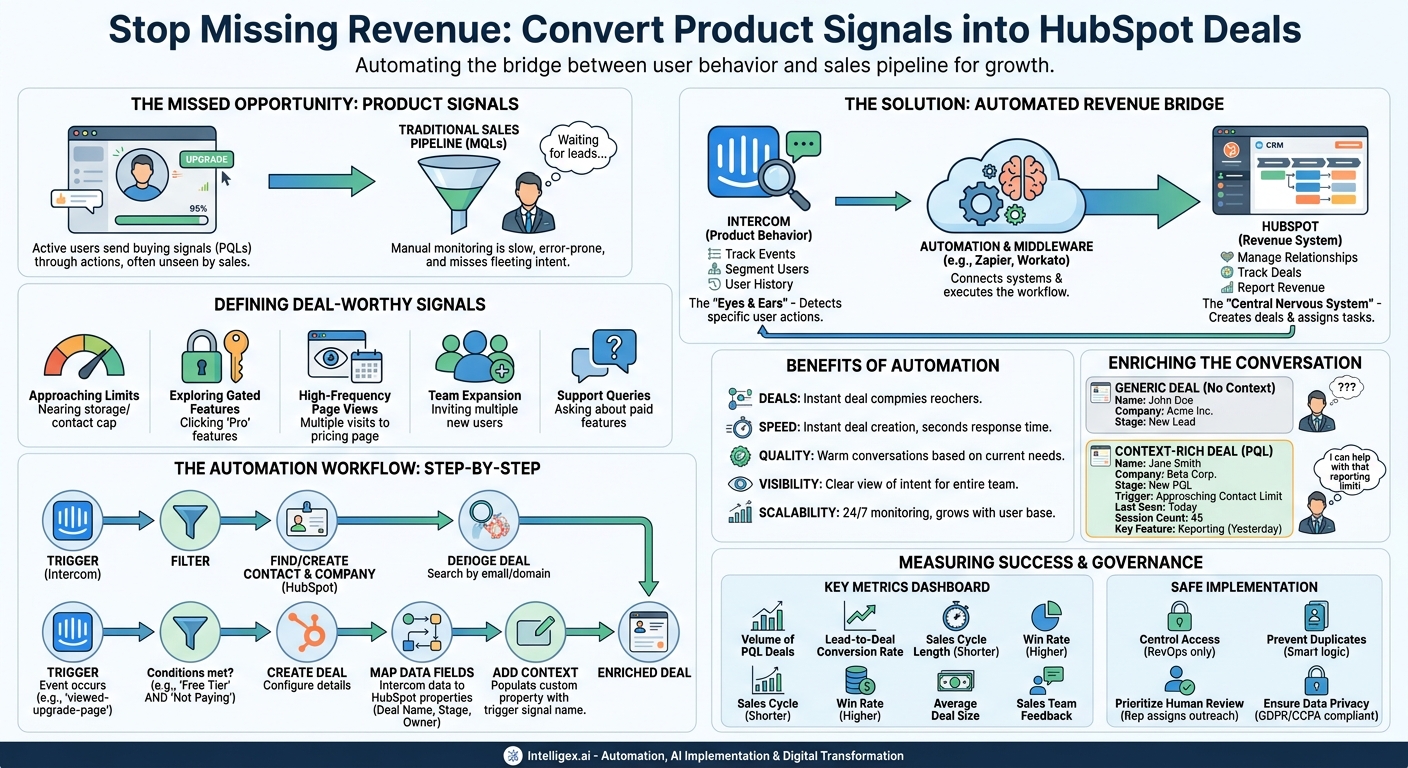
Your sales team is your engine for growth, but that engine can’t run on fumes. It needs high-quality fuel, which means a steady pipeline of qualified leads who are ready to talk. While marketing generates leads through content and campaigns, one of the most potent, yet often untapped, sources of revenue is hiding in plain sight: your product itself. Your active users are constantly sending signals of buying intent through their actions. The challenge is capturing these fleeting signals and turning them into tangible sales opportunities before the moment passes. Manually monitoring user behavior is not a scalable solution; it’s prone to error, slow, and overwhelming for any team.
The solution lies in connecting the systems that track user behavior with the systems that manage your sales pipeline. By creating an automated bridge between your in-app messaging platform, like Intercom, and your CRM, like HubSpot, you can translate product signals directly into new deals. This isn’t just about efficiency. It’s about fundamentally changing how your sales team operates, moving them from cold prospecting to warm, context-rich conversations with users who have already raised their hands, just by using your software.
Why Bridge the Gap Between Product Usage and Sales?
A “product signal” is a specific action a user takes within your application that indicates they may be ready to upgrade, expand their usage, or purchase a higher-tier plan. These are often called Product-Qualified Leads (PQLs), and they represent a significant step up from traditional Marketing-Qualified Leads (MQLs). While an MQL might have downloaded an ebook, a PQL has experienced your product’s value firsthand and is now exploring its limits or advanced capabilities.
Automating the process of identifying and acting on these signals delivers clear business value across several key areas:
- Speed: The moment a user tries to access a premium feature or nears a usage limit, a deal can be created in HubSpot and assigned to a sales representative. This reduces the lead response time from days or hours to mere seconds, allowing your team to engage when the user’s interest is at its peak.
- Quality: PQLs are not strangers. They are active users who understand your core value proposition. When a sales rep reaches out, the conversation isn’t about “what our product does,” but “how our premium features can solve the specific challenge you’re facing right now.” This leads to significantly higher conversion rates.
- Visibility: Without this integration, product usage data often stays locked within the product or analytics team. By pushing these signals into HubSpot, you provide your entire revenue team with a clear view of which accounts are showing strong buying intent. Sales leaders can forecast more accurately, and marketing can identify patterns in behavior that lead to upsells.
- Scalability: A single sales operations professional can build and maintain an automation that monitors thousands of users simultaneously. This system works 24/7, identifying opportunities without requiring manual effort. As your user base grows, the system scales with it, ensuring you never miss a revenue opportunity due to a lack of resources.
The Core Components: HubSpot and Intercom
To build this automated workflow, you need two best-in-class platforms working in concert. While other tools can be used, this combination is powerful because each system excels at its specific role in the customer journey.
Intercom: The Source of Truth for User Behavior
Intercom is uniquely positioned as the “eyes and ears” inside your product. It’s not just a chat tool; it’s a comprehensive customer communications platform that can track user events, segment users based on their attributes and behavior, and house a rich history of their interactions with your team. In this workflow, Intercom acts as the trigger. It detects the specific product signals you define, such as a user clicking an “upgrade” button or adding their tenth teammate to an account.
HubSpot: The System of Record for Revenue
HubSpot serves as your central nervous system for all sales, marketing, and service activities. It’s where customer relationships are managed, deals are tracked through a pipeline, and revenue is ultimately reported. In this automation, HubSpot is the destination. It receives the signal from Intercom and performs the critical action: creating a new deal, associating it with the correct contact and company, and assigning it to the right person on your sales team.
Connecting these two systems allows you to create a closed loop. The behavior happening inside the product (Intercom) directly fuels the sales process and revenue generation (HubSpot), ensuring that valuable intent signals are never dropped.
Defining Your “Deal-Worthy” Product Signals
The success of this entire strategy hinges on choosing the right signals. Triggering a deal for every minor action a user takes will create noise and overwhelm your sales team with low-quality leads. The goal is to identify the moments that genuinely correlate with commercial intent. This requires collaboration between your product, marketing, and sales teams to define what a “deal-worthy” signal looks like for your business.
Start by brainstorming actions that indicate a user is either hitting a limitation of their current plan or actively seeking more value. Here are some concrete examples:
- Approaching Usage Limits: The user is nearing their plan’s limit for contacts, projects, data storage, or another core metric. This is a natural and urgent reason to discuss an upgrade.
- Exploring Gated Features: A user on a “Starter” plan clicks on a feature or menu item that is only available in the “Pro” plan. They are actively trying to access more power.
- High-Frequency Page Views: The user has visited your pricing or upgrade page multiple times in a short period. This is a strong indicator of consideration.
- Support Queries: A user on a free plan asks a support question via Intercom Messenger about a feature that is only available on a paid tier. Their question is a direct expression of need.
–Team Expansion: The user invites several new team members. This suggests the product is becoming embedded in their organization’s workflow, creating an opportunity to discuss a team or enterprise plan.
Before building anything, use this checklist to validate your chosen signals:
- Is the signal unambiguous? Does this action clearly point to commercial intent, or could it be misinterpreted?
- Is it correlated with revenue? Have past customers who upgraded exhibited this behavior? Look at your data.
- Is it actionable for sales? Does the signal give a sales rep a clear reason to reach out with a specific, helpful message?
- Can it be tracked reliably? Is the event or attribute consistently captured in Intercom?
Start with one or two of your strongest, most reliable signals. You can always expand the program after you’ve proven the initial value.
Step-by-Step: Building the Automation Workflow
Once you have defined your product signals, you can build the workflow that connects Intercom and HubSpot. This can be done using a variety of tools, including native integrations if they exist, or middleware platforms like Zapier or Workato. The specific user interface will vary, but the logical steps remain the same.
- Establish the Trigger in Intercom. Your workflow starts when something happens in Intercom. This is typically based on an event or a tag being applied. For example, your trigger could be “Event Occurs” where the event name is `viewed-upgrade-page`.
- Add Filtering Logic. You don’t want this to fire for every user. Add filter steps to narrow the focus. For instance, you might add a condition: “Only continue if… the user’s plan in Intercom is ‘Free Tier’ AND the user’s `is-paying-customer` attribute is ‘false’.” This ensures you only create deals for non-paying users who are good prospects. Another filter could prevent creating duplicate deals for the same company within a 30-day period.
- Find or Create the Contact and Company in HubSpot. Before creating a deal, the workflow must ensure the person and their company exist in HubSpot. The automation should first search for a contact using the user’s email address from Intercom. If a contact is found, it uses that record. If not, it creates a new one. The same logic applies to the company record, using the company name or domain.
- Define the “Create Deal” Action in HubSpot. This is the core of the automation. Select the HubSpot action “Create Deal.” Now you need to configure the details of the deal you’re creating.
- Map Data Fields from Intercom to HubSpot. This step tells the system how to populate the new deal. You will map data from the Intercom user profile to the HubSpot deal properties.
- Deal Name: You can dynamically generate this, for example: “[Intercom Company Name] – PQL – [Trigger Event Name]”.
- Deal Stage: Set this to the first stage of your sales pipeline, such as “New Product-Qualified Lead”.
- Pipeline: Ensure you select the correct sales pipeline.
- Owner: Assign the deal to a specific person, a rotating owner, or a sales leader for manual assignment.
- Company/Contact Association: Use the ID of the company and contact from the previous step to ensure the deal is correctly linked.
- Add Context with Custom Properties. Create a custom property in HubSpot called “PQL Trigger Signal” or “Lead Source Detail.” In your workflow, map the name of the Intercom event that triggered the automation into this field. This gives the sales rep instant context on why the deal was created.
- Test, Activate, and Monitor. Before launching, test the entire workflow with an internal test account to ensure deals are created correctly in HubSpot. Once you’re confident, activate the automation. In the first few weeks, closely monitor the deals being created to catch any errors and gather feedback from the sales team.
Beyond Deal Creation: Enriching the Sales Conversation
Simply creating a deal in the CRM is only half the battle. The true power of this integration is its ability to arm your sales team with the context they need to have intelligent, relevant, and timely conversations. A deal that appears in the pipeline with no explanation is just another task. A deal that appears with the note, “This user just tried to add a sixth project but their plan is limited to five,” is a warm, actionable opportunity.
This is where enriching the HubSpot deal with data from Intercom becomes critical. As mentioned in the steps above, creating a custom property in HubSpot to store the specific trigger signal is a great first step. But you can go further.
Consider passing additional information from Intercom to custom properties on the HubSpot contact or company record, such as:
- Last Seen: When was the user last active in the product?
- Session Count: How many times has the user logged in?
- Key Feature Usage: A timestamp of when they last used a particularly “sticky” feature.
- Team Size: The number of active users from their company.
This information paints a vivid picture of the account’s health and engagement level. When a salesperson opens the newly created deal, they see not just a name and a company, but a story. This allows them to tailor their outreach precisely. Instead of a generic, “I’m calling to see how things are going,” they can say, “I saw you and your team have been using our reporting feature quite a bit. I wanted to show you some advanced reporting capabilities on our Pro plan that could save you even more time.” This is a consultative, value-driven approach, not a sales pitch.
Measuring Success: Key Metrics for Your Integration
To justify the investment in building and maintaining this automation, you must measure its impact. Create a dashboard in HubSpot specifically for tracking the performance of deals generated from Intercom product signals. This will help you understand the ROI and identify areas for optimization.
Focus on these key metrics:
- Volume of PQL Deals Created: This is your baseline. How many opportunities is the automation generating per week or month?
- Lead-to-Deal Conversion Rate: What percentage of the deals created by this workflow move to a second stage in your pipeline? Compare this rate to deals from other sources, like marketing content or paid ads. You should expect the PQL conversion rate to be significantly higher.
- Sales Cycle Length: How long does it take to close a deal that originated from a product signal versus other channels? Because these leads are warmer and have higher intent, the sales cycle should be shorter.
- Win Rate: What percentage of PQL deals are ultimately closed-won? This is the most important metric for proving revenue impact.
- Average Deal Size: Compare the average contract value of PQL-sourced deals to others. This helps you understand if product signals are leading to higher-value customers.
- Sales Team Feedback (Qualitative): Don’t rely solely on quantitative data. Regularly ask your sales reps for their feedback. Are the leads high-quality? Is the context provided useful? Their firsthand experience is invaluable for refining your signal definitions.
Governance and Safe Implementation
Automating any process that handles customer data and initiates sales actions requires careful governance. While this workflow is straightforward, a poorly configured setup can lead to a messy CRM, a frustrated sales team, and a poor customer experience. A “human-in-the-loop” approach is often best.
Here are some best practices for safe implementation:
- Control Access: Limit the ability to create and edit these workflows to a small, trained group of individuals, typically in a Revenue Operations or Sales Operations role. This prevents well-intentioned but untrained employees from making changes that could break the system.
- Prevent Duplicates: Your workflow logic must be robust enough to handle edge cases. What happens if a user triggers the same signal five times in one minute? The system should be smart enough to know that a deal for this company already exists and simply update it or add a note, not create five duplicate deals.
- Prioritize Human Review: The goal is to automate deal creation, not necessarily deal outreach. The deal should be created and assigned to a rep, who then uses their judgment to decide the best way and time to engage. A human should always be the final gatekeeper before a customer is contacted. This prevents awkward interactions if a signal was triggered by accident.
–Ensure Data Privacy: The data you are passing between systems (email, name, usage events) is subject to privacy regulations like GDPR and CCPA. Ensure your process is compliant and that you are only using data in ways that align with your privacy policy and terms of service. Since users have already agreed to these when signing up, this is usually straightforward, but it’s always wise to confirm with your legal or compliance team.
Next Steps: Putting This into Action
Connecting product signals from Intercom to your HubSpot CRM is a high-impact project that can transform your sales efficiency and effectiveness. It bridges the gap between passive user behavior and active sales engagement, allowing you to capitalize on buying intent the moment it arises.
To get started, you don’t need a perfect, all-encompassing system from day one. Begin with a small, focused pilot to prove the concept and build momentum.
- Assemble a Cross-Functional Team: Bring together key stakeholders from Sales, Marketing, and Product. You need sales to define what a good lead looks like, product to identify the right technical signals, and marketing to ensure the messaging is consistent.
- Define One High-Confidence Signal: Don’t try to boil the ocean. Choose one single, unambiguous product signal that you strongly believe correlates with a desire to upgrade or buy. Visiting the pricing page three times in a week is a great place to start.
- Build and Test the Pilot Workflow: Construct the simple automation to create a deal in a test environment or assign it to a single, dedicated sales rep who is part of the pilot.
- Measure, Learn, and Iterate: Track the performance of the deals generated from your pilot signal for a few weeks. Gather feedback, analyze the results, and use those learnings to refine your approach before expanding the program to include more signals and more of the sales team.
By starting small and demonstrating value, you can build a powerful, scalable engine that turns your product into your most effective lead generation channel.
Your Next Read:
Get a FREE
Proof of Concept
& Consultation
No Cost, No Commitment!
