

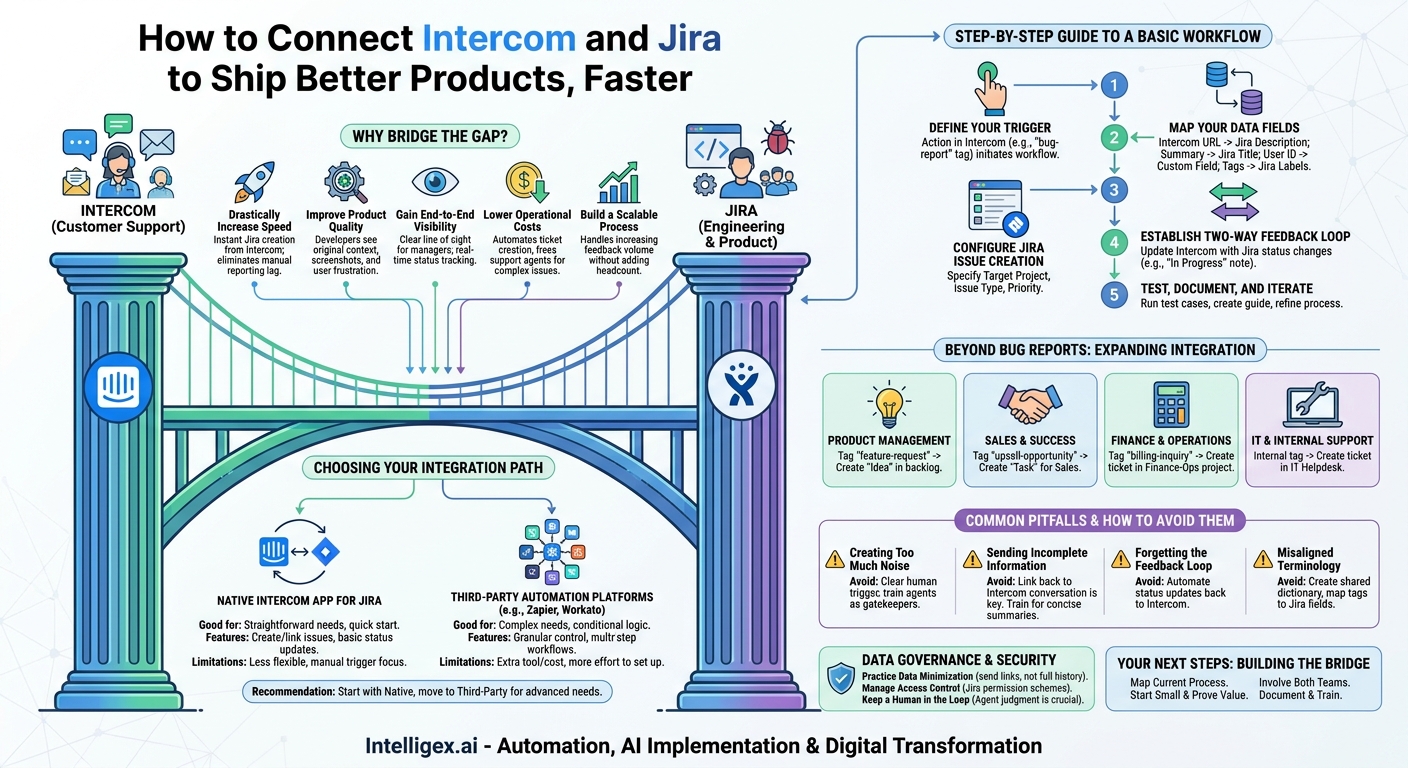
Your customer support team lives in Intercom, managing conversations and solving problems in real time. Your engineering and product teams live in Jira, tracking tasks, squashing bugs, and building the future of your product. Between these two essential platforms lies a gap. It’s a manual, error-prone space where critical customer feedback can get lost, delayed, or misinterpreted. Every minute a support agent spends copying and pasting conversation details into a new Jira ticket is a minute they are not helping another customer. This disconnect isn’t just an operational headache; it’s a bottleneck that slows down your entire business.
Closing this gap by integrating Intercom and Jira is one of the highest-leverage improvements a growing company can make. It transforms a clunky, manual process into a smooth, automated workflow that directly connects the voice of the customer to the hands of your builders. This isn’t about replacing people with automation. It’s about empowering your teams with the context and speed they need to deliver better products and experiences.
Why Bridge the Gap Between Customer Support and Engineering?
Connecting these two systems is more than a simple technical convenience. It delivers tangible business value across several key areas, creating a more responsive and efficient organization. By building a direct bridge, you move from reactive problem-solving to a proactive system of continuous improvement fueled by real-time customer insights.
- Drastically Increase Speed: The moment a support agent identifies a legitimate bug, they can create a Jira ticket directly from the Intercom conversation. The development team is notified instantly with all the necessary context. This eliminates the lag time of manual reporting, reducing the time from bug discovery to fix deployment.
- Improve Product Quality: When developers can see the original customer conversation (via a secure link), they get unfiltered context. They see screenshots, understand the user’s frustration, and grasp the nuances of the problem. This rich information leads to more accurate, robust fixes and reduces the frustrating back-and-forth between support and engineering.
- Gain End-to-End Visibility: For product managers and support leads, the integration provides a clear line of sight. They can see which customer conversations are linked to which Jira issues and track the status in real time. This ends the black box of “What happened to that issue?” and allows support agents to give customers accurate updates.
- Lower Operational Costs: Think of the cumulative time your support team spends manually creating tickets. They have to switch tabs, copy text, re-upload files, and summarize the issue. Automating this frees them to handle more complex customer inquiries. It also reduces the engineering time wasted trying to reproduce bugs due to incomplete information.
- Build a Scalable Process: A manual hand-off process might work with five support tickets a day. It breaks down completely with five hundred. An automated integration ensures that as your customer base grows, your ability to handle their feedback and issues grows with it, without needing to proportionally increase head count for administrative tasks.
Choosing Your Integration Path: Native vs. Third-Party
Once you’ve decided to connect Intercom and Jira, the next step is to choose how. There are two primary approaches, each with its own strengths. The right choice depends on your team’s technical comfort level, budget, and the complexity of the workflow you want to build.
The Native Intercom App for Jira
Intercom provides a built-in integration with Jira, which is often the best place to start. It’s designed to handle the most common use case: creating and linking Jira issues from an Intercom conversation.
- What it’s good for: Teams that need a straightforward way to let support agents create bug reports or feature requests in Jira without leaving their inbox. It’s excellent for getting started quickly with minimal setup.
- Key Features: You can create a new Jira issue, link a conversation to an existing issue, and get basic status updates pushed back into Intercom as internal notes.
- Limitations: The native app is less flexible. You have limited control over complex logic (for example, “if the tag is X and the customer is on plan Y, then assign the ticket to team Z”). It primarily supports a manual trigger by the support agent.
Third-Party Automation Platforms
Tools like Zapier, Workato, or Make act as powerful intermediaries. They allow you to build highly customized, multi-step workflows that can connect Intercom, Jira, and even other applications like Slack or your internal database.
- What it’s good for: Teams with specific or complex needs. For instance, you might want to automatically create a Jira ticket only when a conversation is tagged with “urgent-bug” and the customer has a “VIP” attribute.
- Key Features: You get granular control over triggers, actions, and data mapping. You can introduce conditional logic, format data, and chain actions together to create sophisticated automations that go far beyond what the native integration offers.
- Limitations: These platforms introduce another tool to manage and often come with an additional subscription cost. They also require a bit more effort to set up and maintain. While they are “low-code,” they are not “no-thought.”
For most organizations, the best path is to start with the native integration from Intercom. Master the basic workflow, then explore a third-party tool if and when you identify a clear need for more advanced logic. Don’t over-engineer the solution from day one.
A Step-by-Step Guide to a Basic Intercom-Jira Workflow
Let’s walk through the creation of a foundational workflow: allowing a support agent to flag a bug in Intercom and have it appear as a well-formed ticket in the correct Jira project. This process focuses on clarity, context, and closing the loop.
- Define Your Trigger: The first decision is what action in Intercom initiates the workflow. Don’t automate the creation of a ticket for every conversation. That would flood Jira with noise. A better approach is an intentional trigger. A great starting point is having the support agent add a specific tag, like bug-report or escalate-to-eng, to the conversation. This gives the agent control while still enabling automation.
- Map Your Data Fields: This is the most critical step. You must decide exactly what information from Intercom should populate the fields in your Jira ticket. A solid baseline mapping includes:
- Intercom Conversation URL → Jira Description Field: This is non-negotiable. It provides the full, unabridged context for the engineering team.
- Customer’s Message Summary → Jira Summary (Title): The agent should write a clear, concise title like “User unable to export CSV file on dashboard.”
- Customer Email or User ID → Jira Custom Field (“Reported by”): This helps engineers identify the user if they need to check specific account data.
- Intercom Tags → Jira Labels: Tags like “mobile-app” or “billing-module” can be automatically passed as labels for easier filtering and reporting in Jira.
- Configure the Jira Issue Creation: Within your integration tool, you’ll specify the details of the Jira ticket itself. Define the target Jira Project (e.g., “WEB-APP-BUGS”) and the Issue Type (e.g., “Bug”). You can often set a default Priority, but it’s often better to let the engineering team triage and set the priority themselves based on the full context.
- Establish the Two-Way Feedback Loop: An integration that only sends information one way is only half a solution. The support team needs to know what’s happening with the ticket they created. Configure an action that updates Intercom when the Jira ticket changes. For example, when a Jira ticket’s status changes to “In Progress,” automatically add an internal note to the linked Intercom conversation saying, “Engineering has started working on this issue.” When it moves to “Done,” the note can prompt the agent to follow up with the customer.
- Test, Document, and Iterate: Before rolling it out to the whole team, run several test cases. Use real-world examples of recent bugs. Once you’re confident, create a simple one-page guide for the support team explaining how and when to use the new process. Check in after a few weeks to see what’s working and what needs refinement.
Beyond Bug Reports: Expanding the Integration to Other Teams
The value of this integration extends far beyond the support and engineering departments. Once the bridge is built, you can use the same patterns to streamline communication and data flow across the entire organization. Customer conversations are a goldmine of insights for nearly every team.
- Product Management: When a support agent tags a conversation as feature-request, the integration can create an “Idea” issue type in the product team’s Jira backlog. This ensures that valuable customer suggestions are captured, aggregated, and considered for future development cycles, directly linking product planning to user needs.
- Sales and Customer Success: A customer might mention in a support chat that they are interested in a higher-tier plan. The support agent can add a tag like upsell-opportunity. This could trigger the creation of a “Task” in a Sales Jira project, automatically assigning it to the customer’s account manager with a link to the conversation for context.
- Finance and Operations: A customer reports a confusing charge on their invoice. This isn’t a software bug, but it requires investigation. A tag like billing-inquiry can create a ticket in a “Finance-Ops” Jira project, ensuring the issue is tracked formally and doesn’t get lost in an email chain.
- IT and Internal Support: If your company uses Intercom for internal support, the same logic applies. An employee reporting a problem with their laptop can have a ticket automatically created in the IT Helpdesk Jira Service Management project, streamlining internal ticketing.
Common Pitfalls and How to Avoid Them
Building the integration is one thing; making it effective is another. Many teams stumble by making a few common mistakes. Being aware of these pitfalls from the start will help you build a workflow that your teams actually want to use.
- Pitfall: Creating Too Much Noise. The fastest way to get engineers to ignore the integration is to flood their backlog with low-quality or duplicate tickets.
How to Avoid It: Implement a clear, human-driven trigger. Train your support team to be the gatekeepers. They should only create a Jira ticket after they have confirmed the issue is a genuine bug or a well-defined feature request, not just a simple user question. - Pitfall: Sending Incomplete Information. A Jira ticket that just says “User is getting an error” is useless. It creates more work by forcing a developer to chase down the support agent for more information.
How to Avoid It: Make the link back to the Intercom conversation the centerpiece of your integration. Train agents to write concise but descriptive summaries and to ensure all relevant details (like browser version or steps to reproduce) are in the conversation before they create the ticket. - Pitfall: Forgetting the Feedback Loop. If support agents create tickets that go into a black hole, they will lose trust in the system and revert to old habits like sending direct messages.
How to Avoid It: Automate status updates back to Intercom. Even a simple, automated internal note provides immense value and reassures the support team that the issue is being handled. - Pitfall: Misaligned Terminology. Your support team might use a tag called “Critical,” but your engineering team’s highest Jira priority is “Highest.” This mismatch can lead to confusion and mismanaged expectations.
How to Avoid It: Before launching, get support and engineering leads in a room to agree on a shared dictionary. Map Intercom tags to corresponding Jira fields, priorities, and components to ensure everyone is speaking the same language.
Data Governance and Security Considerations
Connecting a customer-facing tool with an internal one requires thoughtful handling of data. Customer conversations can contain Personally Identifiable Information (PII) or other sensitive details. A secure integration is a trusted integration.
Practice Data Minimization: When mapping fields, only send what is absolutely necessary. For example, instead of syncing the entire message history into a Jira field, just sync a link to the conversation. This keeps the sensitive data in Intercom, which is designed for it, and uses Jira for what it’s good at: tracking the work.
Manage Access Control: Use Jira’s permission schemes to control who can view the tickets created by the integration. Not everyone in your company needs to read customer conversations. You might create a specific user group in Jira for “Developers with Intercom access” and ensure that custom fields containing customer data are only visible to them.
Keep a Human in the Loop: Your automation should empower your team, not replace their judgment. The decision to escalate a conversation to Jira should always rest with a trained support agent. This human checkpoint is your best defense against accidentally sending sensitive or irrelevant information to the development backlog.
Your Next Steps: Building the Bridge
An Intercom-Jira integration is a project that delivers compounding returns. It saves time every day, makes your product better with every ticket, and improves the experience for both your customers and your employees. Getting started is more about process and collaboration than complex technology.
- Map Your Current Process: Before you build anything, grab a whiteboard (physical or virtual) and draw out how a customer issue gets from the support inbox to an engineering task list today. Identify every manual step, every delay, and every point of frustration.
- Involve Both Teams from Day One: This integration is a handshake between two departments. Get buy-in and input from both support agents and engineers. They are the ones who will be using this workflow, and their insights are invaluable for getting it right.
- Start Small and Prove Value: Don’t try to automate everything at once. Pick one critical workflow, like reporting high-priority bugs. Build it, test it, and launch it. The success of this first step will build momentum for future automation. We often recommend a workflow automation tool like Zapier to get started quickly and prove the concept before investing in more complex solutions.
- Document and Train: A tool is only as good as its user. Create a simple, clear guide for your support team on the new process. Host a short training session to walk them through it and answer their questions. A little bit of upfront training prevents a lot of confusion down the road.
By connecting Intercom and Jira, you are building more than a software integration. You are building a system for listening to your customers and a process for acting on what you hear, faster and more effectively than ever before.
Your Next Read:
Get a FREE
Proof of Concept
& Consultation
No Cost, No Commitment!
