

Your support agents are toggling between browser tabs, frantically searching for a customer’s contract details while the customer waits. Your sales team is calling a key account to discuss a renewal, completely unaware that the account has three high-priority support tickets open. These are not isolated incidents. They are symptoms of a disconnected business, a result of your Customer Relationship Management (CRM) and helpdesk platforms operating in separate universes. This disconnect isn’t just an inconvenience; it’s a drag on efficiency, a risk to revenue, and a constant source of friction for your customers.
Integrating these two critical systems is one of the highest-impact digital transformation projects a company can undertake. It moves you from a fragmented view of the customer to a single, coherent picture. But a successful integration isn’t about flipping a switch. It requires a thoughtful strategy about what data to sync, in which direction, and why. Getting this right creates a powerful engine for speed, quality, and growth.
Beyond Convenience: The Business Case for Integration
Connecting your CRM and helpdesk is more than just a quality-of-life improvement for your staff. It’s a strategic move that delivers tangible business value across several key areas. When data flows freely between the teams that talk to your customers, the entire organization becomes more effective.
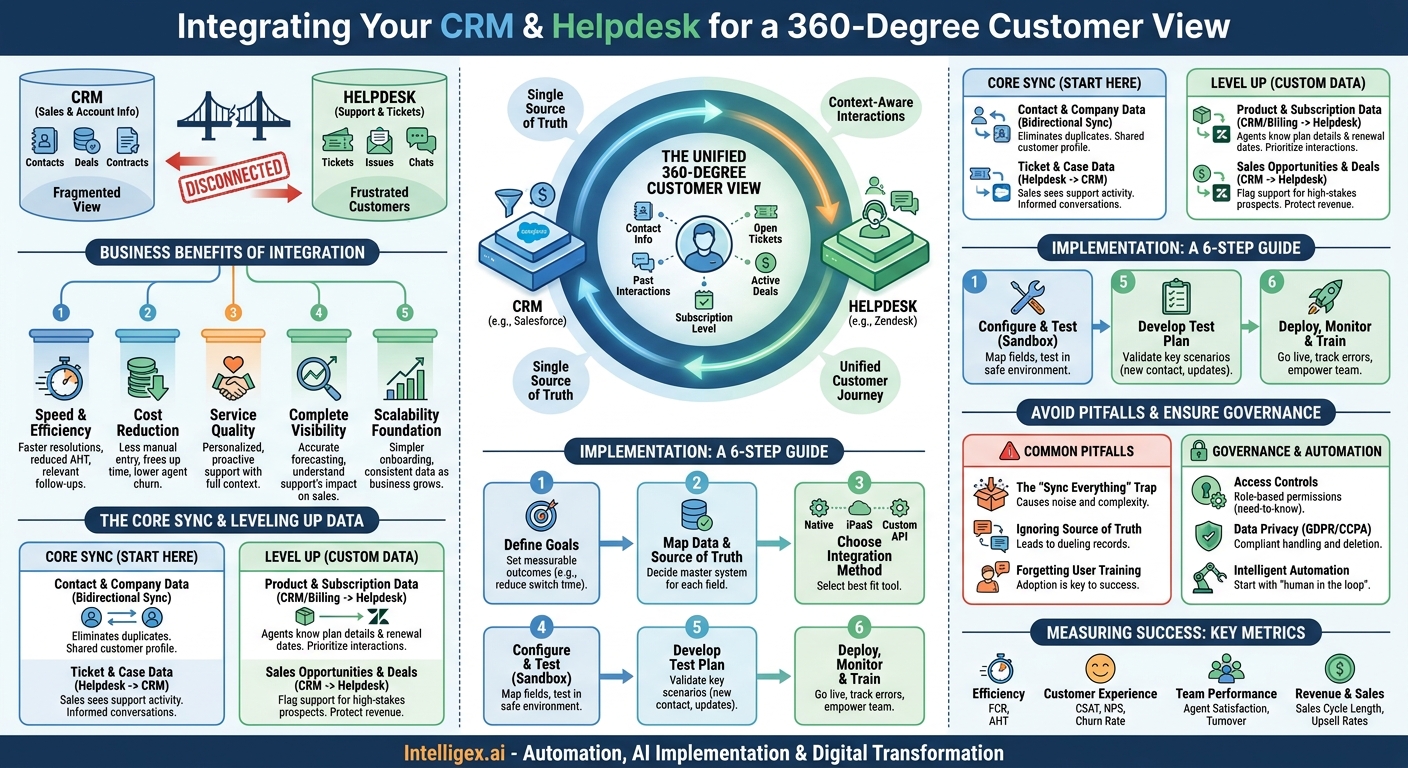
- Speed and Efficiency: When a support agent has a customer’s entire history (purchase records, contract level, past conversations) visible directly within their helpdesk ticket, they solve problems faster. There is no more “let me look that up and get back to you.” This directly impacts metrics like First Contact Resolution (FCR) and Average Handle Time (AHT). For sales, seeing support activity in the CRM means faster, more relevant follow-ups.
- Cost Reduction: Efficiency gains translate directly to cost savings. Reduced handle times mean agents can manage more conversations. Less time spent on manual data entry or switching between systems frees up employees for higher-value work. Furthermore, a better employee experience, where tools support rather than hinder work, can lead to lower agent churn and reduced hiring and training costs.
- Service Quality: Context is king in customer service. An agent who knows a customer’s subscription level, recent product usage, and past frustrations can provide a level of personalized, empathetic support that is simply impossible with siloed data. This transforms support from a reactive cost center into a proactive, relationship-building function.
- Complete Visibility: Integration creates a 360-degree view of the customer journey. Leadership can finally see how support activities impact sales, and how sales promises translate into support tickets. This unified view is critical for accurate forecasting, identifying at-risk accounts, and understanding the true health of your customer relationships.
- Foundation for Scalability: As your business grows, the cost of manual processes and data silos grows exponentially. An integrated system provides a scalable foundation. Onboarding new team members is simpler, and a single source of truth ensures consistency even as you add more customers, products, and employees.
The Core Sync: What Every Business Should Start With
Don’t try to boil the ocean. A successful integration project starts with a solid foundation built on the most critical data points. These are the non-negotiable data sets that provide immediate value to both your support and customer-facing teams. Focus on getting this core synchronization right before moving on to more complex data.
Contact and Company Data (Bidirectional Sync)
This is the bedrock of your integration. Inconsistent or duplicate contact information is a primary source of confusion and inefficiency. The goal is to establish a single source of truth for who your customers are.
Why it matters: When a new lead is created in your CRM (like Salesforce), that contact should be immediately available in your helpdesk (like Zendesk or Intercom). Conversely, if a support agent updates a customer’s phone number during a service call, that change must flow back to the CRM to ensure the sales and billing teams have the correct information. This bidirectional sync eliminates manual data entry and ensures everyone is working from the same contact record.
Key fields to sync:
- Contact Name
- Email Address
- Phone Number
- Company Name
- Job Title
- Customer ID
Ticket and Case Data (Helpdesk to CRM)
This is about providing context to your revenue teams. A salesperson or account manager should never walk into a customer conversation blind. Viewing support activity directly within the CRM provides crucial intelligence about account health.
Why it matters: Imagine an account manager preparing for a quarterly business review. By looking at the customer’s record in the CRM, they can see a summary of recent support tickets: their subjects, their priority levels, and their current status. This insight allows them to proactively address concerns, celebrate successful resolutions, and have a much more informed conversation about the value your company provides.
Key fields to sync:
- Ticket ID (with a link back to the helpdesk)
- Ticket Status (e.g., Open, Pending, Resolved, Closed)
- Priority Level (e.g., Low, Normal, High, Urgent)
- Subject/Title
- Creation and Resolution Dates
- Ticket Type (e.g., Question, Incident, Problem)
Level Up: Syncing Custom and Transactional Data
Once the foundational sync is stable, you can unlock even greater value by integrating more specific business data. This is where you tailor the integration to your unique operations, giving teams the precise context they need to excel.
Product and Subscription Data (From Billing/CRM to Helpdesk)
Empower your support agents with the commercial context of the customer they are helping. Knowing what a customer has bought, how much they pay, and when their contract renews changes the nature of the support conversation.
Why it matters: An agent sees a ticket from a customer on your “Enterprise” plan whose renewal is in 30 days. This context instantly signals that the interaction is high-stakes. The agent can provide a higher level of service and knows to escalate the issue quickly if needed. It also helps them provide more relevant answers. For example, they won’t suggest a solution that uses a feature not included in the customer’s current plan.
Example Scenario (Supply Chain): A logistics company integrates its CRM with its helpdesk. When a customer calls about a missing shipment, the support agent’s screen immediately shows the customer’s shipping volume, their assigned logistics coordinator from the CRM, and their service-level agreement (SLA). This allows the agent to instantly understand the urgency and loop in the right internal contact without delay.
Sales Opportunities and Deals (From CRM to Helpdesk)
Aligning support actions with sales goals is a powerful way to protect and grow revenue. When the support team is aware of active deals, they become a crucial part of the sales process.
Why it matters: A high-priority technical issue is logged by a prospect in the final stages of a major deal. With integration, this ticket can be automatically flagged and escalated. The system can notify the sales representative who owns the deal, ensuring they are aware of the situation. This prevents a deal from being derailed by a frustrating support experience and demonstrates to the prospect that your entire company is responsive to their needs.
Example Scenario (Finance/Ops): A B2B fintech company syncs deal data from its CRM. A ticket arrives from a company that is in the “Contract Negotiation” stage for a six-figure deal. The helpdesk automatically routes this ticket to a Tier 2 support queue, bypassing the standard triage process to ensure a fast, expert response. The deal owner in the CRM gets an automated notification, keeping them in the loop.
Planning Your Integration: A Step-by-Step Guide
A structured approach is essential for a smooth and successful integration project. Rushing into configuration without a clear plan often leads to technical debt, frustrated users, and a failure to realize the expected business value.
- Define and Document Your Goals. What specific, measurable outcomes are you trying to achieve? Don’t just say “improve efficiency.” Instead, aim for goals like “Reduce agent time spent switching between systems by 20%” or “Ensure sales has 100% visibility into high-priority tickets for their top 50 accounts.”
- Map Your Data and Define the Source of Truth. For every piece of data you want to sync, you must decide which system is the master record. For example, the CRM is almost always the source of truth for company and contact information. The helpdesk is the source of truth for ticket status. Documenting this prevents data conflicts where two systems try to overwrite each other.
- Choose Your Integration Method. You generally have three options:
- Native Connectors: Many major CRM and helpdesk platforms (like Zendesk) offer pre-built integrations. These are often the fastest and easiest to set up for basic use cases.
- iPaaS Platforms: Integration Platform as a Service (iPaaS) tools like MuleSoft or Workato offer more flexibility and power than native connectors, allowing you to build complex workflows and connect multiple systems.
- Custom API Development: For highly unique requirements, you can build a custom integration using the APIs of your respective platforms. This offers maximum flexibility but requires significant development resources and ongoing maintenance.
- Configure and Test Field Mappings. This is the technical heart of the project. You must meticulously map each field from the source system to the corresponding field in the destination system. Pay close attention to custom fields, which are unique to your business. Always, always perform this configuration and initial testing in a sandbox or staging environment, never in your live production systems.
- Develop a Test Plan. Before going live, test all your key scenarios. What happens when a new contact is created in the CRM? When a ticket priority is changed in the helpdesk? When a contact’s email is updated in both systems simultaneously? A thorough test plan will catch issues before they impact your customers.
- Deploy, Monitor, and Train. After successful testing, deploy the integration to your production environment. Monitor the system closely for any sync errors or API rate limit issues. Most importantly, train your teams. Show the sales team where to find support data in the CRM. Train support agents on the new customer information available to them and how to use it. The best integration in the world is useless if no one knows how to leverage it.
Common Pitfalls and How to Avoid Them
Even with a good plan, integration projects can run into trouble. Being aware of common mistakes can help you navigate the process more effectively.
The “Sync Everything” Trap. The temptation to sync every single piece of data is strong, but it’s a mistake. Over-syncing creates noise, making it harder for users to find the information that matters. It also increases the complexity of the integration, making it more brittle and expensive to maintain. Start with the core data sets, validate their value, and then incrementally add more as specific business needs arise.
Ignoring the “Source of Truth” Problem. Failing to formally designate a master system for each data object is the number one cause of data corruption. This leads to “dueling records,” where systems continuously overwrite each other’s updates. For example, if both sales and support can edit a customer’s primary address, and you don’t have clear rules, you will inevitably end up with incorrect data. Define ownership for every key field before you begin.
Forgetting About User Training and Adoption. You can build a perfect technical solution, but if your team doesn’t adopt it, the project has failed. You must actively manage the change. Conduct training sessions, create simple documentation, and highlight “wins” where the integration helped close a deal or save a customer. Appoint champions on the sales and support teams who can encourage their peers to use the new capabilities.
A Note on Data Governance and Automation
Integrating systems means more data is flowing and more accessible. This is a powerful advantage, but it requires careful attention to governance and security. As you plan your integration, you must also plan how you will protect the data and use it responsibly.
First, consider access controls. Not everyone needs to see everything. Use role-based permissions to ensure employees can only view the data necessary for their jobs. For instance, a front-line support agent might need to see a customer’s subscription level but probably doesn’t need to see the projected value of their open sales opportunities. Restricting access on a need-to-know basis is a fundamental security best practice.
Second, be mindful of data privacy regulations like GDPR and CCPA. Ensure your data handling and synchronization processes are compliant. This includes honoring customer requests for data deletion, which now must be propagated across all integrated systems.
Finally, this integration is the foundation for intelligent automation. You can build workflows that automatically route tickets based on the customer’s lifetime value stored in the CRM, or create a task for an account manager when a high-value client logs a severe issue. When implementing such automation, especially workflows that trigger external communication, start with a “human in the loop” approach. Have a person review the automated action before it’s executed, at least initially. This allows you to validate the logic and prevent errors while you build confidence in the system.
Measuring Success: Key Metrics to Track
To justify the investment and prove the value of your integration, you need to track the right metrics. Your measurements should be tied directly to the business goals you defined at the start of the project. Focus on metrics across efficiency, customer experience, and revenue.
Key performance indicators to monitor:
- Efficiency Metrics: Track changes in First Contact Resolution (FCR) rate and Average Handle Time (AHT). A successful integration should improve both.
- Customer Experience Metrics: Monitor Customer Satisfaction (CSAT) scores and Net Promoter Score (NPS) for interactions post-integration. Smoother, more contextual support should lead to happier customers and a potential decrease in customer churn.
- Team Performance Metrics: Look at employee satisfaction and agent turnover rates. Better tools can lead to a less frustrating work environment.
- Revenue and Sales Metrics: Analyze the sales cycle length for prospects who interact with support. Measure upsell or cross-sell conversion rates after a positive support interaction.
Your Next Steps
A CRM and helpdesk integration is a foundational step in building a truly customer-centric organization. By breaking down data silos, you empower your teams with the context they need to deliver faster, smarter, and more personalized experiences. The result is a more efficient business, happier employees, and more loyal customers.
To begin your journey, start with a simple, focused plan. Don’t wait for the perfect, all-encompassing strategy. Instead:
- Assemble a small, cross-functional team including representatives from Support, Sales, and IT to ensure all perspectives are considered.
- Audit your current processes. Identify and document the top three biggest pain points caused by your systems not talking to each other.
- Start a data dictionary. Begin listing the core data fields (like those mentioned above) that you believe are most critical to share between your CRM and helpdesk.
This initial groundwork will prepare you for a more detailed strategic discussion about designing and implementing an integration that drives real business results.
Your Next Read:
Get a FREE
Proof of Concept
& Consultation
No Cost, No Commitment!
