

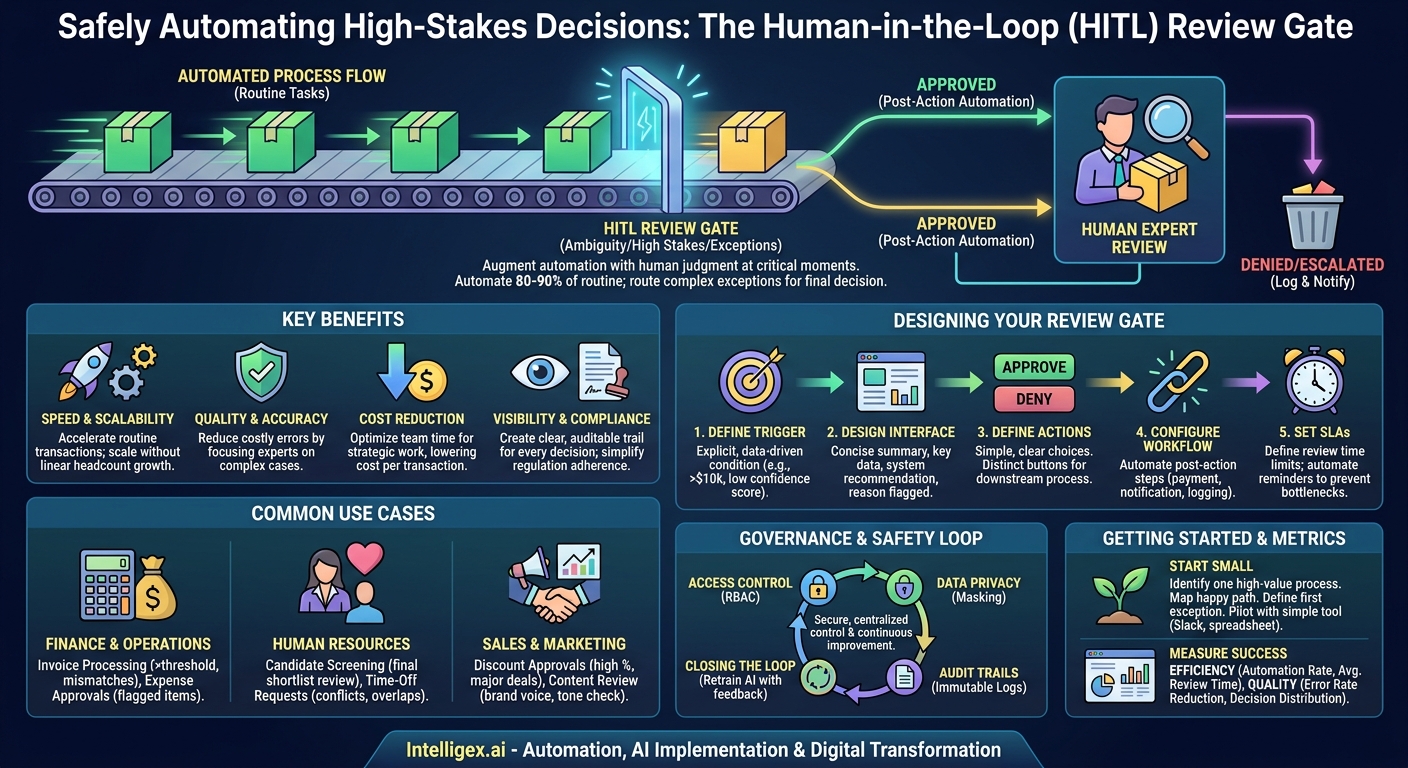
Automation is the engine of digital transformation, promising to make business processes faster, cheaper, and more scalable. But a common roadblock appears when a process involves sensitive, high-stakes decisions. You can’t fully automate a multi-million dollar procurement approval or the final decision on a crucial hire. The risk is just too high. This is where many initiatives stall, caught between the inefficiency of manual processing and the unacceptable risk of blind automation.
The solution isn’t to abandon automation. It’s to augment it with human judgment at precisely the right moments. A Human-in-the-Loop (HITL) Review Gate is a simple but powerful pattern for achieving this balance. It allows you to automate the vast majority of routine tasks while intelligently routing the complex, ambiguous, or high-value exceptions to the right people for a final decision. This approach combines the speed of machines with the wisdom of your expert teams, creating a system that is both efficient and safe.
What is a Human-in-the-Loop (HITL) Review Gate?
A HITL Review Gate is a structured checkpoint in an otherwise automated workflow where a human expert must review, approve, deny, or modify a decision before the process can continue. Think of it as an intelligent traffic controller for your business processes. The system handles all the green-light scenarios automatically, but when a yellow-light situation arises, it pauses and waits for a human to make the call.
The goal is not to slow things down. In fact, it’s the opposite. By isolating the exceptions, you enable the straight-through processing of 80-90% of your transactions, leading to massive gains in speed and efficiency. Your most valuable employees are no longer bogged down reviewing every single item. Instead, their expertise is focused only on the cases where their judgment truly matters.
Implementing review gates delivers clear business value across several dimensions:
- Speed and Scalability: You dramatically accelerate routine transactions. The system can process thousands of standard requests without human intervention, scaling to meet demand without a proportional increase in headcount.
- Quality and Accuracy: By having experts review only the most complex or unusual cases, you reduce the risk of costly errors that fully automated systems might miss. Human oversight acts as a critical quality control mechanism.
- Cost Reduction: You optimize the use of your team’s time. Instead of spending hours on repetitive approvals, they can focus on strategic work, problem-solving, and managing true exceptions. This lowers the cost per transaction.
- Visibility and Compliance: Every decision made at a review gate is logged, creating a clear, auditable trail. This provides unprecedented visibility into your decision-making processes and simplifies compliance with internal policies and external regulations.
When to Implement a Review Gate: Identifying the Right Use Cases
Not every decision needs a human checkpoint. The key is to identify processes where the cost of a bad decision is high. A good review gate is triggered by ambiguity, high financial impact, or compliance requirements. If a decision requires context, nuance, or judgment that is difficult to encode in software rules, it’s a prime candidate for a HITL gate.
Here are concrete examples from various business functions:
Finance and Operations
Financial processes are often governed by strict rules, making them ideal for this pattern. Instead of manually checking every line item, you can automate approvals based on thresholds.
- Invoice Processing: An AI can extract data from invoices and match them against purchase orders. Invoices under $5,000 from a known vendor might be approved automatically. Any invoice over that amount, or one with a line-item mismatch, gets routed to an Accounts Payable specialist for review.
- Expense Report Approval: Expense reports that fall within company policy (e.g., standard meal and travel costs) can be auto-approved. Reports with flagged expenses, like items over a certain limit or from unapproved vendors, are sent to a manager’s queue.
Human Resources
Hiring and employee management involve sensitive decisions that benefit greatly from combining AI-driven efficiency with human empathy and judgment.
- Candidate Screening: An application tracking system (ATS) can automatically screen resumes for required skills and experience, filtering out unqualified applicants. The resulting shortlist of the top 10% of candidates is then presented to a human recruiter for a qualitative review before any interviews are scheduled.
- Time-Off Requests: Standard vacation requests that don’t conflict with team schedules can be approved instantly. Requests that overlap with a project deadline or a colleague’s approved time off are flagged for a manager to resolve.
Sales and Marketing
Maintaining consistency and profitability while empowering sales teams requires careful controls. Review gates help manage this balance.
- Discount Approvals: A salesperson using a CRM like Salesforce can offer standard discounts up to 15% automatically. If they propose a 25% discount to close a major deal, the request is automatically routed to their sales director for approval, complete with deal context and customer history.
- Marketing Content Review: An AI can generate draft social media posts or email campaigns. Before publishing, these drafts are sent to a marketing manager’s queue to check for brand voice, tone, and strategic alignment.
Designing Your First Review Gate: A Step-by-Step Guide
Building a review gate doesn’t have to be a complex, multi-month IT project. You can start small by following a structured design process. A well-designed gate is specific, provides clear context, and enables swift action.
- Define the Trigger Condition. This is the most critical step. Be explicit about what sends a task to a human. Vague rules create confusion. A good trigger is a concrete, data-driven condition. For example, not “a large invoice,” but “an invoice where `total_amount` > $10,000 USD.” Other common triggers include an AI model’s confidence score falling below a certain threshold (e.g., `confidence_score` < 0.90) or the presence of specific sensitive keywords in a text field.
- Design the Review Interface. The human reviewer needs just enough information to make a confident decision quickly. Don’t show them 100 fields if only 5 are relevant. The ideal interface is a concise summary that includes the key data points, the system’s recommendation (if any), and a clear explanation of why it was flagged for review. For an invoice, this might be: Vendor Name, Invoice Number, Total Amount, and the highlighted discrepancy.
- Define the Possible Actions. Keep the decision choices simple and clear. The most common actions are Approve and Deny. You might also add Escalate (to send it to a more senior reviewer) or Request More Information (to send it back to the originator). Each action should be a distinct button that triggers a specific downstream process.
- Configure the Post-Action Workflow. What happens after the human clicks a button? This must also be automated. If “Approve” is clicked, the system should automatically trigger the payment process and notify the vendor. If “Deny” is clicked, it should log the reason, update the transaction status, and notify the person who submitted it. The human’s job is to make the decision, not to perform the subsequent administrative steps.
- Set Service Level Agreements (SLAs). A review gate can easily become a bottleneck if items sit in the queue for days. Define a clear SLA for how quickly items must be reviewed (e.g., 24 hours). Implement automated reminders and escalations for items approaching their SLA deadline to ensure the process keeps moving.
Building a Practical Review Queue and Interface
You don’t need a custom-built application to get started. The goal is to create a centralized place where reviewers can see pending tasks, access the necessary information, and take action. You can often use tools you already have.
For a first pilot, consider simple, low-code solutions. You could set up an automated workflow that sends a formatted message to a dedicated channel in Slack or Microsoft Teams. The message would contain the summary data and buttons that trigger the next step in the process. Alternatively, a shared dashboard in a tool like Airtable or Smartsheet can serve as an effective review queue.
Regardless of the tool, a good review interface should always include the following elements. Think of this as your pre-flight checklist for designing the user experience for your reviewers:
- A Unique ID: A clear, clickable identifier for the transaction (e.g., Invoice #INV-2024-9583).
- A Concise Summary: The most critical data points presented at a glance.
- The System’s Recommendation: If applicable, what the automation suggested (e.g., “Recommended: Approve”).
- The Reason for Review: The specific trigger that flagged the item (e.g., “Reason: Amount exceeds $10,000 threshold”).
- A Link to Full Details: An optional link to the full record in the source system for deep dives.
- Clear Action Buttons: Obvious, single-click buttons for each possible decision.
Measuring Success: Metrics That Matter
To demonstrate the value of your HITL review gate and identify areas for improvement, you need to track the right metrics. These metrics should cover efficiency, quality, and cost, giving you a holistic view of process performance.
Efficiency Metrics
These metrics tell you how fast and smooth your process is running.
- Automation Rate: The percentage of all transactions that are processed without any human intervention. This is your primary measure of efficiency. Your goal should be to safely increase this rate over time as you fine-tune your automation rules.
- Average Review Time: The time from when an item enters the human review queue to when a decision is made. High average review times indicate a bottleneck.
- Average Handle Time: The time a reviewer actively spends on a single item. If this is high, your review interface may be providing too little (or too much) information.
Quality and Decision Metrics
These metrics help you understand the effectiveness of your review process and the accuracy of your automation.
- Error Rate Reduction: Compare the rate of incorrect outcomes (e.g., wrong payments, improper approvals) before and after implementing the gate. This directly measures risk mitigation.
- Human Decision Distribution: Track the percentage of items that are approved, denied, or escalated. If 99% of flagged items are ultimately approved, your trigger condition might be too conservative and could be relaxed to increase the automation rate. Conversely, if 50% are denied, the upstream automated logic may need improvement.
Governance and Safe Implementation
When you centralize sensitive decisions, you must also centralize control and accountability. Strong governance is not optional; it’s a core requirement for a successful and secure HITL system. Platforms like AWS Step Functions or Azure Logic Apps can help orchestrate these workflows securely.
Access Control
Not everyone should be able to review everything. Implement role-based access control (RBAC) to ensure that only authorized individuals can view and act on items in a given queue. A sales manager should only see discount requests from their team, and an HR partner should only see employee-related cases within their business unit.
Data Privacy
The review interface should follow the principle of least privilege. Only display the minimum amount of information necessary for the reviewer to make a decision. If you are reviewing a customer support ticket, you may need to show the customer’s name, but you should mask sensitive information like their credit card number or full address unless it is absolutely essential for the decision.
Audit Trails
Every action taken within the review gate must be logged immutably. The audit trail should capture who reviewed the item, what action they took, the exact time of the decision, and any comments they provided. This log is crucial for regulatory compliance, internal audits, and resolving any future disputes.
Closing the Loop
The decisions your experts make are valuable data. Use this data to improve your automated systems. If reviewers consistently override an AI’s recommendation for a certain type of case, it’s a clear signal that the model needs to be retrained with this new information. This feedback loop creates a cycle of continuous improvement, making your automation smarter and more reliable over time.
Getting Started: Your Next Steps
Implementing a HITL review gate is an iterative process. Start with one well-defined problem to build momentum and demonstrate value quickly.
- Identify One High-Value Process. Don’t try to overhaul your entire operations at once. Pick a single process where manual reviews are a known bottleneck and the cost of an error is high. Invoice approvals or sales discount requests are often great starting points.
- Map the “Happy Path.” Document the exact steps for a standard, no-exceptions transaction that should be automated.
- Define the First “Exception Path.” Identify the single most common or highest-risk reason a transaction needs human review. This becomes the trigger for your first review gate. Start simply.
- Pilot with a Simple Tool. You don’t need a massive software investment to begin. Set up your first review queue using email rules, a dedicated Slack channel, or a shared spreadsheet. Run the pilot for a few weeks, measure your baseline metrics, and gather feedback from the reviewers.
By taking this incremental approach, you can build a powerful system that balances speed and safety, freeing your team to focus on what they do best: making the critical judgments that drive your business forward.
Your Next Read:
Category:
Get a FREE
Proof of Concept
& Consultation
No Cost, No Commitment!
