

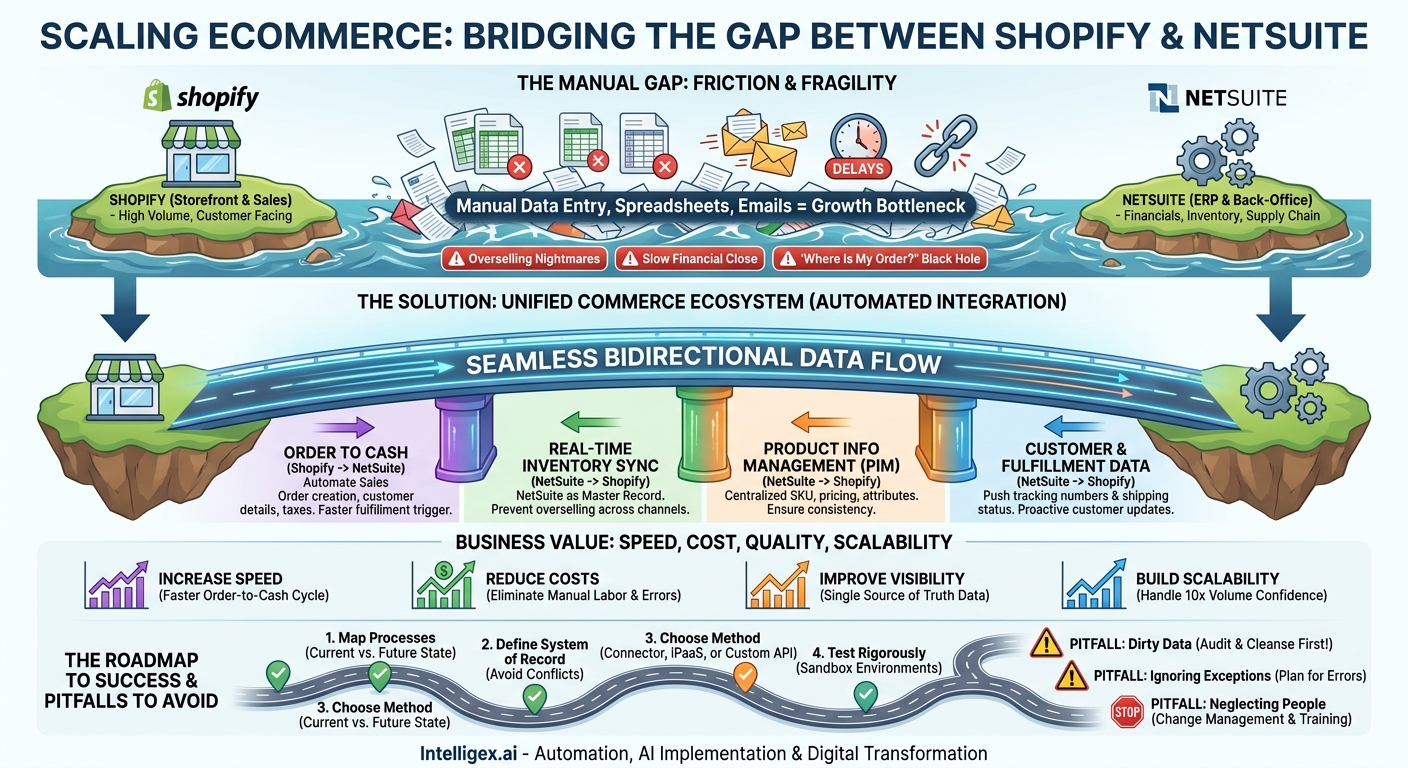
As your ecommerce business grows, the very tools that fueled your success can start to create friction. You have a beautiful, high-converting storefront on Shopify, driving sales and engaging customers. Behind the scenes, you have Oracle NetSuite, a powerful ERP managing your financials, inventory, and supply chain. The problem lies in the gap between them. That gap is often filled with manual data entry, spreadsheets, and frantic emails, a fragile system that cracks under pressure, leading to costly errors, frustrated customers, and a ceiling on your growth.
Closing this gap isn’t just a technical task; it’s a strategic move to build a resilient, scalable commerce operation. By integrating Shopify and NetSuite, you create a seamless flow of information that aligns your customer-facing storefront with your back-office engine. This alignment unlocks new levels of efficiency, visibility, and control, transforming how you manage everything from orders and inventory to fulfillment and finance.
Why Manual Processes Between Shopify and NetSuite Can’t Scale
In the early days, copying and pasting order information from Shopify into NetSuite might have been manageable. But as order volume increases, this manual bridge becomes a significant bottleneck. The risks are not just about inefficiency; they directly impact your revenue and brand reputation.
Consider these common scenarios:
- The Overselling Nightmare: Your marketing team runs a successful flash sale. Orders flood your Shopify store. But your team can’t update inventory levels in NetSuite and push them back to Shopify fast enough. You end up selling 150 units of an item you only have 100 of in the warehouse. Your operations team then spends days contacting angry customers, processing refunds, and managing the fallout on social media. The cost isn’t just the lost sales but the damage to customer trust.
- The Financial Close Scramble: At the end of the month, your finance team is trying to close the books. They discover that dozens of orders were entered into NetSuite with incorrect tax calculations or misplaced discount codes. Now they must manually reconcile Shopify sales reports against NetSuite entries, delaying financial reporting and making accurate forecasting nearly impossible. This isn’t just an accounting headache; it means leadership is making strategic decisions based on outdated or inaccurate data.
- The “Where Is My Order?” Black Hole: A customer contacts your support team asking for their order status. The support agent can see the order in Shopify but has no visibility into its fulfillment status in NetSuite. They have to send an email to the warehouse team, who might not respond for hours. The customer is left waiting, frustrated by a simple query. This poor experience makes them less likely to order from you again.
Each of these issues stems from the same root cause: a lack of real-time, automated data synchronization. Manual processes are inherently slow, error-prone, and incapable of handling the volume and velocity of a modern ecommerce business. They create data silos where your sales, operations, and finance teams are all looking at different, and often conflicting, versions of the truth.
The Business Value of a Unified Commerce Ecosystem
Integrating Shopify and NetSuite is about building a single, cohesive system where data flows automatically and reliably. This creates a powerful foundation for growth by delivering tangible improvements across four key areas: speed, cost, quality, and scalability.
Drastically Increase Speed
Automation collapses the time it takes to move information. When an order is placed on Shopify, it can appear as a sales order in NetSuite within seconds, not hours. This immediately triggers warehouse and fulfillment processes. Shipping confirmations and tracking numbers are sent back to Shopify automatically, notifying the customer instantly. This acceleration doesn’t just delight customers; it shortens your entire order-to-cash cycle, improving cash flow.
Significantly Reduce Operational Costs
Think of all the hours your team spends on manual data entry, error correction, and internal communication to track down information. An integration reallocates that time to higher-value activities. You eliminate the need for temporary staff during peak seasons to handle order processing. Furthermore, by preventing overselling and shipping errors, you reduce the direct costs associated with returns, refunds, and appeasement gestures like free shipping or discounts on future orders.
Improve Data Quality and Visibility
A properly configured integration establishes NetSuite as the single source of truth for core business data like inventory, financials, and item master data. This eliminates discrepancies and ensures everyone is working from the same playbook. Your marketing team sees accurate inventory before launching a promotion. Your finance team trusts the revenue data in NetSuite. Your leadership team can pull real-time reports to make informed decisions about purchasing, pricing, and business strategy.
Build for Future Scalability
Can your current process handle a 10x increase in order volume next Black Friday? For most businesses relying on manual work, the answer is no. An automated integration is built to scale. It can process thousands of orders an hour without breaking a sweat, ensuring your operations can keep pace with your most ambitious growth targets. This allows you to expand into new markets, launch new product lines, or explore new sales channels with confidence, knowing your back-office can handle the success.
Core Data Flows to Automate: A Blueprint for Integration
A successful integration is more than just connecting two systems; it’s about automating specific business processes. Here are the most critical data flows to consider when building your integration between Shopify and NetSuite.
Order to Cash Automation
This is the cornerstone of the integration. The flow typically works like this: a customer places an order on Shopify. The integration automatically creates a corresponding Sales Order in NetSuite, complete with customer details, line items, shipping information, taxes, and discounts. This sales order is then processed through your standard NetSuite fulfillment and invoicing workflows. This end-to-end automation ensures that orders are fulfilled quickly and revenue is recognized accurately without manual intervention.
Real-Time Inventory Synchronization
To prevent overselling, NetSuite should be the master record for your inventory levels. The integration should regularly, even near-instantly, update inventory quantities from NetSuite to your Shopify store. When an item is sold on Shopify, the inventory count is reduced. When new stock arrives at your warehouse and is entered into NetSuite, that quantity is pushed to Shopify, making the product available for sale. This is especially critical if you sell across multiple channels (e.g., Shopify, Amazon, wholesale), as NetSuite can consolidate inventory from all sources.
Product Information Management (PIM)
Maintaining consistent product information is key. You can use NetSuite as the central repository for core product data, such as SKU, price, and weight. When you create a new item or update an existing one in NetSuite, the integration can automatically create or update the corresponding product listing in Shopify. This saves time and prevents inconsistencies where a product might have different prices or attributes listed on different platforms.
Customer and Fulfillment Data
When an order is fulfilled in NetSuite (or by a 3PL connected to NetSuite), the integration should capture the shipping confirmation, carrier details, and tracking number. This information is then pushed back to Shopify, which automatically triggers a shipping notification email to the customer. This closes the loop on the customer experience, providing proactive and transparent communication about their order status. You can also sync customer data from Shopify to NetSuite to build a unified customer record, though this must be done with careful attention to data privacy regulations.
Planning Your Integration: A Step-by-Step Guide
A thoughtful plan is the difference between a smooth integration and a chaotic one. Rushing into development without proper preparation is a recipe for budget overruns and operational disruption. Follow these steps to lay a solid foundation for your project.
- Map Your Current and Future State Processes: Before you write a single line of code or configure any software, document your existing order-to-cash process. Use flowcharts to visualize every step, from the moment a customer clicks “buy” to when the cash is in your bank. Identify every manual touchpoint, every spreadsheet, and every decision point. Then, design your ideal future state. How should the process work with automation? This exercise will reveal the exact requirements for your integration.
- Define Your System of Record: For every key piece of data, you must declare a single “source of truth.” For example, NetSuite is almost always the system of record for inventory and financials. Shopify is the system of record for customer-facing product marketing copy. Making these decisions upfront prevents data conflicts where systems are constantly overwriting each other with outdated information. Create a simple table listing each data entity (Orders, Customers, Products, Inventory) and assign a system of record.
- Choose the Right Integration Method: You have several options for connecting the two platforms, each with its own trade-offs.
- Point-to-Point Connectors: These are pre-built applications, often found in the Shopify App Store, designed specifically to connect Shopify and NetSuite. They are often the fastest to deploy but may lack the flexibility to handle complex or unique business rules.
- Integration Platform as a Service (iPaaS): Tools like Celigo, Boomi, or Jitterbit provide a flexible platform for building and managing integrations. They offer pre-built connectors and visual workflow builders, providing a good balance of speed and customizability. They are an excellent choice for businesses that plan to integrate other systems in the future.
- Custom API Development: Building a custom integration using Shopify’s and NetSuite’s APIs offers the most flexibility but also requires the most development resources, time, and ongoing maintenance. This is typically reserved for large enterprises with highly unique requirements.
- Account for Business Logic and Edge Cases: The devil is in the details. Your integration needs to handle the complexities of your business. How will you map Shopify gift cards to NetSuite? How are bundled products or kits represented? What about orders with multiple shipping destinations? How are taxes for different jurisdictions calculated and passed to NetSuite? Addressing these questions during the planning phase will prevent major headaches later.
- Test, Test, and Test Again: Never test an integration in your live production environment. Use NetSuite’s sandbox and a Shopify development store to rigorously test every scenario. Process test orders with different products, discounts, and customer types. Intentionally try to break the integration. What happens if a NetSuite API is temporarily unavailable? Does the system retry, or does the order get lost? Only when you are confident in its stability should you plan the go-live.
Common Pitfalls and How to Avoid Them
Many integration projects stumble over the same preventable issues. By being aware of these common pitfalls, you can navigate your project more effectively.
Pitfall: Underestimating Data Cleanup
Don’t assume your data is clean. You may find that SKUs in Shopify don’t perfectly match item names in NetSuite, or that customer records are duplicated. Do conduct a data audit before you begin. Plan a one-time data cleansing and mapping project to ensure your foundational data is consistent across both systems before you turn on the automation.
Pitfall: Forgetting About Exception Handling
Don’t build an integration that only works on the “happy path.” What happens when a customer’s credit card is declined, or a fraudulent order is flagged in Shopify? Do design and build clear workflows for these exceptions. This includes setting up alerts that notify the right team member when a record fails to sync so they can intervene manually. Without a plan for exceptions, orders will fall through the cracks.
Pitfall: Ignoring People and Change Management
Don’t just deploy the technology and expect your team to adapt. The new, automated process will change how your customer service, finance, and operations teams do their jobs. Do involve them in the planning process and provide thorough training on the new workflows. Clear communication about why the change is happening and how it benefits them will ensure a much smoother transition.
Measuring Success: Key Metrics for Your Integration Project
To justify the investment and ensure the project delivers on its promise, you must track its impact on key business metrics. Your goal is to see measurable improvement in operational efficiency and effectiveness. Here is a checklist of metrics to monitor before and after your integration goes live:
- Order-to-Ship Time: The average time from when a customer places an order online to when it is shipped from your warehouse. A successful integration should dramatically reduce this.
- Order Entry Error Rate: The percentage of sales orders in NetSuite that require manual correction after being created. This should drop to near zero.
- Inventory Accuracy: The variance between the inventory levels reported in NetSuite and your physical stock counts. Improved sync leads to higher accuracy.
- Time to Close Financials: The number of business days it takes your finance team to close the books each month. This should decrease as manual reconciliation is eliminated.
- Customer Service Response Time: The time it takes your team to resolve inquiries related to order status. With better visibility, this should improve significantly.
Governance and Security in a Connected System
Connecting two powerful systems that handle sensitive customer and financial data requires a strong focus on security and governance. Automation is powerful, but it must be managed responsibly.
First, ensure all connections between Shopify and NetSuite use secure authentication methods. This means protecting API keys and credentials, limiting access to authorized personnel, and using encrypted data transmission protocols. The principle of least privilege is critical: the integration user account should only have the permissions necessary to perform its specific tasks and nothing more.
Second, consider the flow of personally identifiable information (PII). When syncing customer data, be mindful of regulations like GDPR and CCPA. Ensure your process for managing customer data, including requests for deletion, is consistent across both systems. It is often wise to limit the amount of sensitive data being synced and rely on one system (usually NetSuite) as the master customer record.
Finally, automation should not mean a complete lack of human oversight. Implement a robust monitoring and alerting system. If an integration job fails or a high number of errors occurs, the right people need to be notified immediately. For certain high-stakes events, like processing an unusually large order, you might even build in a “human review” step to ensure a person validates the transaction before it is fully processed.
Your Next Steps to a Seamless Operation
Integrating Shopify and NetSuite is a foundational step in building a resilient and scalable digital commerce operation. It replaces fragile manual work with robust automation, freeing your team to focus on growth instead of fixing errors. The journey from disconnected systems to a unified platform requires careful planning, but the rewards in speed, cost savings, and customer satisfaction are immense.
To get started, don’t jump straight to evaluating technology. Instead, begin with your process and your people.
- Assemble a cross-functional team. Bring together stakeholders from IT, Operations, Finance, and Customer Service. This project impacts all of them.
- Document your current order-to-cash process. Identify every manual step and pain point. This will become the basis of your business case.
- Prioritize your goals. Is your biggest problem overselling, slow fulfillment, or inaccurate financial reporting? Focus on the integration points that solve your most pressing business challenges first.
- Begin exploring your options. With a clear understanding of your requirements, you can now effectively evaluate whether a pre-built connector, an iPaaS platform, or a custom solution is the right fit for your business.
By taking a strategic, process-first approach, you can ensure your Shopify and NetSuite integration becomes a powerful engine for your company’s growth.
Your Next Read:
Get a FREE
Proof of Concept
& Consultation
No Cost, No Commitment!
