

Automation promises speed and efficiency, but not all business decisions are created equal. While it’s easy to automate a simple, binary choice, what about the complex ones? The decisions that require judgment, context, or a high degree of accountability. These are the sensitive decisions that often become bottlenecks, landing in the queue of your most experienced (and expensive) team members, slowing everything down.
Many organizations face a false choice: either automate everything and risk costly errors, or keep everything manual and sacrifice scalability. There is a third way. A simple, powerful pattern called a Human-in-the-Loop (HITL) Review Gate allows you to combine the best of machine-speed with the nuance of human expertise. It’s a practical approach to automating sensitive processes safely, turning bottlenecks into well-managed, high-throughput workflows.
What Exactly Is a HITL Review Gate?
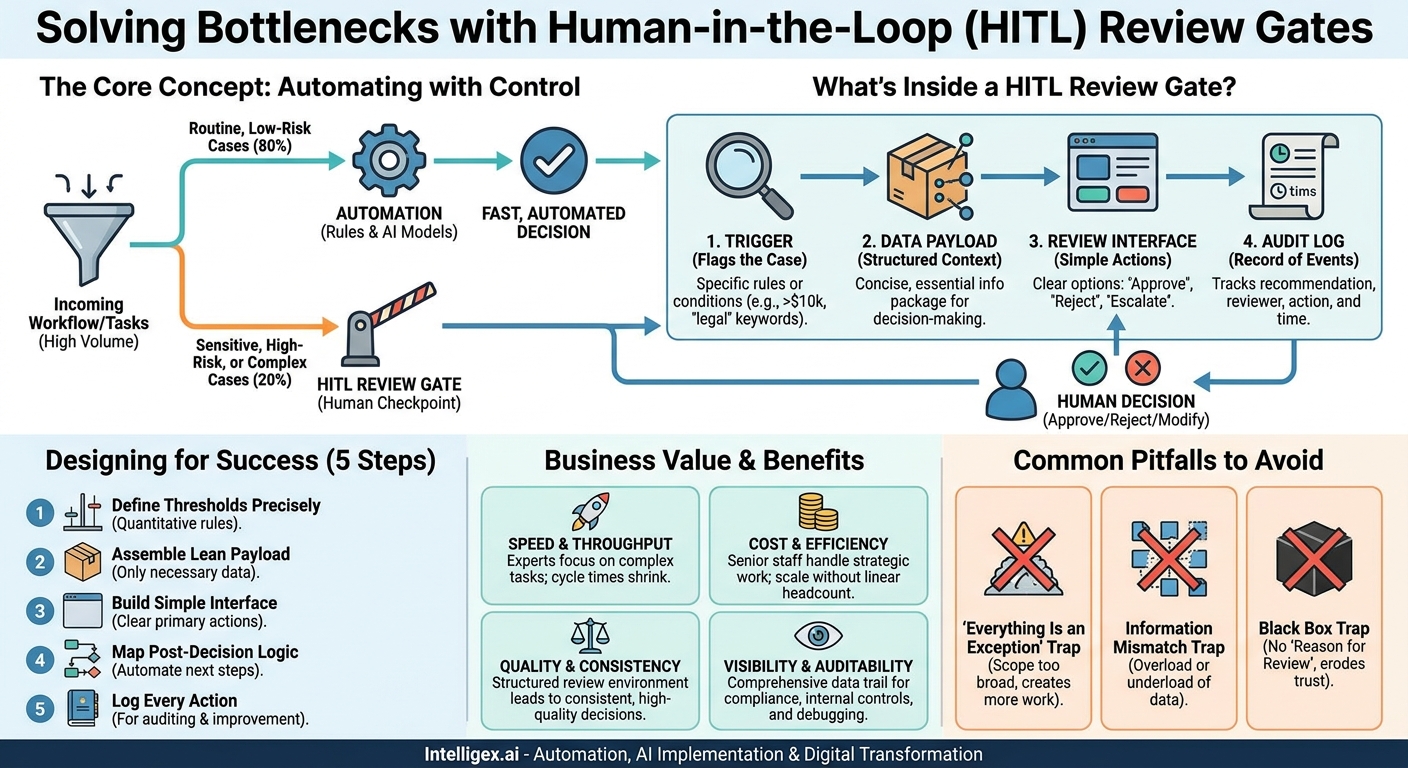
A HITL Review Gate is a designated checkpoint within an otherwise automated workflow where a human expert must review, approve, or modify a decision before the process can continue. Think of it as a smart quality control station on a digital assembly line.
The system handles the repetitive, high-volume, and clear-cut cases on its own. It might be a set of business rules or an AI model making an initial recommendation. But when a case meets certain criteria, for example, it’s high-value, high-risk, or simply unusual, the process pauses. It packages up all the relevant information and routes it to a human reviewer. The workflow is “gated” until that person makes a definitive choice.
A well-designed review gate isn’t just a manual task list. It’s a purpose-built system with a few key components:
- A Trigger: The specific rule or condition that flags a case for human review (e.g., an invoice is over $10,000, a customer complaint contains keywords like “legal” or “safety”).
- A Data Payload: A concise, structured package of all the information the human needs to make an informed decision without hunting through different systems.
- A Review Interface: A simple, clear screen with straightforward actions like “Approve,” “Reject,” or “Escalate.” The goal is a fast, confident decision, not a research project.
- An Audit Log: A record of the system’s initial recommendation, who reviewed it, what action they took, and when. This creates an invaluable trail for compliance and process improvement.
By implementing this pattern, you aren’t just adding a manual step. You are strategically injecting human judgment at the precise moment it adds the most value, letting automation handle the rest.
The Business Case: More Than Just a Safety Net
The most obvious benefit of a review gate is risk reduction. You prevent bad automated decisions from causing financial or reputational damage. But the true business value goes much deeper, impacting speed, cost, quality, and your ability to scale.
Speed and Throughput
By automating the 80% of routine cases, you dramatically increase the overall speed of the process. Your expert team is no longer bogged down by simple, repetitive work. Their entire focus shifts to the 20% of cases that actually require their expertise. The result is that both simple and complex tasks are resolved faster, shrinking your end-to-end cycle times even as the volume of work grows.
Cost and Efficiency
A review gate optimizes your most valuable resource: your people. It allows senior staff to operate at the top of their license, applying their skills to strategic challenges instead of administrative tasks. This structure lets you handle a significant increase in operational volume without a linear increase in headcount, directly improving your cost-efficiency and protecting your margins.
Quality and Consistency
Automation excels at consistency. A rule-based system will execute the same way every single time, eliminating the variability that comes from different people handling the same task on different days. When a case does require human judgment, the review gate provides a structured environment. The reviewer gets the same curated information packet for every case, leading to more consistent, high-quality decisions that are less dependent on “who you happened to ask.”
Visibility and Auditability
Every decision that passes through the system, whether fully automated or human-reviewed, is logged. This creates a comprehensive audit trail that is invaluable for compliance, internal controls, and debugging. When a stakeholder asks, “Why was this payment approved?” or “Who rejected that application?”, you have a clear, data-backed answer. This level of visibility is nearly impossible to achieve in a purely manual, email-based workflow.
Where to Implement Your First Review Gate
The HITL Review Gate pattern is incredibly versatile and can be applied to nearly any department. The best place to start is with a process that is high-volume, largely rules-based, but has a subset of cases that carry risk or require judgment.
Here are a few concrete examples:
- Finance (Accounts Payable): An automated system processes incoming invoices. The rule: If an invoice from a known vendor matches a purchase order and is under a $5,000 threshold, it’s auto-approved for payment. The HITL Gate: If an invoice is over the threshold, from a brand-new vendor, or has no matching PO, it is routed to an AP clerk’s review queue with all relevant documents attached for a one-click approval or rejection.
- Human Resources (Recruiting): An applicant tracking system (ATS) screens resumes. The rule: Automatically reject any candidates who do not meet the three mandatory, non-negotiable qualifications for the role. The HITL Gate: For candidates who meet the minimum criteria, an AI model can rank their resume against the “nice to have” skills. The top 10% might be auto-scheduled for a screening call, while the next 30% are sent to a recruiter’s review dashboard for a quick “yes” or “no” on moving forward.
- Sales Operations (Deal Desk): A workflow manages new sales quotes in your CRM. The rule: Standard quotes using approved pricing and terms are automatically generated and sent to the customer. The HITL Gate: If a sales rep requests a non-standard discount (e.g., over 15%) or custom legal terms, the deal is automatically routed to the Deal Desk or a sales manager for approval before the quote can be generated. The reviewer sees the proposed terms, customer history, and deal size all in one place. You can build this in a platform like Salesforce using its native workflow tools.
- Marketing (Content Moderation): A system monitors user-generated comments on your blog or social media. The rule: Automatically approve comments that are positive or neutral and contain no flagged keywords. The HITL Gate: Comments containing profanity, competitor mentions, or sensitive terms are held in a moderation queue for a community manager to review, edit, or delete.
Designing an Effective Review Gate: A 5-Step Process
Building a successful review gate requires more than just adding a manual step. It’s about designing an efficient, low-friction experience for the human reviewer. Follow these steps to create a system that enhances, rather than hinders, your workflow.
- Define Your Decision Thresholds with Precision. This is the most critical step. You must clearly define the rules that separate a “straight-through” automated case from one that needs human eyes. Vague rules like “flag complex cases” are not helpful. Be specific and quantitative. Examples include: a transaction amount, a customer’s lifetime value, a calculated risk score, the presence of specific keywords, or a confidence score from an AI model falling below 95%.
- Assemble a Lean and Actionable Review “Payload”. When a case is flagged, what information does the human absolutely need to make a decision? The goal is to present everything they need on one screen. Forcing a reviewer to open three other systems to find context defeats the purpose. The payload should include not just the data, but also the reason it was flagged (e.g., “Reason for review: Invoice amount is 30% higher than the PO”).
- Build a Simple, Unambiguous Review Interface. The user interface for the reviewer should be designed for speed and clarity. It must be brutally simple. Avoid clutter and unnecessary information. The focus should be on a few clear, primary actions: Approve, Reject, and perhaps Escalate (to send to a manager). Providing an optional comment field is good, but the core actions should be single clicks.
- Map Out the Post-Decision Logic. What happens after the human clicks a button? This logic needs to be fully automated. An “Approve” click should seamlessly trigger the next step in the workflow, like initiating a payment or sending an email. A “Reject” click might automatically notify the person who submitted the request with a reason. An “Escalate” click should re-assign the task to the correct person. The reviewer shouldn’t have to do any of this manually.
- Log Every Single Action for Auditing and Improvement. Every part of this process must be logged. Record the initial data, the system’s recommendation, which rule triggered the review, who was assigned, what action they took, how long it took them, and the final outcome. This data is not just for compliance; it’s a goldmine for optimizing your process. If you see that reviewers are constantly overriding the system’s recommendation on a certain type of case, you know your automated rule needs to be adjusted.
Common Pitfalls and How to Avoid Them
While the concept is simple, implementation can go wrong. Watch out for these common traps that can undermine the effectiveness of your HITL review gate.
The “Everything Is an Exception” Trap
This happens when decision thresholds are set too conservatively. If your rules are too strict, nearly every case gets flagged for review. The system ends up creating more work than it saves, and your experts are right back to being a bottleneck.
How to avoid it: Start with a narrow and confident scope for automation. Pick the most obvious, low-risk cases to automate first. Analyze the results, and then gradually expand the automation criteria as you build trust in the system. It’s better to automate 50% of cases successfully than to fail at automating 90%.
The Information Mismatch Trap
The review interface either bombards the reviewer with dozens of irrelevant data fields (information overload) or fails to provide critical context, forcing them to open other applications to find what they need (information underload). Both scenarios slow down the review process dramatically.
How to avoid it: Co-design the review payload and interface with the actual end-users. Before you write a line of code, create a simple mockup and ask them: “If you had only this screen, could you confidently make a decision in under 30 seconds? What’s missing? What’s just noise?”
The Black Box Trap
The system flags an item for review, but the human has no idea why. They see the data but don’t understand the logic that triggered the flag. This erodes trust and makes it difficult for the reviewer to focus on the key issue.
How to avoid it: Always include a “Reason for Review” field in the payload. It should be a plain-language explanation, such as “Flagged: New vendor” or “Flagged: AI confidence score of 78% is below the 90% threshold.” This immediately orients the reviewer.
Implementing Safely: AI and Governance Considerations
When HITL gates are used for sensitive decisions, especially those involving AI or personal data, governance is not optional. A well-designed system builds in safety from the start.
Role-Based Access Control (RBAC): Ensure that only authorized individuals can review certain types of information. A junior AP clerk might be able to approve invoices up to $1,000, but anything above that should only be visible in a manager’s review queue. This principle is critical in areas like HR and Finance.
Data Minimization and Privacy: The review payload should only contain the minimum information necessary to make the decision. If a reviewer is verifying a customer’s address, they don’t need to see their entire purchase history. Redact or mask sensitive Personally Identifiable Information (PII) wherever it is not strictly required for the review task.
Explainability (The “Glass Box”): When an AI model is used to make the initial recommendation, its reasoning should be translated into a human-understandable format. This isn’t about showing complex statistics. It’s about providing a simple justification. For example, a fraud detection system might say, “High risk score due to: unusual login location and high-value transaction.” This gives the reviewer a starting point and builds trust in the system’s recommendations.
Your Next Steps: Getting Started
You don’t need a massive, company-wide initiative to benefit from HITL review gates. You can start small and deliver value quickly. The key is to find the right first use case.
Here’s a simple action plan to get started:
- Identify a Bottleneck: Find one high-volume, rules-driven process that is currently causing delays. Good candidates are often found in AP, HR onboarding, or IT service requests.
- Map the Current State: Whiteboard the process as it exists today. Who does what? Where do things get stuck waiting for approval?
- Define the “Happy Path”: Determine the rules that could automatically handle the majority of simple, low-risk cases. Write them down in plain language.
- Design the “Exception Path”: For the cases that don’t fit the happy path, sketch out the HITL review gate. What information would a reviewer need? What buttons would they click?
- Launch a Pilot: Start with a small, low-risk pilot project. Measure the impact on speed, accuracy, and workload. Use the lessons learned to refine the process before expanding it.
By strategically combining automation with human oversight, HITL review gates provide a pragmatic path to scaling your operations. You can move faster, reduce costs, and improve quality, all while keeping a human expert in control of your most sensitive decisions.
Your Next Read:
Category:
Get a FREE
Proof of Concept
& Consultation
No Cost, No Commitment!
