

In today’s complex business landscape, the word “compliance” can evoke a sense of dread. It conjures images of endless paperwork, painstaking audits, and the ever-present fear of hefty fines and reputational damage. Regulations like GDPR, HIPAA, SOX, and countless industry-specific mandates are no longer suggestions; they are strict requirements for doing business. As organizations increasingly turn to workflow automation to boost efficiency and reduce errors, a critical question emerges: Are we automating compliance, or are we just automating risk? Too often, businesses build slick, efficient workflows only to have them stopped in their tracks by a compliance review, leading to costly rework and frustrating delays. The solution lies in a fundamental shift in mindset—from reactive checking to proactive design. This is the principle of Compliance-by-Design, an approach that embeds regulatory and policy requirements into the very DNA of your automated processes from their inception.
Deconstructing Compliance-by-Design
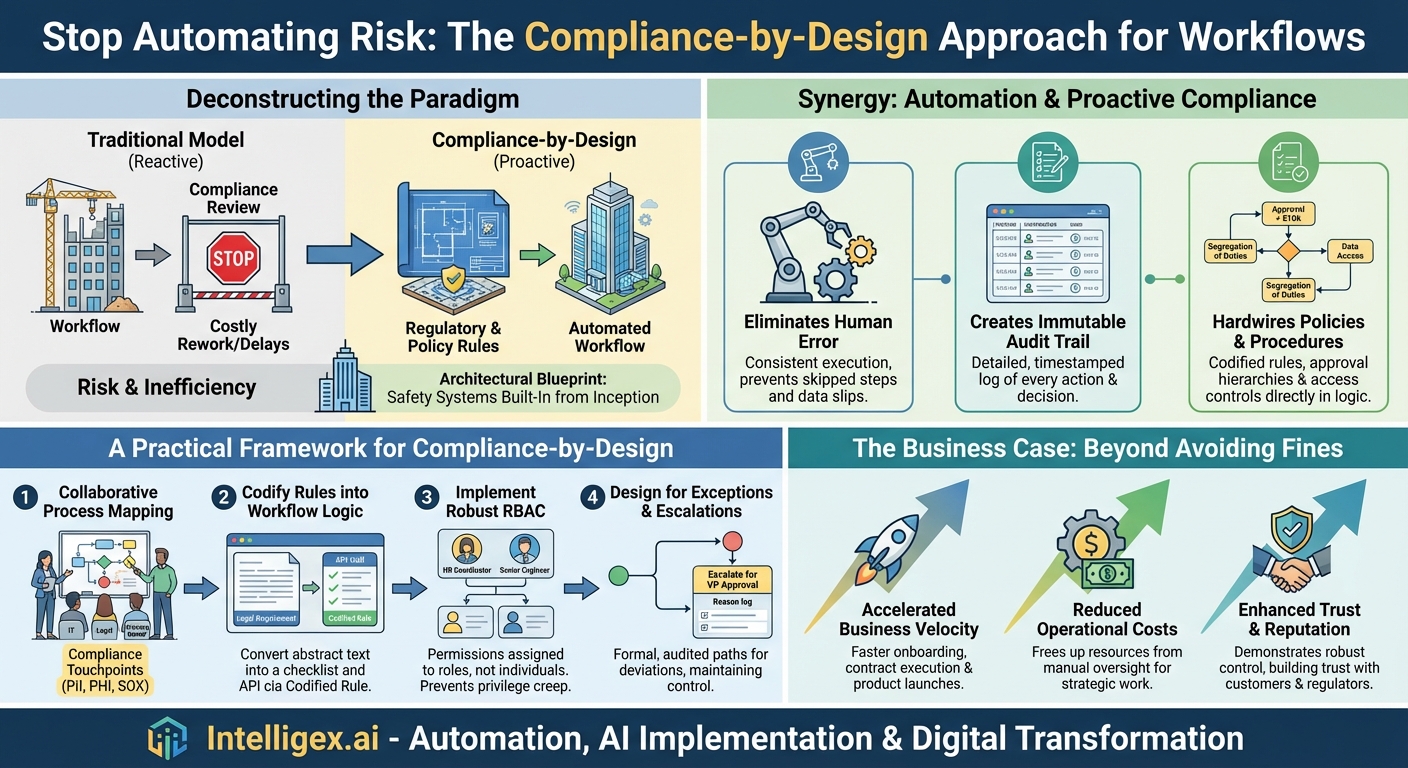
At its core, Compliance-by-Design is a methodology that treats compliance not as a final gate to pass through, but as a foundational blueprint for building any process. It flips the traditional model on its head. The old way involved designing a workflow, building it, and then handing it over to the legal or compliance department for a “blessing.” This reactive approach is fraught with problems. It’s inefficient, siloed, and often leads to the discovery of fundamental design flaws late in the game, requiring developers to go back to the drawing board.
Imagine building a skyscraper. In the traditional model, you’d erect the entire structure and then ask a safety inspector to figure out how to add fire escapes and sprinklers. It would be a chaotic, expensive, and ultimately unsafe endeavor. Compliance-by-Design is the architectural equivalent of incorporating those safety systems into the original blueprints. The fire escapes are an integral part of the design, not an afterthought.
In the context of workflow automation, this means:
- Involving compliance stakeholders from the very first brainstorming session.
- Translating legal and regulatory requirements into concrete, machine-readable rules and logic.
- Building workflows where the system itself prevents non-compliant actions from ever occurring.
The focus shifts from periodically auditing for compliance to continuously enforcing compliance through the automated system itself. The workflow doesn’t just suggest the correct path; it makes it the only path available.
The Powerful Synergy of Automation and Proactive Compliance
When workflow automation is infused with a Compliance-by-Design philosophy, it becomes a powerful engine for risk mitigation and operational excellence. This synergy addresses the most common sources of compliance failures head-on.
Eliminating the Human Error Factor
Let’s be honest: most compliance breaches aren’t malicious. They are the result of simple human error. A forgotten signature, a document sent to the wrong person, a data entry typo, or a missed step in a complex procedure. Manual processes are inherently vulnerable to these slips. Workflow automation, by its nature, enforces consistency. The process is defined once and executed perfectly every single time, ensuring that required steps are never skipped and data flows only through approved channels. This systematic execution drastically reduces the surface area for accidental non-compliance.
Creating an Immutable, Auditable Trail
When an auditor asks, “Can you prove you followed your process for this transaction from six months ago?” a frantic search through email chains, spreadsheets, and shared drives often ensues. It’s a stressful and unreliable way to demonstrate diligence. An automated workflow with built-in compliance creates a detailed, timestamped, and immutable log of every action.
Every approval, every data modification, every document view, and every decision is automatically recorded. Who did it? When did they do it? What was the outcome?
This digital paper trail provides irrefutable evidence of your processes in action. It transforms audits from a dreaded forensic investigation into a simple matter of running a report.
Hardwiring Policies and Procedures
Company policies are useless if they live in a binder on a shelf. Workflow automation brings them to life. You can codify rules directly into the process logic. For example:
- Approval Hierarchies: A purchase order workflow can be designed to automatically route any request over $10,000 to a department head. The system won’t allow the process to continue without that specific approval.
- Segregation of Duties (SoD): A critical financial control is ensuring the same person can’t create a new vendor and also approve payments to that vendor. A workflow can enforce this by automatically assigning the approval task to a different user group, preventing a potential conflict of interest.
- Data Access Rules: In a client onboarding process, the workflow can ensure that only financially-licensed personnel can view a customer’s investment history, while sales teams can only see basic contact information.
A Practical Framework for Implementing Compliance-by-Design
Adopting this approach requires a structured plan. It’s not about flipping a switch; it’s about building a new, more robust foundation for your automation strategy. Here’s a step-by-step guide to get started.
Step 1: Collaborative Process Mapping
You cannot automate what you do not understand. The first step is to bring together process owners, IT, and compliance experts to map out your key workflows. As you document each step, the compliance team’s role is to identify the “compliance touchpoints.”
- Where is Personally Identifiable Information (PII) or Protected Health Information (PHI) handled?
- Which steps require specific, logged approvals to meet SOX requirements?
- What are the data retention policies for documents generated in this process?
This collaborative mapping ensures that compliance isn’t a separate layer but is woven into the process understanding from day one.
Step 2: Codify Rules into Workflow Logic
This is where theory becomes practice. Translate the abstract legal language identified in Step 1 into concrete business rules that the automation platform can understand and enforce.
- Legal Requirement: “All marketing emails must have a clear and conspicuous unsubscribe option.”
- Codified Rule: Create a checklist item in the “Marketing Campaign Launch” workflow titled “Verify Unsubscribe Link.” The workflow cannot be marked as complete until this box is checked by a designated marketing manager.
- Legal Requirement: “Access to sensitive project data must be revoked within 24 hours of an employee leaving the team.”
- Codified Rule: The HR offboarding workflow automatically triggers an API call to the project management system to remove the user’s permissions, logging the action with a timestamp.
Step 3: Implement Robust Role-Based Access Control (RBAC)
RBAC is a cornerstone of Compliance-by-Design. Instead of granting permissions to individual employees, you assign permissions to roles (e.g., “HR Coordinator,” “Accounts Payable Clerk,” “Senior Engineer”). Employees are then assigned to these roles. This approach prevents “privilege creep”—the common problem where employees accumulate access rights over time that they no longer need for their jobs. When an employee changes roles, you simply reassign them to their new role, and their access rights are updated automatically and instantly across all integrated systems. This ensures that users can only see the data and perform the actions that are strictly necessary for their job function, a key principle of data security frameworks like GDPR.
Step 4: Design for Exceptions and Escalations
No automated process can account for every possible scenario. There will always be a need for exceptions. However, these exceptions must be managed in a compliant way. Design clear, pre-defined escalation paths. An override should not be a hidden backdoor; it should be a formal, audited part of the workflow. For example, if a manager needs to approve an invoice that exceeds their authority, the workflow shouldn’t just fail. It should provide an option to “Escalate for VP Approval,” routing the request to the appropriate individual and logging the reason for the escalation. This maintains control and visibility even when deviating from the standard path.
The Business Case: Beyond Just Avoiding Fines
While mitigating the risk of multi-million dollar fines is a powerful motivator, the benefits of Compliance-by-Design extend far beyond the balance sheet.
Accelerated Business Velocity: When compliance is built-in, processes flow without the stop-and-start friction of manual reviews. New employees can be onboarded faster, contracts can be executed more quickly, and products can be launched with greater confidence. The compliance “bottleneck” disappears.
Reduced Operational Costs: Think of the hours your team spends preparing for audits, manually checking processes, and correcting errors found after the fact. Automating compliance enforcement frees up your most valuable assets—your people—to focus on strategic initiatives rather than tedious, repetitive oversight.
Enhanced Trust and Reputation: In a world where data breaches are front-page news, being able to demonstrate robust, verifiable control over your processes is a significant competitive differentiator. It builds trust with customers, partners, and regulators, solidifying your reputation as a secure and reliable organization.
Ultimately, workflow automation is a transformative technology. But its true potential is only unlocked when it’s built on a foundation of integrity and control. By shifting from a reactive posture to a proactive strategy of Compliance-by-Design, you do more than just avoid penalties. You build a more resilient, efficient, and trustworthy organization, ready to adapt and thrive in an increasingly regulated world. The time has come to stop bolting compliance on at the end and start designing it in from the beginning.
Your Next Read:
Category:
Get a FREE
Proof of Concept
& Consultation
No Cost, No Commitment!
