

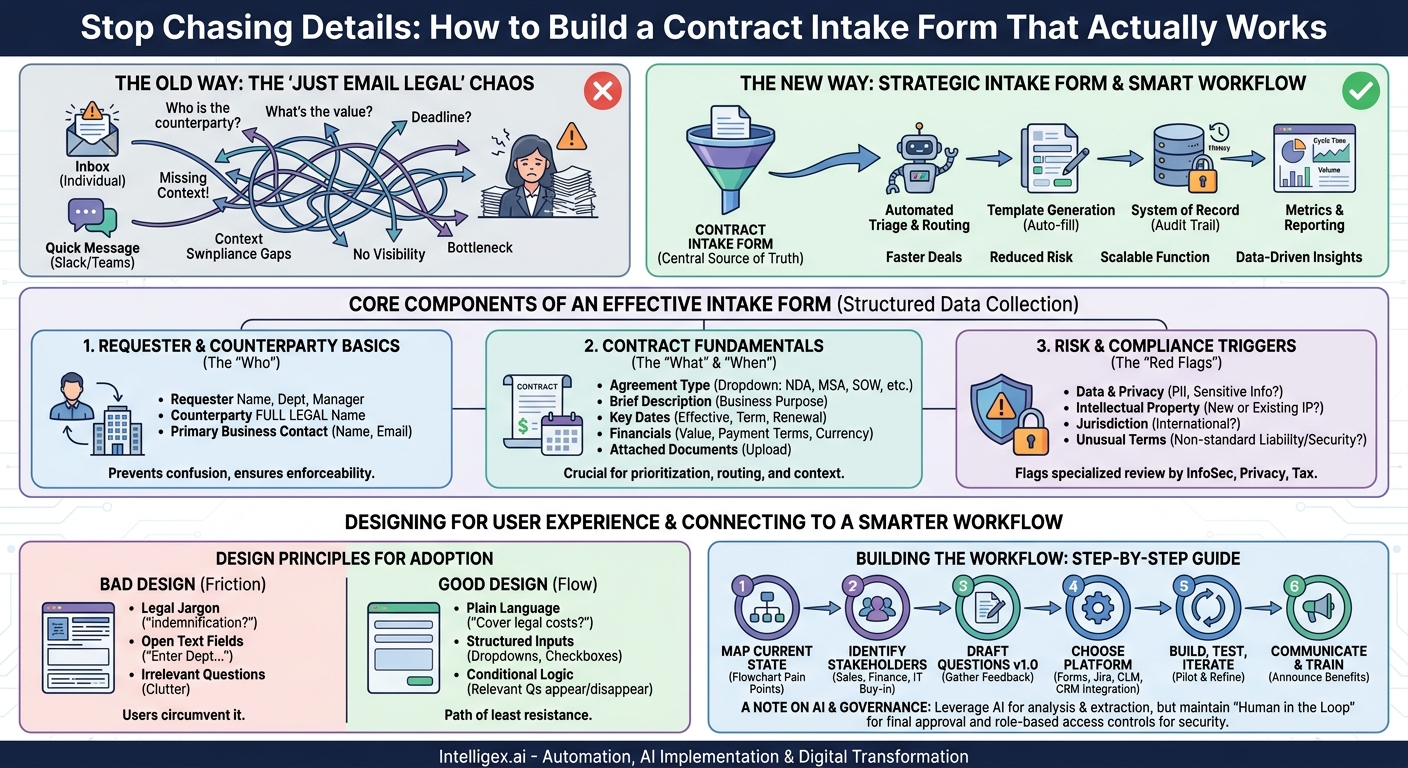
The contract request process is often the hidden source of friction in a growing business. It starts with a simple email to the legal team or a quick message on a shared channel. But that “simple” request quickly spirals into a series of follow-up questions: Who is the counterparty? What’s their legal name? What’s the contract value? Is there a deadline? Each question represents a delay, a context switch for both the business user and the legal professional, and an opportunity for critical information to get lost.
This unstructured, manual process doesn’t just slow down deals. It introduces risk, creates operational bottlenecks, and makes it impossible to manage legal workload effectively. The solution isn’t more lawyers or asking your team to “be more careful.” The solution is a strategic front door: a well-designed contract request intake form. This isn’t just about creating another form; it’s about building the foundation for a faster, smarter, and more scalable contracting function that serves the entire organization.
Why a “Just Email Legal” Process Fails Your Business
For small companies, an informal process might seem sufficient. But as your organization scales in headcount, revenue, and complexity, the cracks begin to show, leading to significant business challenges that extend far beyond the legal department.
First, you lose all visibility and tracking. When requests live in individual inboxes, there is no central source of truth. Business leaders can’t see the status of a critical sales agreement, finance has no foresight into upcoming renewals, and the legal team itself can’t accurately report on its volume or turnaround times. This lack of data makes it impossible to identify bottlenecks, justify headcount, or strategically allocate resources. The team is perpetually reactive, fighting the nearest fire instead of building a more resilient process.
Second, an informal process dramatically increases risk and compliance gaps. Without a structured intake, key details are inevitably missed. A sales rep might forget to mention that a customer is based in Europe, failing to trigger a necessary GDPR review. A project manager might use the wrong template for a statement of work, creating confusion around deliverables and payment milestones. These aren’t malicious errors; they are the natural result of a system that relies on human memory and unstructured communication. Each mistake creates unnecessary risk and potential rework.
Finally, the sheer inefficiency grinds everything to a halt. The constant back-and-forth required to gather basic information consumes valuable time for everyone involved. Your highly skilled legal counsel spends their day chasing down administrative details instead of focusing on high-stakes negotiation and strategic advice. For business teams, these delays mean slower sales cycles, delayed marketing campaigns, and slower onboarding of critical vendors. The legal team becomes a perceived bottleneck, not because they are slow, but because the process they are forced to use is broken.
The Core Components of an Effective Contract Intake Form
A successful intake form balances two competing goals: it must be comprehensive enough to give the legal team what it needs to act, yet simple enough that your business colleagues will actually use it. The key is to organize questions into logical sections that guide the user through the request.
Requester and Counterparty Basics
This section captures the “who” of the contract. While it seems simple, getting it right prevents confusion and ensures proper communication and record-keeping.
- Requester Information: Full Name, Email, Department, and Manager. This ensures the legal team knows who to contact with questions and who may need to be included in an approval chain.
- Counterparty Details: Full legal name, business address, and the primary business contact’s name, title, and email. Stressing the importance of the full legal name (e.g., “Acme Corporation, Inc.” not just “Acme”) is critical, as this is essential for the contract to be legally enforceable.
Contract Fundamentals
Here, you gather the core commercial and logistical details of the agreement. This information is crucial for prioritization, routing, and understanding the business context.
- Type of Agreement: Use a drop-down list with common types like Non-Disclosure Agreement (NDA), Master Services Agreement (MSA), Statement of Work (SOW), Vendor Agreement, or Software License Agreement. This is one of the most important fields for automated routing.
- Brief Description: A one or two-sentence summary of the business purpose. For example, “Engaging a new marketing agency to run our Q4 digital ad campaigns.” This context helps the reviewer understand the goals.
- Key Dates: Desired effective date, initial term length (e.g., 12 months), and any renewal provisions (e.g., “auto-renews for one-year terms”). This helps with deadline management and renewal tracking.
- Financial Information: Total contract value or estimated budget, payment terms (e.g., Net 30, upon receipt), and currency. This data is vital for financial review and for prioritizing high-value agreements.
- Attached Documents: An upload field for the counterparty’s paper, a draft SOW, or any other relevant background materials.
Risk and Compliance Triggers
This is where your intake form evolves from a simple data collection tool into a strategic risk management asset. These questions are designed to flag agreements that require specialized review from teams beyond the primary commercial lawyer, such as InfoSec, Privacy, or Tax.
- Data & Privacy: Will the agreement involve the transfer or processing of Personal Identifiable Information (PII), customer data, or other sensitive information? A “Yes” answer can automatically trigger a review by your data privacy officer.
- Intellectual Property: Does the agreement involve the creation of new intellectual property (IP) or the licensing of your company’s existing IP?
- Jurisdiction: Is the counterparty located outside of your primary country of operation? This can flag potential tax, export control, or data sovereignty issues.
- Unusual Terms: Does the agreement include any non-standard terms related to liability, indemnification, or data security that the counterparty has requested?
By asking these questions upfront, you ensure the right experts are involved from the very beginning, preventing eleventh-hour surprises that can derail a deal.
Designing for User Experience and Data Quality
A form that is technically complete but practically unusable will fail. If the intake process is perceived as a bureaucratic hurdle, users will find ways to circumvent it, sending you right back to the chaos of email and Slack requests. The goal is to make the form the path of least resistance.
Use clear, plain language. Avoid legal jargon wherever possible. Instead of asking about “indemnification,” you might frame the question around the business scenario: “Does this agreement require us to cover the costs for legal issues faced by the other party?” Provide help text or tooltips to explain why you are asking for a particular piece of information. For example, next to “Counterparty Legal Name,” you could add, “We need the exact legal name from their business registration to ensure the contract is valid.”
Leverage conditional logic. A smart form only shows questions that are relevant. If a user selects “NDA” as the agreement type, the fields for contract value and payment terms should disappear. If they answer “Yes” to the question about handling PII, then a new set of questions about the type of data and security measures can appear. This makes the form feel shorter and more relevant to the user’s specific request.
Provide structured inputs. Whenever possible, use drop-down menus, checkboxes, or date pickers instead of open text fields. This standardizes the data you collect, which is absolutely essential for reliable reporting and automation down the line. For example, a “Department” field should be a drop-down list populated from your company directory, not a free-text field where users might enter “Sales,” “sales team,” or “Global Sales.”
A Step-by-Step Guide to Building Your Intake Process
Implementing a new intake form is a project that involves technology, process, and people. Following a structured approach will help ensure a smooth rollout and high adoption.
- Map Your Current State: Before you build anything, understand the current reality. Shadow your legal team and a few key business partners. What are the most common types of requests? What information is consistently missing? Where do things get stuck? Create a simple flow chart of the existing informal process to identify the biggest pain points.
- Identify Key Stakeholders: A successful intake process serves many departments. Talk to leaders in Sales, Procurement, Finance, HR, and IT. Understand their unique contracting needs and frustrations. Getting their buy-in early will make them champions of the new process later. For example, Sales will care most about speed, while Finance will focus on payment terms and budget approvals.
- Draft the Form Questions (Version 1.0): Using the components listed earlier, create a draft of your form questions in a simple document. Don’t worry about the technology yet. Circulate this draft with your stakeholders for feedback. Is it too long? Are any questions unclear? Are you missing anything critical for their department?
- Choose Your Platform: The right tool depends on your company’s scale and existing tech stack. You can start simply with tools like Google Forms or Microsoft Forms that feed a spreadsheet. For more power, you can use project management tools like Jira or Asana. Growing organizations often leverage their existing service management platforms like ServiceNow. Eventually, many companies graduate to a dedicated Contract Lifecycle Management (CLM) platform. For teams deeply embedded in their CRM, intake can even originate directly from a system like Salesforce when a deal reaches a certain stage. The key is to start with a tool that fits your current needs and can grow with you.
- Build, Test, and Iterate: Implement the form in your chosen tool. Before a full company-wide launch, pilot it with a single, friendly department. Let them use it for a few weeks and provide honest feedback. This pilot phase is invaluable for catching confusing questions, technical glitches, and process gaps before you roll it out to everyone.
- Communicate and Train: Announce the new process with a clear explanation of the benefits, focusing on how it will help the business move faster and reduce frustration. Provide simple, clear documentation and consider a brief training session to walk users through the form and answer questions.
Connecting Intake to a Smarter Contract Workflow
A great intake form is just the beginning. Its true power is unlocked when the structured data it collects is used to drive an intelligent, automated workflow.
This is where digital transformation of the legal function truly begins. The data from the form can be used to power a number of automations. Automated triage and routing is a primary benefit. Based on the form inputs, the system can automatically assign the request to the correct person or team. For instance, a standard NDA for a U.S.-based counterparty might go directly to a contract manager, while a high-value sales agreement involving data processing could be routed to a senior commercial counsel and the privacy team simultaneously.
Furthermore, you can enable automatic template generation. If the form captures the agreement type, governing state, and other key variables, the system can automatically generate the correct, pre-approved contract template and populate it with the counterparty information. This alone can save hours of administrative work per agreement and ensures that your teams are always starting with the right document.
Most importantly, the intake submission becomes the start of a digital system of record. Every version of the contract, all related discussions, and the final approval history are all tied back to that initial request. This creates an easily auditable trail and a single source of truth for the entire contract lifecycle.
With this system in place, you can finally generate meaningful metrics and reports. Business leaders can get real-time answers to questions that were previously unknowable. To assess the health and efficiency of your contracting process, you should measure:
- Contract request volume by department, type, and value.
- Average contract cycle time, from request to signature.
- Time spent in each stage of the review process.
- Workload distribution across the legal team.
This data provides objective insights that allow you to pinpoint bottlenecks, make a business case for additional resources, and demonstrate the legal department’s role as a strategic enabler of the business.
A Note on AI, Automation, and Governance
As you build a more sophisticated workflow, you may consider leveraging AI to further enhance efficiency. Modern tools can analyze third-party paper that a counterparty uploads to the intake form. This AI can extract key metadata like the term, contract value, and governing law to pre-populate form fields, saving the requester time. It can also flag non-standard or risky clauses by comparing them against your pre-defined playbooks, allowing human reviewers to focus their attention where it’s needed most.
However, with this power comes responsibility. Your contract intake and management system will contain sensitive commercial information. It is critical to establish strong governance from the start. Implement role-based access controls to ensure that employees can only view the contract requests and data relevant to their jobs. A sales manager might see all contracts for their team, but not those from the HR department.
Finally, it’s crucial to maintain a “human in the loop” approach. Automation and AI are powerful tools to augment the judgment of your legal professionals, not replace it. The goal is to automate the administrative and repetitive tasks so your experts can dedicate their time to strategic advice, negotiation, and managing exceptions. The final review and approval of any significant agreement should always involve a qualified human.
Next Steps: From Chaos to Control
Transforming your contract process from a chaotic mess of emails into a streamlined, data-driven workflow is an achievable goal, and it starts with a single step. The intake form is the foundation upon which speed, visibility, and scalability are built. It empowers your legal team to operate as a strategic partner to the business rather than a reactive service desk.
Don’t try to boil the ocean. Start small and build momentum. Here is a simple action plan to get started this week:
- Schedule one 30-minute meeting. Talk to a leader in a department that frequently requests contracts, like Sales Ops or Procurement. Ask them about their biggest challenges with the current process.
- Document the chase. Ask your legal team to keep a simple log for a few days of the top 5 pieces of information they consistently have to chase down after receiving an initial request.
- Start a draft. Create a shared document and begin listing the questions for your version 1.0 intake form. Aim for a simple draft, not perfection.
By taking these first small steps, you can begin the journey of transforming your contracting process from a source of friction into a true competitive advantage. And when you are ready to connect that solid foundation to a fully automated and intelligent workflow, the right integration strategy can make all the difference.
Your Next Read:
Category:
Get a FREE
Proof of Concept
& Consultation
No Cost, No Commitment!
