

In today’s fast-paced business environment, speed and security are not mutually exclusive goals. They are essential partners. Yet for many organizations, the process of granting employees access to the tools they need remains a significant bottleneck. A new sales hire waits days for Salesforce access, a finance manager is locked out of a critical reporting module during month-end close, and a contractor retains access to sensitive systems long after their project is finished. These delays and risks stem from manual, disjointed processes that rely on emails, spreadsheets, and help desk tickets.
The solution isn’t to work harder or hire more IT staff. It’s to build a smarter, automated system for identity and access management. By integrating two best-in-class platforms, Okta for identity management and ServiceNow for workflow automation, you can create a powerful, self-service system that governs access requests with a complete, unchangeable audit trail. This integration transforms access management from a reactive, manual chore into a strategic, automated function that drives efficiency, strengthens security, and provides unparalleled visibility for compliance.
The Business Case: Why This Integration Matters More Than Ever
Connecting Okta and ServiceNow is more than just a technical convenience. It’s a strategic investment that delivers measurable value across several key business dimensions. It addresses the core operational friction that slows down teams and introduces unnecessary risk, turning a cost center into a source of competitive advantage.
Let’s break down the tangible benefits:
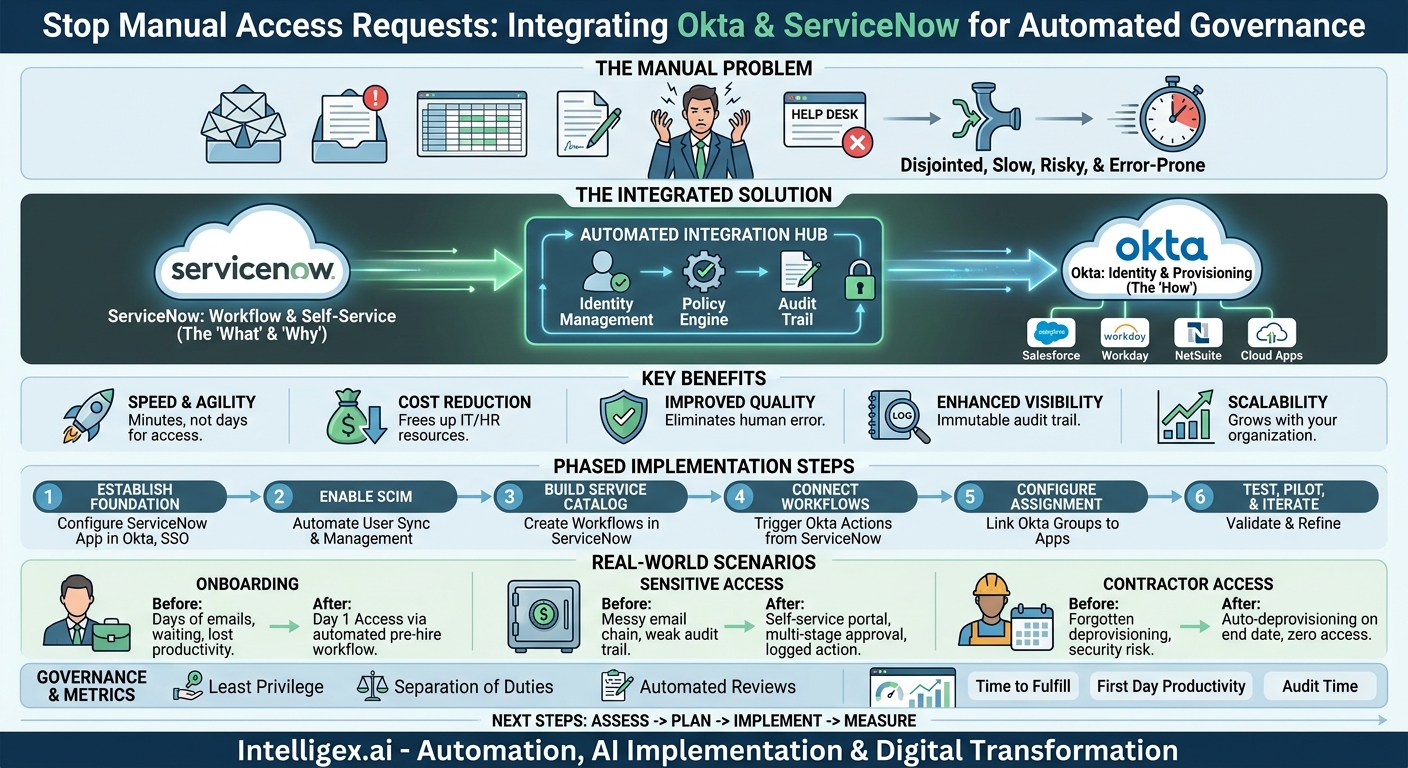
- Speed and Agility: When an employee requests access to an application through the ServiceNow portal, an automated workflow can instantly verify their role, route the request to the correct manager for approval, and, upon approval, use Okta to provision the access. This reduces fulfillment times from days to minutes. For new hires, this means they are productive from day one. For existing employees, it means no more waiting for the tools they need to do their jobs.
- Cost Reduction: Every manual access request consumes valuable IT and HR resources. Time is spent tracking emails, creating tickets, and manually provisioning accounts in multiple systems. Automating this entire lifecycle, from request to approval to provisioning and eventual deprovisioning, frees up your technical teams to focus on high-value strategic projects instead of repetitive administrative tasks.
- Improved Quality and Accuracy: Manual processes are prone to human error. The wrong permissions might be granted, or an employee might be assigned to the wrong group, creating both security risks and productivity roadblocks. An automated workflow ensures that access is granted based on predefined rules and policies tied to an employee’s role and responsibilities, drastically reducing the chance of error.
- Enhanced Visibility and Auditing: This is perhaps the most critical benefit for governance and compliance. Every step of the access request is logged and time-stamped within ServiceNow. Who requested it? Who approved it? When was access granted? When was it revoked? This creates an immutable audit trail that can be produced on demand for internal audits or external regulatory requirements like SOX, HIPAA, or GDPR, reducing audit preparation time from weeks to hours.
- Scalability: As your organization grows, the volume of access requests grows with it. A manual system quickly becomes overwhelmed. An integrated, automated system scales effortlessly. Whether you are onboarding five employees or five hundred, the process remains just as efficient and secure, allowing your business to grow without the proportional increase in operational overhead.
Mapping Your Access Landscape: Before You Build
Jumping directly into the technical configuration without a clear plan is a recipe for failure. A successful integration begins with a thorough understanding of your current state and a clear vision for your future state. You cannot automate a process you do not fully understand. This planning phase is crucial for ensuring the final system meets the needs of your business and your security policies.
Use the following checklist to guide your preparation. Involve stakeholders from IT, HR, security, compliance, and the business units you plan to support first.
Pre-Integration Planning Checklist:
- Identify Key Applications: Which applications cause the most frequent access requests and the biggest delays? Start with a pilot group of 3-5 high-impact applications. This could include your CRM (like Salesforce), your ERP (like SAP or NetSuite), or key cloud platforms.
- Define Roles and Entitlements: For each application, document the different levels of access. What does a “Sales Manager” need in Salesforce versus a “Sales Development Rep”? These role-based access control (RBAC) definitions will become the foundation of your automated rules. Be as granular as necessary.
- Map Existing Approval Workflows: Who currently approves access requests for these applications? Is it the user’s direct manager? The application owner? A department head? Does it require multiple levels of approval for highly sensitive data? Document these paths clearly. This is your chance to simplify and standardize workflows that have grown overly complex over time.
- Document the User Lifecycle: Consider the entire journey of an employee. What access is needed on day one (onboarding)? What changes are required during a promotion or transfer (mover)? And, most importantly, what access must be immediately revoked on their last day (leaver)? The “leaver” process is a critical security step that automation handles flawlessly.
- Clean Up Your Data: The system is only as good as the data within it. Ensure your source of truth for employee identity, typically your HRIS (like Workday or BambooHR), is accurate. Are job titles, departments, and manager relationships up to date? This data will drive the entire automated process.
Completing this discovery and documentation phase first will make the actual technical implementation smoother, faster, and far more likely to deliver the expected business value.
A Phased Approach to Integration: The Core Steps
While the specific technical details can vary based on your environment, the high-level process for integrating Okta and ServiceNow for access governance follows a logical, phased approach. The goal is to establish a secure communication channel where ServiceNow handles the “what” and “why” (the request and approval workflow) and Okta handles the “how” (the actual provisioning of access).
Here is a simplified, step-by-step overview of the implementation process:
- Establish the Foundation: Configure the ServiceNow App in Okta. Your first step is to enable the communication between the two platforms. This involves adding the ServiceNow application from the Okta Integration Network (OIN) and configuring it with your ServiceNow instance details. You will set up SAML (Security Assertion Markup Language) for Single Sign-On (SSO), allowing users to log into ServiceNow using their Okta credentials. This ensures a seamless and secure user experience from the start.
- Enable Automated User Management with SCIM. This is the heart of the automation. You will enable SCIM (System for Cross-domain Identity Management) provisioning. SCIM is a standard protocol that allows Okta to securely create, update, and deactivate users in ServiceNow automatically. When a new user is added to a specific group in Okta, SCIM can create their ServiceNow account. When they are removed, it can be deactivated. This synchronizes user identities between the systems.
- Build the Service Catalog and Workflows in ServiceNow. This is where you translate your mapped-out processes into reality. In ServiceNow, you will create Service Catalog items for each application access request (e.g., “Request Salesforce Access”). You then build the corresponding workflow behind each item. This workflow defines the business logic: route the request to the user’s manager for approval, if approved, check for a secondary approval from the application owner, and so on.
- Connect the Workflow to Okta. Once a request is fully approved in the ServiceNow workflow, the final step is to trigger an action in Okta. This is typically done using an API call from ServiceNow to Okta. The call instructs Okta to add the user to a specific Okta group that is linked to the requested application. For example, approving the “Salesforce Access” request in ServiceNow triggers Okta to add the user to the “Salesforce Users” group.
- Configure Application Assignment in Okta. In Okta, you configure group-based application assignment. You link the “Salesforce Users” group directly to the Salesforce application. Now, any time a user is added to this group (by the ServiceNow workflow), Okta automatically provisions their Salesforce account and grants them the appropriate permissions.
- Test, Pilot, and Iterate. Before rolling this out to the entire organization, test the end-to-end flow thoroughly. Use test users to submit requests, go through the approval process, and verify that access is granted and revoked correctly. Start with a pilot group of users and one or two applications to gather feedback and refine the process before expanding.
Real-World Scenarios: How Different Teams Benefit
The abstract value of “efficiency” becomes concrete when you see how an integrated Okta and ServiceNow system transforms daily operations for different departments.
Onboarding a New Sales Representative
Before: An HR team member sends an email to IT with the new hire’s details. IT creates a help desk ticket. The IT admin manually creates accounts in Okta, Salesforce, the company’s CPQ tool, and a sales enablement platform. The process takes 2-3 days, during which the new rep cannot fully engage in training or start prospecting.
After: The hiring action in the HRIS automatically creates the user’s Okta profile. Okta assigns them to a “New Hire – Sales” group. This group membership automatically triggers requests in ServiceNow for their standard application toolkit. The hiring manager receives a single notification in ServiceNow to approve the bundle of access. Upon approval, Okta instantly provisions all necessary accounts. The new rep has full access on their first morning.
Granting Finance Team Access to a Sensitive ERP Module
Before: A financial analyst needs access to the Accounts Payable module in the ERP. They email their manager, who forwards the email to the Head of Finance. The Head of Finance forwards it to the IT Director. The IT Director creates a ticket for the ERP admin, who finally grants the access. The audit trail is a messy chain of emails, making it difficult to prove proper authorization.
After: The analyst goes to the ServiceNow self-service portal and requests access to the “ERP – AP Module.” The workflow automatically routes the request to their direct manager. Because this is a financially sensitive system, the workflow requires a second approval from the Head of Finance. Once both have approved within ServiceNow, the system instructs Okta to add the analyst to the “Finance – AP Users” group, which grants them the specific, pre-defined permissions in the ERP. The entire request and dual-approval process is captured in a single, auditable record.
Temporary Project Access for a Contractor
Before: A marketing contractor is hired for a three-month project. They are granted access to the project management tool, the digital asset management system, and a shared cloud drive. When the project ends, everyone forgets to manually deprovision their access, leaving a potential security gap.
After: The contractor is onboarded via a ServiceNow request that includes a start and end date. The workflow provisions their access through Okta. Crucially, the workflow is configured to automatically trigger a deprovisioning action on the specified end date. On that day, ServiceNow instructs Okta to suspend the user’s account and remove them from all application groups, revoking all access automatically and ensuring no lingering permissions.
Measuring Success: Key Metrics for Your Integrated System
To demonstrate the ROI of your integration project, it’s essential to track key performance indicators (KPIs) that measure its impact. These metrics will help you quantify the improvements in speed, cost, and security.
Focus on tracking these core metrics:
- Time to Fulfill Access Request: Measure the average time from when a user submits a request to when access is granted. Compare the “before” (manual) and “after” (automated) times. This is your primary measure of speed.
- First Day Productivity: For new hires, track the percentage of employees who have all necessary day-one system access by the start of their first day. The goal should be 100%.
- Access-Related Help Desk Tickets: Monitor the volume of help desk tickets with categories like “access request,” “password reset,” or “permission issue.” A successful implementation should see a significant reduction in these tickets.
- Manual Interventions by IT: Count the number of times an IT administrator has to manually fulfill an access request that should be handled by the automated system. This helps identify gaps in your workflows or catalog items.
- Time to Produce Audit Reports: Measure the staff-hours required to gather evidence for an access audit. With an integrated system, generating a report of all access changes for a specific user or application should be nearly instantaneous.
Governing the Governors: Security and Compliance Guardrails
Automating access management provides a huge boost to your security posture, but the system itself must be governed properly. The goal is to build a system that is not only efficient but also inherently enforces your security policies.
Keep these principles in mind:
- Enforce the Principle of Least Privilege: Use the integration to build a default-deny security model. Users should start with zero access, and each permission should be explicitly requested and justified through a workflow. Define roles and entitlements granularly so you are only ever granting the minimum access required for a user to perform their job.
- Automate Access Reviews: Manually reviewing who has access to what is a time-consuming and error-prone process. Use the integrated system to automate it. Configure periodic campaigns where managers receive a report from ServiceNow showing who on their team has access to which applications. They can then certify or revoke access directly from the review, with all actions logged for auditors.
- Maintain Separation of Duties: Ensure that the person requesting access, the person approving it, and the person auditing it are not the same individual. Your ServiceNow workflows should be designed to enforce this separation, especially for critical systems.
- Trust, but Verify with Logs: Both ServiceNow and Okta produce detailed system logs. Ensure these logs are being collected, monitored, and stored in a central location (like a SIEM tool). This provides a non-repudiable record of all activity, which is crucial for forensic investigations and proving compliance.
Common Pitfalls and How to Avoid Them
While the benefits are significant, an integration project can stumble if not managed carefully. Being aware of common pitfalls can help you navigate them successfully.
Pitfall: Automating a flawed process. Simply automating your existing, inefficient email-based approval chains will only make you do the wrong thing faster.
How to Avoid: Use the planning phase as an opportunity to re-engineer and simplify your access policies and workflows. Challenge assumptions and eliminate unnecessary steps before you build the automation.
Pitfall: Neglecting the user experience. If the self-service portal in ServiceNow is confusing or difficult to use, employees will revert to old habits like emailing the help desk, defeating the purpose of the system.
How to Avoid: Design the service catalog from the user’s perspective. Use clear, non-technical language. Bundle common requests together (e.g., “New Sales Hire Starter Pack”) to simplify the process.
Pitfall: Forgetting about deprovisioning. Many organizations focus heavily on the provisioning process but neglect the equally critical deprovisioning (leaver) process. This creates “orphaned” accounts, which are a major security risk.
How to Avoid: Build robust, automated deprovisioning workflows from day one. Integrate with your HR system so that an employee’s termination immediately triggers the revocation of all their access via Okta.
Pitfall: Scope creep. Trying to automate access for all 500 of your company’s applications in the first phase is a recipe for a stalled project.
How to Avoid: Start small. Pick a handful of high-volume, high-impact applications for your pilot. Demonstrate success and build momentum, then expand the scope iteratively, adding more applications and workflows over time.
Next Steps: Your Action Plan for Implementation
Transforming your access management from a manual bottleneck into an automated, secure, and auditable process is an achievable goal. By leveraging the combined power of ServiceNow’s workflow engine and Okta’s identity platform, you can build a system that delivers immediate and lasting business value.
Your path forward can be summarized in four key stages:
- Assess: Begin by evaluating your current access management processes. Identify the pain points, map your most critical applications, and engage stakeholders from across the business to define your requirements.
- Plan: Develop a detailed implementation plan. Define your roles, entitlements, and the new, simplified approval workflows you want to automate. Choose a pilot group of applications and users to start with.
- Implement: Execute the technical integration, following a phased approach. Configure the systems, build the workflows, and test the end-to-end process rigorously to ensure it is both functional and secure.
- Measure and Iterate: Deploy the solution to your pilot group and begin tracking your key metrics. Use the data and user feedback to refine the system before expanding it across the entire organization. Continuous improvement is key to long-term success.
By taking a strategic, measured approach, you can create a robust access governance framework that not only strengthens your security posture but also empowers your employees with the tools they need to succeed, faster than ever before.
Your Next Read:
Category:
Get a FREE
Proof of Concept
& Consultation
No Cost, No Commitment!
