

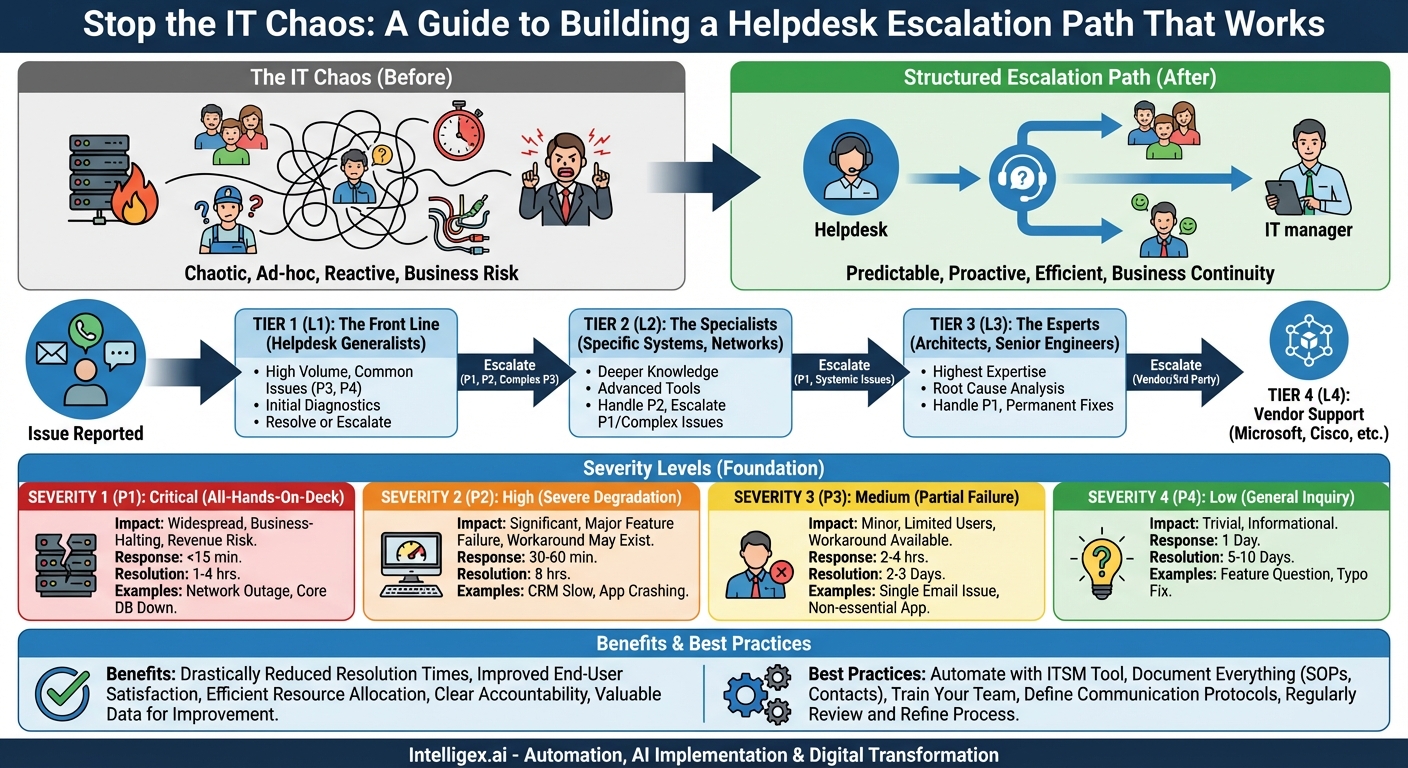
Picture this: a critical server goes down during peak business hours. Your entire sales team is locked out of the CRM, and customer orders are piling up, unprocessed. In the IT department, panic sets in. A junior technician is trying to reboot the server, a senior engineer is on a lunch break, and the department head has no idea the crisis is unfolding. This chaotic, “all hands on deck” approach is not just inefficient; it’s a direct threat to business continuity, customer satisfaction, and revenue. The antidote to this chaos is a well-defined, universally understood helpdesk escalation path based on issue severity.
An escalation path isn’t just a vague idea of “passing a problem up the chain.” It is a formal, documented process that dictates how technical support issues (or tickets) are routed from first-contact support to more specialized resources when they cannot be resolved at the current level. It provides a clear, predictable roadmap for every single issue that enters your support system, ensuring that the right people with the right skills are working on the right problems at the right time.
Why a Structured Escalation Path is Non-Negotiable
Implementing a formal escalation process might seem like bureaucratic overhead, but its benefits permeate every layer of the organization. It transforms your helpdesk from a reactive firefighting unit into a proactive, strategic asset.
- Drastically Reduced Resolution Times: The most significant benefit is a reduction in Mean Time to Resolution (MTTR). Without a clear path, a critical issue can languish with a Tier 1 agent who lacks the permissions or knowledge to fix it. A structured path ensures the ticket is moved to the appropriate expert within minutes, not hours, of being identified as a complex or severe problem.
- Improved End-User Satisfaction: Nothing frustrates an employee or a customer more than having to repeat their problem to multiple people or feeling like their issue has fallen into a black hole. An escalation path provides transparency and builds confidence. Users know their problem is being handled systematically and that its priority is acknowledged.
- Efficient Resource Allocation: Your most skilled and expensive resources are your senior engineers and system architects. Their time is incredibly valuable. A proper escalation path shields them from low-priority tasks like password resets or printer mapping. It ensures they are only engaged for complex, high-impact issues, maximizing their effectiveness and preventing burnout.
- Clear Accountability and Ownership: When an issue is escalated, ownership is clearly transferred. This eliminates the “not my problem” syndrome. The process defines who is responsible for the ticket at each stage, what the expected response time is, and who needs to be kept informed of the progress.
- Valuable Data for Continuous Improvement: A documented escalation process generates a wealth of data. You can analyze which types of issues are most frequently escalated, identify knowledge gaps in your Tier 1 support, and pinpoint recurring problems that may require a permanent, systemic fix. This data is crucial for training, resource planning, and improving your overall IT infrastructure.
The Foundation: Defining Severity Levels
The entire escalation framework rests on a clear, objective system for categorizing the severity of an issue. This ensures that everyone, from the end-user reporting the problem to the CIO, speaks the same language. While specifics can be tailored to your organization, a standard four-level system is a robust starting point.
Severity 1 (P1): Critical
This is an all-hands-on-deck, emergency situation. A P1 issue represents a complete failure of a business-critical system affecting a large number of users, or the entire organization. It directly impacts revenue, business operations, or poses a significant security risk. There is no workaround available.
- Impact: Widespread, business-halting.
- Examples: Entire network outage, primary e-commerce site is down, core database server is unresponsive, active security breach.
- Target Response Time (SLA): Immediate (under 15 minutes).
- Target Resolution Time (SLA): As soon as possible (typically 1-4 hours).
- Communication: Requires immediate notification to IT management and key business stakeholders.
Severity 2 (P2): High
A P2 issue signifies a severe degradation or failure of a key system or service. A large group of users is impacted, or a critical function is not working, but a workaround may exist, or the impact is not company-wide. It causes a significant disruption to business processes but doesn’t bring the entire operation to a standstill.
- Impact: Significant, major feature or service failure.
- Examples: The CRM is extremely slow for the entire sales team, a primary application server keeps crashing, a department’s shared network drive is inaccessible, a key feature of the company website (like the checkout process) is broken.
- Target Response Time (SLA): Within 30-60 minutes.
- Target Resolution Time (SLA): Within 8 business hours.
Severity 3 (P3): Medium
These are the most common tickets. A P3 issue involves a partial failure or degradation of a service that affects a limited number of users. The business impact is minor, and a workaround is often available, allowing employees to remain productive. It’s an inconvenience, not a crisis.
- Impact: Minor, limited user base or non-critical feature.
- Examples: A single user’s email client is not syncing, a non-essential software application is crashing for a few people, a printer in one office is offline, a request for a software installation.
- Target Response Time (SLA): Within 2-4 business hours.
- Target Resolution Time (SLA): Within 2-3 business days.
Severity 4 (P4): Low
P4 issues are general inquiries, cosmetic issues, or requests for information that have no immediate impact on business operations. These are important to address but are not time-sensitive.
- Impact: Trivial or informational.
- Examples: A question about a software feature, a typo on a company intranet page, a request for future feature enhancement.
- Target Response Time (SLA): Within 1 business day.
- Target Resolution Time (SLA): Within 5-10 business days, or as scheduled.
Mapping Severity to Support Tiers: The Path Itself
Once severity levels are defined, you can map them to your support structure. This structure typically consists of several tiers, each with increasing levels of expertise and authority.
Tier 1 (L1): The Front Line
This is your primary helpdesk or service desk. L1 agents are generalists trained to handle a high volume of common, low-severity issues. They follow standard operating procedures (SOPs) and knowledge base articles to resolve problems. Their main goal is to resolve as many tickets as possible on the first contact.
- Handles: Primarily Severity 3 and 4 issues. They are the first point of contact for all issues, responsible for logging the ticket, gathering information, and performing initial diagnostics.
- Escalates When: A problem is identified as P1 or P2, when a P3 issue proves too complex for their skill set, or when they have exhausted their documented troubleshooting steps without a resolution.
Tier 2 (L2): The Specialists
L2 technicians have deeper technical knowledge in specific areas, such as networking, server administration, or specific business applications. They handle issues that L1 was unable to resolve. They have more advanced tools and permissions.
- Handles: Escalated Severity 3 issues and most Severity 2 issues. They are often the primary responders for high-severity problems.
- Escalates When: They encounter a problem requiring architectural changes, code-level bug fixes, or access to systems they are not authorized for. This often happens with P1 or complex P2 issues that point to a systemic flaw.
Tier 3 (L3): The Experts
This tier is composed of your most senior resources: system architects, senior engineers, and specialized developers. They have the highest level of expertise and administrative access. They are not just problem-solvers; they are responsible for root cause analysis and implementing permanent fixes to prevent recurrence.
- Handles: The most complex Severity 2 issues and all Severity 1 issues. They are the final line of internal support.
- Escalates When: The root cause is determined to be a bug or hardware failure with a third-party product or service.
Tier 4 (L4): Vendor and External Support
This isn’t an internal team but represents the support provided by the original software or hardware vendors. When an L3 engineer determines the problem lies with a product from Microsoft, Cisco, Salesforce, etc., they initiate a support case with that vendor.
Best Practices for a Flawless Escalation Process
Defining the path is only the first step. Executing it effectively requires a commitment to a few key principles.
- Automate with Your ITSM Tool: Modern helpdesk and IT Service Management (ITSM) platforms are built for this. Configure your software to automatically route tickets based on severity. Set up automated notifications, SLA timers, and alerts so that a P1 ticket instantly pages the on-call L2 engineer and emails IT management without any manual intervention.
- Document Everything: The entire escalation path, including severity definitions, contact information for each tier, and communication protocols, must be clearly documented and accessible to everyone in a central knowledge base. There should be no ambiguity about what to do when a crisis hits.
- Train Your Team: Every member of the support team, especially L1, must be thoroughly trained on how to properly classify tickets. An incorrectly classified P3 ticket that is actually a P1 in disguise can be disastrous. Regular training and quality checks are essential.
- Define Communication Protocols: The escalation path isn’t just about fixing the tech; it’s about managing perceptions. Define who needs to be notified at each stage. For a P1 issue, this might include the head of the affected department, the CIO, and the communications team. Regular, clear updates prevent panic and manage expectations.
- Review and Refine: Your business is not static, and neither is your IT environment. Schedule quarterly or semi-annual reviews of your escalation process. Analyze escalation data. Are too many password resets being escalated? Your L1 team needs more training or better tools. Is a specific application causing a high number of P2 tickets? It may need a major update or replacement.
By moving away from ad-hoc responses and embracing a structured, severity-based escalation path, you do more than just fix problems faster. You create a stable, predictable, and resilient IT support organization. This builds trust with your end-users, empowers your support staff, and ultimately allows technology to be what it should be: a powerful enabler of your business, not a source of chaos and frustration.
Related Posts
Category:
Get a FREE
Proof of Concept
& Consultation
No Cost, No Commitment!
