

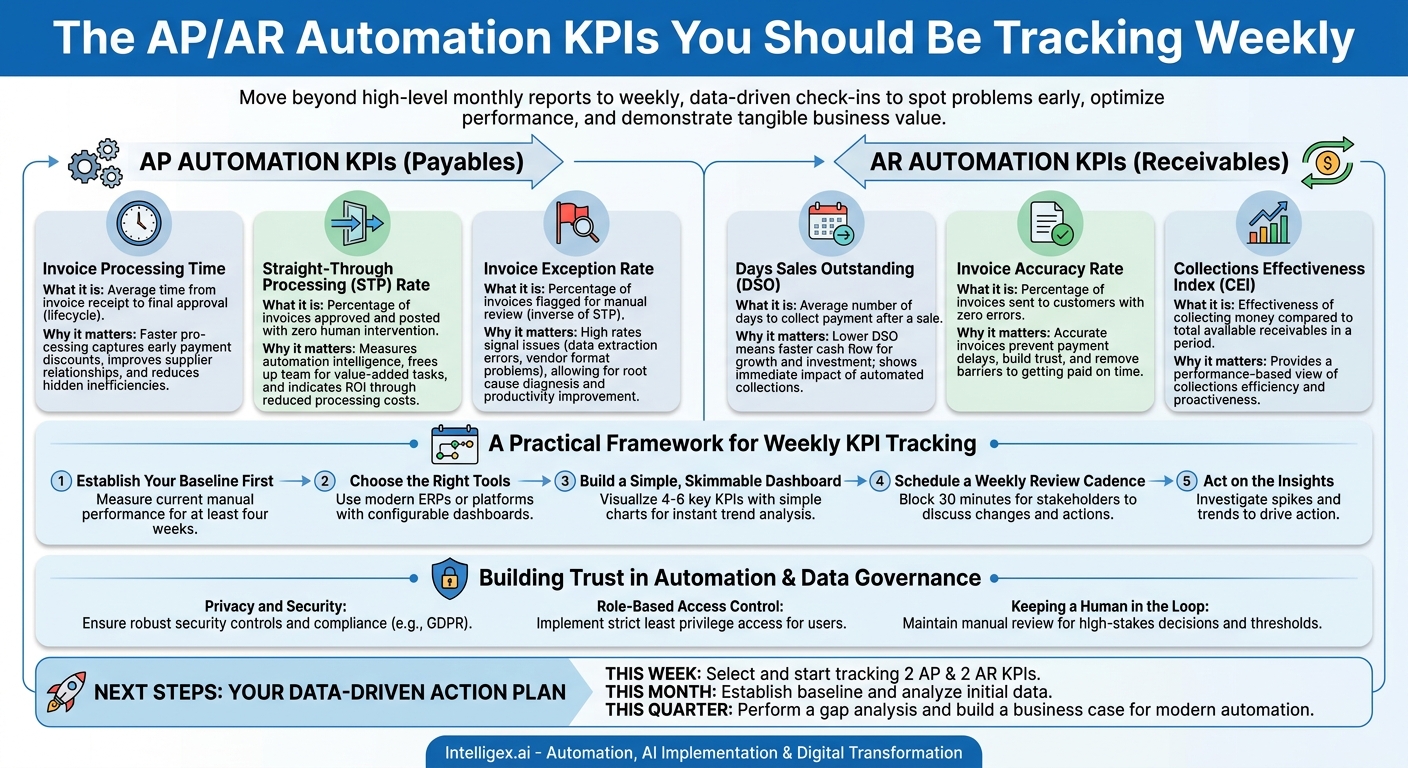
Automating your accounts payable (AP) and accounts receivable (AR) processes promises significant returns. It offers a path to lower costs, faster cash flow, and more accurate financial data. But once you implement a new system, how do you know if it’s truly delivering on that promise? The answer lies in moving beyond high-level monthly reports and embracing weekly, data-driven check-ins. Tracking the right Key Performance Indicators (KPIs) every week gives you the agility to spot problems early, optimize performance, and demonstrate tangible business value far beyond the finance department.
Effective AP/AR automation isn’t just a back-office upgrade; it’s a strategic asset that provides the speed, quality, and visibility your entire organization needs to scale. By monitoring a focused set of metrics, you transform your finance function from a cost center into a source of real-time business intelligence.
The True Business Value of Tracking AP/AR Automation
Before diving into specific metrics, it’s critical to understand why weekly tracking matters. The goal isn’t just to create more reports. The goal is to connect automation performance directly to core business outcomes that resonate with leaders across every department, from Operations to Sales.
Here’s how effective KPI tracking delivers value:
- Cost Reduction: The most obvious benefit is reducing the manual labor required for data entry, approvals, and collections. But the savings go deeper. By tracking metrics like invoice processing cost and discount capture rates, you can quantify the financial impact of automation and identify opportunities for further savings.
- Improved Cash Flow and Speed: For AR, automation accelerates the entire order-to-cash cycle. For AP, it ensures you pay vendors on time, avoiding late fees and strengthening relationships. KPIs like Days Sales Outstanding (DSO) and invoice processing time make the impact on your cash conversion cycle crystal clear.
- Enhanced Data Quality and Accuracy: Manual data entry is a primary source of costly errors. Automation dramatically improves accuracy, but it’s not infallible. Monitoring metrics like invoice exception rates and accuracy rates helps you fine-tune your systems, ensuring the data flowing into your ERP is reliable for forecasting and strategic planning.
- Greater Visibility and Control: When you track KPIs weekly, you replace guesswork with facts. Finance leaders gain a real-time view of liabilities and receivables. The supply chain team can see vendor payment statuses, and the sales team has a clearer picture of customer payment behavior, which can inform credit decisions and contract negotiations.
- Scalability for Growth: As your business grows, you can’t afford for your financial processes to become a bottleneck. Automation allows you to handle a higher volume of transactions without a proportional increase in headcount. Tracking metrics like straight-through processing rates proves your ability to scale efficiently.
–
Core Accounts Payable (AP) Automation KPIs to Track Weekly
On the payables side, the primary goal is to process legitimate invoices accurately and efficiently while safeguarding company funds. Your weekly KPIs should reflect this balance of speed, cost-effectiveness, and control.
1. Invoice Processing Time
What it is: The average time elapsed from the moment an invoice is received (via email, mail, or portal) to the moment it is fully approved and scheduled for payment. This is often called the invoice lifecycle.
Why it matters: A long processing time is a red flag for hidden inefficiencies, such as manual routing, unclear approval hierarchies, or delays in three-way matching (comparing the invoice to the purchase order and receipt of goods). Faster processing allows you to capture early payment discounts, a direct boost to your bottom line, and improves relationships with suppliers who appreciate prompt payment.
How to track: Your automation software should be able to timestamp invoice receipt and final approval. Calculate the average cycle time across all invoices processed during the week. Segment this data by supplier or department to pinpoint specific bottlenecks.
2. Straight-Through Processing (STP) Rate
What it is: The percentage of invoices that are received, validated, approved, and posted to your ERP or accounting system with zero human intervention. This is the ultimate measure of your automation’s intelligence and efficiency.
Why it matters: A high STP rate means your team is freed from tedious, repetitive data entry and can focus on value-added activities like resolving complex exceptions, analyzing spend, and negotiating with vendors. It’s a direct indicator of your system’s ROI, as every touchless invoice represents a significant reduction in processing cost.
How to track: This should be a standard report in any modern AP automation platform. The calculation is simple: (Number of Touchless Invoices / Total Invoices Processed) * 100.
3. Invoice Exception Rate
What it is: The inverse of your STP rate. This is the percentage of invoices that your system flags for manual review. Exceptions can occur for many reasons, including a mismatch with a purchase order, missing information, a new vendor, or a suspected duplicate.
Why it matters: While some exceptions are unavoidable, a high or rising rate signals a problem. It could be an issue with the AI data extraction model, a vendor who consistently sends poorly formatted invoices, or an internal process breakdown in procurement. Tracking this weekly allows you to diagnose and fix the root cause before it drains your team’s productivity.
How to track: Your system should categorize exceptions. Review the top reasons for exceptions each week. For example, if “PO Mismatch” is your top exception, you know you need to work with your procurement team to improve PO compliance.
Key Accounts Receivable (AR) Automation KPIs for Healthy Cash Flow
For receivables, the focus shifts to accelerating cash collection, reducing risk, and making it easy for your customers to pay you. Your weekly AR KPIs should provide a clear view of your cash flow health and customer payment habits.
1. Days Sales Outstanding (DSO)
What it is: The average number of days it takes for you to collect payment after a sale has been made. It is a critical measure of the efficiency of your collections process.
Why it matters: A high DSO means your cash is tied up in receivables, limiting your ability to invest in growth, pay suppliers, or manage operating expenses. AR automation aims to lower DSO by sending invoices faster, offering convenient payment options, and automating payment reminders. Tracking DSO weekly (often as a rolling average) helps you see the immediate impact of these efforts.
How to track: The standard formula is (Total Accounts Receivable / Total Credit Sales) * Number of Days in Period. Your accounting system or AR platform can typically automate this calculation for you.
2. Invoice Accuracy Rate
What it is: The percentage of invoices sent to customers that contain no errors (e.g., wrong pricing, quantity, address, or PO number).
Why it matters: An inaccurate invoice is one of the most common reasons for payment delays. It immediately creates friction with the customer, requires manual effort to correct and resend, and resets the payment clock. A high accuracy rate builds trust and removes a key barrier to getting paid on time.
How to track: Track the number of credit memos issued or invoices that are formally disputed due to errors. Calculate this as a percentage of total invoices sent. Your automation system should connect invoice creation with sales order and contract data to minimize these errors from the start.
3. Collections Effectiveness Index (CEI)
What it is: CEI measures how effective your team was at collecting money during a specific period compared to the total amount of receivables that were available to be collected.
Why it matters: While DSO gives you a time-based view, CEI gives you a performance-based view. It answers the question, “How well did we do with what we had?” A high CEI indicates an efficient and proactive collections process. AR automation boosts CEI by systematically managing reminders and escalations, ensuring no account falls through the cracks.
How to track: The formula can seem complex, but in essence, it compares what you collected against what you could have collected. Your AR automation platform should be able to calculate this for you, but understanding the components (beginning receivables, credit sales, ending receivables) is key to interpreting the result.
A Practical Framework for Implementing Weekly KPI Tracking
Knowing what to measure is only half the battle. You also need a simple, repeatable process to collect, review, and act on the data. A complex or time-consuming reporting process will quickly be abandoned.
- Establish Your Baseline First: Before you fully roll out a new automation system, measure your current manual performance for at least four weeks. This baseline is crucial. Without it, you have no way to prove the ROI of your investment or measure progress over time.
- Choose the Right Tools for Visibility: Your ability to track these KPIs depends on your tools. Modern ERPs like Oracle NetSuite or dedicated AP/AR platforms are built to provide this data through configurable dashboards. Ensure your chosen solution can report on the metrics that matter most to your business.
- Build a Simple, Skimmable Dashboard: You don’t need a 50-page report. Create a single dashboard that visualizes the weekly trends for your 4-6 chosen KPIs. Use simple charts (line graphs for trends, bar charts for comparisons) that anyone can understand at a glance. The goal is to see a change from last week instantly.
- Schedule a Weekly Review Cadence: Block 30 minutes on the calendar each week for key stakeholders (e.g., AP/AR Manager, Controller, Finance Director) to review the dashboard together. Keep the meeting focused and disciplined. Discuss what changed, why it changed, and what actions are needed.
- Act on the Insights: This is the most important step. If the exception rate spiked, assign someone to investigate. Was it a single vendor? A system issue? If DSO is creeping up, is it because one large customer is paying late? The purpose of measurement is to drive action.
AI, Data Governance, and Building Trust in Automation
When you automate financial processes with AI-powered tools, you are entrusting them with sensitive company and customer data. Building and maintaining trust in these systems is non-negotiable. This requires a strong foundation of data governance and a thoughtful approach to implementation.
Privacy and Security
AP and AR data includes bank account numbers, payment terms, and confidential pricing. Ensure any automation partner you work with demonstrates robust security controls, data encryption, and compliance with relevant regulations like GDPR. Your data’s security is paramount.
Role-Based Access Control
Not everyone on the finance team needs permission to do everything. A junior AP clerk may only need to view and code invoices, while a Controller needs the ability to approve high-value payments. Implement strict role-based access controls within your automation platform to ensure users only have access to the data and functions necessary for their jobs. This principle of least privilege is a cornerstone of good security.
Keeping a Human in the Loop
Automation excels at handling high-volume, repetitive tasks, but human judgment remains critical. For high-stakes decisions, maintain a “human in the loop” workflow. For example, you can configure rules to require manual review and approval for all payments over a certain threshold or for any payment being sent to a newly created vendor bank account. This provides a vital safeguard against errors and fraud while still allowing the bulk of transactions to flow through automatically.
Next Steps: Your Action Plan for Data-Driven AP/AR
Shifting to a data-driven, weekly-review culture doesn’t happen overnight. It’s an iterative process that builds momentum over time. Here is a simple plan to get started.
- This Week: Select two AP KPIs and two AR KPIs from the lists above that would have the most immediate impact on your business. Don’t try to track everything at once. Focus on the metrics that address your biggest pain points, whether that’s slow cash flow or high processing costs.
- This Month: Begin tracking those four KPIs to establish your baseline. Even if you have to do it manually in a spreadsheet at first, the process of gathering and analyzing the data will provide immediate insights into your current processes.
- This Quarter: Perform a gap analysis. Compare what you need to track with what your current systems can provide automatically. This exercise will build a powerful business case for investing in modern automation technology and highlight where an experienced integration partner can help you connect your systems and unlock the data you need to optimize your financial operations.
Your Next Read:
Get a FREE
Proof of Concept
& Consultation
No Cost, No Commitment!
