

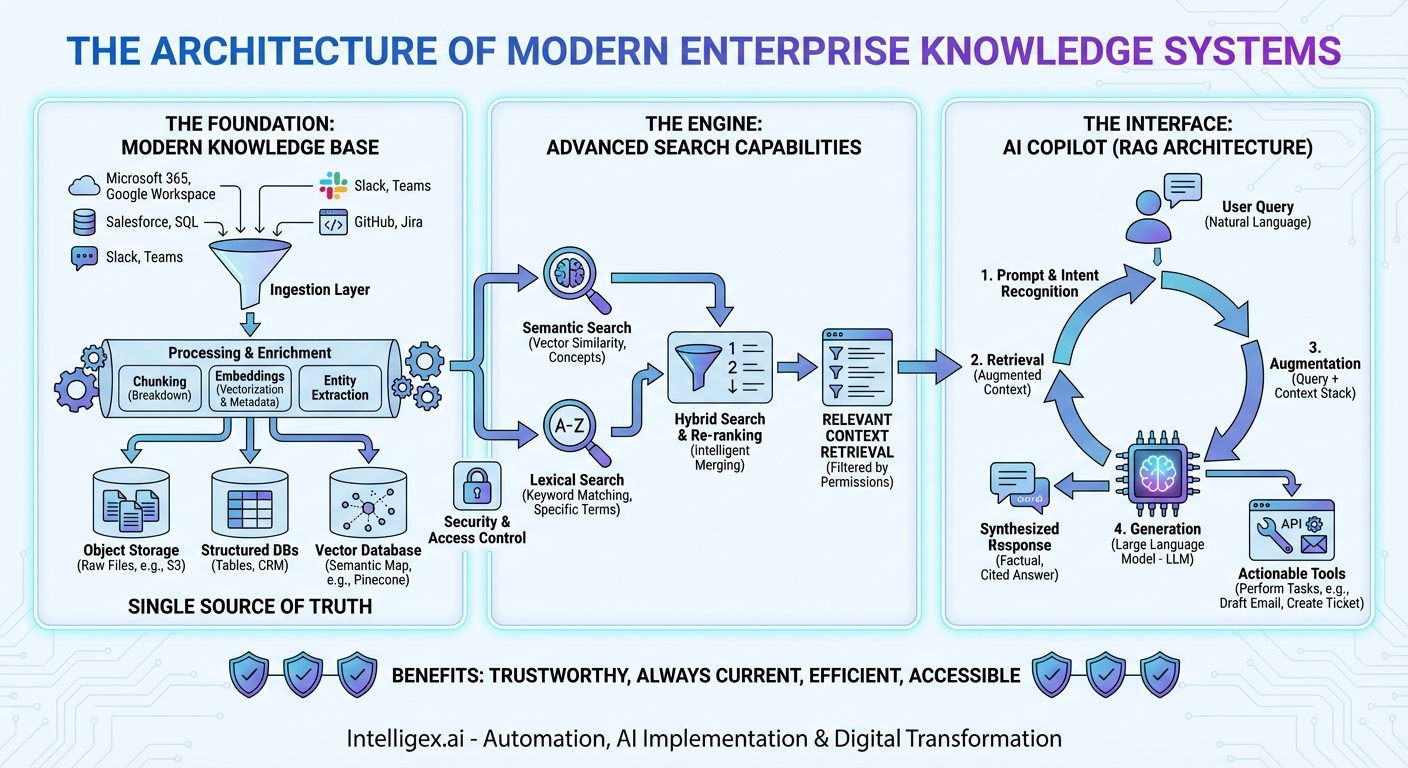
In the modern enterprise, information is both the most valuable asset and the biggest bottleneck. We generate terabytes of it daily—in documents, emails, chat messages, databases, and presentations. Yet, finding the right piece of information at the right time feels like searching for a needle in a haystack that’s growing exponentially. The traditional solutions—static wikis and keyword-based search bars—are no longer sufficient. They are relics of a simpler time. Today, the solution to this information sprawl is not a single tool, but a powerful, integrated architecture: the trifecta of a modern Knowledge Base, an intelligent Search engine, and a conversational AI Copilot. This isn’t just an upgrade; it’s a paradigm shift in how we interact with organizational knowledge. In this post, we will dissect the architecture of this system, exploring how these three pillars work in concert to transform data chaos into actionable intelligence.
The Foundation: The Modern Knowledge Base
Before we can search or converse, we need a source of truth. The modern Knowledge Base is far more than a simple FAQ page or a folder of PDFs. It is a living, breathing, centralized repository designed to ingest, store, and manage the entirety of an organization’s collective intelligence. This foundation is crucial, as the quality of the entire system’s output is directly dependent on the quality and comprehensiveness of the data it contains.
What Constitutes “Knowledge”?
A robust knowledge base architecture must be designed to handle the three primary types of enterprise data:
- Structured Data: This is the neatly organized data living in databases, spreadsheets, and CRM systems. Think customer records in Salesforce, financial figures in an SQL database, or project timelines in a table.
- Semi-structured Data: This includes data with some organizational properties but no rigid schema, like internal wiki pages in Confluence, JSON logs from applications, or tickets in Jira.
- Unstructured Data: This is the largest and most challenging category, encompassing everything from Word documents, PowerPoint presentations, and PDFs to email threads, Slack conversations, and video transcripts. This is where the bulk of human-generated knowledge resides.
Architectural Components of the Knowledge Base
Building a foundation capable of handling this diversity requires a sophisticated data plane.
- Data Ingestion Layer: The first step is getting the data in. This is achieved through a network of connectors and data pipelines. These connectors tap directly into source systems—Microsoft 365, Google Workspace, Salesforce, Slack, GitHub, and more—pulling in new or updated information in near real-time. This ensures the knowledge base is always current.
- Data Processing and Enrichment: Raw data is rarely useful. Once ingested, it passes through a processing pipeline. Here, large documents are broken down into smaller, manageable “chunks.” Most importantly, this is where embeddings are generated. Using advanced language models, the text and content of each chunk are converted into a numerical vector—a mathematical representation of its meaning. This process is the secret sauce that enables semantic understanding. Additionally, metadata (like author, creation date, and source) is extracted and tagged, and key entities (people, products, dates) are identified.
- Multi-Modal Storage: Because we’re dealing with different data types, a single storage solution won’t suffice. A modern knowledge base uses a hybrid storage model. Raw files might live in object storage like Amazon S3. Structured data remains in traditional databases. But the most critical component is the vector database (e.g., Pinecone, Weaviate, Milvus), which stores the embeddings of all the unstructured and semi-structured content, creating a searchable map of meaning.
The Engine: Advanced Search Capabilities
With a well-structured and enriched knowledge base in place, the next layer is the engine that retrieves information from it. Traditional search, based on matching keywords, is fundamentally flawed for knowledge discovery. If you search for “revenue impact of our new marketing campaign” and the report is titled “Q3 Financial Performance and Go-to-Market Analysis,” a keyword search will likely fail. You need a search that understands intent.
From Keywords to Concepts: Semantic and Hybrid Search
The modern search engine is built on two powerful concepts working in tandem.
Think of it like this: Keyword search is like a librarian who can only find books by matching the exact words in your request to the titles on the spines. Semantic search is like a librarian who understands what you’re asking for and can recommend the most relevant books, even if their titles are completely different.
- Semantic Search: This is where the vector embeddings created during data processing come into play. When a user asks a question, the search system converts the question itself into a vector. It then queries the vector database to find the data chunks whose vectors are closest, or most “semantically similar,” to the question’s vector. This allows it to find conceptually related information, not just text with matching words.
- Lexical Search: While semantic search is powerful, traditional keyword search (also called lexical search) still has its place. It excels at finding specific terms, acronyms, product codes, or proper nouns (e.g., searching for “Project X-7B”). Modern systems use improved algorithms like BM25 to rank keyword-based results effectively.
- Hybrid Search: The optimal approach is Hybrid Search, which combines the best of both worlds. The system performs a semantic search and a lexical search simultaneously. The results from both are then fed into a re-ranking algorithm. This re-ranker intelligently merges the two sets of results, pushing the most relevant content to the top. This ensures you get the conceptual understanding of semantic search with the precision of lexical search.
The Interface: The AI Copilot
The final piece of the architecture is the user interface—the AI Copilot. This is much more than a simple chatbot or a search bar. The Copilot is a conversational, context-aware assistant that acts as the intelligent orchestrator for the entire system. It’s the component that translates human language into machine queries and synthesizes complex information into simple, actionable answers.
The RAG Architecture: Grounding AI in Reality
The core of the Copilot’s intelligence lies in an architecture known as Retrieval-Augmented Generation (RAG). This process ensures the Copilot’s answers are not just fluent but also factual and based entirely on your organization’s data. It prevents the “hallucinations” or made-up answers that general-purpose AI models are known for.
Here’s how the RAG flow works when a user asks the Copilot a question:
- Prompt & Intent Recognition: The user types a natural language query, like, “What were the key takeaways from our last quarterly business review with Acme Corp, and what are our next steps?”
- Retrieval (The Search Step): The Copilot doesn’t try to answer from memory. Instead, it sends the query to the Hybrid Search engine. The search engine scours the knowledge base—looking through meeting notes, QBR presentations, CRM entries, and email follow-ups related to “Acme Corp” and “QBR.” It retrieves the top 5-10 most relevant data chunks.
- Augmentation: The Copilot takes these retrieved chunks of information and packages them together with the user’s original question. This forms a new, expanded prompt that now contains both the question and the relevant context needed to answer it.
- Generation: This augmented prompt is sent to a Large Language Model (LLM), such as OpenAI’s GPT-4 or Anthropic’s Claude. The LLM’s instructions are essentially: “Using only the provided context below, answer the following user question.”
- Synthesized Response: The LLM reads the context and formulates a comprehensive, human-like answer. It can synthesize information from multiple sources, saying something like, “The key takeaway from the last QBR with Acme Corp, based on the presentation slides, was their concern about integration timelines. According to the follow-up email, our next steps are to schedule a technical deep-dive with their engineering team by next Friday.” Crucially, the Copilot can provide citations, linking directly back to the source documents it used.
Beyond Q&A: Taking Action
A true Copilot doesn’t just answer questions; it helps you get work done. The architecture can be extended to include “tools” that the LLM can use. By integrating with APIs of other business systems, the Copilot can perform actions based on your requests. For example:
- “Summarize this report and create a draft email to the project team.”
- “Find the latest support ticket from customer XYZ and escalate it to a senior engineer.”
- “Create a new Jira ticket with the details from this Slack conversation.”
In this model, the Copilot acts as a universal, natural language interface to your entire software stack, orchestrated through the central nervous system of your knowledge base.
Bringing It All Together: A Unified Architecture
This integrated system creates a virtuous cycle. The Knowledge Base acts as the single source of truth. The Hybrid Search engine serves as the intelligent and efficient retrieval mechanism that can understand user intent. Finally, the AI Copilot provides a seamless, conversational interface that not only finds information but also synthesizes it, explains it, and even acts on it.
Underpinning this entire system is a critical layer of security and access control. The architecture must enforce user permissions at the retrieval step. When the search engine retrieves documents, it filters them based on the user’s identity, ensuring that no one sees data they aren’t authorized to access. This filtered context is then sent to the LLM, meaning the AI operates strictly within the security boundaries of each user.
The result is a system that is:
- Trustworthy: By grounding every answer in your own data, the RAG architecture minimizes hallucinations and builds user trust.
- Always Current: As your knowledge base is updated, the Copilot’s knowledge is updated instantly, with no need for expensive and time-consuming LLM retraining.
- Incredibly Efficient: It reduces the hours employees waste searching for information, allowing them to focus on strategic, high-value work.
- Accessible: It democratizes access to information. Any employee can ask complex questions and get synthesized answers without needing to know which system holds the data or how to query it.
The era of static knowledge portals and frustrating search bars is over. The future of enterprise intelligence is an integrated, dynamic, and conversational architecture. By combining a comprehensive knowledge base, a powerful hybrid search engine, and an intelligent AI Copilot, organizations can finally unlock the true potential of their collective knowledge, transforming a sprawling haystack into a curated library with a personal librarian for every employee.
Your Next Read:
Category:
Get a FREE
Proof of Concept
& Consultation
No Cost, No Commitment!
