

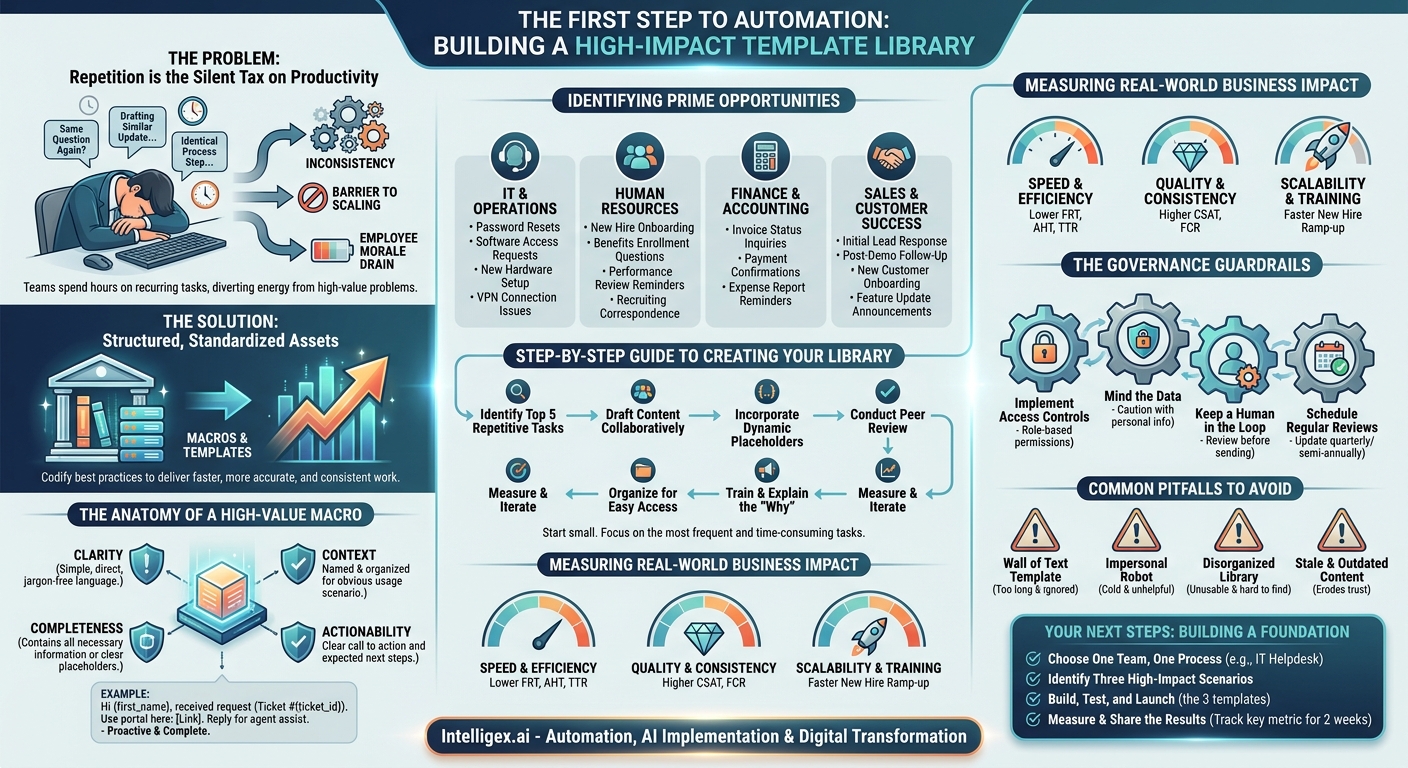
In any growing business, repetition is the silent tax on productivity. Your teams spend hours each day typing the same answers to common questions, drafting similar project updates, and guiding people through identical processes. This isn’t just a time sink; it’s a source of inconsistency, a barrier to scaling, and a drain on employee morale. While sophisticated automation and AI have their place, the journey toward operational excellence often begins with a much more fundamental tool: a well-designed library of support macros and templates.
These are not just simple blocks of pre-written text. They are structured, standardized assets that empower your teams to deliver faster, more accurate, and more consistent work. By codifying best practices for recurring tasks, you transform tribal knowledge into a scalable system, freeing up your team’s cognitive energy for the complex, high-value problems that truly drive the business forward.
The Anatomy of a High-Value Macro
A great macro or template does more than just save a few keystrokes. It acts as a miniature playbook for a specific situation, guiding the user and the recipient toward a successful outcome. The difference between a helpful tool and a source of confusion lies in its design. The most effective templates are built on four key pillars.
- Clarity: The language is simple, direct, and free of jargon. The purpose of the communication is immediately obvious to any reader, whether internal or external.
- Completeness: It contains all the necessary information for the recipient to take the next step, or it uses clear placeholders to prompt the sender for required details. A good template prevents the dreaded back-and-forth of “Can you also send me the…?”
- Context: The template is named and organized in a way that makes it obvious when and why it should be used. The best systems provide brief usage notes, such as “Use for initial response to non-critical bug reports.”
- Actionability: It concludes with a clear call to action. The recipient should know exactly what is expected of them, whether it’s clicking a link, providing information, or simply understanding that their issue is being addressed.
Consider an IT password reset request. A weak template might just say, “We have received your request.” A high-value template provides a complete solution: “Hi {first_name}, we’ve received your request (Ticket #{ticket_id}) to reset your password. For immediate access, you can use our self-service portal here: [Link]. If you encounter any issues, please reply to this email, and an agent will assist you within one business hour.” This simple change transforms a passive update into a proactive, solution-oriented interaction.
Identifying Prime Opportunities Across Your Business
The need for standardized responses is not limited to customer support. Every department handles a high volume of repetitive inquiries and processes. Building a shared library of templates can unlock efficiency gains across the entire organization. Here’s where to start looking.
IT & Operations
The IT helpdesk is the classic use case. Common requests create a perfect environment for macros. By standardizing initial responses, you can provide immediate acknowledgment and guide users toward self-service options, freeing up technicians for more complex troubleshooting.
- Password Resets: A template with a link to the self-service reset tool.
- Software Access Requests: A macro that asks for the specific software, the business justification, and the required access level, ensuring the technician gets all necessary information upfront.
- New Hardware Setup: A step-by-step checklist for employees on how to connect their new laptop, log in for the first time, and install core applications.
- VPN Connection Issues: A template with links to the latest VPN client, a knowledge base article with common troubleshooting steps, and instructions for gathering log files if the issue persists.
Human Resources
The HR team manages the entire employee lifecycle, which involves numerous repeatable communication points. Templates ensure every employee receives consistent, accurate, and timely information, which is critical for both compliance and employee experience.
- New Hire Onboarding: A welcome email template sent before the start date, outlining the first-day schedule, required documents, and contact information.
- Benefits Enrollment Questions: A standardized response pointing to the benefits portal, plan comparison documents, and the contact for the benefits administrator.
- Performance Review Reminders: A series of templates for announcing the review cycle, reminding managers to complete forms, and notifying employees of deadlines.
- Recruiting Correspondence: Templates for acknowledging applications, scheduling interviews, and sending rejection notices that are professional and respectful.
Finance & Accounting
Finance departments are flooded with routine inquiries from both vendors and internal stakeholders. Templated responses reduce the time spent on administrative follow-up and help maintain clear, professional communication regarding financial matters.
- Invoice Status Inquiries: A macro that confirms receipt of an invoice and states the standard payment processing time, for example, “net 30 days from receipt.”
- Payment Confirmations: A simple template to notify a vendor that their payment has been processed, including the payment date and amount.
- Expense Report Reminders: A gentle nudge for employees with outstanding expense reports, including a link to the submission portal and the deadline.
Sales & Customer Success
In customer-facing roles, speed and consistency build trust. Templates and macros help teams in platforms like Salesforce respond quickly to leads and provide uniform guidance to existing customers, ensuring a high-quality experience at scale.
- Initial Lead Response: A template to acknowledge a new inquiry, provide a link to schedule a call, and attach a relevant case study.
- Post-Demo Follow-Up: A summary of what was discussed, answers to common questions, and clear next steps for the prospect.
- New Customer Onboarding: A welcome email that includes a checklist of initial setup tasks, links to training materials, and contact info for their dedicated account manager.
- Feature Update Announcements: A clear, concise template to inform customers about new features, explain the benefits, and link to detailed documentation.
A Step-by-Step Guide to Creating Your First Template Library
Launching a template library doesn’t require a massive, months-long project. You can achieve significant results by starting small and focusing on the most frequent and time-consuming tasks. Follow this process to build a strong foundation.
- Identify the Top 5 Repetitive Tasks: Sit with a target team, like your IT helpdesk. Review their last 100 closed tickets or sent emails. What questions or issues appear most often? Pick the five most frequent ones. This data-driven approach ensures you are solving a real problem.
- Draft the Content Collaboratively: Involve your most experienced team members in writing the initial drafts. They know what works, what language resonates, and what information is critical to include. Don’t write the templates in a vacuum.
- Incorporate Dynamic Placeholders: Modern helpdesk and CRM systems allow you to use dynamic fields (also called variables or merge tags). Instead of writing “Dear Customer,” use a placeholder like {customer.first_name}. This personalizes the message and automatically inserts key data like {ticket.id} or {invoice.due_date}, reducing manual entry and errors.
- Conduct a Peer Review: Before deploying a template, have another team member use it to handle a real request. Did it feel natural? Was any information missing? Did it actually save time? This practical test is more valuable than any theoretical review.
- Organize for Easy Access: A great template is useless if no one can find it. Establish a clear and consistent naming convention (e.g., IT_Password_Reset_SelfService) and organize templates into logical folders within your shared tool, such as your helpdesk platform or CRM.
- Train the Team and Explain the “Why”: Hold a short training session to show the team where the new templates are and how to use them. Crucially, explain the goal: not to turn them into robots, but to free them from repetitive work so they can focus on more engaging challenges.
- Measure and Iterate: Track key metrics before and after implementation. If a template isn’t being used, find out why. Is it hard to find? Is the content wrong? Use feedback to continuously improve your library.
Measuring the Real-World Business Impact
The value of a well-executed macro and template strategy is not theoretical. It shows up in key performance indicators (KPIs) that matter to the business. When you standardize routine work, you create leverage that impacts speed, quality, and cost.
Speed and Efficiency
This is the most direct benefit. By reducing typing and time spent searching for information, you accelerate workflows.
- Metrics to watch: First Response Time (FRT), Average Handle Time (AHT), and Time to Resolution (TTR) in support environments. A lower time for each indicates greater efficiency.
Quality and Consistency
Templates ensure that every customer receives the same high-quality, accurate, and on-brand information, every time. This eliminates the “luck of the draw” factor in who handles a request.
- Metrics to watch: Customer Satisfaction (CSAT) scores often improve as customers get faster, more reliable answers. First Contact Resolution (FCR) rates tend to increase because well-designed templates provide a complete solution upfront.
Scalability and Training
A strong template library is a powerful training tool. It acts as a knowledge base of best practices, helping new hires get up to speed and become productive far more quickly.
- Metrics to watch: New hire ramp-up time, measured by the time it takes for a new team member to handle a full workload independently. This should decrease significantly.
The Governance Guardrails: Using Macros Safely
While powerful, macros need guardrails to prevent them from causing problems. As you build out your library, especially when it touches sensitive data or uses generative AI to draft responses, a light layer of governance is essential for safe and effective use.
Think about three main areas: access control, data privacy, and human oversight. A lack of control can lead to outdated information being sent to customers or, in a worst-case scenario, the exposure of sensitive data.
- Implement Access Controls: Not everyone on the team should be able to create or edit templates, especially those used for financial, legal, or HR communications. Use role-based permissions in your tools to designate a few trusted individuals as “editors” or “approvers.”
- Mind the Data: Be extremely cautious with placeholders that pull in personal data. Ensure that templates do not accidentally expose sensitive information. For example, a macro should never pull a customer’s full address or payment history into an email unless it is absolutely necessary and secure.
- Keep a Human in the Loop: This is the most important rule. Train your teams that macros are a starting point, not the final product. They must always read the macro’s output in the context of the conversation before sending it. This check prevents robotic, out-of-context replies and ensures the final personal touch that makes a customer feel heard.
- Schedule Regular Reviews: Policies, links, and product information change. Assign owners to template categories and schedule a quarterly or semi-annual review to check for broken links, update outdated information, and retire templates that are no longer needed.
Common Pitfalls and How to Avoid Them
Many organizations try to implement templates but fail to see the benefits. This is often because they fall into a few common traps.
The “Wall of Text” Template. A template that is excessively long will be ignored by both employees and customers. Keep your macros focused on a single issue and make them easy to scan. Use bullet points and bold text to highlight key information.
The Impersonal Robot. Over-reliance on macros without any personalization can make your company feel cold and unhelpful. Encourage your team to use the template as a foundation and then add a short, personalized opening or closing sentence to acknowledge the customer’s specific situation.
The Disorganized Library. A collection of 150 macros with names like “Response 1” and “Follow-up v2” is completely unusable. A strict naming convention and logical folder structure are non-negotiable for success. If a team member can’t find the right template in under 15 seconds, they will simply write the response from scratch, defeating the entire purpose.
Stale and Outdated Content. A macro that contains a broken link or incorrect policy information is worse than no macro at all. It erodes customer trust and creates more work when the mistake is inevitably pointed out. The scheduled review process mentioned above is the only reliable way to prevent this.
Your Next Steps: Building a Foundation for Automation
Macros and templates are the building blocks of intelligent automation. By standardizing your responses to common, predictable situations, you create the structured data and processes necessary for more advanced AI-driven workflows later on. But the key is to start now with the fundamentals.
Don’t try to boil the ocean. Your goal this quarter is not to create a comprehensive library for the entire company. It’s to prove the value with a small, measurable win. Here is your action plan:
- Choose One Team, One Process. Pick a single team that is feeling overwhelmed by repetitive tasks. The IT helpdesk or a customer service team is often a great place to start.
- Identify Three High-Impact Scenarios. Work with that team to identify the top three most frequent and time-consuming requests they handle.
- Build, Test, and Launch. Following the steps outlined above, collaboratively create, review, and deploy just those three templates.
- Measure and Share the Results. Track a key metric, like average response time, for those specific scenarios for two weeks. Compare it to the baseline. Share that concrete, data-backed success story with other department leaders to build momentum.
By taking this focused and iterative approach, you can quickly demonstrate tangible business value, build a culture of continuous improvement, and lay a rock-solid foundation for scaling your operations efficiently.
Your Next Read:
Category:
Get a FREE
Proof of Concept
& Consultation
No Cost, No Commitment!
