

The flow of money in and out of your business should feel like a finely tuned machine. Yet for many finance and operations teams, it’s a series of disconnected, manual processes held together by spreadsheets and sheer willpower. Accounts Payable (AP) and Accounts Receivable (AR) are often the epicenters of this friction. Invoices arrive in cluttered inboxes, data is keyed into the ERP by hand, and bank statements are reconciled line by painful line. This isn’t just inefficient; it’s a strategic liability. It slows down cash flow, introduces costly errors, and obscures the real-time financial visibility needed to make smart decisions.
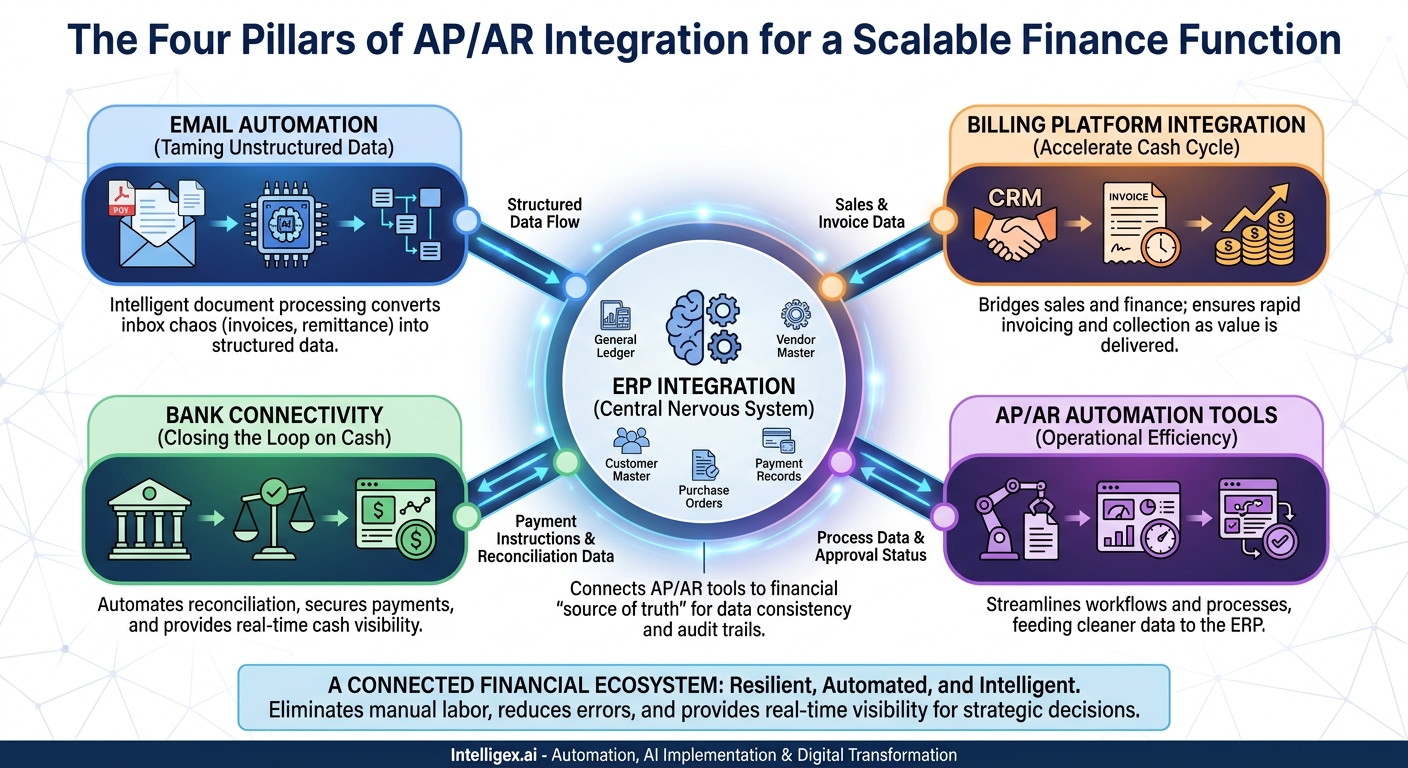
Solving this requires looking beyond a single piece of software. The real transformation comes from creating a connected financial ecosystem. By strategically integrating four key points in your operations, you can build a resilient, automated, and intelligent AP/AR function. These pillars are not isolated systems but nodes in a network: your ERP, your bank, your billing platforms, and your email.
The Four Pillars of AP/AR Integration
Think of your financial operations as a supply chain for data. Raw information (an invoice, a sales order, a bank transaction) enters the system, gets processed, and results in a valuable output (a paid bill, a closed receivable, an accurate financial statement). The goal of integration is to automate the handoffs between each stage, eliminating manual labor and delays. The four pillars represent the most critical handoff points:
- ERP Integration: This connects your AP/AR automation tools to your financial source of truth, ensuring data consistency and providing a complete audit trail.
- Bank Connectivity: This closes the loop between payments, receivables, and your actual cash position, automating the tedious work of reconciliation.
- Billing Platform Integration: This bridges the gap between sales and finance, ensuring that revenue earned is invoiced and collected as quickly as possible.
- Email Automation: This tackles the unstructured chaos of inboxes, turning PDF invoices and remittance notifications into structured data that can fuel the entire process.
When these four points are connected, the value is more than the sum of its parts. You create a system where a single event, like a customer payment, automatically triggers updates across your billing, banking, and ERP systems without anyone lifting a finger. This is the foundation of a scalable and strategic finance function.
ERP Integration: The Central Nervous System
Your Enterprise Resource Planning (ERP) system is the heart of your financial data. It holds your general ledger, vendor and customer master files, purchase orders, and payment records. Any AP or AR process that operates in a silo, disconnected from the ERP, is a source of risk and inefficiency. The primary goal of ERP integration is to ensure that data flows seamlessly and accurately between your operational tools (like an AP automation platform) and your system of record.
A Step-by-Step Guide to ERP Integration
Connecting systems can seem daunting, but it follows a logical path. A well-planned integration project minimizes disruption and maximizes value. Here is a typical, phased approach:
- Define the Data Flows: Before writing any code, map out exactly what information needs to move. For AP, this typically includes syncing vendor master data from the ERP to your AP tool, sending approved invoice data from the AP tool to the ERP to create bills, and pushing payment records back from the ERP to the AP tool to close the loop. For AR, it involves syncing customer data and posting payment information against open invoices.
- Choose the Right Method: The most common methods are API-based and file-based. Modern, cloud-based ERPs like NetSuite or SAP S/4HANA offer robust APIs (Application Programming Interfaces) that allow for real-time data exchange. This is the gold standard. For legacy systems, a file-based transfer using SFTP (Secure File Transfer Protocol) may be more practical. This usually runs on a set schedule (e.g., every hour or once a day) and is less immediate but still highly effective.
- Perform Meticulous Field Mapping: This is where many projects stumble. The field names in one system rarely match the other perfectly. For example, your AP platform’s `Invoice_Number` field must be correctly mapped to the `Reference_No` field in your ERP. You must go field by field, creating a clear map and defining any necessary transformations (e.g., converting date formats).
- Build Robust Error Handling: Integrations will occasionally fail. A vendor ID might not exist, an invoice might be a duplicate, or a network issue could interrupt a data sync. A resilient integration includes a clear process for handling these errors. It should generate automated alerts for the finance or IT team, provide a clear reason for the failure, and offer an easy way to retry the sync after the underlying issue is fixed.
Business Value and a Real-World Scenario
The impact of a solid ERP integration is profound. It delivers higher data quality by eliminating manual entry, which is a primary source of errors. It provides real-time visibility, allowing the finance team to see liabilities as they are approved, not just when they are entered at the end of the week. This directly reduces costs by freeing up skilled finance professionals from tedious data entry and reconciliation to focus on more strategic analysis.
Example: A facilities manager for a retail chain approves an invoice for emergency plumbing repairs in their AP automation platform. Through an API integration, this approved invoice is instantly pushed to the company’s ERP, NetSuite. The system automatically creates a bill payable, codes it to the correct department and GL account based on preset rules, and places it in the next payment run. The finance team never had to touch it, but they have full visibility and a complete audit trail.
Bank Connectivity: Closing the Loop on Cash
Reconciling bank statements with the general ledger is a classic month-end headache. It’s a manual, time-consuming process of matching hundreds or thousands of transactions. Direct bank integration automates this chore and provides something even more valuable: daily, even hourly, visibility into your cash position. It transforms reconciliation from a reactive, historical exercise into a proactive, strategic tool.
Key Integration Touchpoints
Connecting to your bank isn’t a single action but a set of distinct functions that serve different purposes:
- Automated Reconciliation: The system automatically pulls bank transaction data (often in standard formats like BAI2 or CAMT) and uses matching rules to reconcile them against outstanding payments and receivables in the ERP.
- Payment Initiation: Instead of manually uploading payment files to a bank portal, the ERP or AP platform can securely transmit payment instructions (for ACH, wires, or virtual cards) directly to the bank for execution. This is faster and more secure.
- Fraud Prevention with Positive Pay: For check payments, integration enables Positive Pay. Your system sends a file of all issued checks to the bank. The bank will only honor checks that match this file, effectively preventing check fraud.
- Real-time Balance Reporting: APIs can provide on-demand visibility into your bank balances across multiple accounts and banks, giving your treasury team a consolidated and up-to-the-minute view of cash.
Checklist for a Smooth Bank Integration
Before you begin, work through these key decision points with your finance, IT, and banking partners:
- [ ] Verify your bank’s supported connection methods. Do they offer modern APIs, or will you need to rely on SFTP file transfers?
- [ ] Involve your IT security and compliance teams from day one to review the security protocols and data handling procedures.
- [ ] Develop a clear mapping of bank transaction codes to your company’s general ledger accounts to ensure transactions are categorized correctly.
- [ ] Create a workflow for handling exceptions. How will you manage transactions like bank fees or interest payments that don’t have a corresponding invoice in your system?
What to Measure: Success here is easy to quantify. Track the time spent on month-end bank reconciliation, aiming to reduce it by 80-90% or more. Also, monitor your auto-reconciliation match rate, which is the percentage of transactions the system matches without any human help. A higher rate means a more efficient process.
Billing and Invoicing Integration: Accelerate Your Cash Cycle
On the AR side, integration is all about speed and accuracy. The longer it takes to get a correct invoice to a customer, the longer it takes to get paid. Disconnects between your sales team’s CRM, your billing platform, and your ERP create delays and errors that directly lengthen your Days Sales Outstanding (DSO).
Integrating these systems ensures that as soon as value is delivered to a customer, the financial process to collect payment begins automatically.
Practical Scenarios Across the Business
This integration isn’t just a finance project; it delivers value to multiple teams.
- For Sales Teams: A salesperson closes an opportunity in a CRM like Salesforce. A pre-built integration automatically creates a sales order in the ERP and generates the initial invoice in the billing system. This eliminates the “over the wall” handoff to the finance team and ensures the customer gets their bill immediately.
- For Subscription Businesses: A customer upgrades their plan in a subscription management platform like Zuora. The integration automatically updates the recurring billing schedule and pushes the corresponding revenue recognition journals to the ERP, ensuring compliance with ASC 606.
- For E-commerce Operations: A customer makes a purchase on your website and pays through a gateway like Stripe. The integration not only records the sale but also automatically creates the cash entry in your ERP and marks the customer’s invoice as paid, simplifying cash application.
Key Do’s and Don’ts
Do: Standardize your data. Ensure that your product or service SKUs, customer IDs, and pricing information are consistent across your CRM, billing engine, and ERP. This “single source of truth” for core data prevents sync errors.
Don’t: Build fragile point-to-point connections. If you have a CRM, a billing tool, and an ERP, connecting each one to the others individually creates a complex web that is difficult to maintain. Use a central integration platform (iPaaS) to act as a hub, simplifying data flows and making it easier to add or change systems in the future.
The ultimate business value is a direct improvement in cash flow. By invoicing faster and more accurately, you reduce your DSO. This also provides scalability, allowing your AR team to manage a growing business without a linear increase in headcount.
Email Integration: Taming the Unstructured Data Beast
Despite the push for digital transformation, a massive volume of critical financial documents still arrives as email attachments. PDF invoices, purchase orders, and remittance advice from customers clog dedicated inboxes like `[email protected]` or `[email protected]`, creating a huge manual workload.
Email integration uses intelligent document processing (IDP) to automate the extraction of data from these unstructured sources, turning a chaotic inbox into an efficient, automated processing queue.
How It Works in Practice
This is not about generic “AI hype.” It’s about applying specific, proven technology to a well-defined problem. An IDP system connected to an email server can:
- Monitor an Inbox: The system polls the designated inbox for new messages and attachments.
- Classify Documents: It identifies if a document is an invoice, a credit memo, or remittance advice.
- Extract Key Data: Using a combination of optical character recognition (OCR) and layout analysis, it “reads” the document and pulls out key fields like supplier name, invoice number, date, amount, and line-item details. For remittance advice, it extracts payment amounts and corresponding invoice numbers.
- Initiate a Workflow: Once the data is extracted and validated, it is used to kick off the next step in the process, such as creating a draft bill in the AP system or suggesting a match for cash application in the AR system.
A Note on Safe Implementation and Human Oversight
Automating data extraction is powerful, but it requires careful governance. No system is 100% accurate, especially with the wide variety of invoice formats in the wild. A safe and effective implementation must include a “human-in-the-loop” design.
The system should be configured to calculate a confidence score for each extracted field. If the score for a critical field like the invoice total is below a certain threshold (e.g., 95%), it should be flagged for mandatory human review. This ensures you get the efficiency of automation for the majority of documents while maintaining human oversight for the exceptions. Furthermore, access control is critical. The service account used to monitor the inbox should have the minimum permissions necessary, and you must ensure the process is compliant with data privacy regulations for any personal information contained in emails or documents.
Measuring Success: From Process Metrics to Business Impact
Integrating your AP/AR systems isn’t just about technology; it’s about driving measurable business outcomes. To prove the value of your investment and identify areas for further improvement, you need to track both operational and financial metrics.
Operational Metrics (The “How”)
These metrics measure the efficiency of your internal processes. They tell you if the machine is running smoothly.
- Invoice Processing Time: The average time from when an invoice is received to when it is fully approved and ready for payment.
- First-Pass Match Rate: The percentage of invoices that are automatically matched to a purchase order and goods receipt without manual intervention.
- Cost Per Invoice Processed: The total cost of your AP department (salaries, software, overhead) divided by the number of invoices processed.
Financial Metrics (The “Why”)
These metrics measure the impact on the company’s financial health. They tell you why the machine matters.
- Days Sales Outstanding (DSO): The average number of days it takes to collect payment after a sale. Faster, more accurate invoicing directly reduces this.
- Days Payable Outstanding (DPO): The average number of days it takes for your company to pay its own bills. Better visibility and control allow you to optimize this strategically.
- Early Payment Discount Capture Rate: The percentage of available discounts from suppliers that you successfully capture. Faster processing is a prerequisite for this.
The key is to connect the two. For example, by improving an operational metric like Invoice Processing Time, you directly enable the improvement of a financial metric like the Early Payment Discount Capture Rate, turning a process improvement into tangible cash savings.
Your Path Forward: A Phased Approach to Integration
Attempting to integrate everything at once is a recipe for failure. A “big bang” approach creates too much risk and disruption. The most successful transformations are iterative, focusing on delivering value in manageable phases.
- Phase 1: Foundational Cleanup and a Quick Win. Start with the biggest source of manual pain, which for most companies is AP invoice processing. Before you integrate, take the time to clean up your vendor master data in the ERP. Then, implement an AP automation solution that integrates tightly with your ERP. This provides an immediate and highly visible return.
- Phase 2: Close the Cash Loop. Next, tackle bank integration. Automating bank reconciliation eliminates a significant month-end bottleneck and provides the daily cash visibility needed for better treasury management.
- Phase 3: Accelerate Revenue. With the payables process streamlined, turn your attention to receivables. Integrate your CRM and billing platforms with your ERP to shorten the order-to-cash cycle and reduce DSO.
- Phase 4: Optimize and Expand. Once the core is in place, you can explore more advanced integrations. This could include connecting to procurement systems for enhanced spend visibility or integrating with treasury management systems for sophisticated cash forecasting.
By connecting your ERP, bank, billing systems, and email, you do more than just automate tasks. You create a resilient, data-driven financial core for your business. This foundation not only drives efficiency and cost savings today but also provides the agility and scalability needed to support strategic growth tomorrow.
Your Next Read:
Get a FREE
Proof of Concept
& Consultation
No Cost, No Commitment!
