

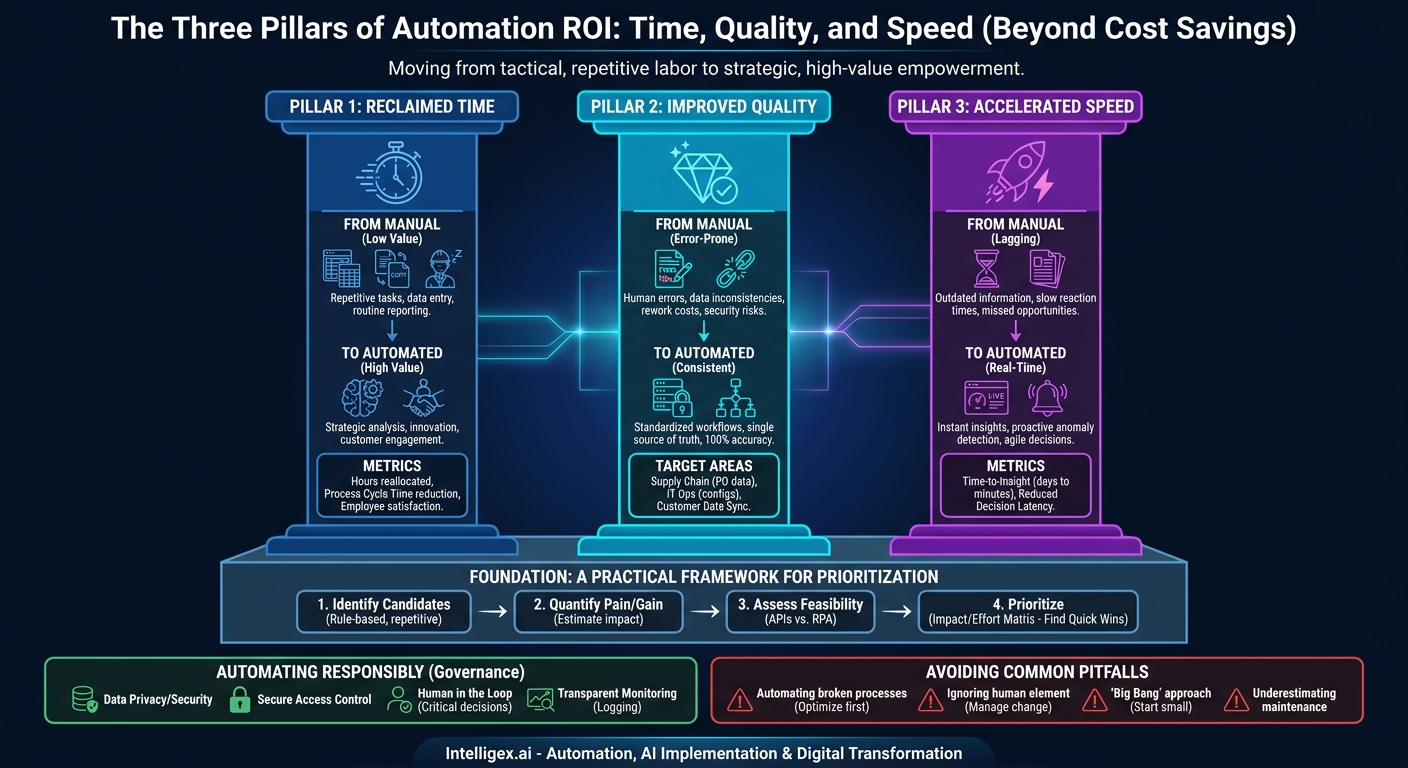
Automation is often discussed in terms of pure cost reduction. While lowering operational expenses is a significant benefit, focusing solely on this metric misses the bigger picture. The true return on investment (ROI) of automation is a three-part story: reclaiming your team’s most valuable resource (time), dramatically improving the quality and consistency of your work, and accelerating the speed at which your organization can make informed decisions. It’s about creating a more resilient, scalable, and intelligent business.
Instead of just doing things cheaper, effective automation allows you to do more of the right things, better and faster. This shift from tactical, repetitive labor to strategic, high-value work is the cornerstone of digital transformation. It’s not about replacing people; it’s about empowering them with tools that handle the mundane, freeing them to innovate, solve complex problems, and focus on customers.
Beyond Cost Savings: The True Value of Reclaimed Time
Time is a finite resource. Every hour an employee spends on manual data entry, copy-pasting information between spreadsheets, or generating routine reports is an hour they are not spending on strategic analysis, customer engagement, or process improvement. Automation directly targets these low-value, time-consuming tasks, creating a significant “time dividend” that can be reinvested across the organization.
This reclaimed time is where the strategic value emerges. It’s not just about doing the same work in less time; it’s about creating the capacity for entirely new, more valuable work.
Real-World Scenarios of Time Reinvestment
Consider the impact across different departments:
- Finance: An accounting team might spend 40 hours per month manually processing invoices and matching them to purchase orders. By automating this process, those 40 hours can be reallocated to cash flow analysis, vendor negotiation, and financial forecasting. The team shifts from being data processors to strategic financial advisors.
- Human Resources: Onboarding a new employee involves a cascade of repetitive tasks: creating accounts, sending standard documents, and updating multiple systems. Automating this workflow ensures a consistent day-one experience for the new hire and frees the HR team to focus on talent development, culture-building, and employee retention strategies.
- Sales Operations: A sales team that manually builds quotes and updates the CRM after every call is losing valuable selling time. Automating quote generation and activity logging means reps can make more calls, build stronger relationships, and focus on closing deals rather than on administrative overhead.
- Marketing: Generating weekly performance reports from various platforms (social media, email, web analytics) can be a tedious, multi-hour process. An automated workflow can pull this data into a centralized dashboard, giving marketers instant access to insights and more time to spend on creative strategy and campaign optimization.
What to Measure
To quantify the ROI of time saved, look beyond simple headcount reduction. Track metrics that show a shift in focus:
- Process Cycle Time: How long does it take from the start to the end of a key process? Measure the reduction in time for processes like “invoice receipt to payment” or “new lead to CRM entry.”
–Hours Reallocated to High-Value Work: Survey team members to estimate the hours saved per week and ask them to describe the strategic tasks they are now able to perform with that extra time.
–Employee Engagement and Satisfaction: Reducing tedious, frustrating work can lead to a more engaged and satisfied workforce. Track this through regular employee surveys.
Eliminating Human Error: The Unseen ROI of Consistency
No matter how skilled or diligent your team is, manual, repetitive tasks are a breeding ground for human error. A single misplaced decimal in a financial report, a typo in a customer’s shipping address, or an incorrect data entry in your CRM can have cascading consequences. These errors lead to financial losses, damaged customer relationships, and wasted time on rework.
Automation enforces consistency. A well-designed automated process performs a task the exact same way, every single time. It doesn’t get tired, distracted, or have a bad day. This reliability is one of the most powerful, yet often overlooked, components of automation ROI. It builds a foundation of high-quality, trustworthy data that the entire organization can rely on.
Where to Target Error-Prone Processes
Certain processes are inherently more susceptible to manual errors. Here are a few examples:
- Supply Chain: Manually transcribing purchase orders from emails or PDFs into an Enterprise Resource Planning (ERP) system is a classic example. A typo in a part number or quantity can lead to incorrect shipments, production delays, and costly returns. Automated document processing can extract this information with high accuracy, ensuring data integrity from the start.
- IT Operations: Deploying servers or configuring user permissions manually can lead to security vulnerabilities and system downtime if a step is missed or a setting is incorrect. Using “Infrastructure as Code” tools and automated scripts ensures that every environment is configured to a precise, pre-approved standard.
- Customer Data Management: When customer data is manually moved between systems, such as from a marketing platform to a CRM like Salesforce, inconsistencies are almost guaranteed. This leads to duplicate records, incomplete customer profiles, and a fragmented view of the customer journey. An integration platform can sync this data automatically, maintaining a single source of truth.
A Quick Checklist for Finding Your Best Opportunities
Use this checklist to identify processes where automation can have the biggest impact on quality:
- Does the process involve copying and pasting data between two or more applications?
- Does it require a high volume of manual data entry?
- Are the consequences of an error in this process significant (e.g., financial loss, customer dissatisfaction, compliance risk)?
- Does the process rely on a long, complex manual checklist to ensure completion?
- Is the data involved structured and rule-based?
If you answer “yes” to several of these questions, you have found a prime candidate for automation.
From Lagging Indicators to Real-Time Insights: Faster, Smarter Decisions
In today’s fast-paced business environment, the speed of decision-making is a critical competitive advantage. Organizations that rely on manual data gathering and report generation are often making decisions based on old information. By the time a weekly or monthly report is compiled, the opportunity to act may have already passed.
Automation transforms data from a lagging indicator into a real-time asset. By automating the collection, aggregation, and visualization of data from disparate systems, you provide decision-makers with an up-to-the-minute view of business performance. This accelerates the entire “observe, orient, decide, act” loop, allowing your organization to be more agile and responsive.
How Automation Powers Faster Decisions
- Real-Time Dashboards: Instead of waiting for a marketing analyst to manually pull data from Google Analytics, Facebook Ads, and an email platform, an automated workflow can feed all this data into a live business intelligence (BI) dashboard. This allows the marketing head to see campaign performance as it happens and adjust spend accordingly.
- Instant Anomaly Detection: An operations manager for a manufacturing facility can’t be everywhere at once. Automated systems can monitor sensor data from production equipment in real time. If a machine’s temperature or vibration exceeds normal parameters, the system can instantly send an alert to the manager’s phone, enabling proactive maintenance before a costly breakdown occurs.
- Accelerated Financial Closing: The month-end close is a notoriously slow, manual process for many finance teams. Automating data consolidation from various subsidiaries and systems can reduce the closing process from ten days to two. This gives leadership a clear picture of financial health much earlier, enabling faster strategic adjustments for the upcoming month.
What to Measure
The impact of faster decisions can be measured by tracking:
- Time-to-Insight: How long does it take to produce critical business reports? Measure the reduction from days or weeks to hours or minutes.
–Decision Latency: Track the time between a key business event occurring and a decision being made in response.
–Frequency of Data-Driven Reviews: Are teams able to review performance daily or weekly instead of monthly, thanks to readily available data?
Finding Your Starting Point: A Practical Framework for Prioritization
Knowing that automation is valuable is one thing; knowing where to start is another. A common mistake is to aim for a massive, complex project first. A much more effective approach is to identify “quick wins” that deliver tangible value quickly. This builds momentum, demonstrates ROI to stakeholders, and provides valuable lessons for future projects. Use this step-by-step process to identify and prioritize your first automation initiatives.
- Identify Candidate Processes: Begin by brainstorming with department heads and team leads. Ask them a simple question: “What are the most repetitive, time-consuming, and frustrating tasks your team performs regularly?” Focus on processes that are rule-based and rely on structured data, as these are typically the easiest to automate.
- Quantify the Pain and Potential Gain: For each candidate process, create a simple business case. Estimate the weekly hours spent on the task, the frequency and cost of errors, and the business impact of any delays it causes. You don’t need perfect numbers, just reasonable estimates to compare opportunities.
- Assess Technical Feasibility: Evaluate the systems involved. Are they modern applications with APIs, or are they legacy systems that might require a different approach like Robotic Process Automation (RPA)? Is the data involved structured (like in a spreadsheet) or unstructured (like in the body of an email)? This assessment helps determine the complexity and cost of implementation.
- Prioritize with an Impact/Effort Matrix: Plot each candidate process on a simple four-quadrant matrix. The vertical axis represents Business Impact (High/Low) and the horizontal axis represents Implementation Effort (Low/High). Your top priorities are in the “High Impact, Low Effort” quadrant. These are your quick wins.
- Launch a Pilot Project: Select the top-ranked process and launch a focused pilot project. Define clear, measurable success criteria before you begin. For example, “Reduce the time to process a new expense report from 15 minutes to 2 minutes” or “Eliminate all data entry errors in the new customer onboarding process.” A successful pilot provides a powerful case study for expanding your automation efforts.
Automating Responsibly: Governance and Human Oversight
As you integrate automation, especially solutions involving AI, it’s crucial to build a framework of governance and control. Unchecked automation can introduce new risks related to data privacy, security, and operational reliability. Responsible automation is not about “set it and forget it”; it’s about creating transparent, secure, and resilient systems that work in partnership with your team.
Here are four key pillars of responsible automation:
- Data Privacy and Security: Automated processes often handle sensitive customer or employee data. Ensure that any automation solution complies with regulations like GDPR and CCPA. Data should be encrypted in transit and at rest, and access should be strictly controlled.
- Secure Access Control: An automated bot or workflow is a non-human identity that interacts with your systems. It needs its own credentials and permissions. Apply the principle of least privilege: give the automation only the minimum level of access required to perform its specific task. Never use a shared administrator account.
- The “Human in the Loop”: For critical or high-risk decisions, full automation is often inappropriate. Instead, design a “human in the loop” workflow. The automation can gather data, perform an analysis, and recommend a course of action, but a human expert makes the final approval. This is common in areas like financial approvals, medical diagnoses, or large-scale procurement.
- Transparent Monitoring and Logging: You must always be able to answer the question, “What did the automation do and why?” Implement comprehensive logging for all automated processes. This is essential for troubleshooting errors, conducting security audits, and ensuring compliance. Dashboards that monitor the health and performance of your automations provide critical operational visibility.
Common Pitfalls and How to Avoid Them
Embarking on an automation journey can be transformative, but there are common pitfalls that can derail projects and diminish ROI. Being aware of these challenges ahead of time can help you navigate them successfully.
Pitfall 1: Automating a Broken Process
Simply automating a flawed or inefficient manual process only helps you do the wrong things faster. Before you write a single line of code or configure a workflow, take the time to analyze and optimize the process itself. Can steps be eliminated? Can approvals be simplified? Streamline first, then automate.
Pitfall 2: Ignoring the Human Element
Automation can be perceived as a threat. If you don’t manage the change effectively, you will face resistance from the very people you are trying to help. Be transparent about your goals. Frame automation as a tool to augment their capabilities and eliminate tedious work, not replace them. Involve them in the process of identifying and designing the automations; they are the subject matter experts and their buy-in is critical.
Pitfall 3: The “Big Bang” Approach
Trying to automate an entire department or a massive, end-to-end process all at once is a recipe for failure. These projects are complex, expensive, and have a high risk of getting bogged down. Instead, follow the pilot-based approach. Start with a small, well-defined problem, deliver value quickly, learn from the experience, and then scale iteratively. This builds momentum and reduces risk.
Pitfall 4: Underestimating Maintenance
Automated workflows are not static. The applications they connect to will be updated, business rules will change, and new exceptions will arise. You need a plan for monitoring, maintaining, and updating your automations over time. Treat your automations like any other critical software asset and allocate resources for their ongoing support.
Your Next Steps: Building a Foundation for Automation
The journey to unlocking the full ROI of automation begins with a single, well-chosen step. It’s about building a culture of continuous improvement, where technology serves to elevate human potential. The value is clear: reclaimed time for strategic work, higher quality outputs with fewer errors, and the agility to make faster, data-driven decisions.
Here is a simple, actionable plan to get started:
- Choose a Focus Area: Select one department that is feeling the pressure of manual, repetitive work. Finance, HR, and Operations are often excellent places to start.
- Hold a Discovery Workshop: Schedule a one-hour meeting with the team. The goal is simple: identify 3 to 5 rule-based, high-volume tasks that are causing the most friction.
- Select Your Pilot: Using the Impact/Effort framework, choose one of those tasks for your first pilot project. Pick the one that offers a clear and measurable benefit with a reasonable level of implementation effort.
- Define Success: Before you begin, clearly document what a successful outcome looks like. Define the specific metrics you will use to measure the ROI, whether it’s hours saved, errors eliminated, or a reduction in process cycle time.
By taking a deliberate, practical, and iterative approach, you can begin to realize the transformative power of automation, moving your organization beyond simple cost-cutting and toward a future of greater speed, quality, and intelligence.
Your Next Read:
Category:
Get a FREE
Proof of Concept
& Consultation
No Cost, No Commitment!
