

Accounts Payable (AP) and Accounts Receivable (AR) are the financial heartbeat of any organization. Yet for many, these critical functions are plagued by manual data entry, endless email chains, and a frustrating lack of visibility. The result is a slow, expensive process that drains resources, delays cash flow, and introduces unnecessary risk. While the promise of “100% automation” sounds appealing, the reality is that exceptions are inevitable. Invoices will have errors, purchase orders will be missing, and customers will make partial payments.
The solution isn’t to chase a perfect, exception-free world. It’s to build a smart, resilient system for handling those exceptions efficiently. This is where a simple but powerful framework comes into play: the 3-Queue Exception Model. By triaging work into distinct categories, you empower your team to focus their expertise where it’s needed most, maximizing the value of both your people and your technology.
What is the 3-Queue Exception Model?
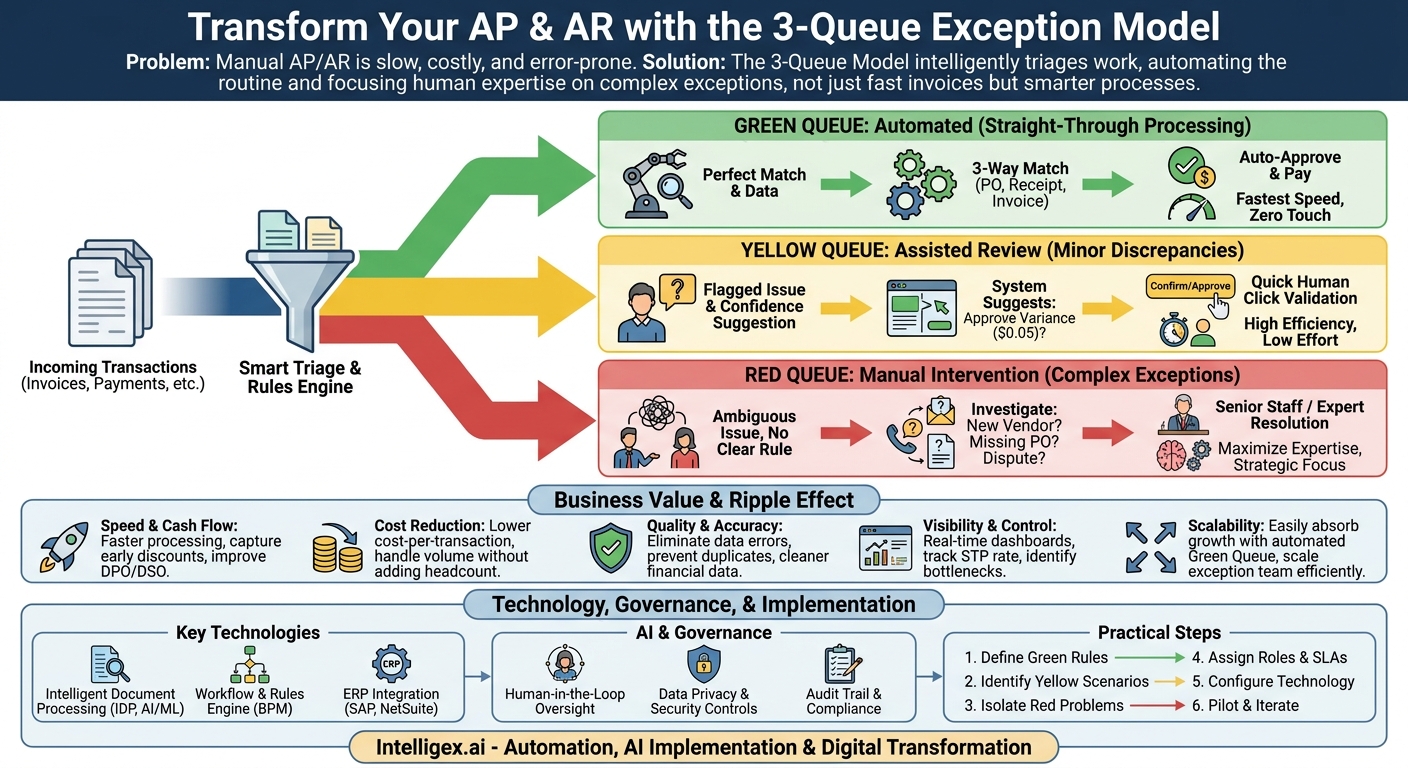
The 3-Queue model is a workflow management strategy that categorizes incoming transactions (like invoices or payments) based on the level of human intervention required. Instead of treating every document the same, it intelligently sorts them, allowing a high volume of standard transactions to pass through without any human touch. This frees up your finance team to become proactive problem-solvers rather than reactive data processors.
The model is built on three distinct workflows:
- The Green Queue (Automated): This is for “straight-through processing.” These are the perfect transactions. An invoice arrives and its data is automatically extracted and validated against a purchase order (PO) and a goods receipt notice. All three documents match perfectly. The system approves the invoice and schedules it for payment without a single person needing to look at it. This is the goal for the majority of your transactions.
- The Yellow Queue (Assisted Review): This queue is for transactions with minor, predictable discrepancies. The automation platform flags a potential issue but also has a high-confidence suggestion for how to fix it. For example, an invoice line item is off by a few cents, but it’s within a pre-approved tolerance. Or a customer payment matches an open invoice amount perfectly but is missing the invoice number in the remittance data. An AP or AR specialist sees the flagged item and the proposed solution, and simply needs to click “Confirm” or “Approve.” It’s a quick, one-click validation.
- The Red Queue (Manual Intervention): These are the complex exceptions that require investigation. The automation couldn’t process the transaction, and the issue is too ambiguous for a simple fix. Examples include an invoice from a new, un-vetted vendor, a bill for a service with no corresponding PO, or a significant short payment from a customer that could indicate a service dispute. These items are routed to a senior team member or a specific department (like Procurement or Sales) for resolution.
By splitting work this way, you ensure that your most valuable asset, your team’s expertise, is applied only to the most complex and high-value tasks in the Red Queue. The bulk of the work is handled automatically (Green) or with minimal oversight (Yellow).
The Business Value: Beyond Just “Faster Invoices”
Implementing a 3-Queue model delivers tangible benefits that resonate far beyond the finance department. It creates a ripple effect, improving financial health, operational efficiency, and strategic decision-making across the business.
Speed and Cash Flow
The most immediate impact is on speed. Green Queue items are processed in minutes, not days. For AP, this means you can consistently capture early payment discounts offered by vendors, which can add up to significant savings. For AR, automated cash application means payments are reflected in your system faster, giving you a more accurate and up-to-date picture of your cash position. This directly improves key metrics like Days Payable Outstanding (DPO) and Days Sales Outstanding (DSO).
Cost Reduction
Manual processing is labor-intensive. Automation dramatically reduces the time spent on repetitive tasks like data entry and manual matching. The 3-Queue model optimizes the labor you do have, shifting your team’s focus from low-value clerical work to high-value analysis and exception resolution. This fundamentally lowers your cost-per-invoice or cost-per-payment-processed, allowing you to handle a higher volume of transactions without increasing headcount.
Quality and Accuracy
Humans make mistakes, especially when performing repetitive tasks. Automation in the Green Queue eliminates data entry errors. The structured validation in the Yellow Queue acts as a safety net, catching potential issues before they become real problems like duplicate payments or misapplied cash. This leads to cleaner financial data, fewer disputes with vendors and customers, and a stronger reputation for reliability.
Visibility and Control
A manual, paper-based process is a black box. Where is that invoice? Has it been approved? When is it scheduled for payment? A digital, queue-based system provides a centralized dashboard with real-time answers. Finance leaders can instantly see the volume of transactions in each queue, identify bottlenecks, and track performance. Key metrics to monitor include:
- Straight-Through Processing (STP) Rate: The percentage of transactions that go through the Green Queue. Your goal is to increase this over time.
- Average Exception Handling Time: How long, on average, does it take to resolve items in the Yellow and Red queues?
- Exception by Type: What are the most common reasons items are landing in the Red Queue? This data is crucial for process improvement.
Scalability
As your business grows, so does your transaction volume. In a manual system, this means hiring more people. With the 3-Queue model, the system is built to scale. The Green Queue effortlessly absorbs the majority of the increased volume. You only need to scale your exception-handling team as the number of complex issues grows, which is a much more efficient and cost-effective approach.
Setting Up Your Queues: A Practical Step-by-Step Guide
Transitioning to a 3-Queue model is a methodical process of defining rules, assigning roles, and configuring technology. It doesn’t happen overnight, but by following a structured approach, you can build a robust and effective system.
- Define Your “Green” Rules: This is the foundation of your automation. Work with your AP, AR, and Procurement teams to define what a “perfect” transaction looks like. For AP, this is often the classic three-way match: the invoice details must exactly match the information on the purchase order and the goods receipt notice. For AR, it might be a payment where the remittance advice clearly states the invoice number and the amount paid matches the invoice total exactly. Be strict with these rules. Anything that doesn’t meet 100% of the criteria is, by definition, an exception.
- Identify Common “Yellow” Scenarios: Dive into your historical data. What are the most frequent, low-risk issues that currently require manual effort? These are your candidates for the Yellow Queue. The goal is to create rules that allow the system to flag the issue and suggest a solution.
- AP Example: An invoice from a known supplier has a unit price of $10.50, but the PO has it as $10.45. If this is within a pre-defined tolerance (e.g., +/- 1%), the system can flag it and suggest approving the variance.
- AR Example: A customer pays $5,000, which exactly matches an open invoice, but they failed to include the invoice number. The system can confidently match the payment to the invoice and present it to an AR clerk for a simple confirmation.
- Isolate the “Red” Problems: These are the exceptions that truly require human intellect and investigation. They lack clear data or fall outside of all established rules.
- AP Example: An invoice arrives from a company not listed in your vendor master file, or a large invoice is submitted without a PO number, which violates company policy.
- AR Example: A customer makes a large payment with a note that says “credit for returned goods,” but there is no corresponding credit memo in the system. This requires coordination with the sales or logistics team.
- Assign Roles and Responsibilities: Clearly define who owns each queue. Junior team members or clerks are often perfect for managing the Yellow Queue, as it involves quick, rule-based validations. The Red Queue should be assigned to more senior staff, managers, or even specific departments who have the authority and knowledge to investigate and resolve complex issues like vendor disputes or contract discrepancies. Establish Service Level Agreements (SLAs) for each queue to ensure timely resolution.
- Configure Your Technology: This is where you translate your business logic into a live workflow. Working with your IT team or an implementation partner, you will configure your automation platform to enforce these rules. The system’s optical character recognition (OCR) and AI will extract the data, and the rules engine you’ve designed will automatically route each transaction to the correct queue (Green, Yellow, or Red) and notify the appropriate person or team.
Choosing the Right Tools for the Job
The 3-Queue model is a framework, and it relies on a combination of technologies to function effectively. While you can implement it with different toolsets, a modern AP/AR automation solution typically includes three core components.
Intelligent Document Processing (IDP): This is the technology that scans and “reads” your documents. Unlike basic OCR, IDP uses AI and machine learning to understand the context of a document, accurately extracting key data fields like invoice number, date, line items, and totals, even from varied layouts and formats. Leading platforms in this space include those from vendors like UiPath and Automation Anywhere.
Workflow and Rules Engine: This is the brain of the operation. After the IDP extracts the data, the rules engine applies the logic you defined in the setup phase. It performs the validations (e.g., the three-way match) and routes the transaction to the appropriate queue. This engine is often a core feature of a Business Process Management (BPM) suite or a comprehensive automation platform.
Integration Layer: Your automation system cannot operate in a silo. It must seamlessly connect with your core financial system, your Enterprise Resource Planning (ERP) platform. This integration allows the workflow to pull data for validation (like PO details from SAP or vendor information from NetSuite) and to post the final, approved transactions back into the general ledger without manual reentry.
When evaluating potential technology partners, consider the following checklist:
- Does the solution integrate easily with our existing ERP and other financial systems?
- How flexible and configurable is the rules engine? Can our business users update rules without needing a developer?
- What are the platform’s documented data extraction accuracy rates for our specific document types (e.g., invoices, POs, remittance slips)?
- Does the user interface for the Yellow and Red queues provide a clear and efficient way for our team to manage exceptions?
- Does it offer built-in dashboards and reporting to track key metrics like STP rate and exception handling time?
AI, Governance, and Keeping Humans in the Loop
Automating financial processes requires a thoughtful approach to governance and security. The AI involved in these systems is typically focused on specific tasks: extracting data and identifying patterns to suggest fixes. It is a powerful tool designed to augment your team, not a “black box” making autonomous financial decisions.
Data Privacy and Access Control: Invoices, payments, and vendor data are highly sensitive. Your automation platform must have robust security controls. User access should be based on roles, ensuring that team members can only view and act on the transactions relevant to their job function. Every action, from automated processing to a manual approval in the Yellow Queue, should be logged in a clear and immutable audit trail for compliance and security purposes.
The Central Role of Human Review: The 3-Queue model is fundamentally designed around human oversight. The Yellow and Red queues are your built-in safety nets, ensuring that any transaction with an anomaly is reviewed by a person. The goal is not to eliminate human involvement but to elevate it. Furthermore, many modern systems learn from the corrections made by your team. When a user corrects a data extraction error or re-routes an exception, the system uses that feedback to improve its performance on future documents.
Navigating Change Management: Implementing this model represents a significant change for your finance team. Their roles will evolve from manual data entry to process oversight and analysis. It is crucial to communicate this shift positively. Provide thorough training on the new tools and processes. Emphasize that the goal is to free them from tedious, repetitive work so they can focus on more strategic activities that add greater value to the business.
Common Pitfalls and How to Avoid Them
While the 3-Queue model is straightforward, there are common missteps that can hinder a successful implementation. Being aware of them upfront can help you navigate the process more smoothly.
Pitfall 1: Aiming for 100% Automation on Day One. The pursuit of perfection can be the enemy of progress. Don’t delay your project trying to automate every conceivable edge case. Start by targeting a realistic straight-through processing rate (e.g., 60-70%) for your most common transaction types. Launch with that, and then use the data from your exception queues to identify the next set of rules to build. It’s an iterative process of continuous improvement.
Pitfall 2: Over-complicating the Queues. The model’s power lies in its simplicity. Resist the temptation to create a complex web of sub-queues for every minor variation. Stick to the three core categories: fully automated, simple human review, and complex human investigation. Keeping the structure clean makes it easier for your team to understand and manage.
Pitfall 3: Neglecting Upstream and Downstream Processes. Your AP/AR process doesn’t exist in a vacuum. The quality of the data you receive is critical. Work with your procurement team to enforce a “No PO, No Pay” policy. Create a vendor portal or a dedicated email address where suppliers can submit invoices in a standardized format. Similarly, work with your sales and customer service teams to ensure customer invoicing and payment terms are clear. Fixing issues at the source is the most effective way to increase your Green Queue percentage.
Pitfall 4: Setting It and Forgetting It. Your business is not static, and neither is your automation. Regularly review the metrics from your queues. If you see the same type of error repeatedly landing in the Red Queue, it’s a clear signal that you need a new business rule to handle it. This analysis is key to progressively moving transactions from Red to Yellow, and from Yellow to Green, constantly improving your efficiency over time.
Your Next Steps to Implementation
Getting started with AP/AR automation and the 3-Queue model is a manageable journey when taken one step at a time. The key is to build momentum with a clear, focused plan.
First, assess your current state. Before you can improve, you must measure. Benchmark your existing processes. Calculate your current cost-per-invoice, average invoice processing time, and error rate. This data will be invaluable for building your business case.
Next, identify a pilot scope. Don’t try to transform your entire finance operation at once. Choose a single process (AP is often a good starting point due to its high volume) and a specific segment, such as a single business unit or a group of your highest-volume vendors. A successful pilot will build confidence and provide valuable lessons for a broader rollout.
Then, build your business case. Use the metrics from your current state assessment to project the potential return on investment. Model the expected savings from reduced labor, the financial benefits of capturing early payment discounts, and the risk reduction from improved accuracy.
Finally, engage an expert partner. This transformation involves process redesign, technology selection, and systems integration. Working with a partner who has deep experience in digital transformation and AI-powered automation can help you avoid common pitfalls, select the right tools, and accelerate your time-to-value. By combining a proven framework like the 3-Queue model with expert guidance, you can turn your AP and AR functions from a costly administrative burden into a streamlined, strategic asset for your business.
Your Next Read:
Get a FREE
Proof of Concept
& Consultation
No Cost, No Commitment!
