

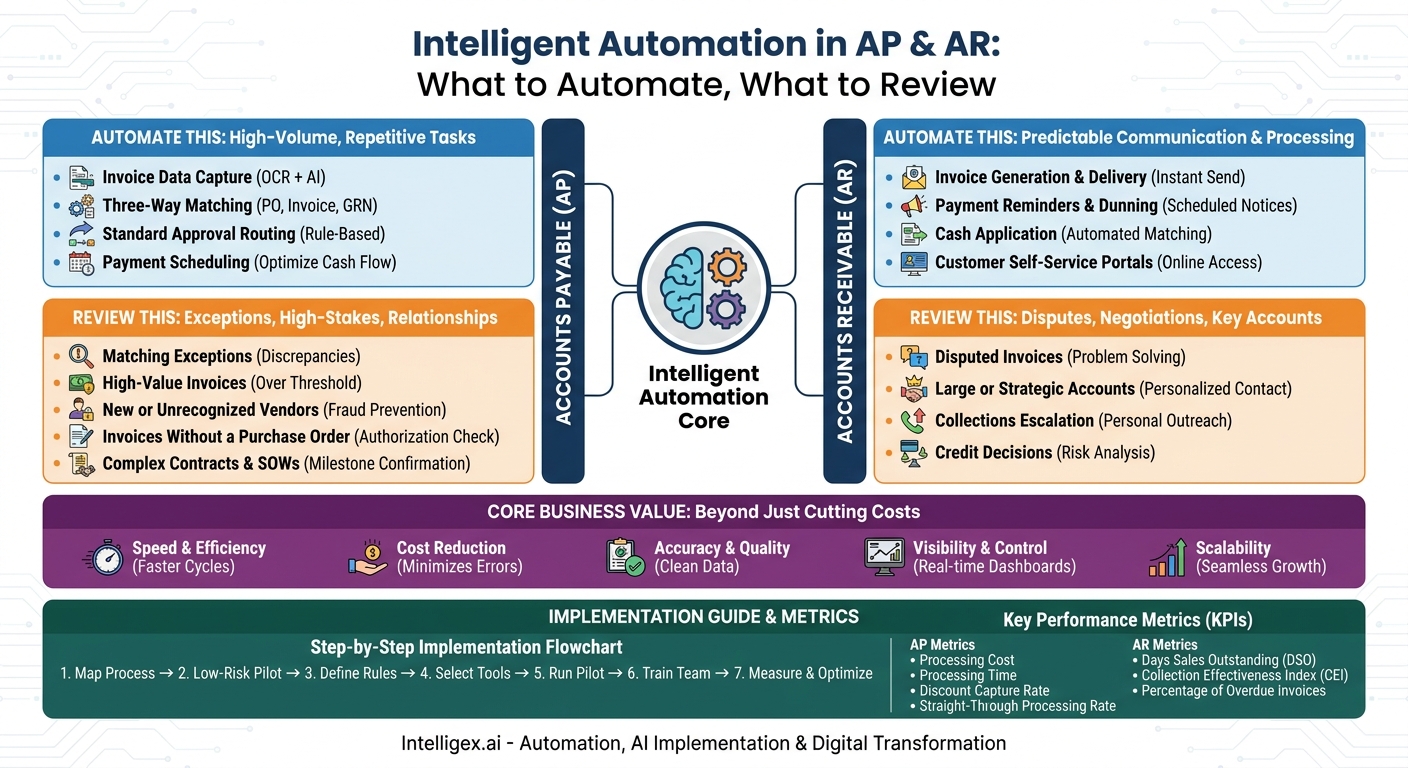
The daily rhythm of accounts payable (AP) and accounts receivable (AR) can feel like a necessary chore. Manual data entry, chasing approvals, matching invoices to purchase orders, and sending payment reminders are essential tasks, but they consume countless hours that could be spent on more strategic work. It’s a universal pain point that drains productivity from finance, operations, and even sales teams.
While automation offers a powerful solution, the goal isn’t to simply “set it and forget it.” True digital transformation lies in a hybrid approach. It’s about intelligently delegating the repetitive, rule-based work to technology while empowering your team to focus on the exceptions, strategic decisions, and relationships that drive the business forward. The key is knowing precisely what to automate versus what needs a human eye. This isn’t about replacing people; it’s about reallocating their expertise from tedious tasks to high-value analysis.
The Core Business Value: Beyond Just Cutting Costs
Implementing AP and AR automation is about more than just reducing headcount or saving on paper. The true value comes from creating a more resilient, efficient, and intelligent financial operation. By understanding these benefits, you can build a stronger business case and measure the real impact of your investment.
- Speed and Efficiency: Manual processes are inherently slow. An invoice can sit on a desk for days waiting for approval. Automation can reduce invoice processing cycles from weeks to hours, or even minutes. For AR, this means generating and sending invoices instantly and accelerating collections. This speed directly improves cash flow and strengthens relationships with vendors and customers.
- Cost Reduction: The cost of a manual process goes far beyond salaries. It includes printing, postage, physical storage, and, most significantly, the cost of correcting human errors. Automation minimizes these direct costs and the expensive rework associated with mistakes.
- Accuracy and Quality: Manual data entry is prone to typos, transposed numbers, and other errors that lead to payment delays, disputes, and compliance issues. Automated data capture and validation enforce consistency and accuracy, ensuring that the financial data you rely on is clean and trustworthy.
- Visibility and Control: Are you still relying on spreadsheets and email chains to track financial workflows? Automation provides centralized dashboards with real-time visibility into invoice statuses, payment schedules, and cash flow forecasts. Leaders can instantly see bottlenecks, monitor key performance indicators, and make data-driven decisions instead of educated guesses.
- Scalability: A manual process breaks under pressure. As your business grows, you have to hire more people just to keep up with the rising volume of transactions. An automated system can process 10,000 invoices almost as easily as it processes 100, allowing your financial operations to scale seamlessly with your company’s growth.
Accounts Payable (AP): The Automation Sweet Spot
AP is often the first place businesses look to automate, and for good reason. It’s a high-volume, rule-intensive process that is perfectly suited for technology. The goal is to achieve “straight-through processing” for the majority of invoices, freeing up your team to act as financial controllers rather than data entry clerks.
Automate This: High-Volume, Repetitive Tasks
These are the predictable, low-risk tasks that consume the most time and are the easiest to define with clear business rules.
- Invoice Data Capture: Using Optical Character Recognition (OCR) combined with AI, the system can automatically “read” PDF or paper invoices and extract key information. This includes vendor name, invoice number, date, amount, purchase order (PO) number, and even line-item details. This step alone eliminates hours of tedious manual keying.
- Three-Way Matching: For purchases made with a PO, this is the most powerful AP automation. The system automatically compares the invoice against the corresponding purchase order and the goods receipt note (GRN). If the vendor, items, quantities, and prices all match within a predefined tolerance (e.g., a 1% variance), the invoice can be approved for payment without any human touch.
- Standard Approval Routing: Not all invoices have a PO. For these, you can set up automated workflows based on rules. For example, any invoice under $1,000 for “Office Supplies” from a known vendor is automatically routed to the Office Manager for approval. Any marketing expense under $5,000 goes directly to the CMO. This prevents invoices from getting lost in email inboxes.
- Payment Scheduling: Once an invoice is fully approved, the system can automatically schedule it for payment based on the vendor’s terms. This allows you to strategically capture early payment discounts or hold onto cash until the due date, optimizing working capital.
Review This: Exceptions, High-Stakes, and Relationships
Human oversight is critical for handling complexity, mitigating risk, and managing strategic relationships. This is where your team’s judgment and problem-solving skills are indispensable.
- Matching Exceptions: Any discrepancy found during the three-way match should immediately flag the invoice for human review. A price might be higher than on the PO, or the quantity delivered might be less than what was billed. An AP specialist needs to investigate these issues by contacting the vendor or the internal procurement team.
- High-Value Invoices: Every company should set a clear monetary threshold (e.g., any invoice over $10,000) that requires mandatory manual review. For very large payments, multi-level approvals from a department head and a finance leader should be enforced by the system.
- New or Unrecognized Vendors: The first invoice from a new vendor should always be manually verified. This is a crucial step in preventing fraud, as it ensures the vendor is legitimate and their banking details are correct before any payment is issued.
- Invoices Without a Purchase Order: Non-PO invoices, especially for services, often require more scrutiny. A human needs to confirm the expense was authorized and that the service was delivered to satisfaction before approving payment.
- Complex Contracts and SOWs: Payments against a Statement of Work (SOW) or a milestone-based project contract cannot be automated easily. A project manager or department head needs to manually confirm that the specific milestone has been met or the contractual obligation has been fulfilled before the corresponding invoice is approved.
Accounts Receivable (AR): Accelerating Your Cash Flow
AR automation focuses on getting cash in the door faster and more predictably. It streamlines the process from invoice creation to cash collection, improving your cash conversion cycle and providing a better experience for your customers.
Automate This: Predictable Communication and Processing
Much of AR involves consistent, timely communication and data reconciliation. These are prime candidates for automation.
- Invoice Generation and Delivery: As soon as a sales order is fulfilled or a subscription period begins, the system should automatically generate the correct invoice using pre-approved templates and deliver it to the customer via their preferred method (email, customer portal).
- Payment Reminders and Dunning: Manually tracking who needs a reminder is inefficient. An automated system can send a polite reminder a few days before an invoice is due, another on the due date, and a sequence of increasingly firm notices if it becomes overdue. This simple automation can dramatically reduce late payments.
- Cash Application: Manually matching incoming payments from bank statements to open invoices is a time-consuming and error-prone chore. Modern AR systems can automate this “cash application” process by matching payment reference numbers, amounts, or customer names, clearing open invoices with high accuracy.
- Customer Self-Service Portals: Provide customers with a portal where they can view and download all their invoices, see their payment history, and make payments online. This reduces the number of inbound queries to your AR team, freeing them up to focus on more complex issues.
Review This: Disputes, Negotiations, and Key Accounts
As with AP, the human touch in AR is reserved for situations requiring negotiation, problem-solving, and relationship management.
- Disputed Invoices: When a customer disputes a charge, automated reminders must stop immediately. An AR specialist needs to step in, understand the nature of the dispute, coordinate with the sales or service team, and work with the customer to find a resolution.
- Large or Strategic Accounts: Your most valuable customers should not receive generic, automated collection notices. For these key accounts, a dedicated account manager or AR specialist should handle all communications regarding billing and payments personally. This protects the relationship.
- Collections Escalation: After a certain point (e.g., an invoice is 90 days past due), automated emails lose their effectiveness. This is the trigger for a human to take over. A personal phone call is far more effective and allows your team to understand the customer’s situation and potentially negotiate a payment plan.
- Credit Decisions: Deciding whether to extend credit to a new customer or adjust the credit limit for an existing one is a strategic financial decision. It requires analyzing payment history, credit reports, and the overall customer relationship, a task that demands human judgment.
A Step-by-Step Guide to Implementing AP/AR Automation
A successful implementation project is not just about technology. It’s about process improvement and change management. Following a structured approach ensures you get the results you expect.
- Map Your Current Process: Before you can automate, you must understand what you do today. Get the team together and visually map every step of your AP and AR workflows. Where do invoices come from? Who approves them? How are payments processed? Identify the biggest bottlenecks, sources of error, and areas of frustration. Don’t automate a broken process.
- Start with a Low-Risk, High-Impact Area: Don’t try to automate everything at once. Pick one area for a pilot project. A great starting point is automating the invoice data capture and three-way matching for your top 10 vendors who consistently use POs. This provides a quick win and builds momentum.
- Define Your Business Rules: This is where you codify the “automate vs. review” logic. Work with finance and department heads to set clear, unambiguous rules. What dollar amount triggers a mandatory manual review? What is the acceptable price variance for an automated match? Who are the designated approvers for different expense types and amounts? Document these rules thoroughly.
- Select the Right Tools and Partners: The market is full of automation tools. The best choice for you depends on your scale, industry, and existing technology stack. Look for solutions that integrate seamlessly with your ERP (like NetSuite) or accounting software (like QuickBooks). An experienced integration partner can help you navigate these options and connect the systems correctly.
- Run a Pilot Program: Test the new system with a small, controlled group. Process a batch of real invoices through the new automated workflow. This allows you to identify any gaps in your business rules, fix technical issues, and gather valuable feedback from the users before a full-scale rollout.
- Train Your Team and Go Live: The goal is to empower your team, not replace them. Training should focus on their new roles: managing exceptions, analyzing financial data, and making strategic decisions. Show them how the new system frees them from tedious work and allows them to add more value.
- Measure, Monitor, and Optimize: The work isn’t done at go-live. Continuously track the key metrics you identified at the beginning. Is invoice processing time decreasing? Are you capturing more early payment discounts? Use this data to fine-tune your business rules and identify the next opportunity for process improvement.
Key Metrics: How to Measure Success
To justify your investment and demonstrate ongoing value, it’s crucial to track the right performance indicators. Vague claims of “improved efficiency” are not enough. Focus on concrete, measurable metrics.
AP Performance Metrics
- Invoice Processing Cost: The total cost of the AP function (salaries, software, etc.) divided by the number of invoices processed. This should decrease significantly over time.
- Invoice Processing Time: The average time from when an invoice is received to when it is fully approved for payment.
- Early Payment Discount Capture Rate: The percentage of available discounts that you successfully take advantage of. This is a direct, measurable financial gain.
- Straight-Through Processing Rate: The percentage of invoices that are processed without any human intervention. This is a primary measure of your automation efficiency.
AR Performance Metrics
- Days Sales Outstanding (DSO): The average number of days it takes to collect payment after a sale has been made. A lower DSO means faster access to your cash.
- Collection Effectiveness Index (CEI): This metric measures how much money was collected out of the total amount that was available to be collected.
- Percentage of Overdue Invoices: Track both the volume and the total value of invoices that are past their due date.
A Note on Governance and Safe AI Implementation
Automating financial processes requires a strong governance framework. Since you are dealing with sensitive data and the direct movement of money, security and oversight are paramount. Keep these principles in mind.
Data Privacy and Security: Ensure any software or partner you work with has robust security protocols and complies with data privacy regulations relevant to your business, such as GDPR. Understand where your data is stored and who has access to it. Vendor financial data and customer payment information must be protected.
Access Controls: Implement strict role-based access controls (RBAC). An AP clerk should be able to enter an invoice, but they should not be able to approve a $200,000 payment or change a vendor’s bank account details. Access rights should be granted on a need-to-know basis and reviewed regularly.
The Human-in-the-Loop Imperative: Automation is not a substitute for human accountability. Maintain a clear, unchangeable audit trail for every action taken by the system. Someone on your team should be responsible for periodically reviewing exception reports, system performance, and the business rules themselves to ensure they are still effective and aligned with your company’s policies.
Your Next Steps: Building an Action Plan
Moving from manual processes to intelligent automation is a journey, not a single leap. By taking a methodical approach, you can build a resilient and efficient financial engine for your business. Here is a simple checklist to get started.
- Schedule a process mapping session. Get your AP, AR, and procurement stakeholders together to whiteboard the current state. You can’t fix what you can’t see.
- Identify your single biggest pain point. Is it the time spent on manual data entry? Slow approval cycles? Chasing overdue payments from customers? Focus your initial efforts there.
- Quantify the problem. Before you can demonstrate improvement, establish a baseline. Calculate your current average invoice processing time or your Days Sales Outstanding (DSO).
- Explore your technology options. Begin researching tools that integrate with your core financial systems. Remember to start with your process problem, not with a specific product.
- Talk to an expert. Navigating the vendor landscape and planning a phased implementation can be complex. An experienced partner can help you develop a realistic roadmap that aligns with your business goals and avoids common pitfalls.
Your Next Read:
Get a FREE
Proof of Concept
& Consultation
No Cost, No Commitment!
