

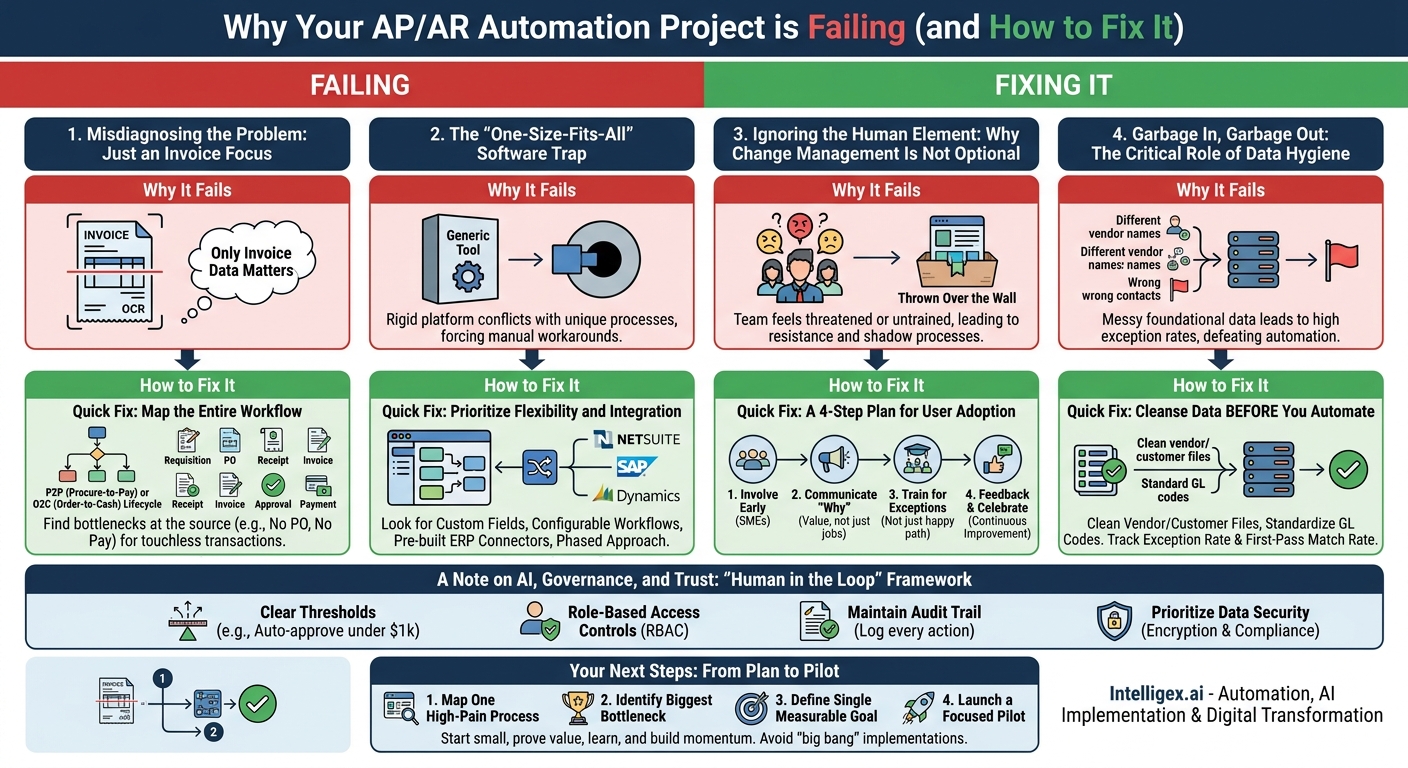
Automating accounts payable (AP) and accounts receivable (AR) processes promises major gains in efficiency, accuracy, and financial visibility. For many organizations, however, the reality falls short of the promise. Projects stall, adoption lags, and the expected return on investment never materializes. The problem is rarely the technology itself. Instead, failure typically stems from overlooking the foundational elements of process, data, and people.
Successful automation isn’t about buying a magic bullet solution. It’s a strategic initiative that requires a clear understanding of your current workflows, the quality of your data, and the needs of your team. This post dives into the most common failure points we see in AP/AR automation projects and provides practical, actionable fixes to get your transformation back on track. We will explore how to move beyond simple invoice scanning and build a resilient, scalable financial engine for your business.
Misdiagnosing the Problem: It’s Never Just About the Invoice
One of the most frequent mistakes is defining the problem too narrowly. Companies often start by looking for a tool that can “read invoices” using Optical Character Recognition (OCR) or AI. While data extraction is a key component, an invoice is merely the final document in a much longer chain of events. Focusing only on this single step ignores the upstream issues that create most of the manual work and exceptions.
Think about a typical AP scenario. A marketing team hires a contractor for an event. The invoice arrives, but there was no purchase order (PO) created, the new vendor hasn’t been onboarded into your system, and the invoice lacks a clear departmental budget code. An advanced AI can extract the vendor name and amount due with 99% accuracy, but that doesn’t solve the core business problem. Your AP team still has to manually chase down approvals, create a vendor profile, and figure out how to code the expense. The “automation” has only automated the easiest part of the job.
The Quick Fix: Map the Entire Workflow
Before you evaluate a single piece of software, you must map your end-to-end processes. For accounts payable, this is the procure-to-pay (P2P) lifecycle. For accounts receivable, it’s the order-to-cash (O2C) lifecycle.
- For P2P: Start from the moment a need is identified. Follow the process through requisition, PO creation, vendor selection, goods or services receipt, invoice arrival, matching, approval, and finally, payment.
- For O2C: Start with the customer order. Map the steps of credit checking, order fulfillment, invoicing, collections communication, payment application, and dispute resolution.
By mapping the entire journey, you will find the real bottlenecks. Often, the biggest gains come from fixing issues at the source, such as enforcing a “No PO, No Pay” policy or standardizing your new customer onboarding process. This holistic view shifts the goal from “processing invoices faster” to “achieving a touchless transaction from start to finish.”
The “One-Size-Fits-All” Software Trap
After mapping your process, the next challenge is selecting the right tools. The market is filled with solutions that promise to automate everything with the flip of a switch. This leads many businesses into the “one-size-fits-all” trap, where they purchase a rigid, off-the-shelf platform that conflicts with their unique business processes, forcing teams to create cumbersome workarounds.
For example, a construction company might need to process complex invoices with line items tied to specific project codes and materials, while a SaaS company deals with recurring subscription billing and revenue recognition rules. A generic invoicing tool may handle neither case well. If your software can’t accommodate your specific approval hierarchies, general ledger coding structures, or dispute resolution workflows, your team will quickly revert to managing everything in spreadsheets and email, defeating the purpose of the investment.
The business value of automation comes from its ability to handle your specific operational complexity at scale. If the tool forces you to simplify your business to fit its limitations, it’s a step backward.
The Quick Fix: Prioritize Flexibility and Integration
Avoid vendors who promise a single tool will solve every problem without any configuration. Instead, look for platforms that are flexible and integrate seamlessly with your existing systems, especially your ERP (like NetSuite, SAP, or Microsoft Dynamics).
Here’s a checklist to help you avoid this trap when evaluating solutions:
- Does it support custom fields? Your business has unique data points it needs to track. The software must accommodate them.
- Can you configure approval workflows? Workflows should be easily adjustable to match your company’s delegation of authority, from simple departmental approvals to complex, multi-level financial checks.
- How does it connect to your ERP? Look for pre-built connectors or robust APIs. A system that requires manual data export and import is not true automation; it’s just another task.
- Can you start small? The best approach is often a phased one. Find a tool that lets you automate one specific, high-pain area first (like 3-way matching for PO-backed invoices) and then expand from there.
Ignoring the Human Element: Why Change Management Is Not Optional
You can have the best technology in the world, but if your team doesn’t understand it, trust it, or want to use it, your project is destined to fail. AP and AR specialists have spent years developing processes and workarounds to manage exceptions and ensure accuracy. A new system that is simply “thrown over the wall” without their input or proper training is often seen as a threat rather than a tool.
Resistance can be subtle. It might look like users exporting data to work in a familiar spreadsheet, keeping a “shadow ledger” to double-check the system’s work, or flooding the IT help desk with tickets for issues that could be solved with proper training. This not only negates the efficiency gains but also breeds a culture of distrust in new technology. The goal of automation is to empower your finance team to become strategic analysts, not to make them feel obsolete. Without their buy-in, you’re just creating more work.
The Quick Fix: A 4-Step Plan for User Adoption
Proactive change management is crucial. Involve your team from day one and frame the initiative around making their jobs better and more valuable.
- Involve Key Users Early. Before you even sign a contract, bring your senior AP/AR clerks into the process mapping and software demonstration sessions. They are your subject matter experts. They know every weird vendor exception and complex customer payment scenario. Their insights will help you choose a tool that solves real-world problems.
- Communicate the “Why” and “What’s In It For Me?”. Be transparent. Explain that the goal is not to eliminate jobs but to eliminate tedious, repetitive tasks like data entry. Frame the change as an opportunity for them to focus on higher-value activities like vendor relationship management, cash flow forecasting, and resolving complex discrepancies.
- Train for the Exceptions, Not Just the Happy Path. Standard training often focuses on how to process a perfect invoice. This is useless for an experienced clerk. Your training must focus on how the new system helps them manage exceptions faster and more effectively. How do they handle a short payment? How do they flag a duplicate invoice? This builds confidence and trust.
- Establish a Feedback Loop and Celebrate Small Wins. After launch, create a dedicated channel (like a weekly meeting or a specific Slack channel) for users to report issues, ask questions, and suggest improvements. When someone identifies a way to streamline a workflow using the new tool, celebrate and share that success with the rest of the team.
Garbage In, Garbage Out: The Critical Role of Data Hygiene
Automating a broken process only helps you make mistakes faster. The same is true for data. If your foundational data is messy, incomplete, or inconsistent, your automation system will struggle, leading to high exception rates and frustrated users. No amount of AI can reliably match an invoice to a PO if the underlying data is a mess.
Common data problems include:
- Inconsistent Vendor Data: Your vendor master file might have entries for “IBM,” “IBM Corp.,” and “International Business Machines,” all with different addresses. This makes automatic matching nearly impossible.
- Outdated Customer Information: Incorrect contact details for a customer’s AP department can derail your AR collections process, as invoices and reminders are sent to the wrong people.
- Lack of Standardized GL Codes: If departments use inconsistent codes for similar expenses, the system cannot automatically code invoices, pushing the task back to the AP team for manual review.
These issues force the automation system to flag transactions for manual review, eroding the efficiency gains you were hoping to achieve. The first-pass match rate, which is the percentage of invoices processed without any human touch, will remain stubbornly low.
The Quick Fix: Cleanse Data Before You Automate
Before you go live, dedicate resources to a data cleanup project. It’s not glamorous, but it’s one of the highest-impact activities you can undertake.
Start by analyzing your vendor and customer master files. Identify and merge duplicate records. Standardize naming conventions and ensure all records have accurate contact information, payment terms, and tax IDs. Establish a clear governance process for adding new vendors or customers to prevent the problem from recurring. Similarly, review and standardize your chart of accounts to ensure consistent GL coding.
What to Measure: Focus on improving key data-driven metrics. Track your invoice exception rate (the percentage of invoices requiring manual intervention). As your data quality improves, this number should fall dramatically. Aim to increase your first-pass match rate. This is a direct indicator of how “touchless” your process is becoming and a powerful measure of your automation ROI.
A Note on AI, Governance, and Trust
Modern automation platforms increasingly use AI and machine learning to handle tasks like data extraction, anomaly detection, and GL code prediction. While incredibly powerful, implementing these tools without proper governance is risky. You are entrusting sensitive financial data and critical business processes to an algorithm, so you need to build a framework of trust and oversight.
Without clear rules, you risk data privacy breaches, inaccurate financial reporting, and unauthorized payments. For example, an AI model might be trained on historical data, but what happens when a new type of fraud emerges? Who is responsible for reviewing the system’s decisions? Rushing into AI without answering these questions can create more problems than it solves.
The Quick Fix: Implement a “Human in the Loop” Framework
Adopt a “trust but verify” approach. The goal is not to create a “black box” system that runs without oversight. It’s to build a reliable assistant for your skilled finance professionals.
- Establish Clear Thresholds: Define rules for what the system can process automatically. For instance, you might set a rule to auto-approve any PO-matched invoice from a known vendor under $1,000. Anything above that amount, or any invoice without a PO, gets flagged for mandatory human review.
- Use Role-Based Access Controls (RBAC): Not everyone needs access to all financial data. Ensure your new system allows you to define user permissions precisely. An AP clerk may only need to process invoices, while a financial controller needs access to reporting and payment approval capabilities.
- Maintain an Audit Trail: The system must log every action taken, both by users and by the automation itself. This is non-negotiable for compliance, internal audits, and troubleshooting. You should be able to see exactly why a payment was approved or why an invoice was flagged.
- Prioritize Data Security: Confirm that any solution you consider uses strong encryption for data both at rest and in transit and complies with relevant data privacy regulations like GDPR or CCPA.
Your Next Steps: From Plan to Pilot
Getting AP/AR automation right is a journey, not a single project. The most successful organizations avoid a “big bang” implementation. Instead, they start with a focused pilot project to prove the value, learn from the process, and build momentum for a broader rollout. The key is to stop talking about transformation in the abstract and start taking concrete, measurable steps.
Here is a simple action plan to get started:
- Map One High-Pain Process. Choose either AP or AR to begin. Physically or digitally whiteboard the entire process from start to finish. Involve the people who do the work every day. Note every manual step, system handoff, and decision point.
- Identify the Biggest Bottleneck. Look at your map. Where does work consistently pile up? Is it waiting for email approvals? Manually keying in line-item details? Chasing customers for remittance advice? This is your ideal starting point for a pilot.
- Define a Single, Measurable Goal. Don’t try to fix everything at once. Set one clear, quantifiable goal for your pilot. Examples include: “Reduce the average invoice approval time from 12 days to 3 days” or “Increase our first-pass PO match rate from 40% to 70%.”
- Launch a Focused Pilot. Select a small, representative sample to test your new process and tools. This could be all invoices from a single key supplier or all collections for one specific customer segment. A pilot lowers the risk, provides valuable lessons, and creates internal champions who can attest to the benefits when it’s time to expand.
By focusing on your processes, empowering your people, and cleaning your data, you can avoid common pitfalls and unlock the true business value of AP/AR automation: improved speed, lower costs, higher quality, and the strategic financial visibility your business needs to grow.
Your Next Read:
Get a FREE
Proof of Concept
& Consultation
No Cost, No Commitment!
