

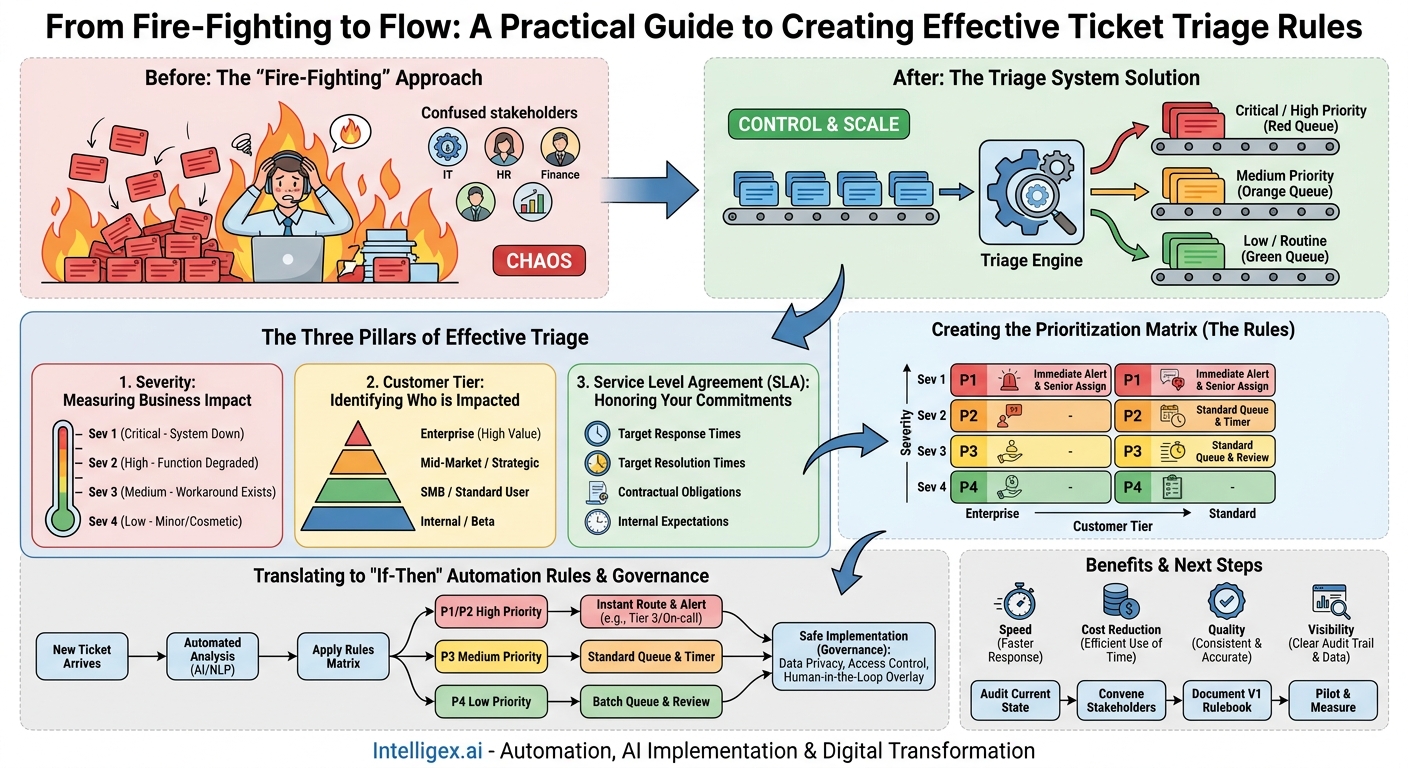
Every department feels the pressure of incoming requests. For IT and Operations, it’s a flood of support tickets. For HR, it’s a mix of payroll questions and onboarding tasks. For Finance, it’s urgent payment approvals and routine expense reports. Without a system, the default response is to tackle whatever is loudest or most recent, leaving critical issues to fester while minor queries get immediate attention. This reactive, “fire-fighting” approach doesn’t scale. It burns out your team, frustrates your stakeholders, and quietly erodes business performance.
The solution is not to work harder, but to work smarter by establishing clear ticket triage rules. A well-defined triage system is the foundation of an efficient, scalable, and high-performing service delivery model. It provides a consistent framework for prioritizing work based on business impact, ensuring that your team’s limited resources are always focused on what matters most. By formalizing this process, you move from chaos to control, replacing guesswork with a predictable, data-driven workflow that benefits the entire organization.
The Three Pillars of Effective Triage
At its core, ticket triage is a decision-making engine. To build one that works, you need to feed it the right information. Three core pillars provide the context needed to make consistently good prioritization decisions: Severity, Customer Tier, and Service Level Agreement (SLA). Understanding and defining each is the first step toward building a robust system.
1. Severity: Measuring Business Impact
Severity defines the impact of an issue on business operations. It answers the question, “How badly does this hurt us right now?” A high-severity issue causes a significant disruption, like a system-wide outage or a critical security vulnerability. A low-severity issue is an inconvenience, such as a typo on a web page or a request for a feature enhancement. Defining these levels objectively is crucial. Without clear definitions, one person’s critical issue is another’s minor annoyance, leading to inconsistent prioritization.
2. Customer Tier: Identifying Who is Impacted
Not all users or requests carry the same weight. A “customer” can be an internal employee, a strategic partner, or an external paying client. The customer tier helps you understand the business context of the person making the request. For example, an issue affecting a top-tier enterprise client with a multi-million dollar contract inherently carries more business risk than the same issue affecting a user on a free trial. Similarly, a request from the CFO during a financial audit is more urgent than a similar request from an intern. This tiering system ensures that high-value relationships are protected.
3. Service Level Agreement (SLA): Honoring Your Commitments
An SLA is a formal commitment that defines the expected level of service, particularly the timelines for response and resolution. For external customers, SLAs are often part of a contract. For internal teams (like IT or HR supporting other departments), they set clear expectations for service delivery. SLAs are not just suggestions; they are measurable promises. A triage system must incorporate SLA targets directly into its logic to avoid contractual penalties, maintain internal trust, and ensure commitments are met consistently.
Defining Your Severity Levels: A Practical Framework
Vague severity levels are a primary cause of triage failure. To be effective, your definitions must be specific, objective, and understood by everyone, from the person submitting the ticket to the agent resolving it. A four-level system is a common and effective starting point.
Here is a sample framework you can adapt for different business functions:
Severity 1 (Critical)
- Definition: A critical business process is stopped, or a system-wide failure is occurring. There is no workaround, resulting in significant revenue loss, security breach, or operational standstill.
- IT Example: The entire e-commerce site is down, and customers cannot place orders.
- Finance Example: The payroll processing system has failed two days before payday, preventing payments from being issued.
- HR Example: The access badge system is offline, preventing all employees from entering the building.
- Required Action: All-hands-on-deck response. Immediate escalation to on-call personnel and leadership notification.
Severity 2 (High)
- Definition: A core business function is severely degraded. A workaround may exist, but it is difficult or inefficient. The issue has a high impact on a significant number of users or a high-value customer.
- IT Example: The checkout process on the e-commerce site is failing for 30% of users, but others can complete purchases.
- Finance Example: The accounts payable system cannot process invoices from a major supplier, risking late payment fees and damaging the relationship.
- Marketing Example: The lead capture form on a major campaign landing page is broken.
- Required Action: Urgent response required within the hour. Assigned to a senior team member or specialist queue.
Severity 3 (Medium)
- Definition: A non-critical feature is impaired, or a limited number of users are affected. A reasonable workaround is available. The issue has a minor impact on business operations.
- IT Example: A user is unable to reset their password using the self-service portal but can get it reset by contacting the help desk.
- Supply Chain Example: The reporting dashboard for warehouse inventory is loading slowly, but the data is still accessible.
- Sales Example: A contact record in the CRM has outdated information that needs manual correction.
- Required Action: Addressed within the business day as part of the standard workflow.
Severity 4 (Low)
- Definition: A minor issue with no significant impact on productivity or service. This includes cosmetic issues, general inquiries, or requests for information.
- IT Example: A typo exists on an internal knowledge base article.
- HR Example: An employee has a question about the holiday schedule for next year.
- Marketing Example: A request to change the color of a button on a non-critical web page.
- Required Action: Handled when resources are available; may be batched with other low-priority tasks.
Segmenting Customers and Users for Prioritization
Once you know the “what” (severity), you need to define the “who” (customer tier). This ensures that you prioritize not just based on the technical or operational impact of an issue, but also on its impact on business relationships and revenue. Your segmentation model should be simple enough to be easily applied but detailed enough to capture true business value.
Common segmentation models include:
- By Contract Value: For sales and support teams, this is often the most direct method. Tiers like Enterprise, Mid-Market, and SMB are common. A ticket from an enterprise client with a high annual contract value (ACV) would automatically receive a higher priority than a similar ticket from a small business client.
- By Business Unit (Internal): For internal service teams like IT and HR, segmentation might be based on department function. For example, a request from the Sales team during the last week of the quarter or from the Finance team during month-end close might be prioritized higher.
- By User Role: Differentiating between an administrator and a standard end-user can also be a useful data point. An admin being unable to manage users for their entire company is a more significant problem than a single end-user experiencing a minor UI glitch.
- By Strategic Importance: Some customers may not have the highest contract value but are critical for other reasons. They could be a strategic partner, a beta tester for a new product, or a reference customer in a new market. These accounts should be flagged for elevated priority.
Checklist for Defining Your Customer Tiers
When creating your customer tiers, discuss the following with stakeholders from Sales, a href=”https://www.salesforce.com/”>Salesforce, and Operations:
- What are our primary revenue segments? (e.g., Enterprise, Commercial)
- Do we have SLAs that differ by customer plan or contract?
- Are there any specific customers designated as “strategic” by leadership?
- For internal support, which departments’ functions are most critical to real-time operations? (e.g., Finance, Operations vs. R&D)
- How will we tag a user or ticket with the correct tier in our ticketing system (e.g., Zendesk, Jira Service Management)? Can this be automated based on the user’s email domain or CRM data?
Translating SLAs into Actionable Triage Rules
With severity levels and customer tiers defined, the final step is to combine them with your SLAs to create a clear, actionable set of rules. This is where the theory becomes practice. Your goal is to create a prioritization matrix that leaves no room for ambiguity. An agent should be able to look at a new ticket and, based on its severity and customer tier, know exactly what the expected first response time is and who to assign it to.
Here is a step-by-step process for creating your first set of triage rules:
- Map Your SLA Targets: Review your contracts and internal service goals. Document the specific time-to-first-response (TTFR) and time-to-resolution (TTR) targets for each customer tier and severity level. For example, an Enterprise customer’s Sev 1 ticket might have a 15-minute TTFR, while a Standard customer’s Sev 3 ticket has a 24-hour TTFR.
- Create a Prioritization Matrix: Build a simple table with Severity levels as rows and Customer Tiers as columns. Each cell in the table will represent a specific priority level (e.g., P1, P2, P3, P4). For example, a Sev 1 from an Enterprise customer is always a P1. A Sev 3 from a Standard customer might be a P3.
- Define “If-Then” Rules for Action: For each priority level, write a clear, simple rule that dictates the required action. These rules should be implemented directly into your ticketing system’s workflow automation.
- Example Rule 1: IF Priority is P1, THEN assign to the “Tier 3 Engineering” queue and send an SMS alert to the on-call manager.
- Example Rule 2: IF Priority is P2, THEN assign to the “Senior Support” group and set the SLA timer to 1 hour.
- Example Rule 3: IF Priority is P4, THEN assign to the “General Queue” and categorize for review at the end of the day.
- Document and Train: Publish this matrix and the associated rules in a central, easily accessible location, like your internal knowledge base. Train all team members on how to use it. Consistency is key, and it can only be achieved if everyone is working from the same playbook.
Automating Triage: Where to Start and What to Measure
Manually triaging every single ticket is not scalable. The real power of a well-defined rulebook is that it provides the logic needed for automation. Automation reduces the manual, repetitive work of reading, categorizing, and routing tickets, freeing up your team to focus on actually solving problems.
You can start with simple, rule-based automation available in most modern helpdesk platforms like Jira or Zendesk. This type of automation uses keywords, email addresses, or custom form fields to route tickets. For example, a rule could state: “If the subject line contains the word ‘Invoice’, assign the ticket to the Finance department.”
The next level is intelligent automation, which uses AI models to understand the content and intent of a ticket. Instead of relying on rigid keywords, Natural Language Processing (NLP) can interpret the user’s message to automatically determine sentiment, urgency, and category. For example, it can distinguish between an angry customer reporting a system outage (high urgency) and a calm customer asking a question about a feature (low urgency), even if they both use the word “down.”
The business value of automation is clear:
- Speed: Triage happens in seconds, not hours. This dramatically improves first response times and ensures critical issues are never missed.
- Cost Reduction: It reduces the hours your team spends on administrative tasks, allowing them to handle a higher volume of value-added work without increasing headcount.
- Quality and Consistency: Automation applies your rules perfectly every time, removing human error and bias from the triage process.
- Visibility: Every automated action is logged, providing a clear audit trail and generating valuable data on ticket trends and team performance.
To measure the success of your automation efforts, track these key metrics:
- Time to First Response (TTFR): This should decrease significantly as manual triage is eliminated.
- Mis-routing Rate: How often does a ticket need to be re-assigned after the initial automated routing? A low rate indicates your rules are accurate.
- Agent Time Spent on Triage: Survey your team or use time-tracking tools to measure the reduction in manual triage effort.
- SLA Achievement Rate: As triage becomes faster and more accurate, your team should meet its SLA targets more consistently.
Governance and Safe Implementation of Automated Triage
As you introduce automation, especially AI-driven tools, it’s essential to implement it safely and responsibly. Good governance ensures your system is effective, fair, and secure.
First, address data privacy. If your automation model learns from past tickets, ensure that any Personally Identifiable Information (PII) is properly anonymized or redacted before being used for training. This protects both your customers’ and your employees’ data and helps with compliance with regulations like GDPR.
Second, establish clear access controls. Not everyone on the team should be able to create or modify triage rules. Limit this capability to team leads or system administrators to prevent accidental changes that could disrupt your entire workflow. All changes to the rule set should be documented and communicated.
Finally, always maintain a “human in the loop.” Automation is a powerful tool for assistance, not a complete replacement for human judgment. There must be a clear and easy process for agents to override an incorrect automated classification or to escalate a ticket that the system may have misunderstood. For your most critical issues (Severity 1) or most important customers (Enterprise Tier), you may decide that the final routing decision always requires a quick human review. This balanced approach gives you the speed of automation with the safety net of human oversight.
Next Steps: Building Your Triage Rulebook
Moving from chaotic, reactive support to a structured, efficient system is a journey, but it starts with a few deliberate steps. You don’t need a complex AI platform on day one. You need a clear, documented process.
Here is your action plan:
- Audit Your Current State: For one week, manually track where your team’s time is going. What types of requests are most common? Where are the biggest bottlenecks in your current process?
- Convene Stakeholders: Schedule a workshop with leaders from the key departments you support or that support you (e.g., Sales, Operations, IT). Use this meeting to collaboratively define your initial severity levels and customer tiers.
- Document Your V1 Rulebook: Using the matrix format, document your first set of triage rules based on the agreed-upon definitions. Keep it simple. You can always add more complexity later.
- Identify a Pilot: Choose one ticket category or request type to test your new rules. Configure your ticketing system, like the one from Atlassian, to automate the routing for just that category and measure the results.
By building this foundation, you create a system that not only makes your team more effective today but also provides the logical framework needed to scale and adopt more advanced automation in the future.
Your Next Read:
Get a FREE
Proof of Concept
& Consultation
No Cost, No Commitment!
