

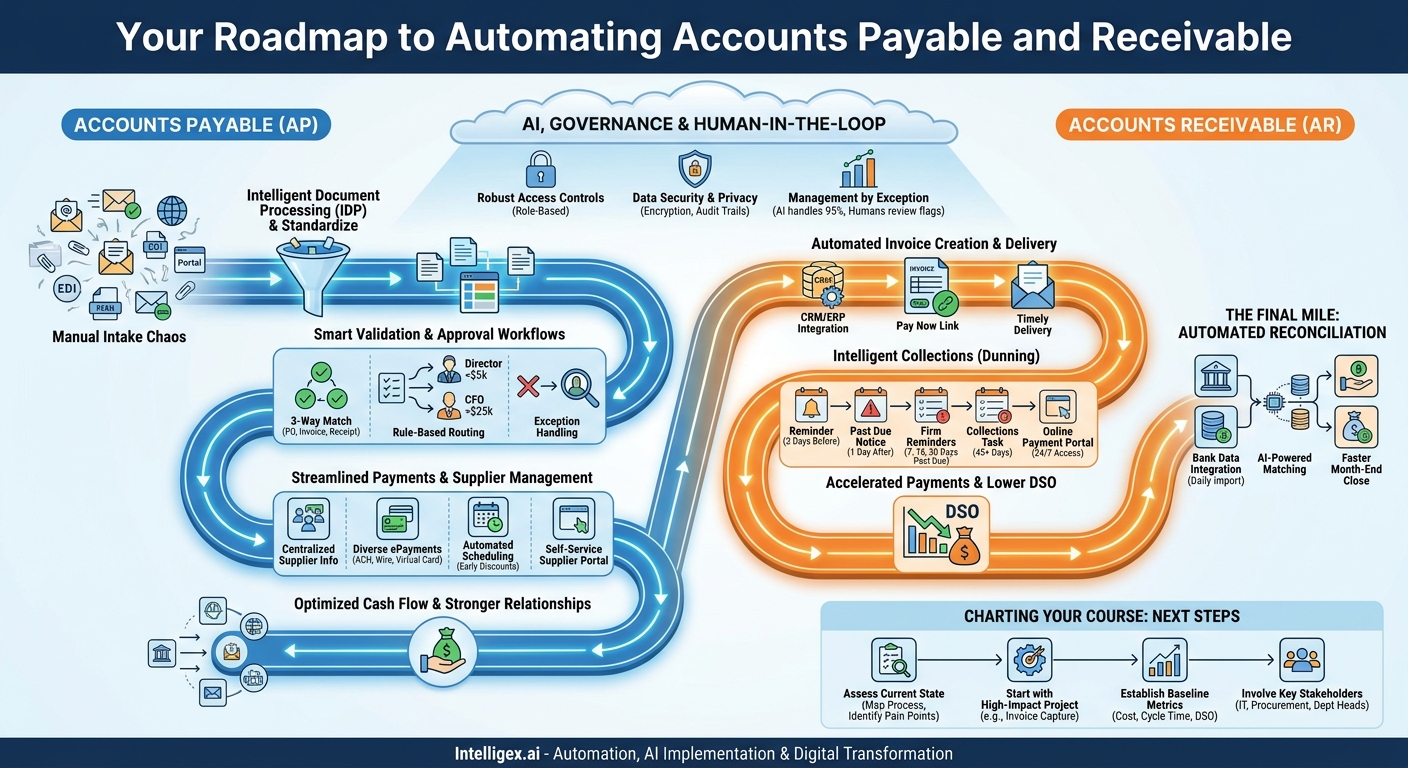
Manual accounts payable (AP) and accounts receivable (AR) processes are a quiet drain on company resources. They consume valuable time, introduce costly errors, and obscure the real-time financial data leaders need to make strategic decisions. Chasing approvals, keying in invoice data, and manually reconciling statements are low-value tasks that prevent your finance team from focusing on what matters most: optimizing cash flow and driving business growth. Shifting from manual to automated isn’t just about adopting new software. It’s about creating a strategic map that connects every step of the financial lifecycle, from the moment an invoice arrives to the final reconciliation.
This map provides a clear path to transforming your AP and AR operations, turning them from a cost center into a source of efficiency and intelligence. By automating these core processes, businesses can achieve significant improvements in speed, cost, data quality, visibility, and scalability, freeing up teams to perform more strategic work.
The Foundation: Standardizing Data Intake and Capture
You can’t automate what you can’t standardize. The single biggest source of friction in any AP process is the chaotic, manual-entry bottleneck at the very beginning. Invoices arrive in a flood of different formats and channels: PDFs attached to emails, physical mail, EDI streams, and supplier portal submissions. Without a unified system to capture and structure this data, your team is stuck manually transcribing information, a task that is both slow and prone to error.
The first step on your automation map is to build a consistent, reliable on-ramp for all incoming financial documents. This involves using technology to read, interpret, and digitize invoice data automatically, creating a clean, structured dataset that can flow seamlessly through the rest of your process. This is where Intelligent Document Processing (IDP) technology, an advanced form of Optical Character Recognition (OCR), becomes essential. It doesn’t just see text; it understands context, correctly identifying fields like invoice numbers, line items, and purchase order (PO) numbers regardless of the invoice layout.
A Step-by-Step Guide to Automating Intake
- Inventory Your Channels: Identify every single way an invoice enters your organization. Create a comprehensive list that includes specific email inboxes, physical mailing addresses, and any online portals. The goal is to funnel all these sources into a single, manageable stream.
- Deploy an IDP Solution: Implement a tool that can automatically monitor your designated channels (like an `[email protected]` email address). This solution should be capable of extracting key data points from any invoice format, converting unstructured PDFs and images into structured data.
- Define a Standard Data Schema: Determine the essential pieces of information you need from every invoice. This typically includes Vendor Name, Invoice Number, Invoice Date, Due Date, PO Number, Line-Item Details (description, quantity, price), and Total Amount. Your IDP tool should be configured to capture this specific schema.
- Establish a Validation Queue: No automated system is perfect. Set up a simple review queue where the system flags invoices with low-confidence data extractions or missing information. This allows a human to quickly verify the data in seconds, rather than manually typing everything from scratch.
What to Measure: Track your Invoice Processing Cycle Time (the time from invoice receipt to its entry into your financial system) and your Data Entry Error Rate. As you automate, you should see both of these metrics decrease significantly.
Intelligent Validation and Approval Workflows
Once data is captured accurately, the next challenge is getting it approved by the right person. Manual approval routing is a notorious bottleneck. Emails get lost, managers are out of office, and finance teams spend countless hours chasing signatures. This not only delays payments, harming supplier relationships, but also weakens financial controls.
Automation transforms this chaotic process into a structured, visible, and compliant workflow. By setting up predefined rules, you can ensure invoices are automatically routed, validated, and approved based on your company’s specific policies. This is where the real intelligence of the system begins to deliver value beyond simple data entry.
Key Components of an Automated Workflow
- Three-Way Matching: This is the gold standard for AP control. The system automatically compares the invoice against its corresponding purchase order and the goods receipt note. If all three documents align on item, quantity, and price, the invoice can be approved for payment without any human intervention. Any mismatch automatically flags the invoice for review.
- Rule-Based Routing: You can create simple yet powerful rules to manage the approval process. For example, an invoice for the marketing department under $5,000 might be routed directly to the Marketing Director, while an IT expenditure over $25,000 might require sequential approval from the department head and the CFO.
- Exception Handling: Define a clear, automated path for invoices that fail validation. Instead of getting stuck in limbo, a mismatched invoice is immediately routed to the procurement team to resolve the PO discrepancy, with all relevant documents attached.
Business Scenario: A facilities manager orders office supplies using an approved PO. The supplier sends the invoice, which is automatically captured and matched against the PO and the delivery receipt. Since it’s a three-way match and the amount is within the manager’s pre-approved spending limit, the system marks it as “approved for payment” instantly. The entire process takes minutes, not days, and requires zero manual touches from the AP team.
Streamlining Payments and Supplier Management
Approving an invoice is only half the battle. The final step in the AP process, payment execution, is often weighed down by inefficient methods like printing and mailing paper checks. This is not only expensive and slow but also lacks the security and visibility of electronic payments. Furthermore, constantly fielding supplier inquiries about payment status consumes a significant amount of your AP team’s time.
A modern, automated AP system centralizes payment execution and supplier communication. By providing flexible electronic payment options and a self-service portal, you can reduce costs, optimize cash flow by capturing early payment discounts, and strengthen relationships with your critical suppliers.
Checklist for Modernizing Your Payment Process
- Centralize Supplier Information: Use a secure system to manage supplier bank details and payment preferences. This avoids storing sensitive information in spreadsheets or email.
- Offer Diverse ePayment Options: Support a range of payment methods including ACH, wire transfers, and virtual cards. This allows suppliers to choose the method that works best for them and helps you reduce reliance on costly checks.
- Automate Payment Scheduling: Instead of paying invoices as soon as they are approved, schedule payments based on their due dates. This gives you better control over outgoing cash flow. The system can also automatically identify and prioritize invoices that offer a discount for early payment.
- Enable a Self-Service Supplier Portal: A portal where suppliers can submit invoices, check the status of their payments, and update their own contact information is a game-changer. It dramatically reduces the volume of emails and phone calls to your AP department, freeing them for more strategic work.
By automating the payment process, you move the AP function from a reactive paper-pusher to a strategic partner in cash flow management. The visibility gained allows for better financial forecasting and decision-making.
Accelerating Accounts Receivable and Collections
On the other side of the ledger, accounts receivable automation focuses on one primary goal: getting paid faster. Manual AR processes are a direct impediment to healthy cash flow. Creating and sending invoices by hand, tracking payments in spreadsheets, and manually following up on overdue accounts are time-intensive activities that delay revenue recognition and increase the risk of bad debt.
Automating your AR cycle ensures that invoices go out on time, customers have easy ways to pay, and your collections process is persistent and professional. This not only shortens your cash conversion cycle but also improves the customer experience.
Core Steps in AR Automation
The first step is to automate the creation and delivery of invoices. By integrating with your CRM or ERP system, invoices can be generated automatically when a sale is closed or a project milestone is reached. They can then be delivered to the customer via email with a “Pay Now” link, directing them to a secure online portal.
Next comes automated collections, often called dunning. Instead of relying on a human to remember to follow up, you can configure a sequence of communications. A typical workflow might look like this:
- A friendly reminder email is sent three days before the invoice due date.
- A “past due” notice is sent one day after the due date.
- A series of increasingly firm reminders are sent 7, 15, and 30 days past due.
- At 45 days past due, a task is automatically created for a collections specialist to make a personal phone call.
This systematic approach ensures no overdue account is forgotten and frees your team to focus only on the most difficult collection cases. Providing a customer payment portal is another key element, allowing clients to view their invoice history and make payments via ACH or credit card 24/7, removing friction from the payment process.
What to Measure: The most important metric here is Days Sales Outstanding (DSO), which measures the average number of days it takes to collect payment after a sale. A successful AR automation project will consistently lower your DSO. Also, monitor your collection effectiveness index and the percentage of overdue invoices.
The Final Mile: Automated Reconciliation
Reconciliation is the critical, often painstaking, process of ensuring the money in your bank accounts matches the money recorded in your books. The traditional month-end close process, where finance teams manually tick and tie thousands of transactions between bank statements and the general ledger, is a massive time sink and a major source of stress.
Automation eliminates this manual grind by creating a continuous, real-time reconciliation process. By directly integrating with your company’s bank accounts, the system can import transaction data daily. It then uses AI-powered algorithms to automatically match cash transactions with the corresponding invoices and payments in your AP/AR system.
For example, the system can match an incoming ACH payment of $1,501.25 to an open invoice for the same amount. More advanced AI can even handle complex scenarios, such as matching a single lump-sum deposit from a customer to multiple outstanding invoices, or correctly identifying a payment despite a minor typo in the remitter’s name. The system learns from the matches your team confirms, getting smarter and more accurate over time.
The business value is immense. It provides an accurate, up-to-the-minute view of your cash position, enabling more agile financial planning. It dramatically shortens the month-end close cycle, reducing team burnout and allowing more time for financial analysis. Finally, it creates a scalable process that can handle a growing volume of transactions without requiring a proportional increase in finance headcount.
AI, Governance, and Keeping Humans in the Loop
Automating financial processes, especially with AI, naturally raises questions about control, security, and governance. Handing over sensitive tasks to a machine requires a framework built on trust and oversight. Effective automation is not about replacing human judgment; it is about augmenting it. It handles the repetitive, high-volume tasks so your team can apply their expertise where it matters most.
A safe implementation rests on three pillars:
1. Robust Access Controls: A well-designed system uses role-based permissions to enforce separation of duties. An AP clerk might be able to enter and code invoices, but only a manager can approve payments over a certain threshold. This ensures that no single individual can control a transaction from end to end, reducing the risk of fraud.
2. Data Security and Privacy: Your AP/AR data includes sensitive information about your suppliers, customers, and internal finances. Any automation solution must use strong encryption for data both at rest and in transit. It should also help you comply with data privacy regulations by providing clear audit trails of who accessed or changed information and when.
3. A Human-in-the-Loop Model: The most effective systems operate on a principle of “management by exception.” The AI should handle 95% of standard transactions, like three-way matches and routine payment reminders. However, it must be configured to flag any exceptions, such as a price discrepancy on an invoice or a customer disputing a charge, for immediate human review. This model combines the speed and scale of automation with the critical thinking and problem-solving skills of your finance professionals.
Charting Your Course: Your Next Steps
Automating your AP and AR functions is a journey, not a single event. The key is to start with a clear map of where you are and where you want to go. Trying to boil the ocean by implementing a massive, all-encompassing system at once often leads to failure. A more pragmatic, phased approach delivers value quickly and builds momentum for broader transformation.
Here is a simple action plan to get started:
- Assess Your Current State: Before you can improve your process, you must understand it. Visually map out every step, from how an invoice is received to how a payment is reconciled. Talk to the people who do the work every day and identify their biggest pain points and the most significant bottlenecks.
- Start with a High-Impact Project: Don’t try to fix everything at once. Pick one area that promises a quick and visible win. For many companies, this is automating invoice data capture. Eliminating manual data entry provides immediate time savings and improves data quality, creating a solid foundation for all subsequent automation.
- Establish Your Baseline Metrics: You can’t manage what you don’t measure. Before you begin, calculate your current performance on key metrics like cost per invoice, invoice cycle time, and DSO. This baseline will be crucial for demonstrating the return on investment of your automation project.
- Involve Key Stakeholders Early: A successful finance transformation requires buy-in from across the business. Engage IT to discuss system integration, Procurement to align on supplier management, and department heads to map out approval workflows. Collaboration ensures the solution you build works for everyone.
By following this map, you can methodically transform your AP and AR processes from manual burdens into automated, intelligent engines that support financial health and strategic growth.
Your Next Read:
Get a FREE
Proof of Concept
& Consultation
No Cost, No Commitment!
