

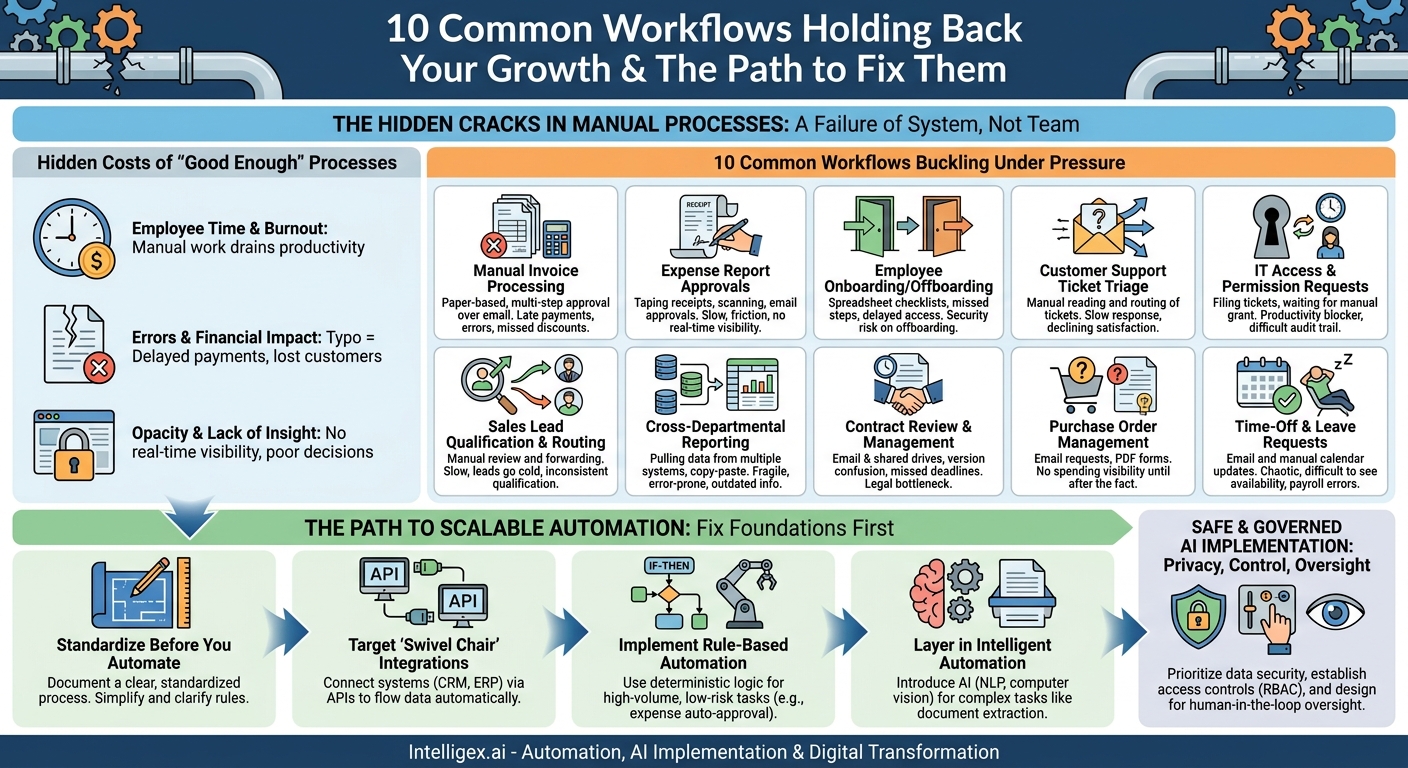
Growth is a universal business goal, but it often exposes the hidden cracks in our internal operations. The manual processes and clever workarounds that served a team of ten can quickly become bottlenecks for a team of one hundred. When communication happens through email chains and data lives in disconnected spreadsheets, every new customer, employee, or transaction adds a disproportionate amount of administrative weight. This isn’t a failure of your team. It’s a failure of the system. The good news is that these breaking points are predictable, and fixing them is the foundation of sustainable growth.
Identifying and redesigning these fragile workflows does more than just save time. It builds a resilient operational backbone for your company, one that supports scale instead of resisting it. By moving from manual effort to automated systems, you unlock powerful business value: faster execution, lower operational costs, higher quality outputs, and clear visibility into your operations. This is about transforming your processes from liabilities that drain resources into assets that drive growth.
The Hidden Costs of “Good Enough” Processes
Workflows that rely on manual intervention carry costs that rarely appear on a balance sheet but constantly drag on performance. The most obvious cost is employee time. When skilled professionals spend their days copying data between applications, chasing approvals, or correcting manual entry errors, their true value is lost. This administrative burden directly impacts productivity and can be a significant source of employee frustration and burnout.
Beyond payroll, the financial impact multiplies. Manual processes are inherently prone to error. A single typo in an invoice can lead to delayed payments, damaged vendor relationships, and hours of work for your finance team to reconcile the mistake. In customer support, a ticket routed to the wrong agent creates delays and frustration, directly impacting customer satisfaction and retention. These small, recurring failures add up to significant costs and reputational damage over time.
Finally, manual workflows create opacity. When critical business information is trapped in individual email inboxes or dozens of separate spreadsheets, leaders have no real-time visibility into the health of the business. You can’t manage what you can’t measure. This lack of insight makes it impossible to spot trends, forecast accurately, or make agile, data-driven decisions. The cost isn’t just inefficiency, it’s a loss of strategic control.
10 Common Workflows That Buckle Under Pressure
While every business is unique, the points of failure are often remarkably similar. These ten workflows, spread across key business functions, are notorious for breaking as transaction volume and organizational complexity increase. Recognizing them in your own operations is the first step toward building a more scalable model.
1. Manual Invoice Processing
At a small scale, manually entering invoice data into an accounting system is manageable. As your company grows, the accounts payable (AP) team gets buried in paper or PDF invoices. Each one requires manual data entry, validation against purchase orders, and a multi-step approval process often conducted over email. This leads to late payments, missed early payment discounts, and a high risk of human error.
2. Expense Report Approvals
The classic process of taping receipts to a form, scanning it, and emailing it to a manager is a significant time sink. It creates friction for employees, delays reimbursement, and offers no real-time visibility into corporate spending. For finance teams, the manual verification of each line item against company policy is tedious and doesn’t scale with a growing headcount.
3. Employee Onboarding and Offboarding
Onboarding a new employee involves dozens of coordinated tasks across HR, IT, and Finance. Using a spreadsheet as a master checklist is a recipe for disaster. Steps get missed, equipment isn’t ready on day one, and new hires are left with a disorganized first impression. Offboarding is even riskier, as manual processes can fail to revoke system access in a timely manner, creating a serious security vulnerability.
4. Customer Support Ticket Triage
When support requests arrive, someone often has to read each one to understand its priority, category, and which team or agent should handle it. This manual triage creates a delay before the customer’s issue is even addressed. As ticket volume grows, this initial bottleneck gets worse, leading to slower response times and declining customer satisfaction scores.
5. IT Access and Permission Requests
An employee needs access to a new software tool or a shared folder. They file an IT ticket. The ticket waits in a queue until a technician can manually grant the permissions. This process is slow for the employee, repetitive for the IT team, and creates an audit trail that is difficult to manage. For fast-moving teams, waiting days for access can be a major productivity blocker.
6. Sales Lead Qualification and Routing
When leads come in from your website, speed is critical. A workflow where a marketing manager manually reviews each lead and forwards it to the appropriate sales representative is too slow. High-value leads can go cold while waiting for assignment, and inconsistent qualification criteria mean the sales team wastes time on prospects who are not a good fit.
7. Cross-Departmental Reporting
The weekly or monthly ritual of pulling data from five different systems (like a CRM, ERP, and marketing platform), pasting it into a spreadsheet, and manually creating charts is a fragile, time-consuming process. It’s highly susceptible to copy-paste errors, and the final report is out of date the moment it is created. This prevents leaders from getting a real-time, consolidated view of business performance.
8. Contract Review and Management
Relying on email and shared drives to manage contracts creates immense risk. Versions get confused, key deadlines for renewals or terminations are tracked on individual calendars (or not at all), and the legal team becomes a bottleneck for every new agreement. Without a central repository, even finding an active contract can become a major challenge.
9. Purchase Order Management
When employees request purchases via email or by filling out a PDF, there is little to no visibility into company-wide spending until after the fact. The approval process is opaque, it’s difficult to enforce budgets, and the finance team spends countless hours matching invoices to purchase orders that were poorly documented in the first place.
10. Time-Off and Leave Requests
Managing leave requests through email and manually updating a shared calendar is chaotic. It makes it difficult for managers to see team availability, creates potential for payroll errors, and provides no easy way to track leave balances or ensure compliance with company and local regulations.
How to Diagnose Your Own Breaking Workflows
Identifying your most critical bottlenecks doesn’t require complex analysis. It starts with observation and conversation. By systematically mapping your processes and measuring their performance, you can move from anecdotal complaints to a data-backed case for improvement. Follow these steps to find the processes causing the most pain.
- Map the Current State: Choose one process you suspect is inefficient, like invoice processing. Sit down with the people who do the work every day and physically draw out every single step on a whiteboard or in a simple diagram. Note every decision point, every system they touch, and every time they have to wait for someone else. Be brutally honest about how it actually works, not how it’s supposed to work.
- Identify the Friction Points: Look at your map and ask critical questions. Where are the handoffs between people or teams? How much time is spent waiting for an approval? Where does information get manually re-entered from one system to another? Where do the most common errors occur? Circle these areas on your map. These are your bottlenecks.
- Quantify the Pain: Attach real metrics to the friction points you identified. You don’t need perfect data to start. Measure things like:
- Cycle Time: How long does it take from the start of the process to the end? (e.g., from when an invoice is received to when it is paid).
- Touch Time: How much of that cycle time is spent on active, manual work versus waiting?
- Error Rate: What percentage of transactions require rework or correction?
- Volume: How many times is this process executed per week or month?
- Prioritize Based on Impact: You can’t fix everything at once. Score each broken workflow on two simple axes: business impact (how much value would fixing it create?) and effort to fix (how difficult would it be to implement a change?). Start with the high-impact, low-effort opportunities. These “quick wins” build momentum and demonstrate the value of process automation.
The Path to Scalable Automation
Once you’ve identified a target workflow, the goal isn’t just to make the old process faster. It’s to fundamentally redesign it for efficiency and scale. This involves a layered approach, starting with a solid foundation and progressively adding more sophisticated automation capabilities. Resist the urge to jump straight to complex AI solutions. Lasting improvement comes from getting the basics right first.
Use this checklist as a guide for your implementation strategy:
- Standardize Before You Automate. You cannot automate chaos. Before you write a single line of code or buy any software, document a clear, standardized process. Eliminate unnecessary steps and clarify decision-making rules. A well-defined manual process is the essential blueprint for a successful automation.
- Target “Swivel Chair” Integrations. Look for places where your team members read information from one screen and type it into another. These are prime candidates for API (Application Programming Interface) integrations. Connecting systems like your CRM (such as Salesforce) and your ERP directly allows data to flow automatically, eliminating manual entry and reducing errors.
- Implement Rule-Based Automation. Start with simple, deterministic logic. For example, in expense reporting, you can set a rule: “IF a report is under $100 AND it is from a direct manager’s budget, THEN automatically approve it.” This handles the high-volume, low-risk tasks, freeing up humans to focus on the exceptions.
- Layer in Intelligent Automation. Once your standardized, integrated, and rule-based system is running, you can introduce AI for more complex tasks. This could involve using Natural Language Processing (NLP) to read and categorize incoming support emails or using computer vision to extract data from unstructured documents like invoices and contracts.
Safe and Governed AI Implementation
As you introduce more advanced automation and AI into your workflows, establishing clear governance is not optional, it’s essential. Without proper guardrails, you risk creating data privacy issues, security vulnerabilities, and “black box” systems that no one understands or trusts. A safe implementation is built on three pillars: privacy, control, and oversight.
First, prioritize data privacy and security. Never feed sensitive personal or customer information into public, third-party AI models without explicit data processing agreements and a thorough security review. Ensure any automation platform you use adheres to standards like GDPR and has robust security controls. All data, whether at rest or in transit, should be encrypted.
Second, establish clear access controls. Not everyone in the company should be able to create or modify an automated workflow that moves financial data or provisions system access. Use role-based access control (RBAC) to define who can build, test, deploy, and manage automations. This prevents unauthorized changes and creates a clear line of ownership.
Finally, always design for human oversight. For critical decisions, especially those involving large sums of money or significant customer impact, use a “human-in-the-loop” model. The AI can analyze the data and provide a recommendation, but a person makes the final approval. For example, an AI might flag a contract clause as non-standard, but it is a lawyer who decides how to proceed. Maintain detailed logs of all automated actions to ensure you have a clear audit trail for troubleshooting and compliance.
Your Next Steps: Building a Resilient Foundation
Understanding which workflows are holding you back is the first step toward building a more efficient and scalable organization. The journey from manual toil to intelligent automation is incremental, but the rewards in speed, cost savings, and quality are substantial. Don’t let the scope of the challenge lead to inaction.
Start today with a simple, focused plan:
- Pick one process. Review the list of ten common scale-breakers. Which one causes the most frequent headaches for your team? Choose that one as your pilot project.
- Talk to the team. Schedule a 30-minute conversation with the people who live in that process every day. Ask them what works, what doesn’t, and what they would change if they could. Their insights are invaluable.
- Identify one small improvement. You don’t need to automate the entire workflow at once. Find one manual step, one point of friction, that you can simplify or automate. A small win builds the confidence and business case for further investment.
Building scalable operations is a continuous process of improvement, not a one-time project. By focusing on the foundational workflows that connect your business, you create a powerful engine for growth that gets stronger, not more fragile, with every new success.
Your Next Read:
Category:
Get a FREE
Proof of Concept
& Consultation
No Cost, No Commitment!
