

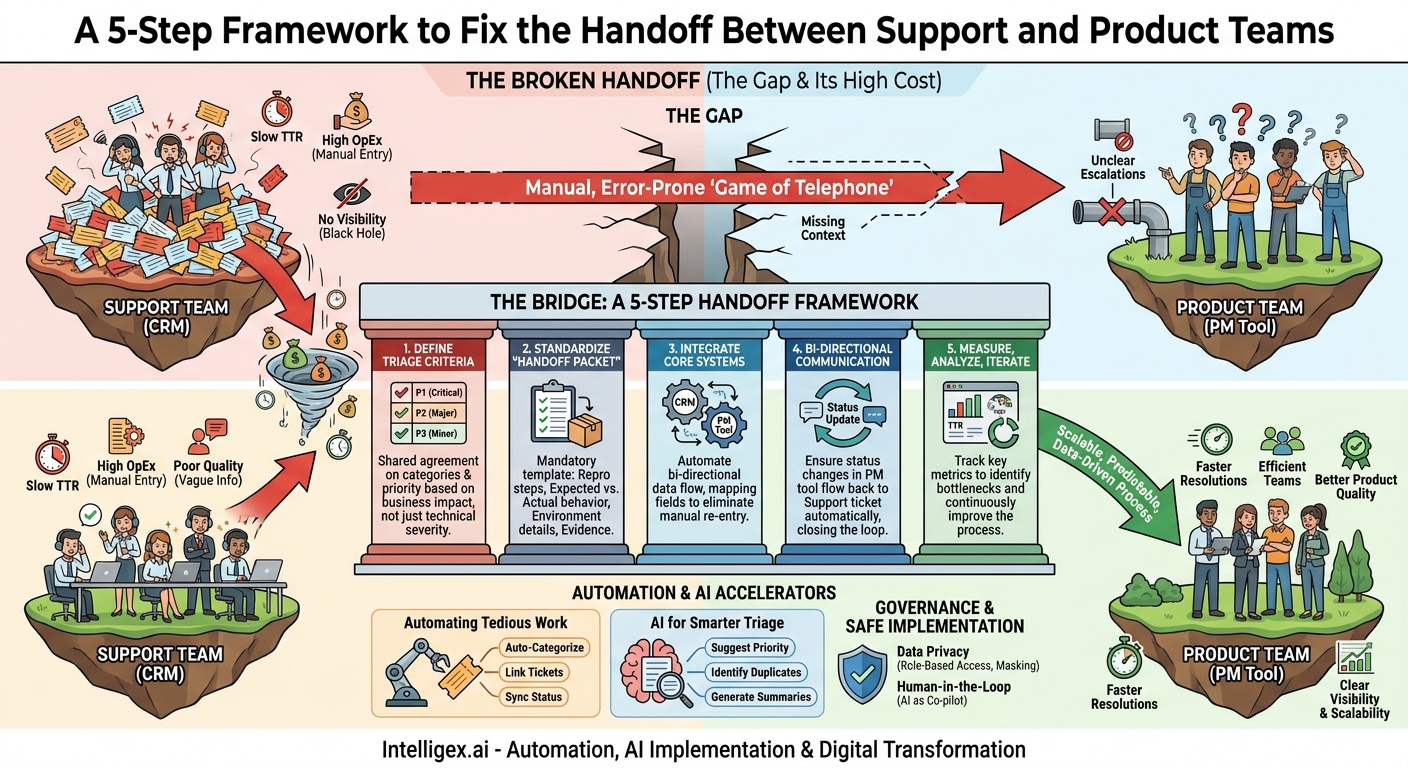
Every organization has it: the gap. It’s the space between a customer reporting a problem and the product team understanding it well enough to act. This isn’t just an operational snag; it’s a hidden factory of waste that silently drains resources, slows innovation, and erodes customer trust. When the handoff of a customer issue from a support team to a product or engineering team is broken, the entire business feels the ripple effects. The process becomes a manual, error-prone game of telephone, with agents, engineers, and customers all losing.
Fixing this handoff isn’t about buying a single piece of software. It’s about building a structured, repeatable, and scalable bridge between your customer-facing and product-building teams. This bridge is built on clear processes, smart tool integration, and a shared understanding of what success looks like. The result is faster resolutions, more efficient teams, and a product that evolves based on clear, aggregated customer feedback instead of disjointed anecdotes.
The High Cost of a Broken Handoff
A clunky, undefined process for escalating issues is more than an annoyance. It directly impacts your bottom line and competitive agility across several key areas. Understanding these costs is the first step toward justifying the investment in a better system.
Speed and Agility
In a broken system, valuable time is lost at every step. Support agents spend hours chasing updates, while engineers waste cycles trying to reproduce vaguely described bugs. This drag on the system directly slows your Time-to-Resolution (TTR), a critical metric for customer satisfaction. Furthermore, when the product team is constantly distracted by poorly vetted escalations, their core work of innovation and feature development stalls. Your product roadmap slows down, and you lose the ability to respond quickly to market changes or competitive threats.
Operational Costs
The financial drain is significant. Consider the labor costs associated with this inefficiency. An engineer earning a high salary might spend hours each week just trying to decipher incomplete support tickets. A support agent’s time is consumed by repetitive manual data entry, copying information from a CRM into a project management tool. These “transactional costs” add up quickly. It also leads to duplicated effort, where multiple engineers unknowingly investigate the same underlying issue reported through different channels because there is no single source of truth.
Product and Service Quality
When the feedback loop is broken, product quality stagnates. Without a structured way to aggregate and analyze incoming issues, product managers can’t see the forest for the trees. They might miss a systemic bug affecting a large user segment because it’s reported as a series of one-off incidents. At the same time, the quality of customer service declines. When agents have no visibility into the status of an escalated ticket, they can only offer vague platitudes to frustrated customers, leading to churn and reputational damage.
Visibility and Scalability
Perhaps the most dangerous aspect of a poor handoff is the lack of visibility. Without a connected system, leadership has no accurate way to measure the volume, type, or business impact of customer-reported issues. You cannot manage what you cannot measure. This lack of data makes strategic planning impossible. As your company grows, this manual, ad-hoc process simply collapses. It cannot scale with an increasing volume of customers, support tickets, and product complexity, creating an ever-widening gap between your customers and the teams building the product for them.
Diagnosing the Disconnect: Common Failure Points
Before you can build a better process, you need to identify where it’s currently failing. Most handoff problems stem from a few common root causes. See if any of these sound familiar within your own operations, whether you’re in IT, Finance, or directly in a software team.
Data Gaps and Inconsistent Information
The most frequent point of failure is the information itself. A support agent, measured on speed, quickly escalates a ticket with a title like “Software is broken” and a one-line description. The engineering team receives this, has no idea where to start, and immediately sends it back, requesting more information. This back-and-forth can continue for days. The ticket lacks critical context, such as:
- Specific error messages or codes.
- Steps to reliably reproduce the problem.
- The user’s environment (e.g., browser, operating system, app version).
- A clear definition of expected versus actual behavior.
Without a standardized template for this information, every escalation is a gamble.
Tool and Departmental Silos
Technology often reinforces organizational divides. Your support team lives in a CRM like Salesforce Service Cloud or Zendesk. Your product and engineering teams work out of a project management system like Jira or Asana. The “integration” between them is a human swivel-chairing between browser tabs, manually copying and pasting data. This is not only inefficient but also prone to human error. Critically, it’s a one-way street. Information might get pushed to engineering, but status updates rarely flow back automatically, leaving the support team in the dark.
Process Ambiguity and Lack of Ownership
Who decides if an issue is a bug, a feature request, or a simple misunderstanding that requires better user documentation? What is the severity of a bug? If these rules are not clearly defined and agreed upon by both Support and Product, chaos ensues. Support may escalate every minor inconvenience, overwhelming the product team. Conversely, they might be too hesitant to escalate, leaving significant issues unresolved. This ambiguity leads to finger-pointing and a breakdown of trust between teams, with each side feeling the other doesn’t understand their priorities.
The Communication Black Hole
This is the single biggest frustration for both support agents and customers. A ticket is escalated, and then… silence. The support agent has no visibility into its status. Is it in the backlog? Is someone working on it? Has it been closed? Without a feedback loop, the agent cannot provide a meaningful update to the customer. This lack of communication forces agents to spend their time chasing internal updates instead of helping other customers, and it makes your company appear disorganized and unresponsive.
Building the Bridge: A 5-Step Handoff Framework
Creating a seamless handoff process requires a deliberate, structured approach. It’s about designing a system that ensures the right information gets to the right people at the right time, with clear ownership at every stage. This framework can be adapted to any functional area, from an HR team escalating a payroll system bug to the IT vendor, to a marketing team reporting an issue with their automation platform.
-
Define and Document Triage Criteria
Before any ticket is escalated, there must be a shared understanding of what warrants an escalation. Work with stakeholders from Support, Product, and Engineering to create a simple, clear matrix. This should define categories (e.g., Critical Bug, Minor Bug, Feature Request, Data Fix Request) and priority levels (e.g., P1-P4). The criteria should be based on business impact, not just technical severity. For example, a “P1 – Critical” issue could be defined as one that causes data loss, a full system outage, or impacts a company’s ability to process financial transactions. Document these definitions in a shared, accessible location. -
Standardize the “Handoff Packet”
Once an issue is deemed worthy of escalation, the information provided must be complete and consistent. Create a mandatory checklist or template that support agents must complete before handoff. This “packet” of information is the single most important element in reducing back-and-forth. It removes guesswork and ensures the receiving product team has everything they need to begin their investigation immediately. We’ll detail the contents of this packet in the next section. -
Integrate Your Core Systems
Manual data entry is the enemy of speed and accuracy. The bridge between your support platform and your product team’s project management tool must be automated. Modern platforms often have native integrations that can be configured to create a new issue in one system when a ticket is escalated in another. For more complex workflows, integration platforms or custom middleware can be used. The key is to map fields correctly so that all the information from your handoff packet is transferred automatically, creating a new, properly formatted task for the product team. -
Establish a Bi-Directional Communication Protocol
Integration is not a one-way street. When an engineer updates the status of their task (e.g., from “In Progress” to “Done”), that status change must flow back to the original support ticket automatically. This closes the communication black hole. The support agent can now see the real-time status without leaving their own tool and can proactively update the customer. This can be supplemented with process-based communication, such as a weekly “bug triage” meeting between support leads and product managers to discuss priorities for the most critical open issues. -
Measure, Analyze, and Iterate
A process is only as good as its results. Define a few key metrics to monitor the health of your handoff process. These could include:- Time-to-Resolution (TTR): Does the new process lead to faster overall resolution for customers?
- Rejection Rate: How many escalations are sent back to support for more information? This should trend down toward zero.
- Engineer Time on Ticket Triage: Survey or track the time engineers spend on non-coding activities related to understanding escalated issues.
- Agent Time on Manual Escalation: Measure the time saved from eliminating manual copy-paste and status check-ins.
Review these metrics quarterly and use them to identify new bottlenecks and opportunities for improvement.
The Essential Handoff “Packet”: A Checklist
A standardized information packet is the cornerstone of an efficient handoff. It transforms a chaotic process into a predictable one. While the specifics may vary based on your product or service, a robust handoff checklist ensures nothing critical is missed. Before any issue is sent from Support to Product, it must contain the following:
- Clear, Problem-Oriented Title: The title should describe the user’s problem, not the technical symptom. Instead of “API Error 500,” use “Users Unable to Save Changes on a Customer Profile Page.”
- Link to Original Customer Conversation(s): Provide a direct link to the support ticket(s) in the CRM. This gives engineers context and access to the raw conversation if needed, while respecting data access controls.
- Detailed Reproduction Steps: A numbered, step-by-step list of the exact actions a user took to trigger the issue. Be explicit. For example: “1. Log in as user X. 2. Navigate to the Reports dashboard. 3. Click the ‘Export’ button.”
- Expected vs. Actual Behavior: Clearly state what should have happened and what actually happened. For instance, “Expected: A CSV file downloads. Actual: An error message ‘Permission Denied’ appears.”
- User and Environment Details: Include relevant, non-sensitive user identifiers, the user’s role or permission level, and technical environment details like their web browser version, operating system, and the version of your application they are using.
- Supporting Evidence: Attach or link to screenshots, screen recordings (videos are incredibly helpful), and any relevant log files or error messages copied verbatim.
- Business Impact Assessment: This is crucial for prioritization. Provide context on the scale of the issue. Is it affecting one user, a specific segment of high-value customers, or all users? Is it blocking a critical business process like invoicing or user onboarding?
The Role of Automation and AI in Streamlining the Flow
Once you have a solid process framework, technology can act as a powerful accelerator. Automation and AI are not about replacing humans but about augmenting their capabilities, freeing them from repetitive, low-value tasks so they can focus on complex problem-solving and customer interaction.
Automating the Tedious Work
Simple rules-based automation can eliminate much of the manual labor in the handoff process. For example, you can configure workflows that automatically:
- Categorize and Route: Use keywords in a customer’s message (e.g., “invoice,” “login,” “API”) to automatically tag the ticket and assign it to the correct support specialist group.
- Create Linked Tickets: When a support agent clicks an “Escalate to Engineering” button, the system can automatically create a corresponding task in Jira, pre-populating it with all the standard fields from the support ticket.
- Sync Statuses: As mentioned earlier, automatically update the support ticket with a private note when the linked engineering task changes status. This keeps the agent informed without any manual effort.
Applying AI for Smarter Triage and Summarization
Artificial intelligence can take this a step further by handling more nuanced tasks. Instead of just relying on keywords, AI models can analyze the sentiment and intent of a customer’s message to provide intelligent assistance.
For example, AI can be used to:
- Suggest Priority and Category: Based on the language used and by comparing the issue to historical data, an AI can suggest whether an issue is a P1 bug or a minor feature request, helping the agent make a faster, more accurate decision.
- Identify Duplicates: Before escalating, an AI can search existing engineering tasks to see if the issue has already been reported. Linking a new customer report to an existing bug investigation saves significant engineering time.
- Generate Concise Summaries: For long, complex customer conversations, a generative AI model can produce a short, neutral summary for the “handoff packet.” This saves the agent significant time in writing and ensures the engineer gets a quick, digestible overview of the problem.
Governance and Safe Implementation
Integrating systems and implementing AI introduces new considerations, especially around data security and privacy. A streamlined process should never come at the expense of responsible data handling. Building a governance framework from the start is essential for safe and effective implementation.
Data Privacy and Access Control
When you connect your support system to your product development system, you are creating a new pathway for data. It is critical to ensure that sensitive customer information, especially Personally Identifiable Information (PII), is handled appropriately.
- Role-Based Access: Not every engineer needs to see a customer’s full contact information or conversation history. Configure your integrations to pass only the necessary, sanitized information. Use the link back to the CRM as a gateway, where access can be controlled by stricter permissions.
- Data Masking: If logs or user details must be shared, use automated tools to mask or anonymize sensitive data like names, email addresses, and financial details before they are sent to the engineering environment.
Maintaining a Human in the Loop
AI should be viewed as a co-pilot, not an autopilot. Its role is to assist and inform human decision-making, not to replace it. This “human-in-the-loop” approach is crucial for maintaining accountability and quality.
For instance, an AI might suggest a priority level, but the final decision to escalate should be made by a support agent or lead. An AI-generated summary should be reviewed and edited by the agent before it’s included in the handoff. This ensures that context and nuance are not lost and that your teams remain in full control of the process, using AI to enhance their judgment rather than ceding it.
Your Next Steps: Creating a Scalable Handoff Process
Transforming your customer issue handoff from a point of friction to a source of strength is an achievable goal. It creates a virtuous cycle: better data leads to faster fixes, which leads to happier customers and more productive teams. The key is to move from theory to action with a deliberate, iterative plan.
Here’s how to get started:
- Audit Your Current State: Before you can design the future, you must understand the present. Map your existing process, no matter how informal. Talk to agents and engineers. Where does time get wasted? Where does information get lost? Identify the biggest bottlenecks and pain points.
- Assemble a Cross-Functional Team: This is not a problem Support or Product can solve alone. Bring together leaders and key individual contributors from Support, Product Management, and Engineering. Their first task is to agree on the shared goals and define the triage criteria and handoff packet checklist.
- Pilot the New Process: Don’t try to change everything at once. Select a specific issue type or product area to pilot the new framework. Use this pilot to test your definitions, templates, and communication protocols. Gather feedback and refine the process before rolling it out more broadly.
- Invest in Smart Integration: Evaluate your tool stack. Identify the integration points that will deliver the most value by eliminating the most manual work. Whether it’s configuring a native integration or deploying a more sophisticated automation solution, focus on creating that seamless, bi-directional flow of information.
By treating the handoff between Support and Product as a critical business process worthy of design and investment, you can unlock significant value across your organization, turning customer feedback into your greatest asset for continuous improvement.
Your Next Read:
Get a FREE
Proof of Concept
& Consultation
No Cost, No Commitment!
