

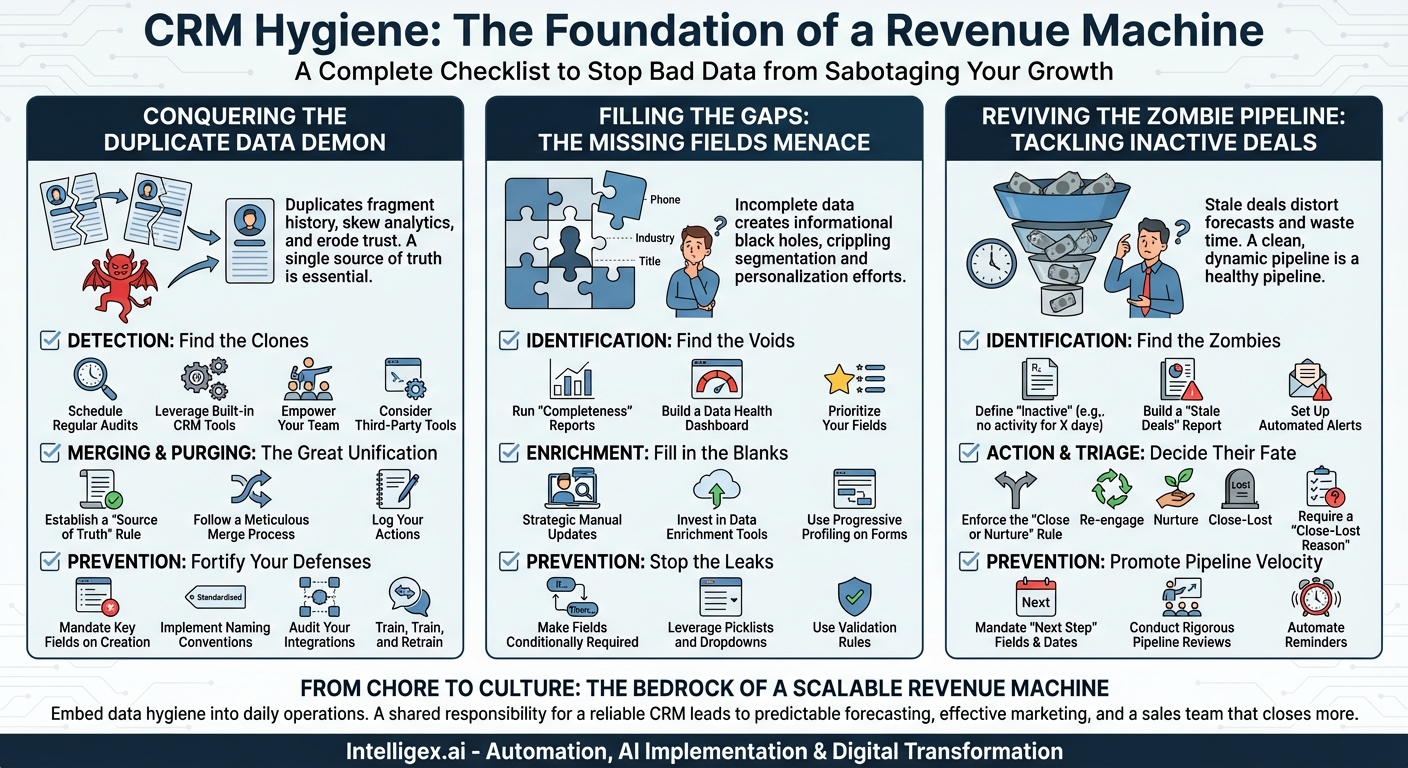
Your Customer Relationship Management (CRM) system is the central nervous system of your business. It’s the repository of your most valuable asset: customer data. When it’s clean, organized, and up-to-date, it’s a powerful engine for growth, enabling personalized marketing, efficient sales processes, and delightful customer service. But when it’s neglected, it becomes a digital junkyard—a chaotic maze of bad data that actively sabotages your efforts. Wasted time, missed opportunities, frustrated employees, and poor customer experiences are the direct result of a messy CRM.
Poor CRM hygiene is a silent killer of productivity and revenue. It creeps in slowly, one duplicate contact, one missing phone number, one forgotten deal at a time. Before you know it, your sales forecasts are a work of fiction, your marketing campaigns are firing blanks, and your team has lost faith in the very tool meant to empower them. Getting a handle on this chaos isn’t just a “nice-to-have” administrative task; it’s a strategic imperative. To help you restore order and turn your CRM back into a revenue-generating machine, we’ve developed a comprehensive hygiene checklist focusing on the three most common and destructive culprits: Duplicates, Missing Fields, and Inactive Deals.
Conquering the Duplicate Data Demon
Duplicate records are more than just a minor annoyance; they are a pervasive plague that erodes the foundation of your customer data. Imagine two sales reps from your company calling the same prospect within hours of each other, completely unaware of the other’s efforts. It’s unprofessional, confusing for the prospect, and damaging to your brand’s reputation. This is just one of the many nightmares caused by duplicate data. Duplicates fragment customer history, making it impossible to get a 360-degree view of a relationship. They skew your analytics, leading to inflated pipeline numbers and inaccurate reports that leadership uses to make critical business decisions. It’s time to declare war on duplicates.
Your Duplicate-Slaying Checklist
Step 1: Detection – Find the Clones
- Schedule Regular Audits: Don’t wait for the problem to become unmanageable. Block out time on a weekly or bi-weekly basis specifically for a data cleanup session. Consistency is key.
- Leverage Built-in CRM Tools: Most modern CRMs (like Salesforce, HubSpot, and Zoho) have native duplicate detection rules. Dive into your settings and configure these rules. You can typically set them to flag potential duplicates based on matching email addresses, company names, or phone numbers. Customize the rules to match your business logic.
- Empower Your Team: Create a simple process for users to flag potential duplicates they encounter in their daily workflow. This turns your entire team into a data quality task force. A shared “Possible Duplicates” report or a specific tag can work wonders.
- Consider Third-Party Tools: For larger, more complex databases, specialized de-duplication apps can be a lifesaver. These tools often use more sophisticated fuzzy logic algorithms to find non-exact matches (e.g., “Rob Smith” vs. “Robert Smith” or “Example Inc.” vs. “Example Incorporated”).
Step 2: Merging & Purging – The Great Unification
- Establish a “Source of Truth” Rule: Before you merge a single record, you need a clear, documented policy for which record to keep. This is your “master record.” Common rules include keeping the record that was created first, the one with the most recent activity, or the one associated with a closed-won opportunity. Whatever you choose, document it and train the team on it.
- Follow a Meticulous Merge Process: Merging isn’t just about deleting one record. It’s about carefully combining the best information from all duplicates into the single master record. Review every field, every note, every activity, and every associated deal or ticket. A hasty merge can result in the loss of critical historical data.
- Log Your Actions: Make it a habit to log a note on the newly merged master record indicating what was merged and when. For example: “Merged duplicate contact [Contact ID] into this record on [Date].” This provides a helpful audit trail.
Step 3: Prevention – Fortify Your Defenses
- Mandate Key Fields on Creation: Make unique identifiers like “Email Address” a required field for creating a new contact. This is your first line of defense against low-quality, duplicate-prone data entry.
- Implement Naming Conventions: Standardize how data is entered, especially for company names. Create a guide that dictates whether to use “Inc.” or “Incorporated,” “LLC” or “L.L.C.,” “The” at the beginning of a name or not. This drastically reduces variations that fool duplicate detection systems.
- Audit Your Integrations: Data flowing in from marketing automation platforms, web forms, and other third-party apps is a primary source of duplicates. Regularly review the mapping and logic of these integrations to ensure they are set up to check for existing records before creating new ones.
- Train, Train, and Retrain: Data hygiene is a cultural issue. Regularly train your team on the importance of searching before creating a new record and adhering to data entry standards. Explain the “why” behind the rules—how it helps them, the customer, and the company.
Filling the Gaps: The Missing Fields Menace
Incomplete data is the silent partner of duplicate data. A record without a phone number, industry, or job title is a dead end. It cripples your ability to segment your audience for targeted marketing, leaves your sales reps fumbling for context before a call, and makes any attempt at personalization feel hollow. How can you send a relevant case study to a prospect in the manufacturing sector if the “Industry” field is empty for half your database? How can your SDRs qualify leads effectively if the “Company Size” is a mystery? Incomplete data creates informational black holes that prevent you from understanding and serving your customers effectively.
Your Data Enrichment Checklist
Step 1: Identification – Find the Voids
- Run “Completeness” Reports: Dive into your CRM’s reporting tools. Create and save reports that specifically look for blank values in your most important fields. Examples include: “Contacts with No Job Title,” “Accounts Missing Industry,” or “Leads without a Lead Source.”
- Build a Data Health Dashboard: Visualize the problem. Use charts and gauges to display the percentage of records that are missing key information. Seeing a giant red bar for “Contacts Missing Phone Number” is a powerful motivator for the entire team.
- Prioritize Your Fields: You can’t fix everything at once. Work with sales, marketing, and service leadership to identify the 5-10 most critical data fields required to run the business effectively. Focus your cleanup and enrichment efforts there first.
Step 2: Enrichment – Fill in the Blanks
- Strategic Manual Updates: For your top-tier accounts and high-priority prospects, there’s no substitute for a little manual research. Task your sales development reps (SDRs) or account managers with using tools like LinkedIn and company websites to fill in missing details for their key contacts.
- Invest in Data Enrichment Tools: For scaling this process, data enrichment services (like ZoomInfo, Clearbit, or similar tools) are invaluable. These platforms integrate with your CRM and can automatically append and update your records with accurate company and contact information, saving hundreds of hours of manual work.
- Use Progressive Profiling on Forms: Don’t ask for 15 pieces of information on your initial website form. Instead, use progressive profiling. When a known lead returns to your site, your forms can intelligently ask for new information you don’t already have, gradually building a more complete profile over time.
Step 3: Prevention – Stop the Leaks
- Make Fields Conditionally Required: Be strategic about mandatory fields. You might not need a phone number for a blog subscriber, but you absolutely should require it when a deal moves to the “Qualification” stage. Use your CRM’s logic to make fields required at specific, logical points in the customer journey.
- Leverage Picklists and Dropdowns: Whenever possible, replace free-text fields with standardized picklists. This prevents variations like “Tech,” “Technology,” and “IT Services” from cluttering your “Industry” field and ensures data is clean and reportable.
- Use Validation Rules: Enforce proper data formatting. Set up validation rules to ensure a “State” field contains a two-letter abbreviation or that a “Website” field is a valid URL. This nips formatting errors in the bud.
Reviving the Zombie Pipeline: Tackling Inactive Deals
A pipeline clogged with stale, inactive, or “zombie” deals is one of the most dangerous forms of bad data. It creates a false sense of security, leading to wildly inaccurate sales forecasts and misplaced resource allocation. Sales reps waste precious time half-heartedly chasing opportunities that went cold months ago, distracting them from pursuing fresh, viable leads. Worse, a stale pipeline masks underlying problems in your sales process. Are deals getting stuck at a certain stage? Are reps failing to establish urgency? A clean, dynamic pipeline is a healthy pipeline; a stagnant one is a sign of sickness.
Your Pipeline Hygiene Checklist
Step 1: Identification – Find the Zombies
- Define “Inactive”: Your first step is to create a clear, company-wide definition of a stale deal. This will vary based on your average sales cycle. Is it a deal with no logged activity (call, email, meeting) in the last 21 days? Is it an opportunity that hasn’t advanced to a new stage in over 45 days? Document this definition.
- Build a “Stale Deals” Report: Create a report that automatically flags all open opportunities that meet your definition of inactive. This report should be a central focus of every sales meeting. Key columns should include Deal Name, Owner, Amount, Last Activity Date, and Days in Current Stage.
- Set Up Automated Alerts: Don’t rely on reps to manually check a report. Use your CRM’s workflow automation to send an email notification to the deal owner and their manager when a deal officially becomes “stale.” This creates proactive accountability.
Step 2: Action & Triage – Decide Their Fate
- Enforce the “Close or Nurture” Rule: For every deal that appears on the stale report, the owner must make a decision. There is no “I’ll get to it later.” The options are:
- Re-engage: The rep must commit to a concrete next step to try and revive the deal within the next 48 hours.
- Nurture: If the prospect is still a good fit but the timing is wrong, close the opportunity and enroll the contact in a long-term marketing nurture sequence.
- Close-Lost: If the deal is dead, close it. This is not a failure; it’s a victory for data accuracy. It cleans the pipeline and allows everyone to focus on what’s real.
- Require a “Close-Lost Reason”: Make this a mandatory picklist field when closing an opportunity. Capturing data on *why* you lose deals (e.g., Lost to Competitor, No Budget, Went with In-House Solution) is an absolute goldmine for improving your product, marketing, and sales strategy.
Step 3: Prevention – Promote Pipeline Velocity
- Mandate “Next Step” Fields: Make the “Next Step” (a text field) and “Next Step Date” (a date field) mandatory for every open opportunity. This forces reps to always be thinking ahead and ensures no deal is left in limbo without a clear plan.
- Conduct Rigorous Pipeline Reviews: Hold weekly pipeline review meetings that are focused and ruthless. Go through the stale deals report and hold reps accountable for making a decision on each one. This fosters a culture of pipeline velocity and realism.
- Automate Reminders: Use workflows to remind reps of their upcoming “Next Step Dates.” A simple automated email—”Your follow-up with Acme Corp is scheduled for tomorrow”—can significantly improve follow-through and prevent deals from slipping through the cracks.
From Chore to Culture
Treating CRM hygiene as a one-time spring-cleaning project is a recipe for failure. The entropy of bad data is relentless. The only sustainable solution is to embed these practices into your company’s daily operations and culture. It’s a shared responsibility that starts with leadership defining the standards and extends to every single user who touches the CRM.
By diligently tackling duplicates, filling in missing data, and keeping your pipeline fluid, you transform your CRM from a source of frustration into what it was always meant to be: a single source of truth. A clean, reliable CRM is the bedrock of predictable forecasting, effective marketing, and a sales team that can spend less time cleaning and more time closing. It is the engine of a truly scalable revenue machine.
Your Next Read:
Category:
Get a FREE
Proof of Concept
& Consultation
No Cost, No Commitment!
