

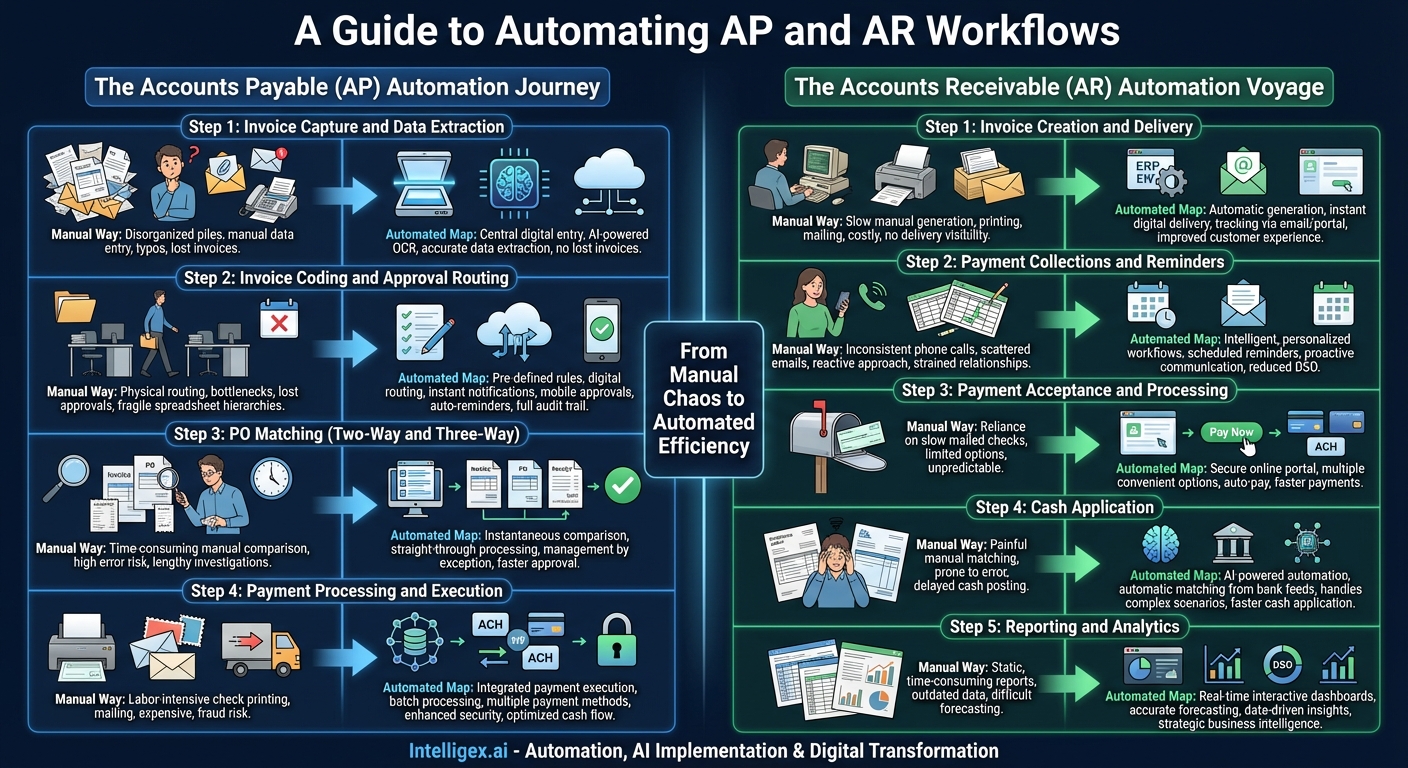
In the world of finance, the Accounts Payable (AP) and Accounts Receivable (AR) departments are the twin engines driving a company’s cash flow. AP manages the outflow of cash, paying bills and maintaining vendor relationships, while AR manages the inflow, ensuring customers pay on time. For decades, these critical functions have been bogged down by manual, paper-based processes. The result? Endless data entry, frustrating approval chases, costly errors, and a severe lack of real-time visibility into a company’s financial health. This operational friction doesn’t just slow things down; it actively hinders strategic decision-making and growth.
The solution lies in automation. By creating a clear workflow map, businesses can visualize the journey from manual chaos to automated efficiency. This map isn’t just a technical diagram; it’s a strategic blueprint for transforming your finance department from a reactive cost center into a proactive, data-driven powerhouse. Let’s navigate the paths of both AP and AR automation to understand how each step of the traditional process is revolutionized.
The Accounts Payable (AP) Automation Journey
The traditional AP process is a labyrinth of paperwork and manual touchpoints. It’s a journey fraught with potential delays and errors at every turn. Automation straightens this path, creating a streamlined, transparent, and efficient workflow from invoice receipt to final payment and reconciliation.
Step 1: Invoice Capture and Data Extraction
The Manual Way: Invoices arrive from a multitude of channels—snail mail, various email inboxes, fax—creating a disorganized pile of documents. An AP clerk must manually sort these invoices and then painstakingly key the data from each one into the accounting system. This process is not only mind-numbingly tedious but also a hotbed for typos, incorrect amounts, and duplicate entries. A single misplaced decimal point can lead to significant overpayments, while a lost invoice can result in late fees and damaged vendor relationships.
The Automated Map: Automation establishes a single, digital point of entry. All invoices, regardless of format (paper, PDF, email body), are directed to a central system. Paper invoices are scanned, and advanced Optical Character Recognition (OCR) technology, often powered by Artificial Intelligence (AI), takes over. The software reads and intelligently extracts key information—vendor name, invoice number, date, line-item details, PO number, and amounts—with near-perfect accuracy. This eliminates manual data entry entirely, freeing up the AP team’s time, drastically reducing errors, and ensuring no invoice is ever lost in a paper shuffle again.
Step 2: Invoice Coding and Approval Routing
The Manual Way: Once entered, an invoice needs to be coded with the correct General Ledger (GL) accounts and then physically or digitally routed for approval. This often involves walking a piece of paper from desk to desk or forwarding an email and hoping it gets seen. If the designated approver is out of the office, the invoice sits idle, creating a significant bottleneck. Complex approval hierarchies managed on spreadsheets are fragile and difficult to maintain, leading to invoices being sent to the wrong person or bypassing necessary checks.
The Automated Map: An automated system uses pre-defined, customizable rules to manage this entire process. Based on the vendor, department, or invoice amount, the system can automatically suggest GL codes, saving time and improving consistency. It then digitally routes the invoice to the correct approver or sequence of approvers. These approvers are notified instantly via email or a mobile app and can review and approve invoices with a single click, from anywhere in the world. The system sends automatic reminders for overdue approvals and can escalate invoices if they remain unapproved for too long, completely eliminating bottlenecks and providing a full, auditable history of every action taken.
Step 3: PO Matching (Two-Way and Three-Way)
The Manual Way: For purchases made with a Purchase Order (PO), the AP team must perform a manual three-way match. This involves meticulously comparing the invoice against the PO and the goods receipt note to ensure the company is paying for what it ordered and received. This line-by-line validation is one of the most time-consuming tasks in AP and is highly susceptible to human error. Even a small discrepancy can require a lengthy investigation to resolve.
The Automated Map: Automation makes this process instantaneous. The system automatically compares the digitized invoice data against the PO and receipt data residing in the ERP or accounting system. If all three documents match within pre-set tolerances, the invoice is approved for payment without any human intervention—a concept known as straight-through processing. If a discrepancy exists (e.g., quantity mismatch or price difference), the system flags it as an exception and routes it to the appropriate person for investigation, complete with all supporting documents attached. This “management by exception” approach allows the AP team to focus their expertise only on the issues that require it.
Step 4: Payment Processing and Execution
The Manual Way: Approving the invoice is only half the battle. Executing the payment involves printing checks, getting them signed, stuffing envelopes, and mailing them. For electronic payments like ACH or wire transfers, it requires manually creating payment files and uploading them to bank portals. This entire process is labor-intensive, expensive (check stock, postage, bank fees), and carries a significant risk of check fraud.
The Automated Map: AP automation platforms integrate payment execution directly into the workflow. Once an invoice is fully approved, it moves into a payment queue. The AP team can then schedule and execute payments in batches across a variety of methods—ACH, virtual cards, wire transfers, or even outsourced check printing and mailing. This centralized process enhances security with features like dual controls and payment limits. Furthermore, it optimizes cash flow by allowing the finance team to strategically time payments to take advantage of early-payment discounts or hold onto cash longer.
The Accounts Receivable (AR) Automation Voyage
On the other side of the financial coin, the AR process is focused on bringing cash into the business efficiently. Manual AR is a constant struggle of creating and sending invoices, chasing payments, and painstakingly applying cash. Automation transforms this reactive, often frustrating process into a proactive, customer-friendly, and data-rich operation.
Step 1: Invoice Creation and Delivery
The Manual Way: An AR specialist generates invoices using templates in Word or Excel, often re-typing customer and order information. These are then printed, put into envelopes, and mailed. This process is slow, meaning the clock on payment terms doesn’t even start for days. It’s also costly in terms of paper, printing, and postage, and provides no visibility—you have no idea if the customer has even received the invoice until it becomes overdue.
The Automated Map: Automation systems integrate directly with your ERP or sales system to generate accurate, professional invoices automatically based on sales orders or billing schedules. These invoices are then delivered instantly to the customer’s preference, typically via email or a self-service online portal. The system can track when an invoice is delivered and when it’s been viewed by the customer, providing valuable insight. This accelerates the entire cycle, reduces costs, and improves the customer experience from the very first touchpoint.
Step 2: Payment Collections and Reminders
The Manual Way: The collections process is often managed through spreadsheets and calendar reminders. AR teams spend their days making phone calls and sending one-off emails to chase overdue payments. This approach is inconsistent, difficult to scale, and often starts only after an invoice is already significantly past due. It can also strain customer relationships if communication is not handled delicately.
The Automated Map: AR automation introduces intelligent, personalized collections workflows. You can define a sequence of communications based on invoice age and customer risk profile. For example, the system can send a friendly reminder email a few days before the due date, a more formal notice one day after, and then automatically schedule a task for a collector to call at the 15-day mark. All communications are logged in a central place, providing a complete history. This proactive, consistent approach dramatically reduces the average collection period, improving your Days Sales Outstanding (DSO).
Step 3: Payment Acceptance and Processing
The Manual Way: Traditionally, businesses relied on customers mailing in checks. This method is slow and unpredictable. Even with electronic payments, the options offered are often limited, forcing customers into a payment method that may not be convenient for them, which can delay payment.
The Automated Map: Modern AR platforms make it incredibly easy for customers to pay. Invoices sent via email can include a “Pay Now” button that leads to a secure online payment portal. In this portal, customers can choose from a variety of options, including ACH, credit card, or digital wallets. They can also set up auto-pay for recurring invoices. By offering convenience and choice, you remove friction from the payment process, which naturally leads to faster payments and improved cash flow.
Step 4: Cash Application
The Manual Way: This is arguably the most painful part of manual AR. A customer sends a single payment covering multiple invoices, and the AR team has to decipher the accompanying remittance advice (if one is even provided) to figure out which invoices to close out. This manual matching process is incredibly time-consuming, prone to error, and a major reason for delays in posting cash and recognizing revenue.
The Automated Map: This is where AI-powered automation truly shines. The system ingests payment information from bank feeds and remittance advice from emails or EDI files. It then uses intelligent algorithms to automatically match payments to open invoices with a high degree of accuracy, even handling complex scenarios like partial payments, deductions, or bundled payments. This can automate over 90% of the cash application process, allowing your team to simply manage the few exceptions. This means cash is on your books faster, and customer accounts are always up to date.
Step 5: Reporting and Analytics
The Manual Way: Generating reports like AR aging or calculating key metrics like DSO requires manually exporting data from the accounting system and manipulating it in spreadsheets. These reports are static, time-consuming to create, and often outdated by the time they are reviewed. This makes it difficult to forecast cash flow accurately or identify trends in customer payment behavior.
The Automated Map: Automation provides real-time, interactive dashboards at your fingertips. You can instantly see your current DSO, view an up-to-the-minute AR aging report, and drill down into the payment history of any customer. Advanced systems use predictive analytics to forecast cash collections with greater accuracy, helping you make more informed business decisions. This transforms AR from a purely transactional function into a strategic source of business intelligence.
Charting a course with an AP and AR automation workflow map is about more than just adopting new software. It is a fundamental redesign of your core financial processes. It’s about eliminating low-value, repetitive tasks to free your skilled finance professionals to focus on analysis, strategy, and partnership with the rest of the business. By following this map, you create a seamless, integrated, and intelligent financial ecosystem that not only accelerates cash flow but also provides the clarity and control needed to navigate the future with confidence.
Your Next Read:
Get a FREE
Proof of Concept
& Consultation
No Cost, No Commitment!
