

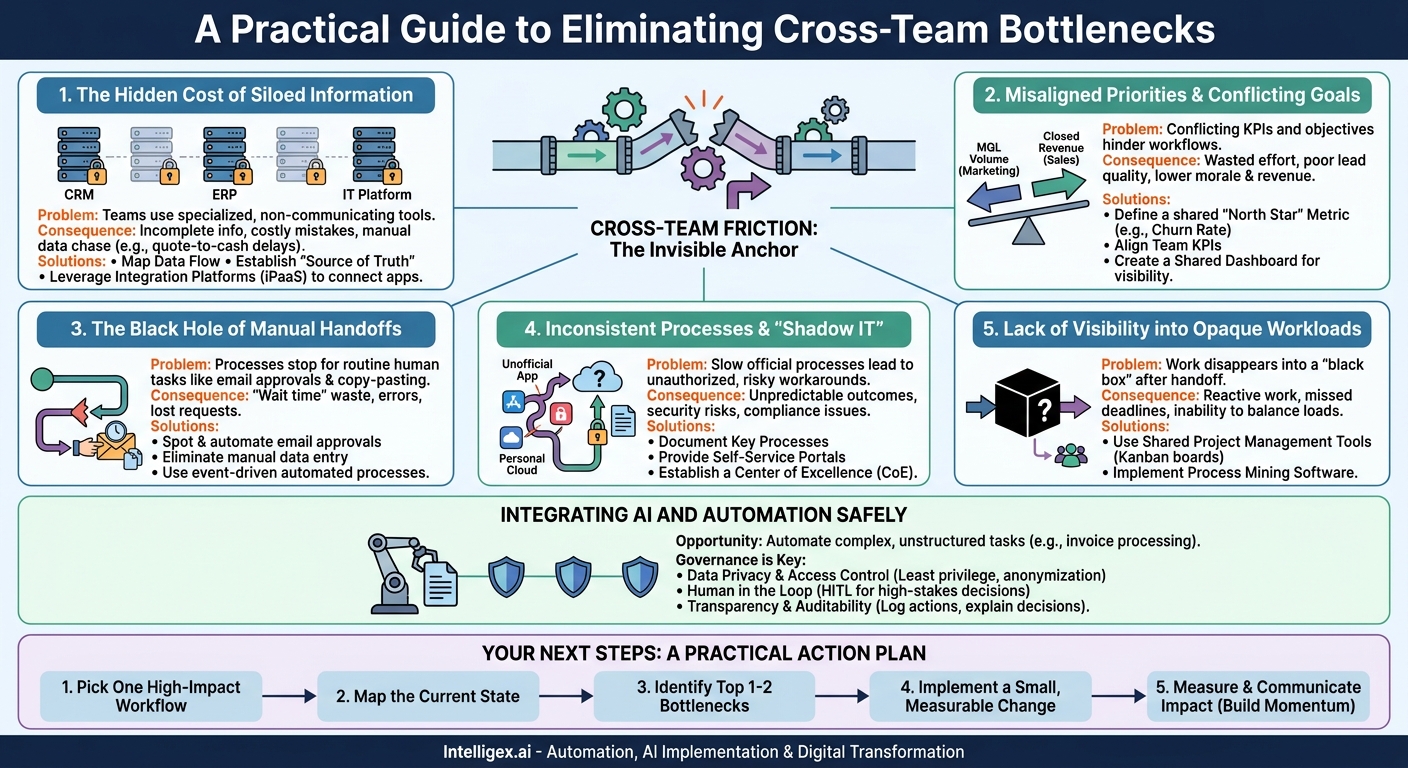
In today’s fast-paced business environment, speed and efficiency are not just advantages; they are requirements for survival. Yet, many organizations are held back by an invisible anchor: friction between teams. When work passes from Marketing to Sales, from Operations to Finance, or from HR to IT, it often hits roadblocks. These bottlenecks slow down projects, inflate costs, frustrate employees, and ultimately impact the customer experience. The problem is not a lack of effort but a lack of connected systems and aligned processes.
Overcoming these challenges requires a systematic approach to identifying and resolving the specific points of failure in your cross-team workflows. By pinpointing where communication breaks down, where data gets trapped, and where manual effort creates delays, you can unlock significant gains in productivity and scalability. This is the foundation of digital transformation, moving from a collection of siloed departments to a single, efficient, and responsive organization.
The Hidden Cost of Siloed Information
The most common bottleneck in any cross-team process is the data silo. Each department uses specialized tools optimized for its unique function: Sales has its CRM, Finance has its ERP, and IT has its service management platform. While these systems are excellent at what they do, they rarely communicate effectively with each other. This forces teams to work with incomplete information, leading to costly mistakes and delays.
Consider a typical “quote-to-cash” process. A salesperson closes a complex deal with custom pricing and non-standard payment terms, all recorded in the CRM. The work then moves to the finance team for invoicing. However, if the ERP system isn’t integrated with the CRM, Finance has no visibility into those custom terms. They either create a standard invoice, which will be incorrect and lead to a customer dispute, or they must manually track down the salesperson to get the correct details. This manual chase adds days or even weeks to the invoicing cycle, directly impacting cash flow.
How to Break Down Data Silos
The goal is not to force every team onto a single, monolithic platform. Instead, the focus should be on creating a seamless flow of data between best-of-breed applications. This is where integration platforms and a clear data strategy become critical.
Key Actions:
- Map Your Data Flow: For a critical process like customer onboarding, identify every piece of data required and which system holds it. Visualize how data needs to move from one team’s system to the next.
- Establish a “Source of Truth”: For each critical data point (like customer contact information), designate one system as the primary source. All other systems should pull from or sync with that source. This prevents discrepancies, such as Sales having an old address while Finance has the new one.
- Leverage Integration Platforms (iPaaS): Tools like MuleSoft or Workato act as a central hub, connecting disparate applications like Salesforce, NetSuite, and ServiceNow. This allows you to build automated workflows that move and transform data between systems without manual intervention.
What to Measure:
- Time-to-Access-Data: How long does it take for a team member to get the information they need from another department’s system? The goal is to reduce this to near-zero.
- Manual Data Entry Errors: Track the rate of errors (e.g., incorrect invoices, shipping to the wrong address) caused by re-keying information between systems.
Misaligned Priorities and Conflicting Goals
Even with perfect data flow, workflows can grind to a halt if teams are working towards conflicting objectives. This often happens when departments are measured by KPIs that are not aligned with the overall business outcome. Each team optimizes for its own metrics, sometimes at the expense of another team’s success and the customer’s experience.
The classic example is the relationship between Marketing and Sales. Marketing’s success is often measured by the volume of Marketing Qualified Leads (MQLs) they generate. Sales, on the other hand, is measured by closed revenue. If Marketing is incentivized purely on volume, they might run broad campaigns that generate thousands of low-quality leads. The marketing team hits its numbers, but the sales team wastes valuable time sifting through leads that will never convert, hurting morale and revenue.
A Step-by-Step Guide to Aligning Team Goals
Alignment is not achieved through a single meeting. It requires a deliberate, structured process to define shared success and create mutual accountability.
- Identify a Critical Cross-Functional Outcome: Start with one specific, high-value business process. Examples include “reducing customer churn by 10%” or “shortening the new-hire onboarding time by 50%.”
- Map All Stakeholder Teams: For the chosen outcome, identify every team that plays a role. For customer churn, this would likely include Customer Support, Product, Sales, and Marketing.
- Define a Shared, “North Star” Metric: This is the one number that everyone involved is collectively responsible for. For the churn example, the North Star metric is the churn rate itself.
- Establish Contributing KPIs for Each Team: Work backward from the North Star metric to define how each team contributes.
- Customer Support: Might be measured on “average ticket resolution time” or “customer satisfaction (CSAT) score.”
- Product: Might be measured on the “adoption rate of new, retention-focused features.”
- Sales: Might be measured on “upsell revenue from at-risk accounts.”
- Create a Shared Dashboard: Build a single dashboard with the North Star metric at the top and the contributing KPIs for each team below it. This provides universal visibility and makes it clear how everyone’s work impacts the overall goal.
The Black Hole of Manual Handoffs
A manual handoff occurs any time a process stops and waits for a human to perform a routine task to move it forward. These are the silent killers of productivity. The most common culprits are email approvals, copy-pasting data between spreadsheets and applications, and manually notifying the next person in a chain that a task is ready for them.
Imagine the process for procuring a new piece of software. An employee fills out a request form. Their manager receives an email and must forward it with their approval to the IT department. IT then forwards it to Finance for budget approval. Finance emails back to IT, who then places the order with the vendor. Each email is a potential point of failure. It can get lost in a crowded inbox, sent to the wrong person, or simply forgotten. The time the request spends “in transit” is pure waste.
Spotting and Automating Manual Handoffs
The first step is to make these invisible steps visible. Use this checklist to audit your key workflows.
- Is email or a messaging app used for approvals or task assignments? This is a classic sign of a manual handoff.
- Does data need to be copied and pasted from one system to another? This indicates a lack of integration.
- Do team members frequently ask, “What is the status of X?” This suggests a lack of a centralized, visible workflow.
- Is there a standard task that often takes more than 24 hours to be passed to the next step? This “wait time” is a key metric to track and reduce.
Once identified, these handoffs are prime candidates for workflow automation. Modern platforms can connect your existing tools to create seamless, event-driven processes. For example, when a manager clicks “Approve” on a request in a central portal, the system can automatically create a purchase order in the ERP and assign a task to the procurement team in their project management tool. No emails, no copying, no waiting.
Inconsistent Processes and “Shadow IT”
When official processes are too slow or cumbersome, employees will inevitably find their own ways to get work done. This leads to two major problems: inconsistent execution and the rise of “Shadow IT.” Inconsistency means that the same task, like onboarding a new client, is handled differently depending on who is doing it. This creates unpredictable outcomes and makes it impossible to measure or improve performance.
Shadow IT refers to the use of apps, software, and services without explicit approval from the IT department. For example, a marketing team might subscribe to a new analytics tool using a corporate credit card because the official procurement process is too slow. While this solves an immediate problem for the team, it introduces significant risks. The data in that tool may not be secure, it doesn’t integrate with other company systems, and the company has no oversight over the cost or compliance.
From Chaos to Standardization
The solution is not to crack down on resourceful employees. Instead, you should understand the need that Shadow IT is filling and provide a better, sanctioned alternative. The goal is to make the “official” way the “easiest” way.
Key Actions:
- Document Key Processes: Work with teams to map out and agree upon a single, standard way to perform critical cross-functional tasks. This standardized process becomes the baseline for automation and improvement.
- Provide Self-Service Portals: Instead of requiring employees to send emails or fill out complex forms, create simple, centralized portals for common requests like new hardware, software access, or HR inquiries. These portals can guide users through the process and kick off an automated workflow on the back end.
- Establish a Center of Excellence (CoE): A CoE is a central team dedicated to process improvement and automation. They can provide guidance, build reusable automation components, and ensure that new workflows adhere to security and governance standards.
Lack of Visibility into Opaque Workloads
You cannot fix a bottleneck you cannot see. In many organizations, cross-team work disappears into a “black box.” A task is handed off from one team to another, and the original team has no idea about its status until it is completed or a deadline is missed. This lack of visibility makes it impossible for managers to proactively balance workloads, identify potential delays, or communicate accurate timelines to stakeholders.
Consider a new product launch. The product team finishes a feature and hands it off to the marketing team to prepare launch materials. But the marketing team is currently swamped with an upcoming event. The product team has no visibility into marketing’s workload, so they assume their request is being worked on. Days later, they follow up, only to find out that the work hasn’t even started. This reactive, follow-up-driven culture creates stress and leads to rushed, low-quality work.
Implementing Tools for Shared Visibility
The solution is to move work out of individual inboxes and spreadsheets and into a shared system that visualizes the entire process from end to end.
Practical Solutions:
- Shared Project Management Tools: Platforms like Asana, Trello, or Jira allow teams to manage cross-functional projects in one place. Using a simple Kanban board, everyone can see what tasks are in which stage (e.g., To Do, In Progress, In Review, Done), who is assigned, and what the deadlines are.
- Process Mining Software: For more complex, high-volume operational workflows (like order fulfillment or claims processing), process mining tools can analyze the event logs from your existing systems (ERP, CRM) to automatically create a visual map of your actual process. This map highlights bottlenecks, deviations from the standard process, and rework loops that would be impossible to see otherwise.
What to Measure:
- Cycle Time: The total time from when a work request is made until it is completed.
- Wait Time: The time a task spends sitting in a queue between active work steps. Reducing wait time is often the biggest opportunity for improvement.
Integrating AI and Automation Safely
Artificial intelligence and automation present a massive opportunity to eliminate the most time-consuming bottlenecks, especially those involving unstructured data and complex decision-making. For example, an AI model can read an incoming vendor invoice, extract the key information (vendor name, invoice number, amount, due date), match it against a purchase order in the ERP, and flag any discrepancies for human review. This can turn a multi-day manual process into a minutes-long automated one.
However, this power comes with significant responsibility. Using AI on sensitive customer, financial, or employee data without the right governance can create serious security, privacy, and compliance risks. A poorly implemented automation could approve a fraudulent invoice or share sensitive customer data with the wrong system.
A Plain-Language Guide to Safe Implementation
Building trust in automation requires a “safety first” approach. Before you deploy an AI-powered workflow, ensure you have a clear plan for governance and oversight.
- Data Privacy and Access Control: Follow the principle of least privilege. An automation should only have access to the specific data fields it needs to do its job. Anonymize or mask personally identifiable information (PII) whenever possible before it is processed by an AI model.
- Human in the Loop (HITL): For high-stakes decisions, do not fully automate the final step. Instead, use a HITL design. The AI can analyze the data and recommend an action (e.g., “Recommend approving this expense report”), but a human makes the final, auditable approval.
- Transparency and Auditability: You must be able to explain why an automated system made a particular decision. Log every action the automation takes and the key data points it used. This is critical for troubleshooting, compliance audits, and building trust with users. The AWS Well-Architected Framework, for example, has extensive guidance on security and reliability that can be applied to these systems. A link to its documentation can be found at https://docs.aws.amazon.com/.
Your Next Steps: A Practical Action Plan
Reading about bottlenecks is one thing; fixing them is another. Real change comes from taking small, deliberate, and measurable steps. Do not try to boil the ocean by fixing every broken process at once. Instead, build momentum by focusing your efforts on a single, high-impact area.
Follow this five-step plan to get started:
- Pick One High-Impact Workflow: Choose a process that is widely known to be slow, error-prone, or frustrating for employees and customers. Good candidates include new hire onboarding, vendor payments, or sales-to-operations handoffs.
- Map the Current State: Gather the key people from each team involved in the process. On a whiteboard (physical or virtual), map out every single step, decision point, system, and handoff as it exists today, not how it’s supposed to exist.
- Identify the Top 1-2 Bottlenecks: Using the map and the concepts from this article, pinpoint the biggest sources of delay or rework. Is it a data silo requiring manual lookups? Is it a series of email approvals? Is there a lack of visibility into workload?
- Implement a Small, Measurable Change: Propose a targeted solution for the bottleneck you’ve identified. Don’t plan a year-long project. Instead, aim for a quick win. Maybe it’s integrating two applications to eliminate one copy-paste step. Maybe it’s creating a single shared dashboard for one project.
- Measure and Communicate the Impact: Before you make the change, measure a baseline metric (e.g., average cycle time is 15 days). After implementing the change, measure it again. Share the results with stakeholders to demonstrate the value and build the business case for your next process improvement initiative.
By systematically identifying and resolving these cross-team bottlenecks, you can transform how work gets done in your organization. The result is a more agile, scalable, and resilient business that can deliver value to customers faster and more reliably.
Your Next Read:
Category:
Get a FREE
Proof of Concept
& Consultation
No Cost, No Commitment!
