

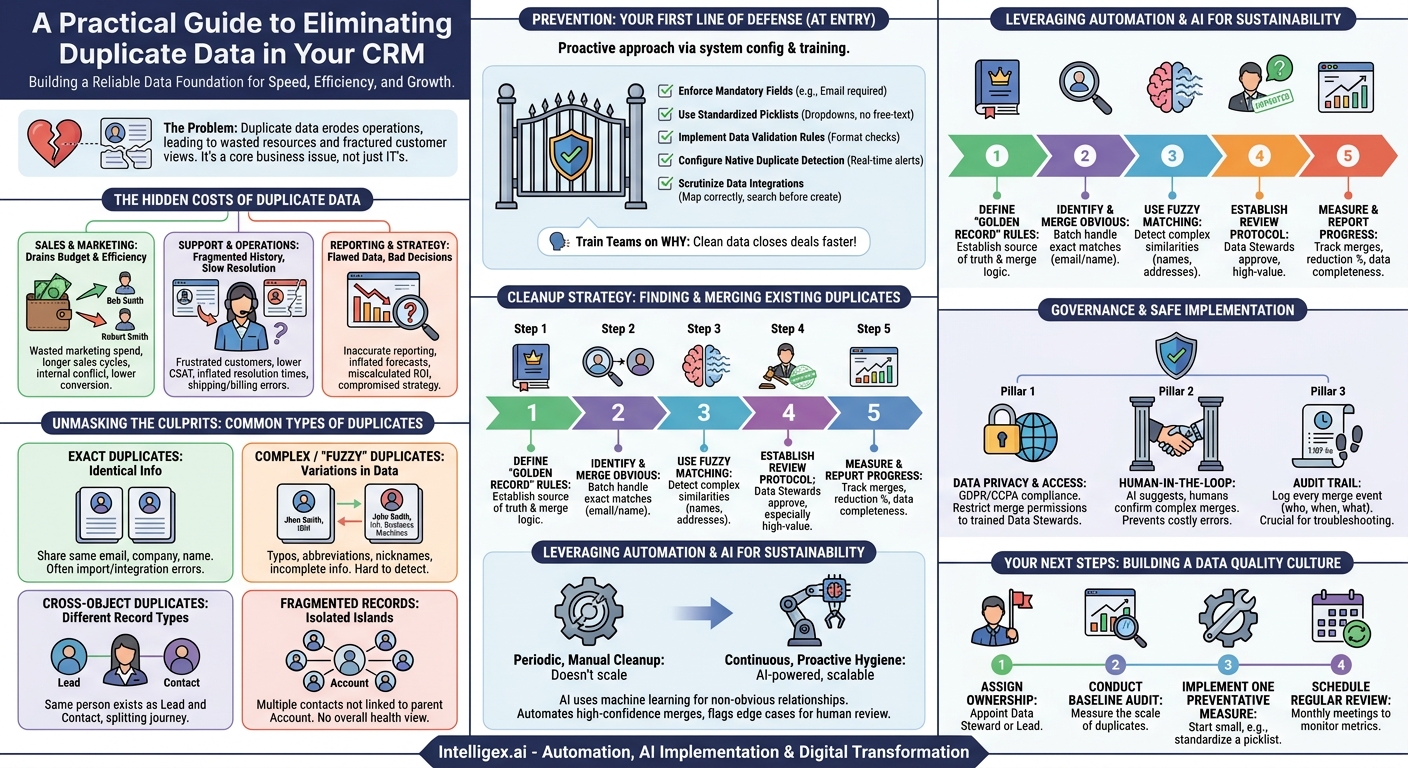
Your CRM and helpdesk platforms are the lifeblood of your customer-facing operations. They hold the key to understanding your customers, closing deals, and providing stellar support. But what happens when that lifeblood is contaminated? Duplicate data, a seemingly minor annoyance, quietly erodes the foundation of your business operations, leading to wasted resources, frustrated teams, and a disjointed customer experience. It’s not just a technical problem for IT to solve; it’s a core business issue that directly impacts your bottom line.
Duplicate records create a fractured view of your customer. Your sales team might see a new lead for a person who is already a long-time, high-value customer in another department’s view. Your support agents might struggle to find a customer’s full ticket history because it’s split across three different contact records with slightly different names. This chaos slows everyone down, introduces risk, and makes it impossible to get a clear picture of your business performance. Fixing this isn’t about achieving a perfectly pristine database. It’s about building a reliable data foundation that powers speed, efficiency, and growth.
The Hidden Costs of Duplicate Data
Duplicate records are more than just clutter. They are active liabilities that create tangible costs and operational friction across your entire organization. Understanding these specific impacts is the first step toward building a business case for investing in data quality.
Impact on Sales and Marketing
For revenue-generating teams, duplicates are a direct drain on efficiency and budget. A single prospect or customer existing under multiple records can lead to embarrassing and costly mistakes. Imagine your marketing team spends a significant portion of its budget on a high-touch campaign, only to send the same expensive welcome kit to “Bob Smith” and “Robert Smith,” who are the same person. Beyond wasted marketing spend, sales cycles become longer and less effective. A salesperson might invest time nurturing a “new” lead, unaware that a colleague is already in late-stage negotiations with the same person under a different record. This not only creates internal conflict but also makes your company look disorganized to the potential customer. The result is a lower lead conversion rate and a higher cost of customer acquisition.
Impact on Customer Support and Operations
In a helpdesk environment, a complete and unified customer history is non-negotiable. When a customer contacts support, agents need to see every previous interaction, ticket, and purchase to provide context-aware help. If that history is fragmented across duplicate contacts, the agent is flying blind. They might ask the customer to repeat information they’ve already provided, leading to frustration and a lower Customer Satisfaction (CSAT) score. This also inflates the average time to resolution, as agents waste precious minutes hunting for information that should be readily available. For operations teams, duplicates complicate everything from logistics and shipping to billing, potentially leading to incorrect invoices or products sent to the wrong address variant.
Impact on Reporting and Strategy
Reliable data is the bedrock of sound business strategy. When your CRM is riddled with duplicates, your reporting becomes fundamentally flawed. You can’t accurately answer basic questions like, “How many customers do we have?” or “What is the lifetime value of our average customer?” Your sales forecasts will be inflated, your marketing campaign ROI will be miscalculated, and your ability to identify trends or segment your audience will be severely compromised. Leaders end up making critical decisions based on a distorted view of reality, steering the company in the wrong direction.
Unmasking the Culprits: Common Types of Duplicates
Not all duplicates are created equal. Identifying them requires looking for different patterns, from the obvious to the subtle. Understanding these common types helps you tailor your prevention and cleanup strategies effectively.
- Exact Duplicates: These are the easiest to spot. Two or more records share the exact same key information, such as the same email address, company name, and contact name. They often occur from data import errors or system integration glitches where records are created multiple times.
- Complex or “Fuzzy” Duplicates: These are much harder to detect with simple filters. They represent the same entity but have variations in the data. Examples include typos (“Jhon Smith”), abbreviations (“Intl. Business Machines” vs. “IBM”), nicknames (“Bob” vs. “Robert”), or incomplete information. These require more sophisticated matching logic to identify.
- Cross-Object Duplicates: A very common problem in CRMs like Salesforce. This happens when the same person exists as different types of records. For example, a “Lead” record is created for Jane Doe when a “Contact” record for her already exists from a previous interaction. This splits her journey and prevents a 360-degree view of her relationship with your company.
- Fragmented Household or Account Records: This occurs when multiple contacts from the same company or household are not properly linked to a single parent “Account” record. Each contact exists as an isolated island, making it impossible to understand the overall health and value of the account. This is a major issue for B2B sales and account management teams.
Your First Line of Defense: Prevention at the Point of Entry
The most effective and least expensive way to manage data quality is to prevent bad data from entering your system in the first place. A reactive, cleanup-only approach is a never-ending battle. Proactive prevention involves a combination of system configuration, process definition, and user training.
Start by reinforcing the gates to your CRM. Whether data is entered manually by a user, imported from a spreadsheet, or synced from another application, you should have rules in place to enforce consistency. Here is a checklist of foundational preventative measures you can implement:
- Enforce Mandatory Fields: Identify the absolute minimum information needed to create a useful record (e.g., email address for a contact, company domain for an account) and make those fields required. This prevents the creation of empty or “ghost” records.
- Use Standardized Picklists: Wherever possible, replace free-text fields with standardized dropdown menus. Fields like “Country,” “State,” “Industry,” or “Lead Source” should use predefined values to eliminate variations like “USA,” “U.S.A.,” and “United States.”
- Implement Data Validation Rules: Most modern CRMs allow you to create rules that enforce a specific format for data entry. For example, you can require that a phone number field contains a certain number of digits or that a postal code matches the format for the selected country.
- Configure Native Duplicate Detection: Turn on and configure the built-in duplicate detection rules in your CRM or helpdesk. Set them to alert users in real-time if they are about to create a record that matches an existing one. This simple step empowers users to be the first line of defense.
- Scrutinize Data Integrations: Be cautious when connecting third-party applications. Ensure that data flowing into your CRM from marketing automation tools, web forms, or other systems is mapped correctly and includes logic to search for existing records before creating new ones.
Finally, remember that tools alone are not enough. You must train your teams on why these standards matter. Explain how clean data helps them close deals faster or resolve tickets more efficiently. When users understand the personal and business value, they are far more likely to adhere to the processes.
A Practical Cleanup Strategy: Finding and Merging Existing Duplicates
While prevention is key for the future, you still need a concrete plan to address the duplicates that already exist in your system. A systematic cleanup project can feel daunting, but breaking it down into manageable steps makes it achievable and delivers immediate value.
Follow this structured process to begin cleaning your existing data:
- Define Your “Golden Record” Rules: Before you merge a single record, you must decide what a “source of truth” record looks like. Establish a clear set of rules for how to handle conflicting data during a merge. For example, you might decide to always keep the email from the most recently updated record, the phone number from the oldest record (assuming it was the original entry), and the custom field data from a specific source system. Documenting these rules ensures consistency, no matter who is performing the merge.
- Identify and Merge the Obvious Duplicates: Start with the low-hanging fruit. Run reports to find records with an identical email address or a perfectly matching company name and address. These are high-confidence matches that typically pose little risk. Use your CRM’s mass merge tools to handle these in batches, but always review a sample set first to ensure your matching logic is sound.
- Use Fuzzy Matching for Complex Cases: Once the easy duplicates are gone, move on to the more complex ones. This requires “fuzzy logic,” which identifies records that are similar but not identical. Most enterprise CRMs have some fuzzy matching capabilities built-in, or you can use third-party data quality tools. Create reports that look for similarities in names, company names, and street addresses. For example, a rule might flag “Intelligex Corp.” and “Intelligex Corporation” as potential duplicates.
- Establish a Review and Merge Protocol: Do not allow everyone to merge records. Designate one or more “Data Stewards” who are trained on the golden record rules and are authorized to perform merges. For duplicates flagged by fuzzy logic, the protocol should involve a manual review. The system should suggest potential duplicates, but a human must make the final decision to merge, especially for high-value customer accounts.
- Measure and Report on Your Progress: To maintain momentum and prove the value of the project, track your progress. Key metrics to monitor include the number of duplicates merged per week, the percentage reduction in total duplicate records, and the improvement in data completeness (e.g., the percentage of contacts with a valid phone number and job title). Sharing these wins with leadership helps secure ongoing support for data quality initiatives.
Leveraging Automation and AI for Sustainable Data Quality
Periodic, manual cleanup projects are essential for getting started, but they don’t scale. For long-term success, you need to embed data quality management into your daily operations using automation and, where appropriate, artificial intelligence. This shifts your posture from reactive cleanup to continuous, proactive hygiene.
Modern data quality solutions go beyond simple rule-based matching. They use machine learning algorithms to analyze multiple fields simultaneously to find non-obvious relationships. For example, an AI-powered tool might identify two contacts as duplicates because they have slightly different names and emails but share the same company, have similar job titles, and are associated with activities in the same geographic region. This probabilistic approach is far more powerful than rigid “if/then” rules for uncovering complex duplicates.
The goal of using these advanced tools is not to replace human oversight but to augment it. Automation can run in the background, constantly scanning for new duplicates and flagging them for review. It can handle the high-volume, high-confidence merges automatically, freeing up your data stewards to focus on the complex, edge cases that require human judgment. This approach allows you to maintain a high level of data quality in a scalable way, even as your business and data volumes grow.
Governance and Safe Implementation
As you introduce more powerful automation and potential AI tools into your data management processes, establishing strong governance is critical. Entrusting a system to modify or merge customer data requires a framework built on safety, privacy, and accountability.
First, consider data privacy and access control. Any process that handles customer data must comply with regulations like GDPR and CCPA. Ensure that the tools you use have clear data processing agreements. Internally, access to data merging capabilities should be tightly restricted. Not everyone in the company should be able to merge contacts. Limit this permission to a small group of trained and trusted data stewards who understand the “golden record” rules and the downstream impact of their actions.
Second, always maintain a human-in-the-loop. For all but the most obvious exact-match duplicates, automation should not merge records without human confirmation. The ideal workflow is one where the system identifies and suggests a potential duplicate, presenting the conflicting information side-by-side. A data steward then reviews the suggestion and either approves or rejects the merge. This oversight prevents costly errors, such as incorrectly merging two different people who happen to have similar names.
Finally, ensure you have a clear audit trail. Your CRM or data quality tool must log every merge event. The log should capture who performed the merge, when it happened, and which records were involved. This accountability is crucial for troubleshooting if a bad merge occurs. If a customer’s record suddenly seems wrong, you need the ability to trace back the changes to understand what happened and, if necessary, how to correct it.
Your Next Steps: Building a Data Quality Culture
Improving data quality is not a one-time project; it is a sustained commitment to operational excellence. It requires a combination of technology, process, and people. The journey from a cluttered database to a reliable source of business intelligence is incremental. By taking small, consistent steps, you can build momentum and demonstrate value quickly.
Here is a simple action plan to get started:
- Assign Ownership: The first step is to make data quality someone’s responsibility. This could be a dedicated Data Steward, a small committee, or an operational leader. Without clear ownership, initiatives often fail.
- Conduct a Baseline Audit: You can’t fix what you can’t measure. Use your CRM’s built-in reporting to run a basic duplicate analysis. Get a clear sense of the scale of your problem. How many potential duplicates exist for contacts? For accounts? This baseline will be your benchmark for success.
- Implement One Preventative Measure: Don’t try to boil the ocean. This week, choose one high-impact preventative measure and implement it. This could be as simple as making the “Lead Source” field a mandatory, standardized picklist instead of a text field.
- Schedule a Regular Review: Put a recurring meeting on the calendar, perhaps monthly, to review data quality metrics and discuss new challenges. This ensures that data hygiene remains a priority and doesn’t get forgotten after the initial cleanup project is over.
By treating your CRM data as the valuable strategic asset it is, you empower your teams to work faster, smarter, and more effectively. The result is a more efficient business, a more accurate view of your performance, and ultimately, a better experience for your customers.
Your Next Read:
Get a FREE
Proof of Concept
& Consultation
No Cost, No Commitment!
