

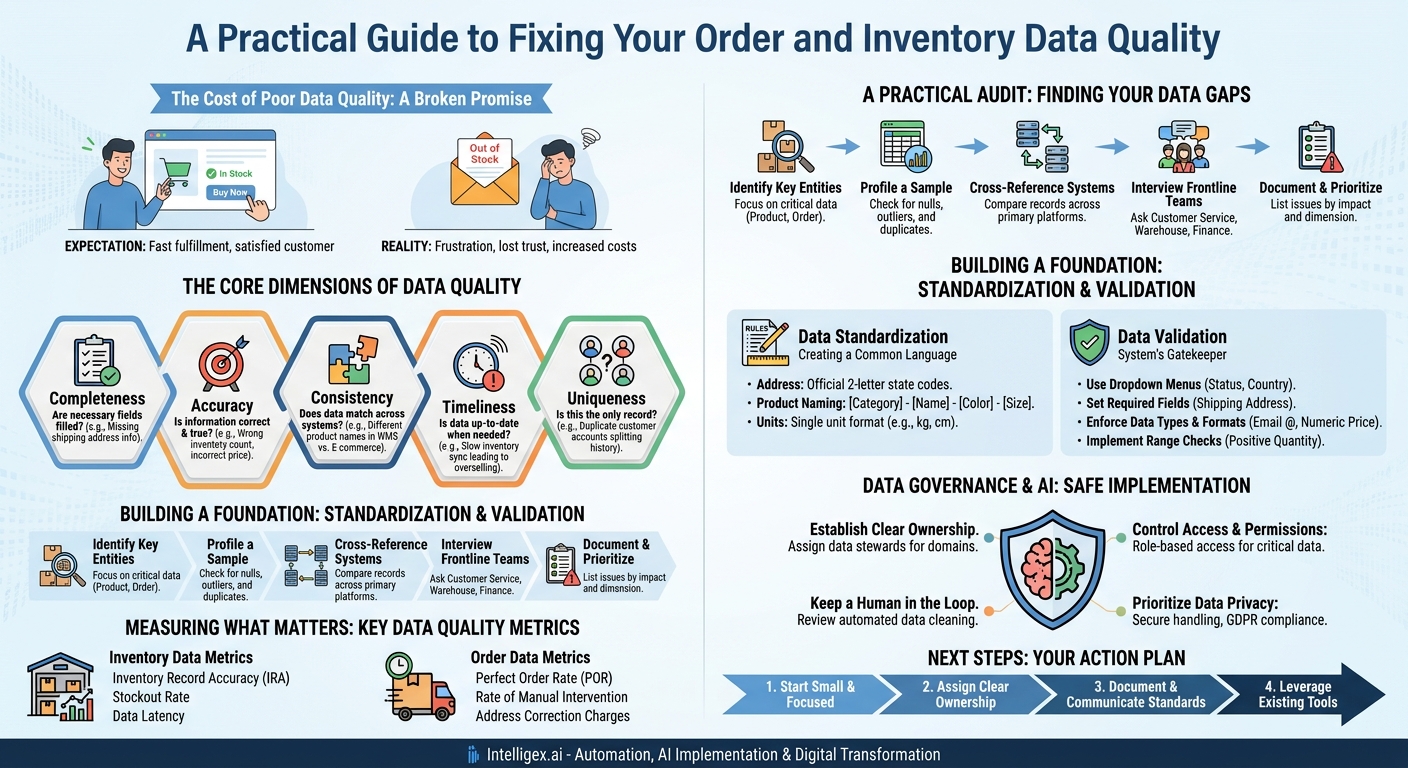
An online shopper finds the perfect product on your site. The page says “In Stock.” They click “Buy Now,” enter their details, and feel a small spark of satisfaction. Two days later, they receive an email: “We’re sorry, but the item you ordered is out of stock.” That small spark of satisfaction is now a flicker of frustration. This isn’t a rare fluke; it’s a direct failure of data quality. It’s a broken promise to your customer, powered by incorrect information. This single error ripples across your business, impacting everything from customer trust and operational efficiency to financial reporting.
Poor data quality isn’t a vague technical problem for the IT department to solve. It is a tangible business problem that quietly drains resources, slows growth, and creates unnecessary friction. For inventory and order management, the two pillars of any commerce operation, the quality of your data directly dictates your ability to deliver on your brand’s promise. Getting it right means faster fulfillment, lower costs, and a scalable foundation for growth. Getting it wrong means death by a thousand paper cuts: wasted time, expensive mistakes, and unhappy customers.
Why “Good Enough” Data Isn’t Good Enough
Many businesses operate on “good enough” data. A few typos in customer addresses, a slight delay in updating inventory counts, or inconsistent product names across systems might seem like minor annoyances. However, these small errors compound, creating significant and costly problems that affect every team.
The true cost of poor data quality shows up in very real ways:
- Increased Costs: Every time an order is shipped to the wrong address due to a typo, you pay for the return shipping and the cost to reship. Every time inventory counts are wrong, you either hold excess “safety stock” (tying up capital) or face stockouts (losing sales). Finance teams spend countless hours reconciling mismatched order and payment records.
- Reduced Speed: When an order contains incomplete information, it can’t be processed automatically. A warehouse team member has to stop, investigate, and manually correct the record, delaying that order and every one behind it. Inaccurate inventory data slows down purchasing decisions, as supply chain managers can’t trust the numbers they see.
- Damaged Customer Experience: From the customer’s perspective, these are not data problems; they are service problems. They receive the wrong product, their shipment is delayed, or they are frustrated by a support agent who can’t find their order because their name is spelled three different ways in three different systems.
- Impaired Visibility: Leaders rely on data to make strategic decisions. But if the underlying order and inventory data is flawed, your analytics and business intelligence reports are unreliable. You might be making critical forecasting, marketing, and expansion decisions based on a distorted picture of reality.
This isn’t just an operations issue. A marketing team might launch a campaign for a product that is actually out of stock. The sales team might offer a discount that, when combined with an incorrect shipping cost in the system, makes an order unprofitable. Every part of the business relies on a shared, accurate understanding of what you sell and who you sell it to.
The Core Dimensions of Data Quality
To fix data problems, we first need a common language to describe them. Data quality is often assessed across several key dimensions. Understanding these helps you diagnose your specific issues instead of just saying “the data is messy.”
Completeness
The question: Are all the necessary data fields filled in?
The problem: An order record is missing a postal code, preventing the shipping label from being printed. A product record is missing weights and dimensions, making it impossible to calculate shipping costs automatically. A customer record lacks a phone number, so the delivery driver cannot contact them if there is an issue.
Accuracy
The question: Is the information correct and true to reality?
The problem: The system says you have 10 units of SKU 123 on the shelf, but a physical count reveals you only have 8. A customer’s address is listed as “123 Main St” when it should be “132 Main St.” The price of a product is listed as $49.95, but the correct price is $59.95.
Consistency
The question: Does the same piece of information match across all your systems?
The problem: Your e-commerce platform lists a product as “Men’s Classic Blue T-Shirt,” but your warehouse management system (WMS) has it as “Tee, M, Blue, Classic.” This makes it incredibly difficult to reconcile inventory. Your CRM from Salesforce says a customer’s name is “William Jones,” but your billing system has “Bill Jones,” potentially creating duplicate accounts and billing confusion.
Timeliness
The question: Is the data available and up-to-date when it’s needed?
The problem: Inventory updates from your physical stores are only synced with your e-commerce site once every 24 hours. A customer buys the last unit of a product online, but it had already been sold in a store hours earlier. This is the direct cause of the overselling scenario that ruins customer experiences.
Uniqueness
The question: Is this the only record for this specific entity?
The problem: A returning customer creates a new account because they forgot their old password or used a different email address. You now have two (or more) records for the same person, splitting their order history. This skews your customer lifetime value calculations and prevents you from having a single, unified view of their relationship with your brand.
A Practical Audit: Finding Your Data Gaps
You can’t fix what you can’t see. Before you can improve your data quality, you need a clear picture of where the biggest problems lie. You don’t need a massive, expensive project to get started. A focused mini-audit can reveal the most urgent issues in just a few days.
Follow these steps to conduct a targeted audit of your order and inventory data:
- Identify Key Data Entities and Attributes: Start by listing the most critical pieces of information for a successful transaction. Don’t try to boil the ocean. Focus on the essentials. For example:
- Product Data: SKU, Product Name, Price, Quantity on Hand, Warehouse Location.
- Order Data: Order ID, Customer Name, Shipping Address, Email, Phone Number, Products Ordered, Order Status.
- Profile a Sample of Your Data: Take a representative sample, like all orders from last Tuesday or the data for your top 100 selling products. Use simple tools, even a spreadsheet program, to perform basic checks. Look for obvious gaps (completeness), strange values (accuracy), and repeated entries (uniqueness).
- Check for nulls: How many order records are missing a phone number?
- Check for outliers: Is there a product with a negative inventory count? Is there an order with a shipping cost of $5,000? These could be typos or system errors.
- Check for duplicates: Export a list of customer emails or names and sort it. How many duplicates do you see?
- Cross-Reference Your Core Systems: This is where you test for consistency. Manually compare 20 to 30 recent records across your primary systems. For a single order, does the customer’s shipping address in your e-commerce platform perfectly match the address in your shipping software? Does the product price in your product catalog match the price on the final customer invoice? Document every mismatch you find.
- Interview Your Frontline Teams: The people who deal with the consequences of bad data every day are your best source of information.
- Ask Customer Service: “What are the top three data-related problems customers call about? Is it wrong tracking information, incorrect order details, or something else?”
- Ask the Warehouse Team: “How often do your physical counts not match the system? What information is most frequently missing from pick lists?”
- Ask the Finance Team: “Which data discrepancies take the most time to resolve during month-end closing?”
- Document and Prioritize Your Findings: Create a simple document listing each issue you discovered, which data quality dimension it relates to (e.g., Accuracy, Consistency), and the business impact (e.g., “Costs $X in return shipping per month,” or “Causes a 2-day delay in fulfillment”). Prioritize the issues that cause the most financial loss or customer friction. Fixing incorrect inventory counts for a fast-moving item is more important than cleaning up inconsistent capitalization in product descriptions.
Building a Foundation: Standardization and Validation
Cleaning up past mistakes is only half the battle. The other, more important half is preventing new errors from entering your systems. This is achieved through two key practices: standardization and validation. Think of this as building a strong fence to keep bad data out, rather than constantly chasing it down after it’s already inside.
Data Standardization: Creating a Common Language
Standardization means creating and enforcing a single, consistent format for your data across the entire organization. It ensures that everyone is recording the same information in the same way. This makes data easier to aggregate, search, and analyze, and it is a prerequisite for reliable automation.
Practical Examples:
- Address Data: Create a rule that all state and province fields must use the official two-letter postal abbreviation (e.g., “CA” instead of “California,” “Calif.,” or “Ca.”).
- Product Naming: Establish a consistent naming convention for products, such as [Category] – [Product Name] – [Color] – [Size]. This prevents the same item from being listed as “Blue T-Shirt, Medium” in one system and “T-Shirt, Med, Blue” in another.
- Units of Measure: Ensure that all weight measurements are in a single unit (e.g., kilograms) and all dimensions are in another (e.g., centimeters) to avoid conversion errors.
Adhering to an international standard like ISO 8000, which is focused on data quality, can provide a formal framework, but the core principle is simple: agree on one way and stick to it.
Data Validation: Your System’s Gatekeeper
Validation refers to the rules and checks built into your systems at the point of data entry to ensure that incoming information conforms to your standards. This is your first line of defense against human error and inconsistencies.
A Checklist for Simple Data Validation Rules to Implement Now:
- Use Dropdown Menus: For fields with a finite set of options (like “Order Status,” “Country,” or “Product Category”), use a dropdown list instead of a free-text field. This eliminates typos and variations.
- Set Required Fields: Identify the absolute minimum information needed to process an order or create a product. Make those fields mandatory in your systems. An order simply cannot be saved without a full shipping address.
- Enforce Data Types and Formats: Ensure a “price” field only accepts numbers and a “customer email” field must contain an “@” symbol. Use input masks to format phone numbers or postal codes correctly as they are typed.
- Implement Range Checks: Prevent illogical entries by setting acceptable ranges for numeric fields. For example, an order quantity should not be less than 1, and an inventory count should not be negative.
Measuring What Matters: Key Data Quality Metrics
To manage and improve data quality over time, you need to measure it. Tracking key metrics helps you quantify the business impact of your efforts, identify trends, and hold teams accountable. These metrics should be tied directly to operational outcomes.
Metrics for Inventory Data
- Inventory Record Accuracy (IRA): This is the classic metric. It measures the percentage of items where the physical count matches the count in your system. A low IRA is a direct indicator of accuracy problems.
- Stockout Rate: The percentage of time an item is unavailable when a customer tries to purchase it. While influenced by demand planning, this rate is often inflated by poor data timeliness, where the system fails to reflect that an item has already sold out.
- Data Latency: Measure the time gap between a physical inventory event (like a sale, return, or new stock arrival) and when that event is reflected accurately across all relevant systems (e.g., your e-commerce site, WMS, and ERP). Shorter latency means less risk of overselling.
Metrics for Order Data
- Perfect Order Rate (POR): The percentage of orders that are delivered to the right customer, with the right products, on time, and without any issues. Incomplete or inaccurate order data is a primary cause of imperfect orders.
- Rate of Manual Intervention: Track the percentage of orders that require a person to manually fix or add information before they can be fulfilled. A high rate points to issues with data completeness or consistency at the point of sale.
- Address Correction Charges: Shipping carriers often charge a fee for correcting an invalid delivery address. This line item on your shipping invoice is a direct financial measurement of address data accuracy problems.
Data Governance and AI: A Note on Safe Implementation
As you begin to rely more on automation and AI to manage operations or clean your data, the importance of a solid data foundation becomes even more critical. An AI algorithm is only as good as the data it’s trained on. Feeding it inaccurate, inconsistent data will only lead to it making flawed decisions faster and at a greater scale.
Implementing basic governance is not about creating bureaucracy; it’s about establishing clear, safe rules of the road.
- Establish Clear Ownership: Data quality is a shared responsibility, but specific datasets need clear owners. The merchandising team might “own” product data, while the finance team owns billing data. These owners are responsible for defining the standards and validation rules for their respective areas.
- Control Access and Permissions: Not everyone in the company should be able to edit a product’s price or change an inventory count. Use role-based access controls to ensure that only trained individuals can modify critical data. This minimizes the risk of accidental errors.
- Keep a Human in the Loop: When using tools to automate data cleaning, such as merging duplicate customer records, implement a review process. An algorithm might not understand the nuance that “John Smith” and “Jon Smith” at the same address are two different people (a father and son), not a duplicate. Have a human approve significant changes before they are committed, especially in the early stages.
- Prioritize Data Privacy: Order and customer data is sensitive. It contains personally identifiable information (PII) that is protected by regulations like the General Data Protection Regulation (GDPR). Ensure that any data cleaning process, especially if it involves third-party tools or exporting data, is done in a secure environment that respects customer privacy.
Next Steps: Your Action Plan for Better Data
Improving data quality is a continuous process, not a one-time project. The goal is to build a culture where accurate data is valued and maintained by everyone. Here is a simple action plan to get started.
- Start Small and Focused: Don’t attempt to fix all your data at once. Use the findings from your mini-audit to pick one high-impact area. For example, focus exclusively on improving inventory record accuracy for your top 50 best-selling products. A quick win will build momentum for broader initiatives.
- Assign Clear Ownership: Formally assign a “data steward” for each critical data domain (e.g., Products, Customers, Orders). This person is the go-to expert who defines the rules and is responsible for the quality of that data. This steward is often a business user, not an IT staffer, because they have the best contextual understanding.
- Document and Communicate Your Standards: Write down your data entry rules in a simple, accessible document. If the standard for a US state is the two-letter code, make sure every employee who enters address data knows it. Make this documentation part of your training for new hires.
- Leverage Your Existing Tools: Before you invest in a complex new software platform, explore the data validation capabilities already built into your current systems. Your e-commerce platform, ERP, or CRM likely has features for setting required fields, creating dropdown lists, and enforcing data formats. Activating these is often the lowest-cost, highest-impact first step you can take.
By treating data as the critical business asset it is, you move from constantly reacting to problems to proactively building a more efficient, resilient, and customer-focused operation. The journey starts not with a massive technological overhaul, but with a commitment to getting the small details right, every single time.
Your Next Read:
Category:
Get a FREE
Proof of Concept
& Consultation
No Cost, No Commitment!
