

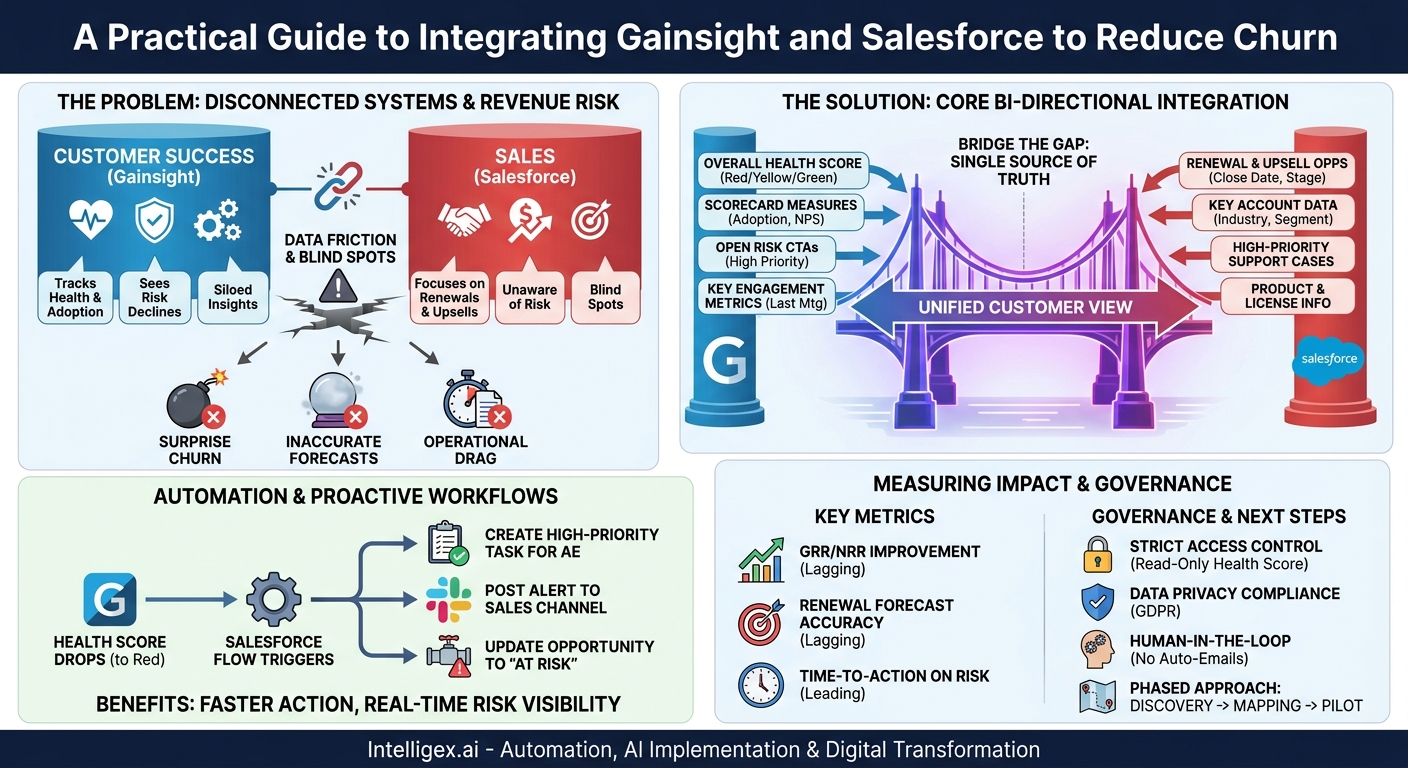
In today’s subscription-based economy, the gap between your Customer Success (CS) team’s insights and your Sales team’s actions can directly impact your bottom line. CS teams live in platforms like Gainsight, meticulously tracking customer health, product adoption, and sentiment. Sales teams, meanwhile, operate from your CRM, typically Salesforce, focusing on renewals, upsells, and new business. When these two worlds don’t communicate automatically, you create blind spots that lead to surprise churn, inaccurate forecasts, and missed expansion opportunities.
The core problem is data friction. A Customer Success Manager (CSM) might see declining product usage and flag a customer as “at-risk” in Gainsight, but the Account Executive (AE) preparing for a renewal conversation in Salesforce remains unaware. This disconnect forces teams into reactive fire-fighting instead of proactive value delivery. Integrating Gainsight and Salesforce bridges this gap, creating a unified view of the customer that aligns your entire revenue team around a single source of truth. This isn’t just about technical convenience; it’s a strategic imperative for improving operational speed, data quality, and the scalability of your customer management processes.
Why a Disconnected System Creates Revenue Risk
When your primary customer health platform and your system of commercial record operate in silos, you expose your organization to several predictable and costly risks. These issues go beyond simple inefficiency, creating systemic challenges that undermine growth and profitability.
First and foremost is the risk of uninformed renewal and upsell conversations. An AE might enter a renewal discussion armed with pricing information but completely blind to the fact that key users have stopped logging in or that a critical support ticket has been languishing for weeks. They are walking into a landmine. Without the real-time health score and risk alerts from Gainsight visible directly on the Salesforce Account page, the sales team cannot tailor their approach. They may push for an upsell when the customer is actually on the verge of churning, damaging the relationship and jeopardizing the renewal.
Second, you create inaccurate revenue forecasting. Sales leaders and finance teams rely on the data in Salesforce to predict future revenue. If the renewal opportunities in your pipeline are not qualified with objective health data, your forecast is based on guesswork and anecdotal feedback. An opportunity marked as “Commit” by an optimistic AE might be a severe churn risk in the eyes of the CSM. Integrating Gainsight health scores into Salesforce allows you to build reports and dashboards that weigh pipeline value against customer health, providing a much more realistic and defensible forecast. This visibility is critical for resource planning, hiring, and strategic investment.
Finally, disconnected systems foster operational drag and wasted effort. In the absence of an integration, how do teams share this vital information? They resort to manual, error-prone workarounds: exporting spreadsheets, copy-pasting notes into different systems, and holding endless “sync-up” meetings to verbally align on account status. This administrative burden pulls your highly skilled AEs and CSMs away from what they do best: talking to customers. It slows down reaction times, as critical information can be delayed by hours or days, and it introduces the risk of human error with every manual data entry.
The Core Integration: Defining Your Bi-Directional Data Flow
A successful integration is not just about pushing data from one system to another; it’s about creating a thoughtful, bi-directional flow where each platform enriches the other. The goal is to give every team the context they need within the application where they spend their time. Before you configure any connector, you must clearly define which system is the “source of truth” for each key piece of data to prevent conflicts and data overwrites.
What to Sync from Gainsight to Salesforce
This flow is about arming your commercial teams with leading indicators of customer health and risk. This data should appear directly on the Account and Opportunity objects in Salesforce, making it impossible to miss.
- Overall Health Score: This is the most critical data point. Sync the overall score (e.g., Red, Yellow, Green) and the numerical score to a custom field on the Salesforce Account. This provides an immediate, at-a-glance status check.
- Scorecard Measures: Don’t just sync the final score. Bring over the individual component scores, such as “Product Adoption,” “Support Sentiment,” or “NPS Score.” This gives the sales team context behind why an account is red.
- Open Risk CTAs: Sync the name and status of any high-priority “Call to Action” (CTA) from Gainsight. An AE seeing an open “Executive Escalation Required” CTA on an account will approach a conversation very differently.
- Key Engagement Metrics: Sync crucial data points like the “Last CSM Meeting Date” or “Last Executive Business Review.” This helps coordinate outreach and prevents teams from “double-tapping” a customer.
What to Sync from Salesforce to Gainsight
This flow provides your CS team with the commercial and operational context needed to manage their portfolio effectively. It ensures they are aligned with sales cycles and aware of broader account activities.
- Renewal and Upsell Opportunities: Sync key opportunity fields like Close Date, Amount, and Stage. This allows CSMs to prioritize their efforts on accounts with upcoming renewals and collaborate with the sales team to mitigate risks.
- High-Priority Support Cases: If you use Salesforce Service Cloud, syncing information about critical, open support cases provides another layer of risk intelligence for the CS team.
- Product and License Information: For companies with complex product lines, syncing entitlement or license data from Salesforce custom objects ensures CSMs know exactly what products a customer owns and can tailor their engagement accordingly.
– Key Account and Contact Data: While the account name is a basic sync, ensure other firmographic data owned by Salesforce (e.g., Industry, Employee Count, Account Segment) flows into Gainsight. This enables more sophisticated health score calculations and customer segmentation within the CS platform.
A Step-by-Step Guide to Your Initial Sync
Implementing the integration requires a structured approach to avoid data corruption and ensure the system works as intended from day one. Rushing this process can lead to more problems than it solves. Follow these foundational steps to build a reliable and scalable integration between Gainsight and Salesforce.
- Assemble a Cross-Functional Team and Define Goals: Before touching any technology, gather stakeholders from Sales Ops, CS Ops, Sales leadership, and Customer Success. The goal isn’t just “to integrate the systems.” Define specific business outcomes, such as “Reduce surprise churn by 10%” or “Improve renewal forecast accuracy by 15%.” This team will be responsible for defining the data mapping and rules.
- Declare the Source of Truth for Every Field: This is the most important step to prevent data conflicts. Create a simple spreadsheet that lists every field you plan to sync. For each field, designate a single “source of truth.” For example, Salesforce is the source for `Account.Name` and `Opportunity.CloseDate`. Gainsight is the source for `Account.HealthScore` and `Account.CSM_Name`. This prevents a scenario where an update in one system overwrites a more accurate update from another.
- Map Your Objects and Fields: With your source of truth defined, create your technical mapping. The standard mapping connects the Gainsight `Company` object to the Salesforce `Account` object. You will then map individual fields. For example: `Gainsight Company::Score` maps to `Salesforce Account::GainsightHealthScore__c` (a custom field you create). Be meticulous and document every mapping.
- Configure the Connector in a Sandbox Environment: Never build an integration directly in your production environment. Use your Salesforce Sandbox and a Gainsight Sandbox to install and configure the Gainsight Connector. This involves authenticating the systems, setting up user permissions, and translating your field map into the connector’s rules engine.
- Establish Sync Rules and Frequency: Configure the rules that determine which records to sync (e.g., only “Active” customers) and how often. While a real-time sync is tempting, start with a daily or hourly batch sync during testing. This makes troubleshooting easier and reduces the load on your systems’ APIs. Once you are confident in the logic, you can move to more frequent, real-time updates for critical data like the health score.
- Test, Validate, and Iterate: In your sandbox, run through common business scenarios. For example, have a CSM update a health score in the Gainsight sandbox and verify it appears correctly on the corresponding Account in the Salesforce sandbox. Have a sales user change an opportunity close date in Salesforce and confirm it updates in Gainsight. Test with a small but representative data set to identify and fix any issues before deployment.
- Deploy to Production and Monitor Closely: Once testing is complete, schedule your production deployment. For the first few weeks, closely monitor the integration’s logs. Look for API errors, sync failures, and unexpected data changes. Provide clear documentation and training to the sales and CS teams so they understand the new data and processes.
Automating Workflows for Proactive Renewals
The true power of this integration is unlocked when you move beyond simple data visibility and begin automating actions based on the synced data. By using the native automation tools in Salesforce (like Flow Builder), you can build a proactive system that turns customer health data into timely, coordinated actions for your revenue teams.
Consider a practical scenario for the Sales team. A customer’s health score, synced from Gainsight, drops from “Green” to “Red” on their Salesforce Account record. Instead of relying on an AE to notice this change, you can build a Salesforce Flow that triggers automatically. This flow can:
- Create a high-priority Task for the Account Executive assigned to the account, with a subject like “Check-in Required: Account Health Dropped to Red.”
- Post an alert to a dedicated Slack channel for the sales team or send an email notification to the AE and their manager.
- Automatically update a custom “Health Status” field on the open renewal Opportunity from “Healthy” to “At Risk,” immediately flagging it in pipeline reviews.
This simple automation transforms a passive data point into an urgent, actionable alert. It reduces the “time-to-action” from days or weeks to mere minutes, ensuring that negative trends are addressed before they escalate. It provides Sales leadership with a clear, real-time view of pipeline risk that is based on objective data, not just rep sentiment.
For Finance and Operations, the benefits are equally compelling. When a CSM flags a “Renewal at Risk” in Gainsight, this status can be synced to a field on the corresponding Opportunity in Salesforce. Finance teams can then build their revenue forecasts and reports in Salesforce to exclude or segment at-risk deals. This dramatically improves the quality and accuracy of financial forecasting. It allows leadership to make more informed decisions about spending and investment because they have a higher degree of confidence in the company’s projected revenue.
Measuring the Impact: Metrics That Matter
To justify the investment in integration and prove its value, you must track the right metrics. These should be a mix of leading indicators that measure operational efficiency and lagging indicators that measure direct business outcomes.
Leading Indicators (Operational Metrics)
These metrics help you understand if the integration is working as designed and improving your internal processes. They are early signals of success.
- Time-to-Action on Risk: Measure the time elapsed between a risk CTA being created in Gainsight and a corresponding task being created for the AE in Salesforce. This should drop from days (manual process) to minutes (automated process).
- Data Consistency Rate: Periodically audit a sample of accounts. What percentage of accounts have matching health scores and CSM assignments between both systems? Aim for 99% or higher consistency.
- Adoption by Sales Team: Use Salesforce reporting to track how often AEs are viewing or reporting on the new Gainsight-sourced fields. Low usage may indicate a need for more training.
Lagging Indicators (Business Value Metrics)
These are the bottom-line results that demonstrate the strategic value of the integration to your executive team.
- Gross and Net Revenue Retention (GRR/NRR): This is the ultimate measure of success. Over several quarters, you should see an improvement in these key retention metrics as your teams become more proactive in mitigating churn and identifying expansion opportunities.
- Renewal Forecast Accuracy: Compare your forecasted renewal rate at the beginning of the quarter to the actual rate at the end. The integration should significantly reduce the variance by providing a more realistic view of the pipeline.
- Sales and CS Productivity: While harder to quantify, you can survey the teams. Ask them to estimate the hours per week they spent on manual data reconciliation before the integration versus after. This provides a clear cost-savings and productivity-gain narrative.
Governance and Data Integrity: Keeping Your Integration Healthy
An integration is not a “set it and forget it” project. It requires ongoing governance to ensure data quality, security, and user trust. Without clear rules, your newly unified system can quickly become a source of confusion.
First, establish strict access control. Just because a Gainsight field is visible in Salesforce doesn’t mean everyone should be able to edit it. The health score, for instance, should be a read-only field in Salesforce for all users except perhaps a system administrator. This preserves Gainsight as the single source of truth for health data and prevents an AE from manually changing a score to make their account look healthier in a pipeline review. Use Salesforce profiles and permission sets to enforce these rules.
Next, consider the implications for data privacy and AI. Customer health scores are often calculated by proprietary models in Gainsight that analyze sensitive usage data. When you sync this score to Salesforce, you are propagating that data and its derivatives. Ensure this process is compliant with regulations like GDPR and that your customer agreements allow for this type of data usage. Be transparent internally about how the score is calculated to build trust with the teams who rely on it.
Finally, always keep a human in the loop. Automation should be used to trigger human action, not to replace human judgment. A drop in health score should create a task for a person to investigate; it should not trigger an automated, impersonal email to the customer. This ensures that the context behind the data is always considered, maintaining the quality of your customer interactions and preventing automated systems from damaging relationships.
Next Steps: Building Your Integration Roadmap
Integrating Gainsight and Salesforce is a foundational step in building a scalable, proactive, and customer-centric revenue organization. It eliminates data silos, aligns teams around a common set of facts, and transforms raw data into intelligent, automated actions. The result is faster response times to customer risk, more accurate financial forecasting, and ultimately, higher revenue retention.
To begin, don’t try to boil the ocean. A phased approach is the most reliable path to success.
- Start with a Discovery Workshop: Gather your key stakeholders from Sales, Customer Success, and Operations. Map out the current state of your processes and identify the most painful data gaps. Focus on the one or two use cases that will deliver the most immediate business value.
- Create Your Data Mapping Blueprint: Before you configure anything, build the detailed field mapping and source-of-truth document. This blueprint is the most critical piece of documentation for your project and will guide the entire implementation.
- Launch a Pilot Program: Start by syncing only the most important data point, the overall health score, from Gainsight to Salesforce. Roll this out to a small, pilot group of users. This allows you to test the technical connections and gather user feedback in a controlled environment before moving to a full, bi-directional sync with more complex workflow automation.
By following this structured approach, you can build a powerful integration that serves as the central nervous system for your entire customer lifecycle, driving efficiency and growth across the organization.
Your Next Read:
Get a FREE
Proof of Concept
& Consultation
No Cost, No Commitment!
