

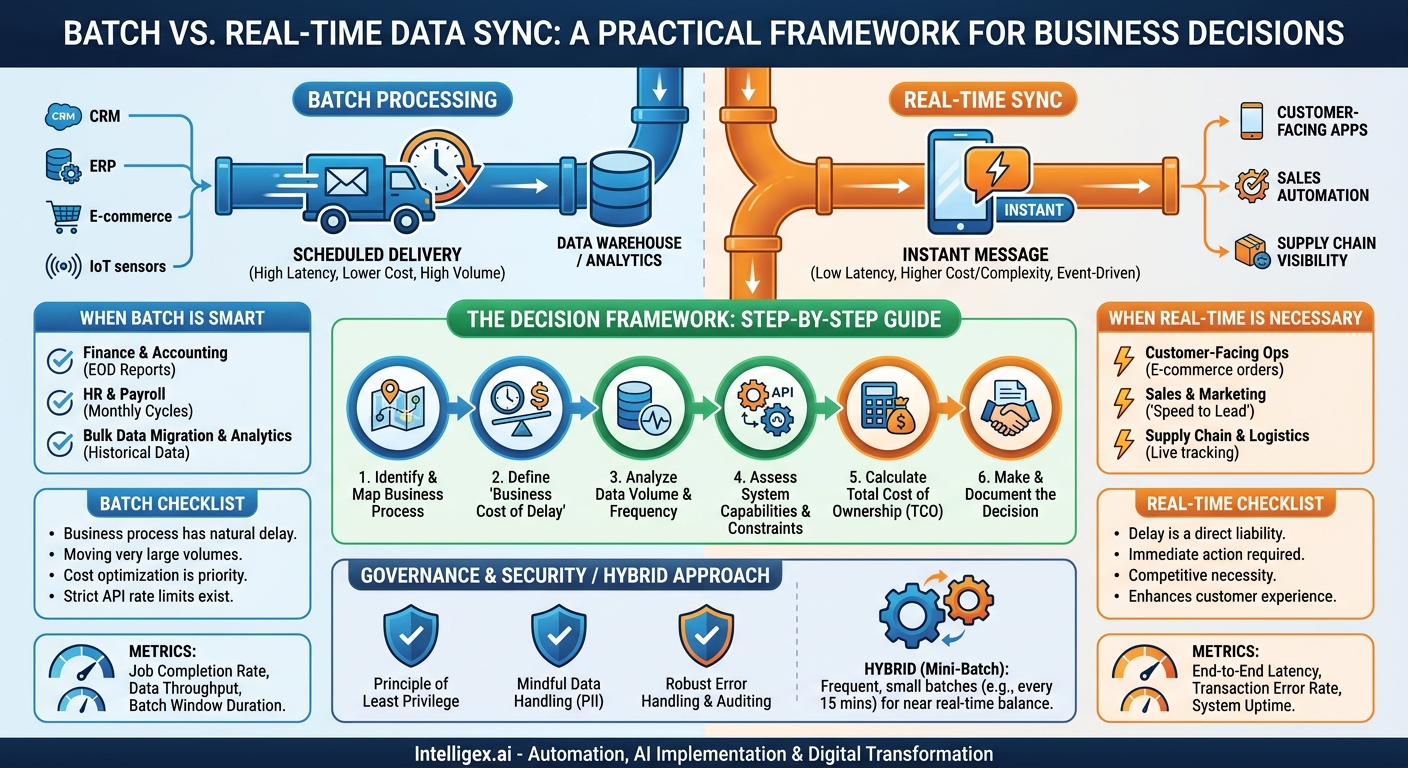
In a truly connected enterprise, data flows seamlessly between the systems that run your business. Your CRM talks to your ERP, your marketing platform talks to your sales tools, and your supply chain software knows what your e-commerce site just sold. But behind this vision of digital harmony lies a critical, often overlooked decision: how should that data move? The choice between batch and real-time synchronization is more than a technical detail. It’s a strategic decision that directly impacts your operational efficiency, customer experience, and bottom line.
Making the wrong choice can lead to frustrated teams working with stale data, missed sales opportunities, and costly, brittle systems that are a nightmare to maintain. Making the right one unlocks new levels of speed, accuracy, and business insight. This guide provides a practical framework to help you decide, moving beyond technical jargon to focus on what really matters: business value.
Understanding the Core Difference: Latency and Cost
At its heart, the debate between batch and real-time processing is a trade-off between the freshness of your data and the resources required to move it. Let’s break down each approach using simple analogies.
Batch Processing: The Scheduled Delivery
Batch processing is like the postal service delivering mail once a day. Data is collected, grouped together, and moved in large “batches” on a set schedule. This could be nightly, hourly, or even weekly. The defining characteristic is the planned delay; the system waits to process a large volume of information all at once.
- Business Value: The primary advantages are cost-effectiveness and efficiency. Processing thousands of records in a single, scheduled job is far less taxing on your systems and APIs than handling each record individually. It’s reliable, predictable, and excellent for handling massive datasets.
- Common Scenarios:
- End-of-day sales reporting: Aggregating all daily transactions from point-of-sale systems into a central data warehouse for analysis.
- Payroll processing: Calculating pay and deductions for all employees at the end of a pay period.
- Data archiving: Moving old records from a live production database to a cheaper, long-term storage solution.
Real-Time Sync: The Instant Message
Real-time synchronization (or event-driven integration) is like sending a text message. As soon as an event occurs in one system, the data is sent and processed in the destination system almost instantly. There is no scheduled delay. The integration is always “on,” listening for changes.
- Business Value: The key benefit is immediacy. Real-time data enables faster decision-making, powers responsive customer experiences, and prevents operational errors caused by data lag. It provides an up-to-the-minute view of your business operations.
- Common Scenarios:
- E-commerce inventory updates: When a product is purchased, the stock level is immediately updated across all systems to prevent overselling.
- Fraud detection: A credit card transaction is analyzed for fraudulent patterns in milliseconds, before the payment is approved.
- Lead routing: A new lead from a web form is instantly sent to the CRM and assigned to a sales representative.
The choice isn’t about which is “better” in a vacuum. It’s about which is right for the specific business process you’re trying to enable or improve.
When Batch Processing is the Smart Choice
Before chasing the allure of “real-time everything,” it’s crucial to recognize where batch processing is not just adequate, but superior. If a business process has a natural, acceptable latency, forcing a real-time solution adds unnecessary cost and complexity.
Finance and Accounting Operations
Financial teams operate on well-defined cycles: daily reconciliations, monthly closes, quarterly reports. A nightly batch job that syncs invoices from a sales system to the general ledger is often perfect. The accounting team doesn’t need to see every single invoice the second it’s created; they need a complete, accurate set of all invoices from the previous day to begin their work each morning. Insisting on a real-time sync here would create a constant stream of data that offers little immediate value and could complicate reconciliation efforts.
Human Resources and Payroll
Consider the process of updating employee data. When a manager approves a promotion in the HRIS, does the payroll system need to know that exact second? Not usually. A daily batch sync of employee changes is perfectly sufficient, as payroll is typically run on a bi-weekly or monthly schedule. This approach ensures all changes from a given day are captured and processed together, reducing the chance of errors from multiple, piecemeal updates.
Bulk Data Migration and Analytics
When you’re moving large volumes of historical data for a system migration or populating a data warehouse for business intelligence, batch is the only practical option. Attempting to move millions of customer records in real-time would be incredibly slow, expensive, and likely to fail due to API rate limits and network instability. Batch jobs are designed for this kind of heavy lifting, with robust error handling and retry mechanisms built for large-scale data transport.
Checklist: Go with Batch Sync If…
- The business process has a built-in delay (e.g., end-of-day reporting, monthly closing).
- You are moving very large data volumes where per-transaction speed is not the priority.
- Cost optimization is a primary driver, and you need to minimize API calls and compute resources.
- The source or destination systems have strict API rate limits that a real-time approach would violate.
- You need to ensure a complete dataset is moved and reconciled at a specific point in time (e.g., “all of yesterday’s transactions”).
When Real-Time Sync is a Competitive Necessity
In many modern business functions, delay is a direct liability. A lag of even a few minutes can result in a lost customer, a costly operational mistake, or a missed opportunity. In these scenarios, real-time sync is not a luxury; it’s a core requirement for competing effectively.
Customer-Facing Operations
Any interaction that a customer experiences directly is a prime candidate for real-time integration. Think of an e-commerce transaction. When a customer clicks “buy,” a cascade of real-time events must occur:
- The payment gateway must authorize the transaction instantly.
- The inventory system must immediately decrement the stock count.
- The order must appear in the fulfillment system to begin the picking and packing process.
- A confirmation email must be sent to the customer.
A batch process that updates inventory every hour would lead to overselling and customer frustration. A delay in order confirmation would create anxiety and increase “where is my order?” support tickets.
Sales and Marketing Automation
The concept of “speed to lead” is a powerful driver for real-time integration. When a potential customer fills out a “Contact Us” form on your website, the clock starts ticking. A real-time workflow ensures this lead is instantly created in your CRM (like Salesforce), assigned to the correct sales rep based on territory rules, and enrolled in an automated email nurture sequence. If that process takes 24 hours via a nightly batch job, that lead has likely already engaged with three of your competitors.
Supply Chain and Logistics Visibility
Modern supply chains run on real-time information. When a shipment leaves a warehouse, sensors and scanners trigger events that update tracking systems. This allows logistics managers to monitor shipments in transit, reroute them to avoid delays, and provide customers with accurate, up-to-the-minute tracking information. This level of visibility and agility is impossible with batch data that is hours or days old.
The Decision Framework: A Step-by-Step Guide
Avoid starting your decision with technology. Instead, begin with the business process and work backward. Follow these steps to make a well-informed choice.
- Identify and Map the Business Process. Clearly define the workflow you are automating or improving. Who are the stakeholders? What are the inputs and outputs? For example, don’t just say “integrate sales and finance.” Instead, specify “When a sales opportunity is marked ‘Closed Won’ in the CRM, automatically create a corresponding customer and sales order in the ERP.”
- Define the “Business Cost of Delay.” This is the most critical step. Ask your stakeholders pointed questions: What is the tangible negative impact if this data is one hour late? One day late? Quantify it. Does it result in lost revenue, a compliance penalty, increased manual labor, or a poor customer satisfaction score? If you can’t identify a significant cost of delay, batch is likely sufficient.
- Analyze the Data Volume and Frequency. How much data are you moving, and how often does it change? Syncing five new employee records per day is a vastly different technical challenge than processing 500 orders per minute. High-frequency, low-volume updates are a good fit for real-time. Low-frequency, high-volume updates are better suited for batch.
- Assess System Capabilities and Constraints. Not all applications are built for real-time integration. Review the API documentation for your source and destination systems. Do they offer webhooks or streaming APIs for real-time events? What are their API rate limits? A legacy system with a clunky, slow API may force you into a batch approach, regardless of the business need.
- Calculate the Total Cost of Ownership (TCO). Real-time integrations often have a higher TCO. They require more sophisticated monitoring, more complex error handling logic (e.g., what if a single transaction fails?), and potentially higher infrastructure or API usage fees. A batch process is typically simpler to build and maintain. Weigh this cost against the “cost of delay” you identified in Step 2.
- Make and Document the Decision. Based on the previous steps, choose the integration pattern that delivers the most business value for an acceptable TCO. Document the “why” behind your decision. This rationale will be invaluable for future projects and for explaining the choice to stakeholders.
Measuring Success: Key Metrics for Your Integration Strategy
Once your integration is live, you need to measure its performance to ensure it’s delivering the expected value. The metrics you track will differ depending on the pattern you chose.
Metrics for Batch Integrations
- Job Completion Rate: The percentage of scheduled jobs that run to completion without errors. A low rate indicates brittle code or underlying data quality issues.
- Data Throughput: The number of records processed per job. This helps you track data volume growth and plan for future capacity needs.
- Batch Window Duration: How long does the job take to run? If this time is consistently increasing and starting to interfere with business hours, it’s a sign that the process needs to be optimized or the underlying infrastructure needs an upgrade.
Metrics for Real-Time Integrations
- End-to-End Latency: This is the golden metric. It measures the time from when an event occurs in the source system to when the data is successfully processed in the destination system. This should be measured in seconds or even milliseconds.
- Transaction Error Rate: The percentage of individual events that fail to process. A high error rate points to a systemic problem with data validation, connectivity, or the endpoint systems themselves.
- System Uptime: For critical real-time workflows, the integration platform must be highly available. Track uptime to ensure it meets the business requirements.
A Note on Hybrid Approaches and Future-Proofing
The choice is not always a strict binary between nightly batch and instant real-time. A pragmatic middle ground, often called “mini-batch” or “near real-time,” can offer a powerful compromise. In this model, data is synced in small batches on a frequent schedule, such as every five or fifteen minutes.
This approach provides data that is significantly fresher than a nightly batch run without incurring the full complexity and cost of a true event-driven architecture. For example, syncing new customer support tickets from a platform like Zendesk to a data warehouse every 15 minutes is often sufficient for operational dashboards.
When designing your integrations, consider building for flexibility. A process that starts as a simple nightly batch might need to evolve as the business grows. Using an integration platform that can support both patterns allows you to adapt your strategy over time without having to re-architect everything from scratch.
Data Governance and Security in a Connected World
Connecting systems inevitably increases the flow of data, which requires a deliberate approach to security and governance. As you implement either batch or real-time integrations, keep these principles in mind.
- Principle of Least Privilege: The integration’s service account or API key should only have the permissions necessary to perform its specific task. If the integration only needs to create new invoices in your ERP, it should not have permission to delete customers or modify the chart of accounts.
- Mindful Data Handling: Be intentional about which data fields you sync. Avoid moving sensitive personally identifiable information (PII) unless it is absolutely essential for the business process. This minimizes your compliance risk with regulations like GDPR and CCPA.
- Robust Error Handling and Auditing: Every integration, whether batch or real-time, will eventually encounter an error. You must have an automated alerting system to notify the right people when a job fails or a real-time transaction cannot be processed. Maintain clear logs of all sync activities for auditing and troubleshooting purposes. For processes that feed AI models, a human review step for anomalous or high-impact results is a critical safeguard.
Your Next Steps
Moving from theory to action is key. Don’t try to overhaul all your integrations at once. Instead, build momentum by focusing on one high-impact area.
- Pick a Process: Identify a single, critical business process that is currently hampered by manual data entry or stale information. The “lead-to-cash” cycle is often a great place to start.
- Apply the Framework: Walk through the six-step decision framework with the business stakeholders for that process. Get their input on the real-world cost of data delays.
- Start Small: Begin with a pilot project to prove the value of your chosen integration pattern. A successful pilot builds trust and secures buy-in for more ambitious projects.
By thoughtfully choosing between batch and real-time synchronization, you can build a more efficient, responsive, and data-driven organization. It’s a foundational step in any successful digital transformation journey.
Your Next Read:
Get a FREE
Proof of Concept
& Consultation
No Cost, No Commitment!
