

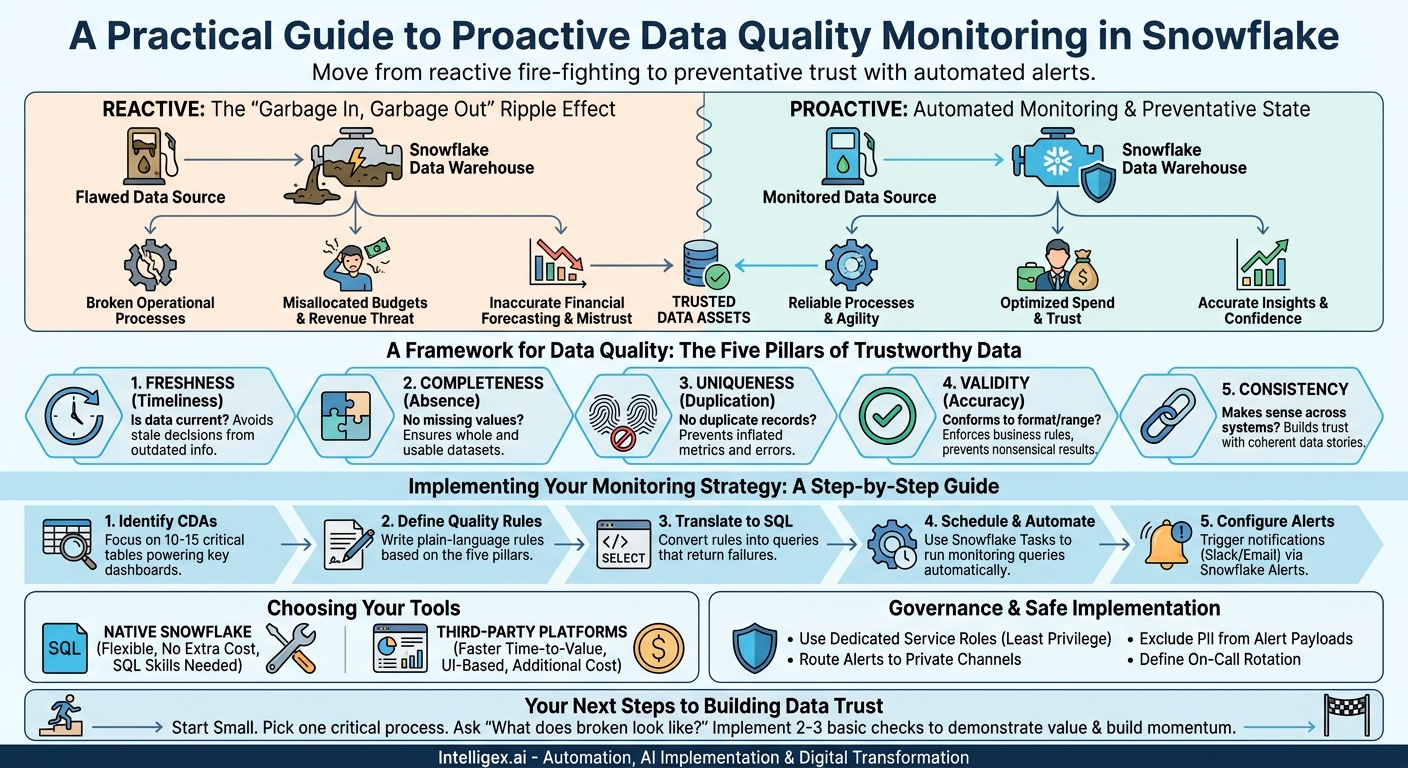
Your Snowflake data warehouse is the engine of your business intelligence, powering everything from executive dashboards to machine learning models. But if the fuel is contaminated, the engine sputters. Poor data quality is not just a technical nuisance; it is a direct threat to revenue, customer trust, and strategic agility. Decisions made on flawed data can lead to misallocated marketing budgets, inaccurate financial forecasting, and broken operational processes. The problem is, you cannot fix what you cannot see.
Proactive data quality monitoring is the answer. It moves your team from a reactive, fire-fighting mode to a preventative state where issues are caught before they impact downstream consumers. This is not about achieving perfect data, which is an impossible goal. It is about establishing trust and reliability by defining what “good” looks like and creating automated alerts for when data deviates from that standard. The key is to focus your efforts on the alerts that matter most to the business.
Beyond “Garbage In, Garbage Out”: The Real Cost of Bad Data in Snowflake
The old adage “garbage in, garbage out” only scratches the surface of the problem. In a modern data stack built on Snowflake, the impact of poor data quality is amplified. A single flawed data source can ripple through dozens of downstream models, dashboards, and applications, silently corrupting insights across the organization. The costs are tangible and often hidden.
Consider a marketing team that relies on a customer data platform (CDP) feeding into Snowflake. If a bug introduces duplicate customer profiles, the team might unknowingly target the same individual with conflicting offers, wasting ad spend and creating a poor customer experience. Or imagine a finance department finalizing its quarterly earnings report. A delayed data pipeline or a batch of null values in a critical transaction table could force analysts to scramble, manually patching data and delaying the release of vital information to leadership and investors.
These are not edge cases. They are the daily reality for organizations that treat data quality as an afterthought. Effective monitoring transforms this dynamic by providing visibility and control. It helps you quantify the health of your data assets, build confidence among business users, and ensure that your significant investment in Snowflake delivers its promised value: faster, smarter decisions.
A Framework for Data Quality: The Five Pillars of Trustworthy Data
To monitor data effectively, you need a simple framework for categorizing potential issues. Instead of a random collection of checks, organizing your tests around these five pillars will ensure comprehensive coverage of your most critical data assets.
1. Freshness (or Timeliness)
The Question: Is my data current? Has it arrived when we expected it to?
Business Impact: Stale data leads to outdated decisions. A supply chain manager looking at three-day-old inventory data cannot make effective restocking decisions. A sales leader viewing a weekly pipeline report that has not been updated is flying blind. Freshness alerts are your first line of defense against broken ETL/ELT pipelines and source system outages.
2. Completeness (or Absence)
The Question: Are there missing values where there should not be?
Business Impact: Null values in critical fields can break downstream calculations and skew analysis. If an `order_total` field is null, it cannot be included in revenue reporting. If a `customer_email` field is null in a new batch of leads, those leads are useless for an email marketing campaign. Monitoring completeness ensures that your datasets are whole and usable.
3. Uniqueness (or Duplication)
The Question: Does this dataset contain duplicate records?
Business Impact: Duplicates inflate key metrics and can cause serious operational errors. Duplicate customer records can lead to multiple salespeople contacting the same prospect. Duplicate transaction IDs in a financial table can cause revenue to be overstated. Uniqueness tests are vital for maintaining the integrity of entities like customers, orders, and products.
4. Validity (or Accuracy)
The Question: Does the data conform to the expected format, type, and range?
Business Impact: Invalid data can cause processing errors and lead to nonsensical results. An email address without an “@” symbol is not an email address. A product price with a negative value is incorrect. A shipping date set in the past for a new order is logically impossible. Validity checks enforce the fundamental business rules that govern your data.
5. Consistency
The Question: Does my data make sense across different tables or systems?
Business Impact: Inconsistencies erode trust. If a user sees 1,050 active customers on the main sales dashboard but a detailed regional report only sums to 950, they will question the reliability of both. Consistency checks ensure that your data tells a coherent story, for example, by verifying that every `order_id` in a `payments` table also exists in the main `orders` table (referential integrity).
Setting Your Baselines: What Does “Normal” Look Like?
You cannot effectively alert on anomalies if you have not defined what is normal. Before implementing a single check, your first step is to profile your data to establish a baseline. This involves understanding the typical shape, size, and patterns of your key tables. Snowflake’s query capabilities make this process straightforward.
Start by asking simple questions about your most critical tables, like `customers`, `orders`, or `web_events`:
- Volume: What is the average number of rows added per day? What is the normal range? A sudden drop to zero or a 10x spike are both cause for concern. Use `COUNT(*)` over time to find this.
- Distribution: What are the typical `MIN`, `MAX`, and `AVG` values for important numeric columns like `revenue` or `session_duration`? Are they changing unexpectedly?
- Cardinality: How many unique values do you expect in a column like `country_code` or `product_category`? A sudden drop could indicate a filtering error upstream. Use `COUNT(DISTINCT column_name)`.
- Null Rates: What percentage of rows typically have a null value in a specific column? A sudden increase in the null rate for `shipping_address` is a clear quality signal.
By running these aggregate queries on a historical basis (for example, over the last 30 days), you can establish quantitative thresholds for your alerts. Instead of a vague rule like “check for nulls,” you can create a precise, actionable alert like, “Alert if the percentage of null `billing_zip_code` values in the daily new customer load exceeds 2%, which is four standard deviations above the monthly average.”
The Alerting Playbook: Critical Checks for Key Business Areas
Data quality is context-dependent. A critical issue in a financial table might be irrelevant in a marketing analytics dataset. The most effective monitoring strategies tie alerts directly to specific business functions and their key metrics. Here are practical examples of what to alert on for different teams.
For Finance & Operations
Financial data demands the highest level of accuracy and integrity. Errors here can have direct regulatory and monetary consequences.
- Alert on failed relationship tests: Trigger an alert if an `order_id` exists in your `stripe_transactions` table but not in your internal `orders` table. This points to a severe consistency problem.
- Alert on negative values in currency fields: A `revenue` or `invoice_amount` column should never be negative. A simple `MIN(column) < 0` check can prevent major reporting errors.
- Alert on unusual transaction volumes: If your daily sales transaction count suddenly drops by 50% compared to the previous 4-week average for the same day of the week, it could signal a payment processor outage or a critical bug in your checkout flow.
For Sales & Marketing
Here, the focus is on the quality of customer and lead data, which directly impacts campaign effectiveness and sales productivity.
- Alert on high null rates for contact info: If a new batch of leads from a third-party provider arrives and more than 10% have a null `email` or `phone_number`, the data is not actionable. This alert allows you to reject the batch before it pollutes your CRM.
- Alert on duplicate lead creation: Set up a check that looks for newly created leads where the `email` and `company_name` match an existing record created in the last 7 days. This helps keep your CRM clean and prevents multiple reps from contacting the same person.
- Alert on invalid formats: A simple regular expression can validate that values in a `state` or `zip_code` column match expected formats. High failure rates can indicate a source system data entry issue.
For Supply Chain & Logistics
Timeliness and accuracy are paramount for managing inventory, shipments, and logistics.
- Alert on data freshness: The `inventory_levels` table must be up-to-date. Create an alert that triggers if the `MAX(last_updated_timestamp)` in the table is more than 3 hours old. Stale data here can lead to stockouts or over-ordering.
- Alert on impossible values: The `quantity_on_hand` for a product should never be negative. An alert on this condition can help you find issues in your inventory management system or receiving process.
- Alert on “zombie” statuses: If a shipment record has been in a “processing” status for more than 48 hours, it likely represents a stuck process. A freshness check on records within specific status categories can identify these operational bottlenecks.
Implementing Your Monitoring Strategy: A Step-by-Step Guide
Moving from theory to practice involves a systematic process of identifying key assets, defining rules, and automating their execution. While specific tools can accelerate this, the underlying logic remains the same.
- Identify Critical Data Assets (CDAs): You cannot monitor everything, so do not try. Work with business stakeholders to identify the 10-15 tables that power the most critical dashboards, reports, and operational systems. These are your CDAs and your starting point.
- Define Quality Rules in Plain Language: For each CDA, define a set of rules based on the five pillars. Write them down in plain language first. For example: “The `users` table should have no duplicate `user_id` values,” or “The `daily_web_sessions` table should receive new data every hour.”
- Translate Rules into Monitoring Queries: Convert each plain-language rule into a SQL query that returns failing rows or a count of failures. For example, the duplicate `user_id` check becomes: `SELECT user_id, COUNT(*) FROM users GROUP BY user_id HAVING COUNT(*) > 1;`. A query that returns a count of zero indicates the test has passed.
- Schedule and Automate with Snowflake Tasks: Use Snowflake’s native scheduling capabilities to run your monitoring queries automatically. A Snowflake Task can be configured to execute a SQL statement on a schedule (e.g., every hour, or after a dbt run completes). This is the engine of your monitoring system.
- Configure Alerting Notifications: An automated check is useless if no one sees the result. Use Snowflake Alerts, a feature designed for this purpose, to trigger a notification when your monitoring query returns a failure. These alerts can execute actions like sending an email or calling a custom webhook to post a message in a specific Slack channel.
Choosing Your Tools: Native Snowflake vs. Third-Party Solutions
You have two primary paths for implementing data quality monitoring in Snowflake: using native features or adopting a specialized third-party tool.
The Native Snowflake Approach
This approach relies on writing your own SQL-based tests and using features like Tasks, Streams, and Alerts to automate them.
- Pros: It is highly flexible, completely customizable, and has no additional software cost since it uses your existing Snowflake compute credits. It is a great way to start and learn what matters for your business.
- Cons: It can be time-consuming to build and maintain, especially at scale. It requires strong SQL and data engineering skills, and it lacks a centralized user interface for managing rules and viewing historical quality trends.
Third-Party Data Observability Platforms
An ecosystem of tools has emerged to specialize in data quality and observability. These platforms connect to your Snowflake account and provide a dedicated solution for monitoring.
- Pros: They offer much faster time-to-value with user-friendly interfaces for creating rules without writing SQL. Many use machine learning to automatically suggest monitors and detect anomalies. They provide centralized dashboards, lineage, and incident management workflows. Frameworks like dbt also offer powerful, integrated data testing capabilities that are a core part of the development workflow.
- Cons: They represent an additional software cost and require your team to learn a new tool. There is also a risk of “alert fatigue” if not configured thoughtfully.
For many organizations, a hybrid approach works best. Use a framework like dbt for core, in-workflow tests related to data modeling, and use native Snowflake checks or a dedicated observability tool for monitoring data freshness and production pipeline health.
Governance and Safe Implementation
As you roll out your monitoring and alerting system, it is crucial to do so safely and securely, especially when dealing with sensitive or personally identifiable information (PII).
First, apply the principle of least privilege. Your monitoring jobs should run using a dedicated service role in Snowflake with read-only access to the specific tables it needs to check. This role should not have permissions to modify data or access tables outside its scope. This minimizes the security risk if credentials were ever compromised.
Second, be mindful of what you put in your alert messages. An alert should provide enough context to diagnose the problem without exposing sensitive data. For example, an alert should say, “High null count in `customer_address` column for batch ID 12345,” not, “Customer John Smith (ID 789) has a null address.” Design your alerts to send identifiers, not the raw PII itself.
Finally, establish a clear process for handling alerts. Who is responsible for investigating a freshness alert versus a validity alert? This is your incident response plan. By defining ownership, you ensure that alerts are not just fired into a void but are acted upon swiftly by the correct team, whether it is data engineering, a specific business analytics team, or a source system owner.
Here is a short checklist for implementing safe alerting:
- Use dedicated service roles: Create a unique role for your monitoring tasks with strict, read-only permissions.
- Route alerts to private channels: Send notifications to private Slack channels or email distribution lists, not public forums.
- Exclude PII from alert payloads: Design your alert messages to contain metadata and identifiers, not sensitive customer data.
- Define an on-call rotation: Establish a clear owner or team responsible for acknowledging and investigating data quality incidents.
Your Next Steps to Building Data Trust
Starting a data quality monitoring program can feel daunting, but the key is to start small and demonstrate value quickly. Do not try to boil the ocean by monitoring every table in your warehouse from day one. Instead, build momentum by focusing on a single, high-impact area.
Pick one critical business process that relies heavily on Snowflake data, such as your lead-to-cash reporting or your primary marketing attribution dashboard. Sit down with the business users who own that process. Ask them a simple question: “What does broken look like to you?” Their answers, whether about late data, missing entries, or strange values, are the foundation of your first set of data quality monitors.
Implement just two or three of these checks using the step-by-step guide. Start with the basics: a freshness check (is the data arriving on time?) and a volume check (are we getting the expected number of rows?). Once you catch your first real issue and prevent a bad decision, you will have a success story to share. This is how you build a culture of data reliability. You prove its value one alert at a time, transforming data from a source of uncertainty into an asset your entire organization can trust.
Your Next Read:
Category:
Get a FREE
Proof of Concept
& Consultation
No Cost, No Commitment!
