

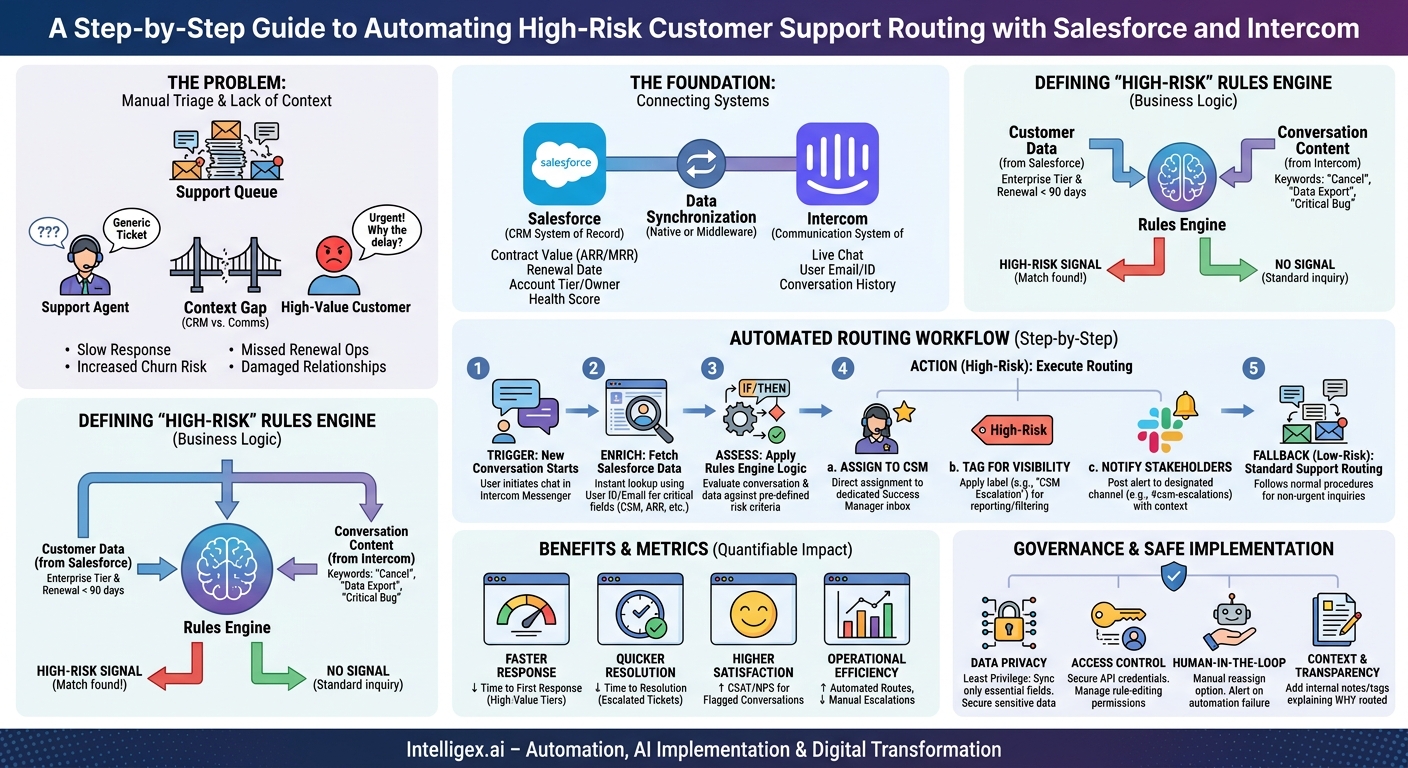
When a high-value customer has a problem, every minute counts. Yet for many companies, that customer’s urgent message lands in the same general support queue as every other inquiry. A support agent, lacking the full context of the customer relationship, treats it as just another ticket. Hours or even days can pass before someone realizes the person on the other end is from a top-tier account with an upcoming renewal. By then, the damage is done.
This delay isn’t a failure of the support team; it’s a failure of the system. The information that provides critical context, like contract value, renewal date, and account health, lives in your CRM, typically Salesforce. The customer conversations, however, are happening in a communication platform like Intercom. Manually bridging this gap is slow, inefficient, and prone to error. By integrating these two platforms, you can build an automated workflow that identifies high-risk conversations in real-time and routes them directly to the person best equipped to handle them: the Customer Success Manager (CSM).
Why Manual Triage Fails at Scale
In the early days, a small team can manage to keep an eye on important customers. The Head of Customer Success might even be in the main support inbox, spotting crucial conversations. But as the business grows, this approach breaks down completely. The volume of conversations becomes too high, and the manual process of cross-referencing every customer with your CRM becomes a major bottleneck.
Consider these common scenarios:
- The Technical Crisis: A user from a top enterprise account reports a critical bug that is blocking their entire team. Because the support agent doesn’t see the account’s Annual Recurring Revenue (ARR) or its “strategic” status in Salesforce, the ticket is categorized as a standard P2 bug and sits in a queue for 12 hours before a developer sees it. The customer, feeling ignored, escalates to their executive sponsor.
- The Billing Dispute: The finance contact at a key account questions an invoice. The conversation is routed to a general billing queue, where the response time is 48 hours. The assigned CSM, who has a strong relationship with the account and could have resolved the misunderstanding in minutes, is completely unaware of the issue until it appears as a churn risk in their weekly report.
- The Silent Churn Signal: A user from an account with a renewal date in 60 days asks, “How do I export all of my data?” This is a massive red flag. A standard agent might simply send a link to a help article, missing the crucial subtext. The CSM needs to see this conversation immediately to proactively address the customer’s unstated concerns.
In each case, the core problem is a lack of context at the point of interaction. The cost of this disconnect is not just operational inefficiency; it’s increased churn risk, damaged customer relationships, and missed opportunities to strengthen partnerships with your most important clients.
The Foundation: Connecting Your Systems of Record and Engagement
To automate routing, you first need to ensure Intercom has access to the right data from Salesforce. This connection creates a data-rich environment where your routing rules can operate effectively. The goal is to enrich every Intercom conversation with a snapshot of the most important customer details from Salesforce.
There are generally two approaches to this integration: using a native connector or building a custom workflow with middleware. The Intercom App for Salesforce is a powerful native option that can handle many use cases, allowing you to sync data and view Intercom conversations within Salesforce. For more complex logic, such as combining multiple data points in real time to make a routing decision, a middleware platform like Workato or MuleSoft might be necessary. The right choice depends on your technical resources and the complexity of your routing rules.
Regardless of the method, the first step is to identify the key data points you need. Your integration should focus on syncing only the essential information to keep the process fast and secure.
Checklist: Essential Salesforce Fields to Sync
- Account Owner or CSM: The most critical field. You need to know who the dedicated contact is.
- Account Tier: A clear segment like “Enterprise,” “Strategic,” “SMB,” or “Trial.”
- Contract Value (ARR/MRR): A quantitative measure of the account’s financial importance.
- Renewal Date: Essential for identifying customers in a critical pre-renewal window.
- Opportunity Stage: Useful for flagging conversations from active prospects in a late-stage sales cycle.
- Health Score: If you use a customer health scoring system, this provides immediate risk context.
Getting this data into Intercom lays the groundwork for all subsequent automation. Without it, any routing rules you create will be based on incomplete information.
Defining “High-Risk”: Creating Your Business Rules Engine
Once the data is flowing, you must define what “high-risk” means for your business. This is not a technical decision; it’s a strategic one that should involve stakeholders from Customer Success, Sales, and Support. A rule that is too broad will flood CSMs with noise, while a rule that is too narrow will let critical issues slip through.
Your rules can be based on customer data, conversation content, or a combination of both. Start with simple, high-impact rules and iterate from there.
Examples of Effective Risk Criteria:
- Based on Customer Data:
- Rule: If `Account Tier` is “Enterprise” AND `Renewal Date` is within the next 90 days, escalate to CSM.
- Rationale: Protects your most valuable renewing revenue from any friction.
- Based on Conversation Keywords:
- Rule: If conversation body contains “cancel account,” “data export,” or “GDPR request,” escalate to CSM.
- Rationale: These phrases are strong indicators of potential churn or a serious legal/compliance inquiry.
- Based on a Combination:
- Rule: If `ARR` is greater than $50,000 AND conversation body contains “outage,” “critical bug,” or “system down,” assign to CSM and notify a support manager.
- Rationale: Combines financial impact with issue severity to identify business-critical technical problems immediately.
This “rules engine” is the brain of your operation. It can be built using Intercom’s native automation rules or within your middleware tool. The key is to make it flexible, allowing you to adjust the criteria as you learn which signals are the most reliable indicators of risk.
Step-by-Step: Building the Automated Routing Workflow
With the data synced and the rules defined, you can now build the end-to-end workflow. This process takes an incoming conversation, enriches it with data, evaluates it against your rules, and takes decisive action. Here is a typical implementation flow.
- Set the Trigger: A New Conversation Starts. The process begins the moment a user initiates a new conversation in the Intercom Messenger. This is your starting point.
- Enrich the Conversation with Salesforce Data. As soon as the conversation is created, the system uses the user’s email address or a unique user ID to look them up in Salesforce. The key data fields you identified earlier (CSM, ARR, Renewal Date, etc.) are pulled and temporarily associated with the conversation. This step must be fast, ideally taking less than a second to avoid delaying the customer experience.
- Apply the Risk Assessment Logic. Your rules engine now runs against the combination of conversation content and the newly attached Salesforce data. It checks for keyword matches and evaluates the customer data against your predefined thresholds. For example, it might check: Does the message contain “billing error”? Is the account’s ARR over $25,000?
- Execute the Routing Action. If a conversation is flagged as high-risk, the workflow performs one or more actions:
- Assign to CSM: The conversation is taken out of the general queue and assigned directly to the designated CSM in their Intercom inbox.
- Tag for Visibility: The conversation is tagged with a clear label like “High-Risk” or “CSM Escalation.” This helps with reporting and allows managers to quickly filter for these critical issues.
- Notify Stakeholders: A message is posted to a specific Slack channel (e.g., #csm-escalations) with a link to the conversation and a summary of why it was flagged (e.g., “New conversation from TopCo Inc. (Enterprise, $100k ARR) mentioning ‘outage'”).
- Handle the Fallback. If the conversation does not meet any of your high-risk criteria, no special action is taken. It simply follows your standard support routing rules, ensuring the automation only intervenes when necessary.
This automated process ensures that within seconds of a high-value customer reaching out, the right person is notified and empowered with the context they need to resolve the issue effectively.
Measuring the Impact: From Anecdotes to Metrics
An automated routing system provides clear, measurable business value. To justify the investment and fine-tune the process, you need to track the right metrics. Move beyond anecdotal “wins” and focus on quantifiable improvements across speed, quality, and efficiency.
What to Measure:
- Time to First Response (for High-Value Tiers): Measure the time it takes for a CSM to send the first reply to an automatically routed conversation. Compare this to the average first response time for the same customer tier before the automation was implemented. You should see a dramatic reduction.
- Time to Resolution (for Escalated Tickets): Track the total time from when a high-risk conversation starts to when it is closed. Faster routing to the right person should significantly decrease the overall resolution time.
- CSAT/NPS for Flagged Conversations: Monitor the customer satisfaction scores for conversations handled through this workflow. A faster, more contextual response from a familiar CSM often leads to higher satisfaction.
- Volume of Automated Routes: Keep a simple count of how many conversations are automatically routed each day or week. This helps you understand the scale of the impact and can highlight the need for more CSM resources if the volume is consistently high.
- Manual Escalations vs. Automated Routes: Track the number of manual escalations from the support team to CSMs. As your automated rules become more effective, this number should decrease, indicating that the system is catching most issues proactively.
Over the long term, you can correlate these improvements with broader business goals, such as retention and churn rates for the customer segments served by this workflow. This ties the operational improvement directly to revenue impact.
Governance and Safe Implementation
Integrating systems and automating workflows based on customer data requires a thoughtful approach to governance and security. While the goal is efficiency, it cannot come at the expense of data privacy or system integrity. A well-governed implementation builds trust and ensures the system remains reliable.
Data Privacy: Adhere to the principle of least privilege. Only sync the data fields that are absolutely necessary for the routing logic to function. Avoid syncing sensitive personal information or proprietary financial data from Salesforce to Intercom unless it is essential for a specific, documented rule.
Access Control: Use secure, well-managed API credentials for the integration. Tightly control who has the permission to build or modify the routing rules. Changes to the logic that defines a “high-risk” ticket should be documented and approved by business stakeholders, not just an IT administrator.
The Human in the Loop: Remember that this is a routing system, not a resolution system. Its purpose is to get a conversation to the right human faster. Always provide a clear, easy way for a CSM or support agent to manually reassign a conversation if the automation gets it wrong. Build alerting for when the workflow fails (e.g., if a CSM is not found for an account) so a human can intervene.
Context and Transparency: When a ticket is routed, the system should provide context. Use internal notes or tags to explain why it was routed (e.g., “Auto-routed: Enterprise tier, renewal in 60 days”). This transparency helps the CSM understand the urgency and context instantly, without having to dig for it.
Next Steps: Putting This Plan into Action
Implementing an intelligent routing system is an iterative process that delivers increasing value over time. Instead of aiming for a perfect, all-encompassing system from day one, start with a focused pilot and expand from there.
- 1. Audit Your Data: The success of this entire workflow depends on the quality of your Salesforce data. Is the “Account Owner” field always populated and accurate? Are account tiers clearly defined? Clean up your core data first.
- 2. Define Your Initial Rules: Hold a workshop with leaders from Customer Success, Sales, and Support. Agree on one or two simple, high-impact rules to start with. A good starting point is often routing based on your top account tier.
- 3. Choose Your Integration Path: Evaluate if the native Intercom and Salesforce connectors meet the needs of your initial rules. If not, begin exploring a lightweight middleware solution.
- 4. Launch a Pilot: Roll out the automation for a single customer segment or a single CSM team. Measure the results, gather feedback, and refine the rules before expanding the program across the entire organization.
By connecting your systems and automating the flow of information, you transform your customer support from a reactive function into a proactive, context-aware engine for customer retention.
Your Next Read:
Get a FREE
Proof of Concept
& Consultation
No Cost, No Commitment!
