

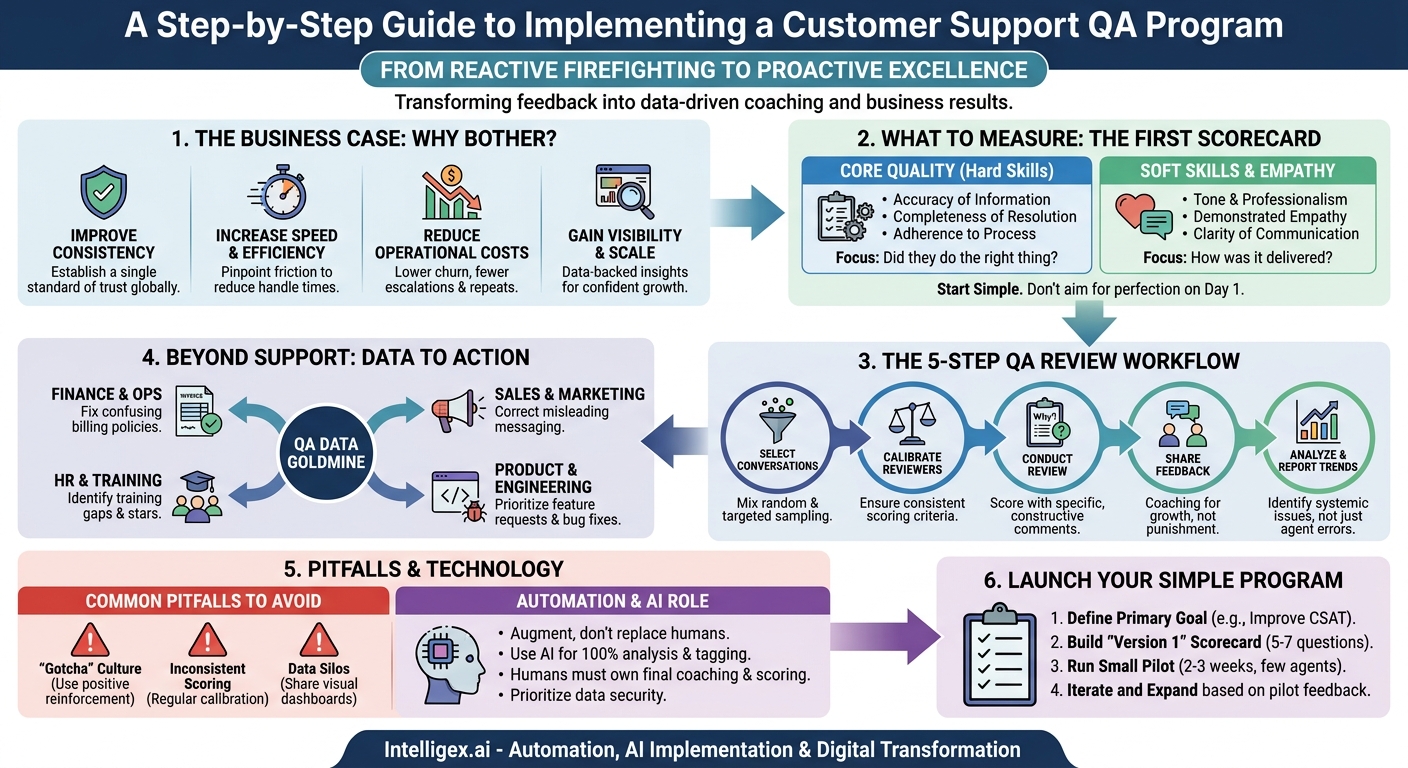
Customer support is more than just a cost center; it is the frontline of your customer experience. Every interaction has the potential to build loyalty or create a detractor. But with teams handling thousands of conversations daily, how do you ensure every customer receives the same high standard of care? The answer isn’t more scripts or stricter policies. It’s a systematic process of review and coaching: a support Quality Assurance (QA) program.
A well-designed QA program moves you from reacting to customer complaints to proactively improving the quality of service. It provides a structured way to evaluate agent performance, identify knowledge gaps, and uncover systemic issues that affect the entire customer journey. More importantly, it transforms feedback from a subjective conversation into an objective, data-driven coaching tool that empowers agents and drives measurable business results.
Why Bother with Support QA? The Business Case
Implementing a new process can feel daunting, but the return on investment for support QA is clear and impacts multiple facets of the business. It’s not just about “checking boxes”; it’s about creating a more resilient, efficient, and customer-centric operation.
Improve Quality and Consistency
Your brand promise is delivered in every customer interaction. Inconsistency erodes trust. A QA program establishes a single standard of excellence, ensuring that whether a customer interacts with a new hire or a seasoned veteran, they receive the same accurate information, professional tone, and effective resolution. This consistency is the foundation of a reliable and trustworthy customer experience.
Increase Speed and Efficiency
Slow resolution times are often a symptom of deeper issues, like knowledge gaps, inefficient workflows, or uncertainty about processes. QA reviews pinpoint these exact friction points. By identifying that agents are consistently struggling with a specific type of billing inquiry, for example, you can provide targeted training or improve the knowledge base article on that topic. Fixing the root cause makes the entire team faster, reducing handle times and improving first-contact resolution rates.
Reduce Operational Costs
Quality directly impacts your bottom line. A high-quality interaction resolves an issue the first time, preventing costly repeat contacts. It reduces the number of escalations to more expensive senior staff or managers. Furthermore, investing in agent development through constructive QA coaching improves morale and reduces agent churn, saving significant recruitment and training costs over time.
Gain Visibility and Scale Intelligently
As your company grows, you can’t personally oversee every support interaction. A QA program provides leadership with a clear, data-backed dashboard of support quality. It answers critical questions: Are we prepared for the new product launch? Is our outsourced team meeting our standards? Which agents are ready for promotion? This visibility allows you to scale your team confidently, knowing that quality will not degrade as you grow.
Building Your First QA Scorecard: What to Measure
The heart of any QA program is the scorecard. This is not just a checklist; it is the rubric that defines what a “good” interaction looks like for your business. A simple, clear scorecard is far more effective than a complex one that is difficult to use. Start with the fundamentals and build from there.
Core Quality Metrics
These categories are non-negotiable and focus on the technical accuracy and effectiveness of the resolution. They measure whether the agent did the right thing.
- Accuracy of Information: Was the solution provided to the customer correct and aligned with company policy?
- Completeness of Resolution: Did the agent address all parts of the customer’s question? Did they solve the root problem or just the symptom?
- Adherence to Process: Did the agent follow required procedures, such as security verification, ticket categorization, or escalation protocols?
Soft Skills and Customer Empathy
These metrics evaluate how the agent delivered the solution. The right answer delivered with the wrong tone can still create a poor experience. These elements are crucial for building rapport and customer loyalty.
- Tone and Professionalism: Was the agent’s language professional, positive, and brand-aligned?
- Demonstrated Empathy: Did the agent acknowledge the customer’s frustration or issue? Did they show they were listening?
- Clarity of Communication: Was the explanation easy for the customer to understand, free of jargon?
Your first scorecard can be a simple yes/no checklist for a few key items. For example, a section on “Problem Resolution” might include: “Accurately identified the customer’s core issue,” “Provided a correct solution,” and “Confirmed the solution worked for the customer.” Start small and get feedback from your team before adding more complexity.
The 5-Step QA Review Workflow
A consistent process ensures that reviews are fair, efficient, and lead to meaningful change. Rushing implementation can lead to confusion and mistrust, so follow a structured workflow from the beginning.
- Select Conversations for Review: You cannot review every ticket, so you need a sampling strategy. A good starting point is a mix of random sampling (to get a baseline of overall quality) and targeted sampling. Targeted reviews might focus on interactions with low CSAT scores, conversations handled by new agents, or tickets related to complex or high-value topics like security or cancellations.
- Calibrate the Reviewers: Consistency is key. Before you begin, have all your reviewers (whether they are team leads, peers, or a dedicated QA specialist) score the same three conversations independently. Then, bring them together to discuss their scores. This calibration session helps align everyone on what each scorecard category means in practice and ensures agents are graded fairly, regardless of who is reviewing their work.
- Conduct the Review Using the Scorecard: The reviewer carefully reads the conversation transcript or listens to the call recording. They score the interaction against each category on the scorecard. The most important part of this step is the “why.” The reviewer must leave specific, constructive comments. Instead of saying “Poor tone,” they should write, “The use of the phrase ‘You have to…’ can sound demanding. Try using ‘The next step is to…’ for a softer approach.”
- Share Feedback with the Agent: The goal of QA is development, not punishment. Schedule regular, one-on-one coaching sessions to go over QA scores. Focus on trends and patterns, not just a single bad score. Frame the feedback as a collaborative effort to help the agent grow. Always start by highlighting what the agent did well before discussing areas for improvement.
- Analyze and Report on Trends: The true power of QA comes from aggregating the data. Look beyond individual agent scores to find team-wide patterns. Are 30% of agents struggling to correctly categorize tickets about a new product feature? That isn’t an agent problem; it’s a training or process problem. These insights allow you to make systemic improvements to training, knowledge base content, and internal processes.
From Data to Action: Examples Across Your Business
A mature QA program doesn’t just benefit the support team. The qualitative and quantitative data it produces is a goldmine of insight for the entire organization. When you connect QA data to other departments, you amplify its value exponentially.
Finance and Operations: Imagine your QA reviews uncover a trend of customers confused about a specific line item on their invoice. The support team can provide a workaround, but the QA analyst can package this data and present it to the Finance team. This could lead to a simple change in invoice wording that eliminates thousands of future support tickets, reducing support costs and improving the customer experience.
Sales and Marketing: A customer contacts support, frustrated that a feature highlighted in a marketing campaign doesn’t work as they expected. A QA review flags this not as an agent error, but as a disconnect between marketing messaging and product reality. This feedback loop allows the Marketing team to adjust their copy to be more accurate, leading to better-qualified leads and less customer frustration.
Product and Engineering: Support tickets are one of the most direct sources of user feedback. A QA process can systematize this feedback. By creating a specific scorecard category or tag for “Product Bug” or “Feature Request,” you can quickly quantify the most common issues. A report showing that “the inability to export data to CSV” was mentioned in 15% of all reviewed tickets last month is a powerful, data-driven case for the product team to prioritize that feature.
HR and Training: QA data provides a precise roadmap for your training needs. If scores for “Process Adherence” drop after a new workflow is introduced, you know the initial training was insufficient and can schedule a follow-up session. It also helps identify your star performers, providing objective data to support promotions and career pathing.
Common Pitfalls and How to Avoid Them
Many well-intentioned QA programs fail not because of a bad strategy, but because of poor execution. Being aware of these common traps can help you navigate them successfully.
Pitfall: Creating a “Gotcha” Culture. If agents feel that QA is only there to find their mistakes, they will become defensive and disengaged. This punitive approach destroys morale.
How to Avoid It: Make positive reinforcement a formal part of the process. Mandate that every review includes a comment on something the agent did well. Frame coaching sessions around growth and development, not just correcting errors.
Pitfall: Inconsistent Scoring. Two reviewers give the same interaction wildly different scores. This undermines the credibility of the entire program and feels unfair to agents.
How to Avoid It: Regular calibration sessions are non-negotiable. At least once a month, have all reviewers score the same few tickets and discuss their reasoning. This ongoing alignment is crucial for maintaining fairness and consistency.
Pitfall: The Data Lives in a Silo. The QA scores are tracked in a private spreadsheet and are only used for one-on-one agent feedback. This misses the biggest opportunity for systemic improvement.
How to Avoid It: Create simple, visual dashboards that show team-wide trends over time. Share a monthly or quarterly summary with leadership in other departments highlighting key customer insights and process improvement suggestions.
Pitfall: The Perfect Scorecard Problem. Teams spend months debating the perfect, 30-point scorecard, but never actually start reviewing tickets. This analysis paralysis prevents any value from being created.
How to Avoid It: Start with a “good enough” version 1. A simple 5-question scorecard that you use consistently is infinitely better than a perfect one that never gets launched. You can and should iterate on it every few months based on feedback from the team.
A Note on Automation and AI in QA
The conversation around support QA is increasingly including AI and automation. While these technologies offer powerful capabilities, it’s essential to approach them practically, not as a magic solution. The goal of AI in this context is to augment human reviewers, not replace them.
AI-powered tools can analyze 100% of your customer conversations, automatically tagging them by topic, detecting customer sentiment (positive, negative, neutral), and identifying keywords. This can help you move beyond random sampling. For example, you could create a workflow that automatically flags all conversations with a high negative sentiment score and a mention of the word “cancel” for human QA review. This ensures your reviewers focus their limited time on the most critical, high-impact interactions.
However, human judgment remains critical. An AI might flag a conversation as “negative” because a customer used frustrated language, but a human reviewer can understand the context and see that the agent did an excellent job of de-escalating the situation. For this reason, final quality scores and coaching feedback should always be managed by a person.
When considering any tool, prioritize data security and privacy. Ensure that any platform you use to analyze customer conversations complies with regulations like GDPR and has strict access controls to protect sensitive customer information. The human-in-the-loop approach is not just best practice for quality, it is also essential for governance.
Your Next Steps: Launching a Simple QA Program
Getting started with support QA doesn’t require expensive software or a dedicated team. You can launch a simple, effective program in a matter of weeks by following a phased approach. The key is to start small, prove the value, and build from there.
- Define Your Primary Goal. Before you build anything, decide on the single most important outcome you want to achieve. Is it to improve your CSAT score, reduce first-response time, or decrease escalations? A clear goal will help you design a focused and effective scorecard.
- Build a “Version 1” Scorecard. Create a simple scorecard with 5-7 questions based on your primary goal. Use a basic spreadsheet to track the results. Ask your most experienced agents for feedback. They often have the best insights into what defines a quality interaction.
- Run a Small Pilot. Select a single, experienced reviewer and a small group of 2-3 agents to participate in a pilot program. Run the complete QA workflow (review, coaching, and analysis) with this group for two or three weeks. This will help you work out the kinks in your process on a small scale.
- Iterate and Expand. Use the feedback from the pilot to refine your scorecard and workflow. Once you have a process that is working smoothly for the small group, you can create a plan to roll it out to the entire team.
By starting today, you can begin the journey of transforming your support team from a reactive service center into a proactive driver of customer loyalty and business intelligence.
Your Next Read:
Category:
Get a FREE
Proof of Concept
& Consultation
No Cost, No Commitment!
