

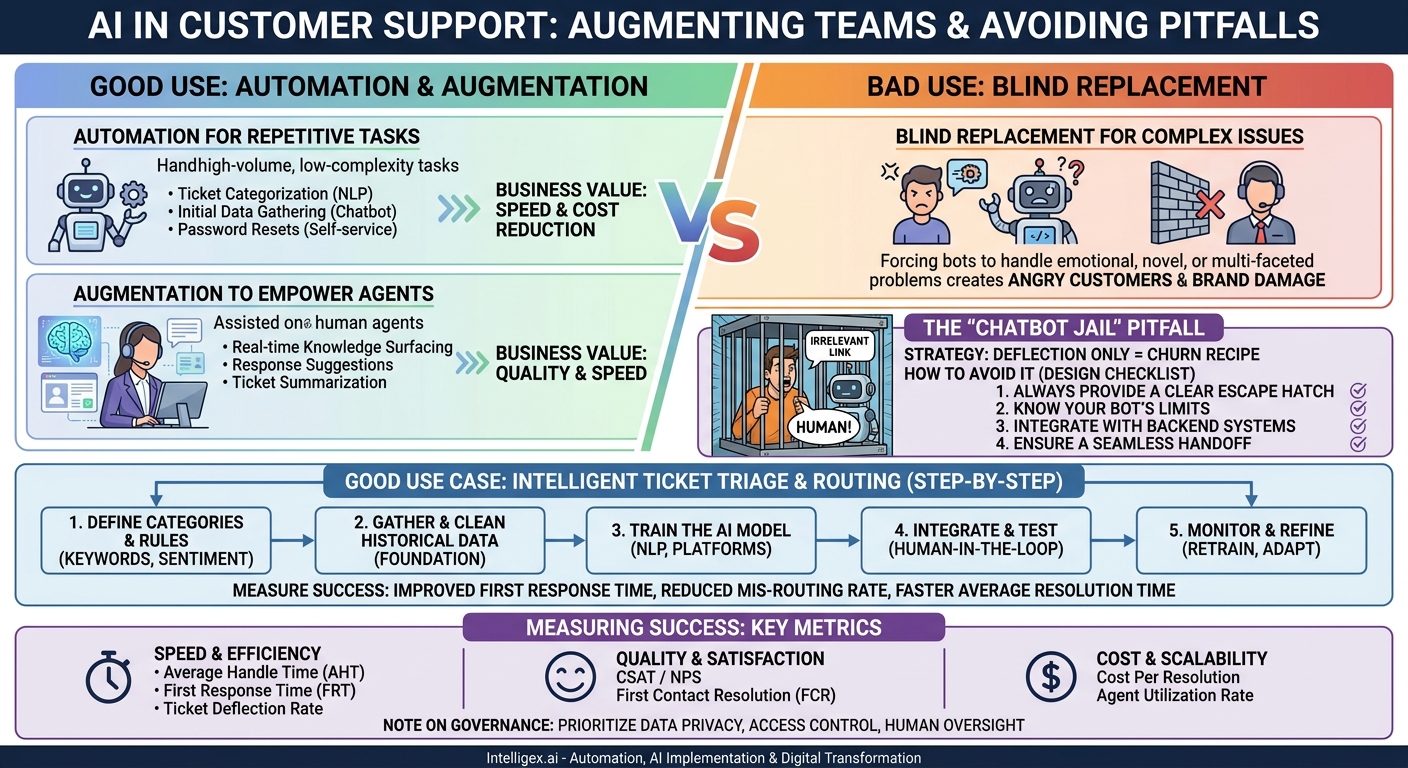
Customer support is no longer a cost center. It’s a critical driver of customer loyalty and retention. Yet, support teams are under constant pressure to do more with less. They face rising ticket volumes, increasing customer expectations for instant resolutions, and the challenge of maintaining high-quality service at scale. This is where Artificial Intelligence enters the conversation, not as a futuristic concept, but as a practical tool available today. However, implementing AI in support is not a simple switch to flip. The difference between success and failure lies in understanding its ideal uses versus its common misuses.
AI’s real value isn’t in replacing your best human agents. It’s in augmenting their abilities and automating the repetitive tasks that consume their time. When applied correctly, AI enhances speed, improves quality, and provides unprecedented visibility into your support operations. When misapplied, it creates frustrating experiences for customers and demoralizes your team. This guide breaks down the good from the bad, providing actionable steps to help you harness AI effectively.
The Right Tool for the Right Job: Augmentation vs. Automation
The most common mistake businesses make is viewing AI as a blunt instrument for headcount reduction. A more effective approach is to distinguish between two primary functions: automation and augmentation. Understanding this difference is the first step toward a successful AI strategy.
Good Use: Automation for Repetitive Tasks
Automation is best suited for high-volume, low-complexity tasks that follow predictable rules. These are the jobs that don’t require empathy, creative problem-solving, or nuanced judgment. By automating them, you free up your human agents to focus on work that truly requires their skills.
Examples of good automation targets:
- Ticket Categorization: Using Natural Language Processing (NLP) to read an incoming email or support ticket and automatically assign it a category (e.g., “Billing,” “Technical Issue,” “Feature Request”).
- Initial Data Gathering: A chatbot can ask initial qualifying questions like “What is your account number?” or “Which version of the software are you using?” before routing the ticket to a human.
- Password Resets: Guiding a user through a secure, automated password reset process without needing agent intervention.
Business Value: The primary benefits here are speed and cost reduction. Automated processes run 24/7, reducing first-response times and handling a significant volume of simple queries without adding to agent workload. This directly lowers the cost per resolution for common issues.
Good Use: Augmentation to Empower Agents
Augmentation is about making your human agents better, faster, and more consistent. The AI works alongside them as a co-pilot, providing information, suggestions, and insights in real time. This is where AI delivers the most significant improvements in service quality.
Examples of powerful augmentation:
- Real-time Knowledge Surfacing: As an agent types, an AI can search the internal knowledge base, past tickets, and technical documentation to surface the most relevant articles and solutions.
- Response Suggestions: Based on the customer’s query, the AI can draft a complete, on-brand response that the agent can quickly review, edit, and send.
- Ticket Summarization: For a long, complex ticket history, an AI can generate a concise summary, allowing an agent taking over the case to get up to speed in seconds instead of minutes.
Business Value: Augmentation directly impacts quality and speed. It helps ensure every agent has access to the same information, leading to more consistent and accurate answers. This improves First Contact Resolution (FCR) and Customer Satisfaction (CSAT) scores. It also drastically reduces the ramp-up time for new hires.
Bad Use: Blind Replacement for Complex Issues
The worst application of AI is forcing customers to interact with a system that is not equipped to handle their problem, with no clear escape route to a human. This happens when businesses try to automate complex, emotional, or high-stakes interactions. A bot cannot show genuine empathy to a frustrated customer or troubleshoot a novel, multi-faceted technical problem. Forcing it to try only leads to angry customers and brand damage.
Good Use Case: Intelligent Ticket Triage and Routing
One of the most immediate and impactful applications of AI is in the initial handling of support requests. Manual triage is a significant bottleneck in many organizations. An agent has to read each ticket, determine its nature and urgency, and then manually assign it to the correct team or individual. This process is slow, prone to human error, and can leave urgent issues sitting in a queue for hours.
Intelligent triage uses AI to automate this entire workflow. By analyzing the text of the ticket, the AI can instantly identify key information like the product mentioned, the user’s sentiment (e.g., frustrated, neutral), and the core intent (e.g., requesting a refund, reporting a bug). Based on this analysis, it can execute pre-defined routing rules with perfect consistency.
How to Implement Intelligent Triage: A Step-by-Step Guide
- Define Your Categories and Rules: Start by mapping out your support structure. What are your main ticket categories (Sales, Billing, Technical Support Tier 1, etc.)? What keywords, sentiment, or customer attributes should trigger a ticket to be routed to a specific team? For example, a ticket containing the words “invoice,” “charge,” and “credit card” should go to the Finance team. A ticket with negative sentiment and the word “outage” should be marked as high priority and sent to IT Operations.
- Gather and Clean Your Data: The AI model needs to learn from your history. You will need a dataset of past support tickets, correctly categorized. This historical data is the foundation of your model’s accuracy. Ensure the data is clean and representative of your typical ticket flow.
- Train the AI Model: Using a platform or service, you feed your historical data into an NLP model. The model learns the patterns connecting the language in a ticket to its correct category and priority. Many modern helpdesk platforms, like Salesforce Service Cloud or Zendesk, have these capabilities built-in or offer integrations.
- Integrate and Test with Human Oversight: Connect the trained AI to your live support intake channel (e.g., email, web form). For the first few weeks, run it in a “suggestion mode.” The AI can tag and suggest a route, but a human team lead gives the final approval. This “human-in-the-loop” approach allows you to validate the AI’s accuracy and build trust with your support team before fully automating the process.
- Monitor and Refine: Continuously monitor the AI’s performance. Are tickets being routed correctly? As new products or issues emerge, you will need to periodically retrain the model with new data to keep it accurate.
What to Measure: The success of this implementation is easy to track. Look for improvements in Time to First Response, as tickets no longer sit in a general queue. Measure the Mis-routing Rate to ensure accuracy. Over time, you should also see an improvement in overall Average Resolution Time because tickets get to the right expert faster.
Bad Use Case: The “Chatbot Jail” and How to Avoid It
Everyone has experienced it. You have a specific, urgent problem. You open a chat window and are greeted by a bot. You state your issue, and it responds with irrelevant links to a FAQ page. You rephrase your question, and it gives you the same unhelpful answer. You type “talk to a human” or “speak to an agent,” and the bot replies, “I’m sorry, I don’t understand that.” You are trapped in a “chatbot jail,” and your frustration is boiling over.
This is the most damaging misuse of AI in customer support. It stems from a strategy focused solely on ticket deflection, with no regard for the customer experience. The goal becomes preventing users from reaching a human agent at all costs, which is a recipe for churn.
How to Design a Chatbot That Helps, Not Hinders
A well-designed chatbot should serve as a helpful front door, not a barricade. It should be able to resolve simple, repetitive queries on its own while seamlessly escalating more complex issues to the right human agent. Here is a checklist for avoiding the “chatbot jail”:
- Always Provide a Clear Escape Hatch: From the very first interaction, the option to connect with a human agent should be visible and easy to access. Don’t bury it behind multiple failed attempts or confusing menus.
- Know Your Bot’s Limits: Define what the chatbot is designed to do and, more importantly, what it is not designed to do. It’s great for order status lookups, password resets, or answering top-10 FAQs. It is terrible for handling a bug report for a new software feature or calming down a customer whose shipment was lost.
- Integrate with Backend Systems: A chatbot that can’t access real data is just a glorified search bar. To be useful, it needs to be integrated with your CRM, order management system, or other business platforms. A customer should be able to ask, “Where is order #12345?” and get a real answer.
- Ensure a Seamless Handoff: When a user chooses to speak with an agent, the transition must be smooth. The chatbot should automatically transfer the entire conversation history, along with the customer’s identity and any data it has already collected, directly to the agent. Forcing the customer to repeat themselves is a cardinal sin of customer service.
A Note on Safe Implementation and Governance
When you use AI to analyze customer conversations, you are handling sensitive data. A responsible implementation requires a strong focus on governance, privacy, and security from day one. Ignoring these aspects can lead to data breaches, regulatory fines, and a loss of customer trust.
Data Privacy: Customer support tickets often contain Personally Identifiable Information (PII) like names, email addresses, phone numbers, and account details. Before using this data to train an AI model, you must have a process to scrub or anonymize PII. This is not just good practice; it’s a legal requirement under regulations like GDPR and CCPA. Work with your legal and compliance teams to ensure your data handling practices are sound.
Access Control: AI can generate powerful insights, such as summaries of all support interactions with a high-value client. This information is valuable, but it shouldn’t be accessible to everyone in the company. Implement role-based access controls to ensure that employees can only see the data and AI-driven insights relevant to their jobs. A sales representative, for example, might see a summary of recent support issues, while a support agent sees the full, detailed ticket history.
Human Oversight: An AI model is a tool, not a final decision-maker. Always maintain a “human-in-the-loop” process for critical or sensitive actions. For example, if an AI flags a customer for potential churn based on their support interactions, this should trigger a review by a human account manager, not an automated action. This oversight prevents errors, builds internal trust in the system, and ensures that technology serves your business strategy, not the other way around.
Measuring Success: Key Metrics for AI in Support
To justify the investment in AI and prove its value, you need to track the right metrics. Your goal is to connect the features you implement directly to measurable business outcomes. Don’t focus on vanity metrics like “number of bot interactions.” Instead, measure the impact on your core support operations.
Metrics for Speed and Efficiency
- Average Handle Time (AHT): With AI-powered response suggestions and knowledge surfacing, agents should be able to resolve issues faster, lowering AHT.
- First Response Time (FRT): Intelligent triage and automated acknowledgments can drastically reduce the time it takes for a customer to receive their first meaningful response.
- Ticket Deflection Rate: This measures how many issues are successfully resolved by a chatbot or self-service portal without ever becoming a human-handled ticket. This is a good metric, but only when balanced with CSAT to ensure you aren’t just deflecting frustrated customers.
Metrics for Quality and Satisfaction
- Customer Satisfaction (CSAT) / Net Promoter Score (NPS): This is the ultimate measure. If your AI initiatives are making customers angrier, you have a problem. CSAT should remain stable or improve as you use AI to deliver faster, more consistent answers.
- First Contact Resolution (FCR): By empowering agents with the right information at the right time, AI augmentation should increase the percentage of issues resolved in a single interaction.
Metrics for Cost and Scalability
- Cost Per Resolution: By automating simple tickets and making agents more efficient with complex ones, AI should lower the average cost of resolving a customer issue.
- Agent Utilization Rate: This tracks how much of an agent’s paid time is spent actively helping customers. By removing administrative overhead, AI can increase this rate.
Your Next Steps: A Practical Action Plan
Getting started with AI in your support organization doesn’t require a massive, multi-year project. The key is to start small, target a specific pain point, and demonstrate value quickly. A successful pilot project builds momentum and secures buy-in for broader implementation.
- Identify Your Biggest Bottleneck: Talk to your support managers and agents. What is their biggest source of frustration or inefficiency? Is it slow ticket triage? Inconsistent answers to common questions? Time spent searching for information? Pick one specific problem to solve first.
- Start with a Low-Risk Pilot: Don’t try to automate your most complex customer interactions on day one. A great place to start is with your internal IT helpdesk, where the stakes are lower. Alternatively, focus on a narrow, high-volume use case, like automating the categorization of “how-to” questions for just one of your products.
- Define Success Metrics Upfront: Before you begin, decide exactly how you will measure success. For a triage pilot, your goal might be to reduce the average time to assignment by 50% while maintaining a 95% accuracy rate. Clear metrics make it easy to evaluate the pilot’s success.
- Choose the Right Tools and Partners: You don’t need to build this technology from scratch. Many platforms, from large cloud providers like AWS to specialized support software vendors, offer powerful, pre-built AI capabilities. Choose a partner who understands your business process and can help you integrate the technology thoughtfully into your existing workflow.
By focusing on augmenting your team and automating the right tasks, you can use AI to build a support function that is faster, smarter, and more scalable, ultimately creating better experiences for both your customers and your employees.
Your Next Read:
Category:
Get a FREE
Proof of Concept
& Consultation
No Cost, No Commitment!
