

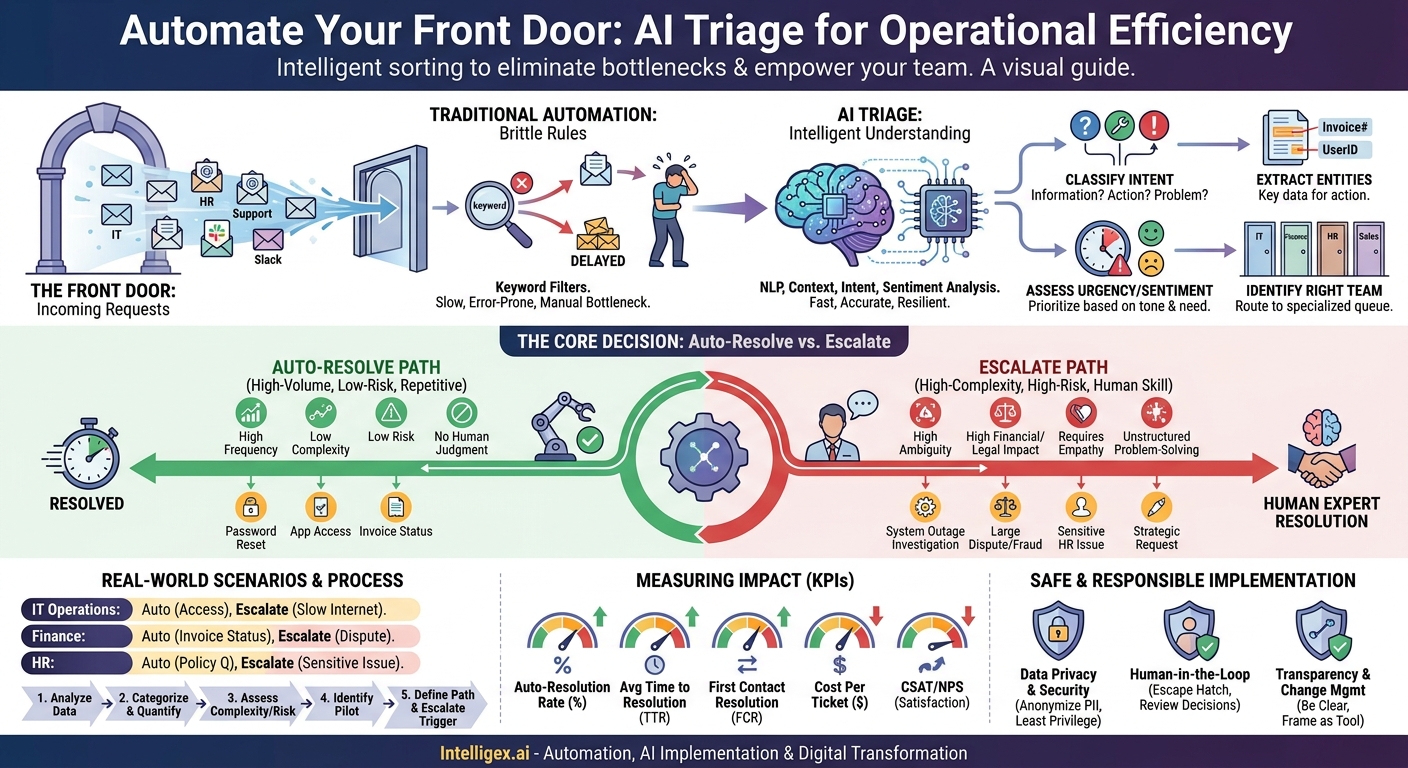
Every team in your organization has a front door. It might be an IT service desk, an HR inquiry email, a customer support chat, or even a shared Slack channel for the finance team. Through this door comes a constant stream of requests, ranging from the trivial to the mission-critical. For most businesses, the process of sorting this influx is manual, slow, and expensive. A person reads each request, tries to understand its intent and urgency, and then either answers it or routes it to someone who can. This initial step, triage, is a critical bottleneck that drains resources and delays resolutions.
This is where AI-powered triage changes the game. It’s not about replacing your team. It’s about giving them a powerful assistant that can instantly handle the repetitive noise, allowing your skilled professionals to focus on the complex, high-value work where they are needed most. The core challenge, however, isn’t just adopting the technology. It’s building a smart system that knows exactly which requests to resolve automatically and which to escalate to a human expert. Get this balance right, and you unlock significant gains in speed, cost savings, and both employee and customer satisfaction.
What is AI Triage? More Than a Keyword Filter
Traditional automation often relies on simple, rigid rules. For example, if an email contains the word “password,” it gets routed to the IT help desk. This is brittle and easily broken. What if the email is from a manager asking for advice on a team member’s password security habits? A simple keyword filter would misroute this request, causing delays and frustration.
AI triage is fundamentally different. It uses Natural Language Processing (NLP) and machine learning models to understand the intent, sentiment, and context behind a request, much like a human would. Instead of just spotting keywords, it can:
- Classify Intent: Does the user want information (“What is our travel policy?”), need to perform an action (“Reset my VPN access”), or report a problem (“The payment portal is down”)?
- Extract Entities: It can identify key pieces of information within the text, such as invoice numbers, usernames, device IDs, or case numbers, which are needed to take action.
- Assess Urgency and Sentiment: The AI can recognize frustrated or urgent language (“This is the third time I’m asking!” or “Critical system failure”) and prioritize the ticket accordingly, even if the user didn’t manually set a high priority.
- Identify the Right Team: It understands the difference between a request about a sales commission payment (Finance) and a question about updating a customer’s payment method in the CRM (Sales Ops), routing it to the correct specialized queue from the start.
By moving beyond simple rules, AI triage provides a more accurate, resilient, and intelligent “front door” for your business operations. It ensures that every incoming request is understood and sent down the fastest possible path to resolution, whether that path is fully automated or leads to the perfect human expert.
The Core Decision: When to Auto-Resolve vs. Escalate
The central question in designing an AI triage system is deciding where to draw the line between full automation and human intervention. This isn’t a one-time decision. It’s a strategic framework you apply to each type of request your teams handle. Getting this balance right maximizes efficiency without sacrificing quality or introducing risk.
Your decision should be based on a few key factors for each category of request.
Criteria for Auto-Resolution
Automated resolution is best suited for tasks that are high-volume, low-risk, and follow a predictable pattern. These are the requests that tie up your team with repetitive work but require little to no subjective judgment.
- High Frequency and Repetitiveness: Is this a question your team answers multiple times a day? Think password resets, application access requests, or simple status lookups (“Where is my order?”).
- Low Complexity: The request has a clear, unambiguous answer that can be found in a structured data source. For example, checking an employee’s paid time off balance by querying an HR system.
- Low Risk: The consequence of an error is minimal and easily reversible. Granting access to a non-sensitive software application is low-risk. Approving a multi-million dollar wire transfer is not.
- Requires No Human Judgment: The process is binary and requires no empathy, negotiation, or complex problem-solving. A policy question with a standard, documented answer is a prime candidate.
Criteria for Escalation to a Human
Escalation is necessary when a request requires uniquely human skills like empathy, strategic thinking, or navigating ambiguity. Pushing these tasks to automation is a recipe for poor outcomes and frustrated stakeholders.
- High Complexity or Ambiguity: The request is poorly defined, has multiple dependencies, or involves troubleshooting an unknown issue. Investigating a widespread system outage requires human diagnostic skills.
- High Risk or Financial Impact: The request involves sensitive data, significant financial transactions, or has legal implications. Contract reviews, security breach reports, and large refund approvals must have human oversight.
- Requires Empathy or Relationship Management: Handling a distressed customer, mediating an interpersonal conflict in HR, or negotiating terms with a key supplier are tasks where human connection is paramount.
- Involves Unstructured Problem-Solving: The issue does not have a pre-defined playbook and requires creativity or strategic input. For example, a marketing request to brainstorm a campaign for a new product launch.
A good starting point is to classify your top 20 most common request types against these criteria. The tasks that fall squarely in the “auto-resolve” category become your initial automation targets.
A Step-by-Step Process to Identify Triage Candidates
Moving from theory to practice requires a structured approach. You cannot automate what you do not understand. This five-step process helps you analyze your existing workflows and pinpoint the best opportunities for AI-powered triage and resolution.
- Gather and Analyze Your Data: The first step is to look at the work that is actually happening. Export at least three to six months of request data from your existing systems, such as Zendesk, Jira, or even shared email inboxes. Your goal is to see a real picture of what your teams spend their time on. Look for the raw text of the incoming requests, the team or person who resolved it, and the time it took.
- Categorize and Quantify Requests: Manually or with an analytics tool, group the requests into specific categories. Don’t be too broad. Instead of “IT Problems,” create categories like “Password Reset,” “VPN Access,” “Laptop Hardware Issue,” and “New Software Request.” For each category, count the monthly volume. This immediately reveals your highest-frequency tasks.
- Assess Complexity and Risk: For your top 10-20 highest-volume categories, work with the team leads to score each one on a simple 1-5 scale for both complexity and risk. A password reset might be a 1 for complexity and a 1 for risk. A server failure investigation could be a 5 for both. This scoring helps you visualize the opportunities on a simple matrix.
- Identify Pilot Candidates: Your ideal pilot projects are in the “high-volume, low-complexity, low-risk” quadrant. These are your quick wins. They provide immediate value by freeing up team time and offer a safe environment to test, learn, and build confidence in the AI system before tackling more complex tasks. A good pilot might be automatically answering “What is the status of my invoice?” by having the AI look up the invoice number in your ERP.
- Define the Resolution Path: For your chosen pilot, clearly map out the automated workflow. What information does the AI need to extract? Which system does it need to query? What is the exact response it should provide? Equally important, define the escalation trigger. For example, if the AI cannot find the invoice number or if the user replies with negative sentiment like “This is wrong,” the system must immediately and seamlessly escalate the entire conversation history to a human agent.
By following this process, you ensure your first foray into AI triage is grounded in data and focused on a tangible business problem, dramatically increasing your chances of success.
Real-World Triage Scenarios Across Business Functions
AI triage is not just an IT or customer support tool. Its principles can be applied to streamline operations across virtually any department that receives and processes internal or external requests.
IT Operations and Help Desk
- Auto-Resolve: A user requests access to a common software application like Slack or a specific shared drive. The AI can verify their role in the HR system, confirm their manager’s approval (or even initiate the approval workflow), and use an integration to provision access automatically. The entire process takes seconds.
- Escalate: A user reports, “The internet is slow for my whole team.” This is ambiguous and could have many causes (local network issue, ISP problem, application-specific latency). The AI should immediately create a high-priority ticket, assign it to the networking team, and include any preliminary diagnostic information it could gather, such as the user’s location and recent network health alerts.
Finance and Accounts Payable
- Auto-Resolve: A vendor emails asking for the payment status of invoice #ABC-123. The AI can extract the invoice number, query the accounting system (e.g., NetSuite, SAP), and reply with the current status: “Invoice #ABC-123 for $5,400 was approved and is scheduled for payment on October 25th.”
- Escalate: A department head emails, “We need to dispute a $50,000 charge from a key supplier for services not rendered.” This involves a significant financial amount, a critical business relationship, and requires investigation. The AI should route this directly to a senior accounts payable manager and flag it as urgent.
Human Resources
- Auto-Resolve: An employee asks a benefits-related question with a clear answer in the company handbook, such as “How many floating holidays do we get per year?” The AI can retrieve the relevant paragraph from the knowledge base and provide a direct, accurate answer.
- Escalate: An employee writes, “I need to discuss a sensitive issue with my manager but I am not comfortable.” This request requires empathy, confidentiality, and knowledge of company policy and conflict resolution procedures. The AI must recognize the sensitive nature of the request and escalate it directly to an HR Business Partner, marked as confidential.
Measuring the Impact of Automated Triage
To justify and scale your AI triage program, you must measure its impact on business value. The goal is not just to deploy technology but to improve performance. Focus on a handful of key metrics that directly reflect speed, cost, and quality.
Key Performance Indicators (KPIs) to Track
- Auto-Resolution Rate: The percentage of incoming requests that are resolved entirely by the AI with no human touch. This is the most direct measure of efficiency gain. An initial goal of 10-15% for a complex service desk is a great starting point.
- Average Time to Resolution (TTR): Measure the total time from when a request is created until it is closed. You should track this for both auto-resolved tickets (which should be minutes) and human-handled tickets. A successful system reduces the overall average TTR.
- First Contact Resolution Rate (FCR): For tickets that are escalated, what percentage are resolved by the first human who touches them? Good AI triage routes tickets to the *correct* specialist, which should improve your FCR.
- Cost Per Ticket: Calculate the blended cost of resolving a ticket. As your auto-resolution rate increases, your average cost per ticket should decrease significantly, as automated resolutions are fractions of the cost of manual ones.
- Employee or Customer Satisfaction (CSAT/NPS): After an interaction is closed (whether automated or human-handled), survey the user. An effective AI system provides instant, accurate answers to simple questions, which can often boost satisfaction scores.
Tracking these metrics provides a clear picture of your return on investment and helps you identify which areas to target next for automation.
Implementing AI Triage Safely and Responsibly
While the efficiency gains are compelling, implementing AI in business processes requires a thoughtful approach to governance and security. An AI system is an extension of your team, and it must operate within the same boundaries of trust and data protection.
Data Privacy and Security: Never use sensitive customer or employee data (personally identifiable information, or PII) to train AI models without proper anonymization techniques. The AI should also operate under the principle of least privilege. It should only have access to the specific data systems and information required to do its job, just like a human employee.
The Human in the Loop: An AI should never be a dead end. Every automated interaction must include a clear and simple way for the user to say, “I need to talk to a person.” This escape hatch is critical for handling edge cases, managing frustration, and building user trust. Furthermore, human teams should regularly review a sample of the AI’s decisions and resolutions to catch errors and identify opportunities for improvement.
Transparency and Change Management: Be transparent with both users and your internal teams. When a user is interacting with an AI, it’s often best practice to let them know. For your employees, frame the AI not as a replacement, but as a tool to help them offload repetitive work and focus on more engaging, strategic tasks. Proactive communication and training are key to smooth adoption.
Your Next Steps: Building a Smarter Front Door
Getting started with AI triage doesn’t require a massive, multi-year transformation project. It’s about taking a focused, incremental approach to solving a real-world business bottleneck. By automating the front line of request management, you free up your most valuable resource, your people, to solve your most valuable problems.
Here is a simple action plan to begin:
- Choose One High-Traffic Area: Don’t try to boil the ocean. Pick one service desk or shared inbox with high volume and clear patterns, like IT, HR, or a specific customer support queue.
- Talk to Your Team: Sit down with the front-line staff who handle these requests every day. Ask them: “What are the most repetitive, mind-numbing questions you have to answer?” They know where the best automation opportunities are.
- Start with Data, Not a Tool: Before you evaluate vendors, follow the steps to analyze your request data. Understanding your own processes and identifying a specific use case will make you a much smarter buyer. A platform like Salesforce Service Cloud or many other modern help desks have these capabilities built in or offer integrations.
- Focus on a Business Outcome: Define what success looks like from the start. Is your primary goal to reduce response times, lower operational costs, or improve employee satisfaction? Align your pilot project with that clear business goal.
The journey begins with a single, well-chosen process. By proving the value on a small scale, you can build the momentum and expertise needed to deploy intelligent triage across your entire organization, creating a more efficient and responsive enterprise.
Your Next Read:
Get a FREE
Proof of Concept
& Consultation
No Cost, No Commitment!
