

In today’s interconnected digital landscape, data is the lifeblood of any organization. It flows between countless applications—from your CRM and ERP to your marketing automation platform and e-commerce storefront. The success of your operations, customer satisfaction, and strategic decision-making hinges on one critical factor: ensuring this data is consistent and accurate across all systems. But how do you achieve this harmony? The answer lies in data synchronization, and the two prevailing methods to accomplish it are Batch Sync and Real-Time Sync.
Choosing between these two approaches is not merely a technical decision; it’s a strategic one that can profoundly impact your efficiency, budget, and customer experience. While one offers methodical, cost-effective processing, the other provides lightning-fast, up-to-the-second accuracy. Understanding the fundamental differences, strengths, and weaknesses of each is essential for building a robust and scalable data architecture. This guide will visually and textually deconstruct Batch and Real-Time synchronization, helping you determine which method—or perhaps a combination of both—is the perfect fit for your business needs.
The Core of the Matter: Understanding Data Synchronization
Before we dive into the “how,” let’s solidify the “what.” Data synchronization is the continuous process of establishing and maintaining consistency among data across different applications and databases. Its primary goal is to ensure that any change made in one system is accurately reflected in others, creating a single source of truth. Without proper sync strategies, businesses suffer from data silos—isolated islands of information that lead to costly inefficiencies, poor customer service, and flawed business intelligence.
Imagine a sales representative updates a customer’s contact information in the CRM. If that information isn’t synchronized, the accounting department might send an invoice to the wrong address, and the marketing team might target them with an irrelevant campaign. This is where the method of synchronization becomes paramount. Do you update that address change everywhere instantly, or do you wait for a scheduled update later that night? This is the core question that separates Real-Time from Batch.
A Deep Dive into Batch Synchronization: The Workhorse
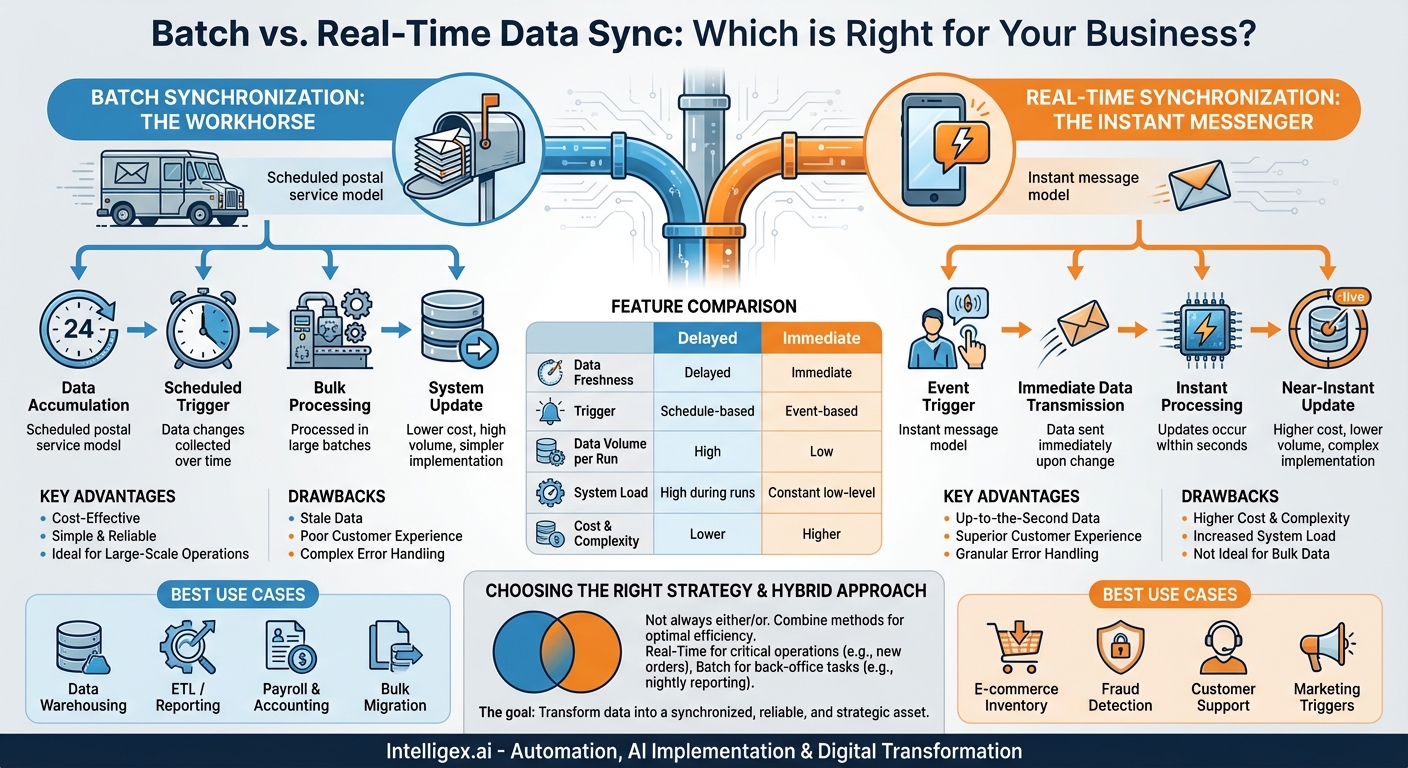
Batch synchronization is the traditional, time-tested method of data integration. Think of it like a scheduled postal service. Instead of delivering each letter the moment it’s written, the mail carrier collects all the mail from a region, sorts it in bulk, and delivers it on a fixed schedule—once a day. Similarly, batch sync collects data changes over a period of time and processes them in a large group, or “batch,” at a predetermined interval.
How Does Batch Sync Work?
The process is cyclical and schedule-driven:
- Data Accumulation: Over a set period (e.g., an hour, a day, a week), changes in the source system are logged and stored.
- Scheduled Trigger: At a specific time—often during off-peak hours like midnight to minimize operational disruption—a trigger initiates the sync process.
- Bulk Processing: The integration tool extracts the entire batch of accumulated data, transforms it into the required format for the target system, and loads it all at once.
- System Update: The target system is updated with the new information from the completed batch. The cycle then repeats.
The Advantages of a Scheduled Approach
- Cost-Effectiveness: Batch processing is generally less resource-intensive. By running during off-peak hours, it minimizes the load on servers and networks during critical business times. Furthermore, it often results in fewer API calls compared to real-time methods, which can significantly reduce costs for services that charge per call.
- Simplicity and Reliability: Designing and implementing a batch integration is typically simpler. The logic is straightforward—collect, transform, load. This makes it easier to manage, troubleshoot, and maintain. It’s exceptionally reliable for handling massive volumes of data without overwhelming systems.
- Ideal for Large-Scale Operations: For processes like data warehousing, end-of-day financial reporting, or migrating millions of records from a legacy system, batch is the superior choice. It’s built to handle bulk data efficiently and predictably.
The Drawbacks of Data Latency
- Stale Data: The most significant disadvantage is data latency. The information in your target systems is only as fresh as the last batch run. If your sync runs nightly, a decision made at 3 PM is based on data from the previous day, which can be problematic for fast-moving operations.
- Poor Customer Experience: This delay can directly impact customers. For example, if a customer buys the last available item online, but the inventory system only updates via a nightly batch, other customers might be able to “purchase” the out-of-stock item for hours, leading to frustration and canceled orders.
- Complex Error Handling: If an error occurs within a large batch, it can be difficult to pinpoint the specific record that caused the failure. Often, the entire batch might fail, requiring a manual, time-consuming investigation and rerun.
Unpacking Real-Time Synchronization: The Instant Messenger
Real-Time synchronization is the modern, event-driven approach to data integration. If batch sync is the postal service, real-time sync is an instant message or a phone call. The moment a piece of information is created or changed, it is sent and received almost instantaneously. This method ensures that your data is perpetually current across all connected systems.
How Does Real-Time Sync Work?
The process is triggered by events, not schedules:
- Event Trigger: An action occurs in the source system, such as a new lead being created in a CRM, an order being placed on an e-commerce site, or a support ticket being closed.
- Immediate Data Transmission: This event triggers an immediate API call or a webhook, which sends a small packet of data containing only the information about that specific change.
- Instant Processing: The integration platform receives this data, transforms it on the fly, and pushes it to the target system(s).
- Near-Instant Update: The target system is updated within seconds of the original event.
The Power of Immediacy
- Up-to-the-Second Data: The most obvious benefit is data freshness. Decision-makers have access to the most current information possible, enabling agile and accurate business intelligence.
- Superior Customer Experience: Real-time sync is the engine behind seamless modern customer interactions. A new user signs up and immediately receives a welcome email. A customer service agent has the complete, up-to-date history of a client the moment they call. Inventory levels are always accurate.
- Granular Error Handling: Since data is processed one transaction at a time, errors are isolated. If a single record fails to sync, it doesn’t stop other updates. It’s much easier to identify, troubleshoot, and resend a single failed transaction than to sift through a failed batch of thousands.
The Considerations of a Constant Connection
- Higher Cost and Complexity: Real-time integrations are more complex to build and maintain. They require a more robust infrastructure to handle the constant flow of data and can be more expensive due to the high volume of API calls. Many SaaS platforms have API rate limits, and a poorly designed real-time sync can quickly exceed them.
- Increased System Load: The continuous “chatter” between systems can put a constant strain on server resources and network bandwidth. While each transaction is small, the cumulative effect can be significant, especially for high-volume businesses.
- Not Ideal for Bulk Data: Attempting to use a real-time, event-based method for a large, one-time data migration would be incredibly inefficient and likely cause system failures. It’s designed for a stream of individual events, not a flood of historical data.
Batch vs. Real-Time: A Side-by-Side Comparison
As our visual guide illustrates, the choice between these two methods boils down to a trade-off between several key factors. The following table breaks down their core differences to help clarify which is right for different scenarios.
| Feature | Batch Synchronization | Real-Time Synchronization |
|---|---|---|
| Data Freshness | Delayed (minutes, hours, or days) | Immediate (seconds) |
| Trigger | Time-based schedule | Event-based (e.g., new record, update) |
| Data Volume per Run | High (handles large datasets) | Low (single transaction or small payload) |
| System Load | High load during scheduled runs, low otherwise | Constant, low-level load |
| Cost & Complexity | Lower cost, simpler to implement | Higher cost, more complex to implement |
| Best Use Cases | Data warehousing, ETL, nightly reports, payroll, bulk data migration, non-critical backups. | E-commerce inventory, fraud detection, customer support systems, marketing automation triggers, financial trading. |
Choosing the Right Strategy: It’s Not Always Either/Or
The decision of which sync method to use is entirely dependent on the specific business process. You must ask: How critical is it for this specific piece of data to be up-to-date right now?
When to Choose Batch Sync:
Opt for batch processing when immediacy is not a primary concern and you are dealing with large volumes of data. Good examples include:
- Business Intelligence and Analytics: Populating a data warehouse for end-of-day reporting or weekly trend analysis doesn’t require real-time data. A nightly batch job is perfectly sufficient and much more efficient.
- Accounting and Payroll: These functions operate on cycles (e.g., bi-weekly, monthly). Running a batch process to sync timesheets to the payroll system or sales data to the general ledger is the standard, reliable practice.
- Archiving and Backups: Creating backups or archiving old data is a classic batch process, best performed during system downtimes.
When to Choose Real-Time Sync:
Opt for real-time processing when data latency has an immediate, negative impact on operations or customer experience. Prime examples include:
- E-commerce Inventory Management: When an item is sold, its stock level must be updated instantly across all channels (website, mobile app, in-store POS) to prevent overselling.
- Customer Service: A support agent must have the absolute latest information—recent purchases, past complaints, contact updates—to provide effective service.
- Fraud Detection: A financial institution needs to analyze and flag a potentially fraudulent transaction the moment it happens, not hours later.
The Hybrid Approach: Getting the Best of Both Worlds
For most modern businesses, the optimal solution isn’t a strict choice between one or the other but a strategic combination of both. A hybrid approach allows you to use the right tool for the right job, maximizing efficiency while minimizing cost.
Consider an online retailer. They would use:
- Real-Time Sync for customer-facing, critical operations: New orders, inventory updates, shipping notifications, and customer support ticket creation.
- Batch Sync for back-office, less time-sensitive operations: Sending daily sales data to their accounting software, updating their BI dashboard with nightly performance metrics, and archiving old order histories.
This hybrid model ensures a seamless customer experience and agile operations where it matters most, while still leveraging the cost-effectiveness and power of batch processing for heavy-lifting, back-end tasks.
Conclusion: From Data Flow to Business Growth
The debate between Batch Sync and Real-Time Sync isn’t about which is definitively “better”—it’s about which is “right” for a specific task. Batch synchronization remains the powerful, reliable, and cost-effective choice for large-scale data processing where a degree of latency is acceptable. Real-time synchronization is the indispensable solution for a modern, connected world, delivering the immediacy required for exceptional customer experiences and critical, in-the-moment decisions.
By carefully auditing your business processes, identifying your data-sensitivity requirements, and referring to the visual comparisons in this guide, you can design a data integration strategy that is both powerful and pragmatic. Whether you choose batch, real-time, or a smart hybrid of the two, the goal is the same: to transform disparate data points into a synchronized, reliable, and strategic asset that drives your business forward.
Your Next Read:
Category:
Get a FREE
Proof of Concept
& Consultation
No Cost, No Commitment!
