

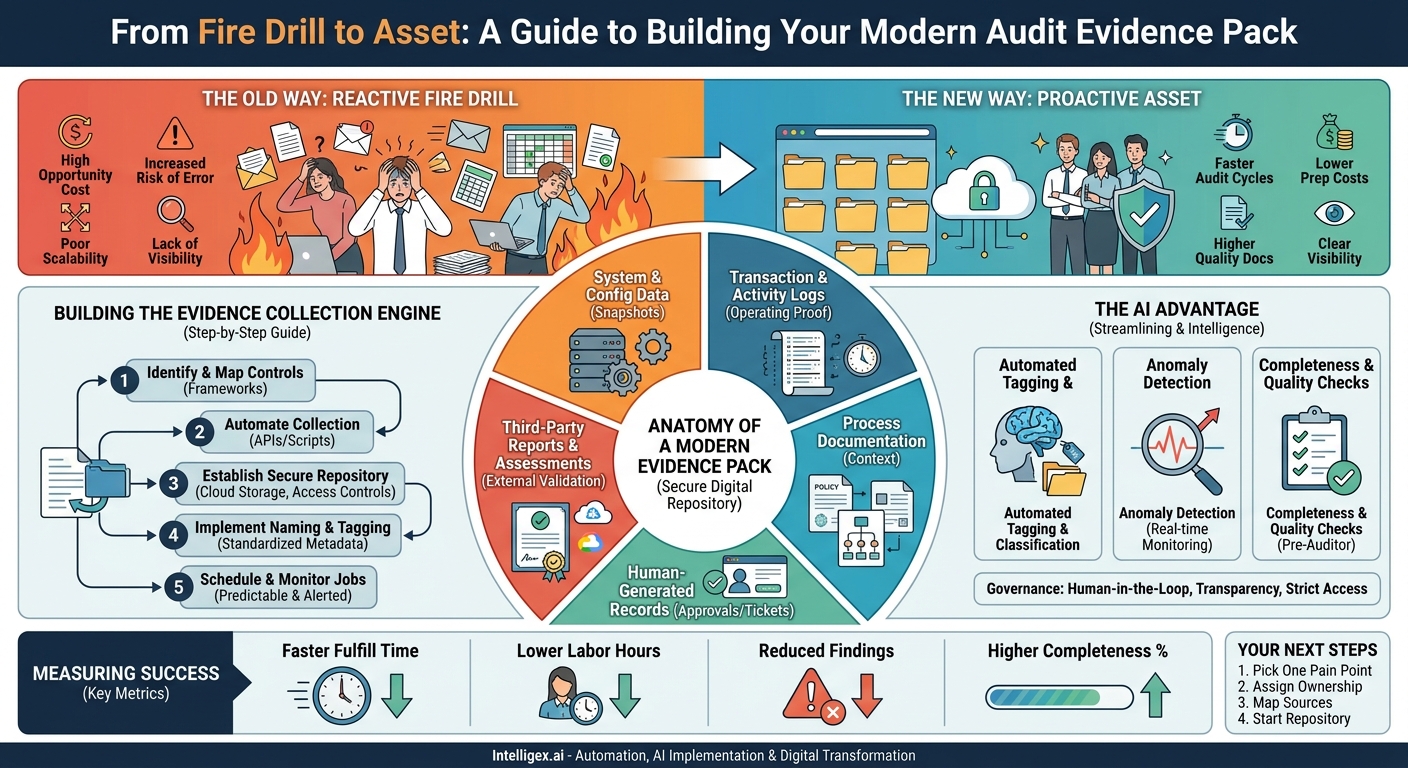
Audit season. For many organizations, these two words trigger a familiar cycle of urgent requests, frantic searches through emails and network drives, and long hours spent manually compiling spreadsheets and screenshots. This reactive, fire-drill approach is more than just stressful. It’s a significant drain on resources, a source of operational risk, and a barrier to scaling your business with confidence. The annual scramble for evidence disrupts your team’s focus, pulls your most valuable engineers and analysts away from their core work, and increases the chance of human error leading to negative audit findings.
The solution is to transform your audit evidence from a scattered collection of last-minute artifacts into a structured, continuously updated asset. An “audit evidence pack” isn’t just a folder of files; it’s a systematic approach to capturing, organizing, and presenting the proof of your compliance. When done right, it delivers powerful business value: faster audit cycles, lower preparation costs, higher quality documentation, and clear visibility into your control environment. This allows you to not only pass audits more easily but also to operate with greater assurance year-round.
Why Your Manual Audit Process Is Costing You More Than You Think
The direct cost of an audit is clear, but the indirect costs of a manual evidence collection process are often hidden and far greater. Consider the ripple effect across your organization when an auditor requests proof for a specific control, like “quarterly user access reviews for critical financial systems.”
First, the request lands with your compliance team. They then have to identify the correct system owner in IT, who must stop their current project to search for the records. They might find the meeting invitation, but the sign-off sheet is in a separate email thread. The list of reviewed users is in a spreadsheet on a shared drive, but it’s unclear which version is final. Meanwhile, a manager in Finance is interrupted to confirm that a specific user’s access was indeed revoked. Each step introduces delay and context-switching, reducing productivity across multiple teams.
This manual churn has tangible consequences:
- High Opportunity Cost: Your best people are spending dozens, or even hundreds, of hours on low-value administrative tasks instead of innovating, serving customers, or improving operations.
- Increased Risk of Error: Manual processes are prone to mistakes. A forgotten screenshot, a mislabeled file, or an incomplete log can lead to a qualified opinion or a finding that requires costly remediation.
- Poor Scalability: As your company grows, adding new systems, employees, and compliance requirements, this manual process breaks down completely. What was a headache for a 50-person startup becomes an operational crisis for a 500-person enterprise.
- Lack of Visibility: Between audits, do you have a clear, real-time view of your compliance posture? With manual evidence collection, the answer is almost always no. You only get a snapshot during the audit itself, which is too late to be proactive.
By systematizing evidence collection, you shift from a reactive, costly process to a proactive, efficient one. You build a foundation for “continuous compliance,” where evidence is gathered automatically as part of your daily operations, ready for inspection at any time.
The Anatomy of a Modern Audit Evidence Pack
A comprehensive evidence pack is not just a collection of random files. It’s a curated set of data that, together, tells a complete and verifiable story about how your controls are operating. While the specific requirements will depend on the framework (like SOC 2, ISO 27001, or SOX), the types of evidence generally fall into several key categories.
Your goal is to collect objective, time-stamped, and tamper-evident proof. Here’s a checklist of the essential components to consider for your evidence pack:
- System and Configuration Data: These are snapshots of how your systems are configured at a specific point in time. This is your proof of “design effectiveness.” Examples include screenshots of AWS security group settings, exported firewall rulesets, user role and permission configurations from your CRM, or the `config.json` file for a critical application.
- Transaction and Activity Logs: These records show that your controls are not just designed well, but are also “operating effectively” over time. This includes user access logs from your identity provider (like Okta or Azure AD), change logs from your database, API call records, and Git commit histories for infrastructure-as-code.
- Process Documentation: This is the human-readable context for your controls. Auditors need to understand your intent. This category includes your official policies (e.g., Information Security Policy, Data Retention Policy), Standard Operating Procedures (SOPs) for key processes like employee onboarding, and architectural diagrams.
- Human-Generated Records: Many controls involve human action and approval. The evidence for these activities is crucial. This includes change management tickets from systems like Jira or ServiceNow (showing request, approval, and implementation), signed employee attestation forms for security training, and meeting minutes where critical risk decisions were made.
- Third-Party Reports and Assessments: You don’t operate in a vacuum. Evidence from external parties provides independent validation of your controls. This includes penetration test reports, vulnerability scan results from tools like Nessus or Qualys, and compliance reports from your cloud provider (like an AWS or Azure SOC 2 report).
A robust evidence pack contains a mix of these types. For example, to prove your change management control, you would provide the policy (documentation), a Jira ticket (human record), and the Git commit log (activity log) for a specific change.
Building Your Evidence Collection Engine: A Step-by-Step Guide
Creating a systematic process for evidence collection doesn’t require a massive, multi-year project. You can achieve significant improvements by taking a structured, iterative approach. The key is to move from manual, ad-hoc collection to an automated, continuous flow of information into a secure, organized repository.
- Identify and Map Your Controls: Start with your primary compliance framework, whether it’s for SOC 2, SOX, or another standard. List every control you are audited against. For each control, identify the specific pieces of evidence needed to prove it is effective. For example, for a control like “Backups are performed daily and tested quarterly,” you need to map it to its evidence sources: the backup system’s daily success logs and the report from the quarterly restoration test.
- Automate Collection from the Source: This is the most critical step for scalability and accuracy. Instead of taking manual screenshots, use APIs and scripts to pull evidence directly from the source systems. For instance, you can write a simple Python script that uses the AWS API to fetch IAM user lists and policies every week and save the output as a JSON file. For SaaS platforms like Salesforce, use their reporting APIs to schedule and export key configuration reports. This removes human error and provides time-stamped, machine-readable evidence.
- Establish a Secure Central Repository: All collected evidence must be stored in a single source of truth. A “data dump” to a shared network drive is not sufficient. Use a secure cloud storage solution like Amazon S3 or Azure Blob Storage. Configure the repository with strict access controls so that only authorized personnel can add or view evidence. Enable versioning to ensure you have an immutable history of every piece of evidence, which is critical for demonstrating integrity to auditors. You can find extensive documentation on securing these services on sites like https://docs.aws.amazon.com/.
- Implement Strict Naming Conventions and Metadata Tagging: An organized repository is a searchable repository. Enforce a standardized naming convention for every file, such as:
YYYY-MM-DD_Control-ID_Evidence-Description.filetype. For example,2023-10-26_CM-04_Production-Web-Server-Config.json. This immediately tells you what the evidence is, when it was collected, and which control it supports. Use metadata tags to add further context, such as the audit period (e.g., “Q4-2023”) or the system it relates to (e.g., “AWS-Production”). - Schedule and Monitor Your Collection Jobs: Your automated scripts and integrations should run on a predictable schedule aligned with your control frequency (daily, weekly, monthly). Implement basic monitoring and alerting to notify you if a collection job fails. A simple notification to a Slack channel or an email to your compliance team can ensure that gaps in evidence are caught and remediated long before an audit begins.
Practical Examples by Business Function
Compliance is a team sport, and the burden of evidence collection falls on nearly every department. By defining clear evidence requirements for each function, you can streamline collaboration and ensure nothing is missed.
IT and Security (ISO 27001 / SOC 2)
IT and Security teams are at the heart of most technical audits. They need to provide evidence for controls related to access management, network security, and system changes.
- Control: All changes to production systems must be formally requested, approved, and tested before deployment.
- Evidence Pack:
- The Change Management Policy document.
- A change request ticket from Jira showing the initial request, risk assessment, peer review, and management approval.
- Test results or a QA sign-off report attached to the ticket.
- The Git commit log showing the exact code change, linked back to the Jira ticket ID.
- A post-deployment monitoring alert or report confirming the change was successful.
Finance and Operations (SOX)
For publicly traded companies, Sarbanes-Oxley (SOX) compliance is non-negotiable. The finance team must prove the integrity of financial reporting controls.
- Control: Segregation of duties is enforced for the procure-to-pay process; the person who creates a vendor cannot be the same person who approves payments to that vendor.
- Evidence Pack:
- A user role and permission matrix exported from the ERP system (e.g., NetSuite, SAP).
- A screenshot or system report showing the specific permissions assigned to the Accounts Payable team.
- A sample of system logs for new vendor creation, showing which user created the record.
- A corresponding sample of payment approval logs, demonstrating that a different user approved the payments.
Human Resources (GDPR / CCPA)
HR teams manage sensitive employee data and are critical for proving controls related to privacy and employee lifecycle management.
- Control: Terminated employee access to company systems is revoked in a timely manner (e.g., within 24 hours of departure).
- Evidence Pack:
- The formal Employee Termination SOP document.
- An offboarding ticket from the IT service management system, showing the date and time of the termination notification from HR.
- System logs from key applications (e.g., G Suite, Slack, Salesforce) and the identity provider (e.g., Okta) showing the exact timestamp when the user’s account was deactivated.
- A post-offboarding access review report run one week later, confirming the terminated user’s account no longer appears on active user lists.
The Role of AI in Streamlining Evidence Management
While automation is about systematically executing predefined tasks, AI can add a layer of intelligence to make your evidence management process smarter and more proactive. This isn’t about futuristic, undefined “AI magic”; it’s about applying specific machine learning techniques to solve real-world audit challenges.
Here are three practical applications:
- Automated Tagging and Classification: An AI model can be trained to analyze the content of incoming evidence. For example, it can read a policy document and automatically tag it with the relevant controls it addresses (e.g., `AC-01`, `CM-03`). It can scan logs and identify entries containing Personally Identifiable Information (PII), automatically tagging them for stricter access controls. This vastly reduces the manual effort of organizing your evidence repository.
- Anomaly Detection for Control Failures: Instead of waiting for a quarterly review to find a problem, AI can monitor activity logs in near real-time. It can learn the baseline of normal activity and flag deviations that might indicate a control failure. For example, an administrator account that suddenly accesses an unusual number of customer records could be an anomaly. The AI can automatically flag the event and package the relevant logs, creating an evidence item for your security team to investigate immediately.
- Evidence Completeness and Quality Checks: An AI-driven system can act as a pre-auditor. It can compare your collected evidence against a checklist of requirements for a specific framework like ISO 27001. It can flag gaps, such as a missing vulnerability scan for a production server or an access review that is past its due date. It can even perform basic quality checks, like flagging a screenshot that is blurry or a log file that appears to be truncated.
Governance and Safe Implementation
Implementing AI in a compliance context requires careful governance. The goal is to build trust with auditors, not to introduce a “black box” they cannot understand.
- Maintain a Human-in-the-Loop: AI should be used to augment human experts, not replace them. All AI-generated tags or flagged anomalies should be reviewed and validated by a member of your compliance or security team. The final sign-off remains a human responsibility.
- Ensure Model Transparency: When an AI flags an anomaly, you must be able to explain why. Use models that provide explainability features, allowing you to show an auditor the specific data points or rules that triggered the alert.
- Strict Access Controls: The AI system itself is a critical part of your infrastructure. It should operate with the principle of least privilege, having only the read-only access it needs to analyze logs and configurations. The outputs and the model itself must be protected with the same rigor as your other sensitive data.
Measuring Success: Metrics That Matter
How do you know if your improved evidence management process is working? You need to move beyond the simple pass/fail outcome of an audit and track metrics that reflect efficiency, quality, and business value.
- Time to Fulfill Evidence Request: This is a direct measure of speed. Track the average time from the moment an auditor requests a piece of evidence to the moment you deliver it. Your goal is to shrink this from days or weeks down to hours or even minutes.
- Internal Labor Hours per Audit Cycle: This is your key cost metric. Before you start, estimate the total number of person-hours your teams spend on audit prep. Track this number again after implementing an automated system. This demonstrates a clear return on investment by freeing up expensive resources.
- Audit Finding Reduction Rate: Specifically track the number of audit findings, concerns, or qualifications that are related to “insufficient,” “missing,” or “untimely” evidence. A primary goal of a structured evidence pack is to drive this number as close to zero as possible.
- Evidence Collection Completeness (%): This is a measure of proactivity. Before the audit even begins, calculate the percentage of required evidence items that are already collected, tagged, and stored in your central repository. Aiming for 95% or higher demonstrates a mature, continuous compliance posture.
Your Next Steps to an Audit-Ready Organization
Moving to a modern, automated audit evidence process is a journey, not a single leap. The key is to start now with small, manageable steps that build momentum and deliver immediate value. A chaotic, last-minute approach to compliance is not sustainable; it inhibits growth, introduces risk, and burns out your best employees. By treating your audit evidence pack as a strategic asset, you build a foundation of trust and operational excellence that allows your business to scale securely and efficiently.
Here is a simple action plan to get started:
- Pick One High-Pain Area: Don’t try to boil the ocean. Select a single, recurring audit task that consumes significant time, such as quarterly user access reviews or change management evidence. Focus on automating the evidence collection for just that one process.
- Assign Clear Ownership: Designate a single person or a small team as the owner of the audit evidence management process. This is typically a partnership between the GRC (Governance, Risk, and Compliance) team and a leader in IT or Engineering.
- Map Your Evidence Sources: For your chosen pilot area, create a simple spreadsheet that maps the compliance control to the exact system, API endpoint, or report that provides the necessary evidence. This map becomes your blueprint for automation.
- Start Building Your Repository: Even before you have full automation, establish your secure central repository. Define your folder structure, naming conventions, and access control lists. Getting the foundation right is half the battle.
By taking these concrete steps, you begin the shift from reactive audit preparation to proactive compliance management, turning a source of stress into a source of strategic advantage.
Your Next Read:
Category:
Get a FREE
Proof of Concept
& Consultation
No Cost, No Commitment!
