

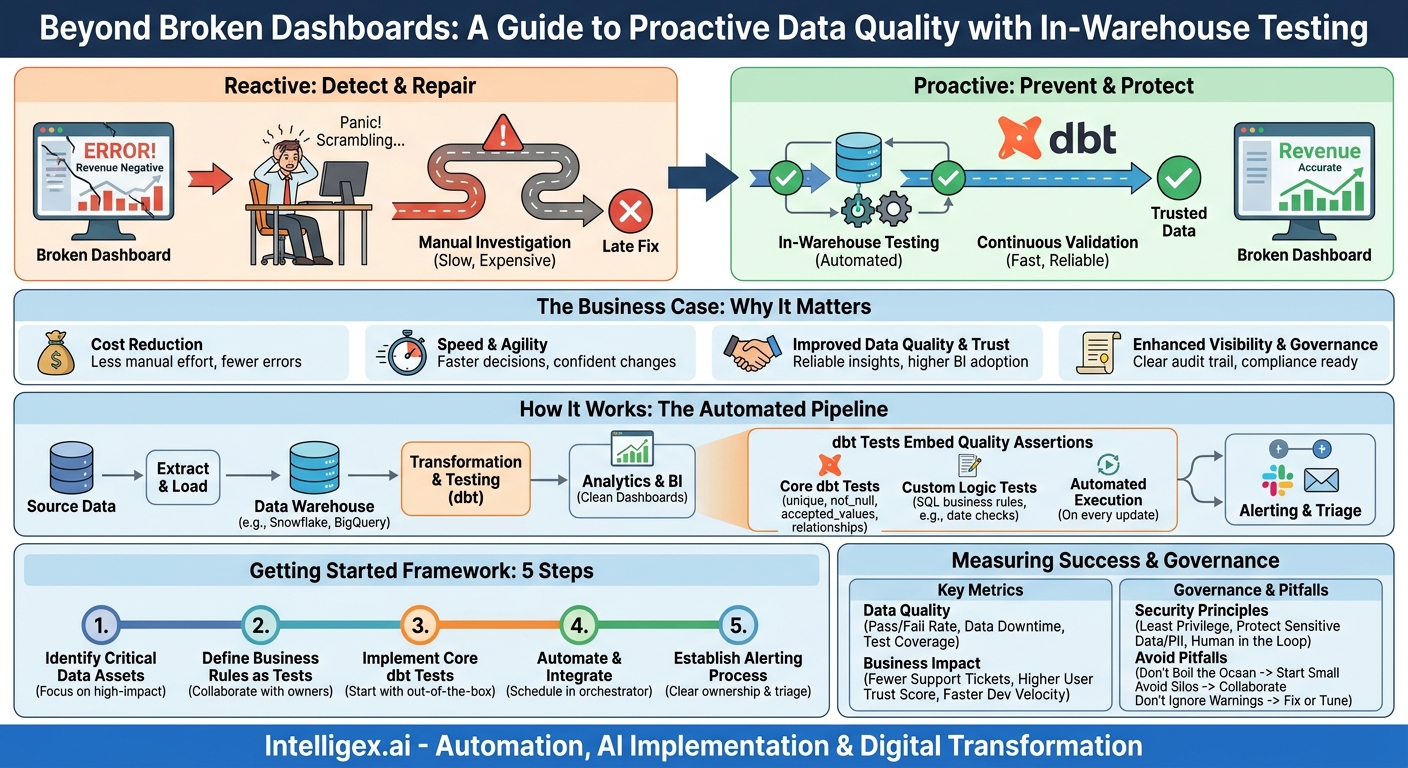
The alert pops up on a Monday morning. A key sales performance dashboard shows that last week’s revenue was negative. Panic sets in. The data team scrambles, tracing columns back through layers of transformations, scripts, and tables. Hours later, they find the culprit: a currency conversion API returned null values, which were incorrectly cast to zero during a transformation, leading to a catastrophic miscalculation. The dashboard was wrong for half a day, a dozen bad decisions were narrowly avoided, and trust in the data took another hit. This fire drill is a familiar story for many organizations. It’s a reactive, expensive, and stressful way to manage data quality.
There is a better approach. Instead of waiting for broken dashboards to tell you something is wrong, you can catch bad data where it lives: inside your data warehouse. By integrating automated data tests directly into your data transformation pipeline, you can shift from a reactive “detect and repair” model to a proactive “prevent and protect” strategy. This method doesn’t just fix broken dashboards; it builds a foundation of reliable data that accelerates business intelligence, reduces operational risk, and fosters a true data-driven culture.
What is “Testing in the Warehouse”? A Shift from Reactive to Proactive
Traditionally, data quality has been an afterthought. Data is extracted from source systems, loaded into a warehouse like Snowflake, BigQuery, or Redshift, and then transformed. Only after it’s served in a business intelligence (BI) tool does anyone notice a problem. This discovery, made by an end-user, kicks off that frantic, backward-looking investigation.
Testing in the warehouse flips this model on its head. It treats your data transformations as a software development process, complete with automated testing. Using a tool like dbt (data build tool), you embed data quality assertions directly into the transformation workflow. These tests run automatically every time your data is updated.
Think of it like a quality control check on a factory assembly line. Instead of inspecting the final product after it has shipped to the customer, you have checkpoints at each stage of production. If a component is faulty, the line stops or an alert is raised immediately, before the flaw is incorporated into the finished product. Similarly, if a batch of source data is missing values, or a business rule is violated during transformation, an in-warehouse test can flag the issue or even stop the pipeline, preventing the flawed data from ever reaching your analytics users.
This proactive approach turns your data warehouse from a passive repository into an active, self-monitoring system that enforces data integrity at its core. The tests themselves are often simple SQL queries that codify your business’s expectations about the data.
The Business Case: Why Your CFO and COO Care About dbt Tests
Implementing a data testing framework isn’t just a technical exercise for the data team. It delivers tangible business value that resonates across the organization, from finance to operations.
Cost Reduction
Bad data carries significant costs. The most obvious is the engineering time spent on reactive fire drills. Every hour a data engineer spends hunting down an issue in a dashboard is an hour not spent building new data products that drive revenue. Less obvious costs include poor business decisions made on faulty reports, wasted marketing spend targeting the wrong customer segments, and potential compliance fines for inaccurate regulatory reporting. By catching errors early, automated testing dramatically reduces the manual effort needed for data validation and remediation, freeing up valuable resources.
Increased Speed and Agility
When data is trusted, decisions happen faster. Teams no longer need to second-guess reports or perform manual validation in spreadsheets before taking action. This confidence accelerates everything. Furthermore, a robust testing suite acts as a safety net for your data team. They can refactor data models, add new data sources, or change business logic with confidence, knowing that if they break a downstream dependency, a test will fail immediately. This allows them to iterate and deliver value to the business much more quickly.
Improved Data Quality and Trust
The ultimate goal is to build unwavering trust in your organization’s data assets. When leadership knows that critical financial and operational metrics are protected by a suite of automated tests, their confidence grows. This leads to higher adoption of BI tools and a greater return on investment for your entire data stack. When dashboards become the undisputed source of truth, the organization can align around a common set of facts and move forward cohesively.
Enhanced Visibility and Governance
dbt tests serve as executable documentation. Each test codifies a specific business rule or assumption about the data. A test that ensures an `order_status` is always one of `(‘shipped’, ‘pending’, ‘returned’)` is a clear, unambiguous, and machine-verified piece of documentation. This creates a transparent and auditable record of your data governance policies, which is invaluable for regulatory compliance, onboarding new team members, and ensuring consistency across business units.
Getting Started: A Practical Framework for Implementing dbt Tests
Adopting in-warehouse testing doesn’t require a complete overhaul of your data stack. You can start small and build momentum by focusing on your most critical data assets first. Follow this step-by-step process to get started.
-
Step 1: Identify Your Critical Data Assets
You cannot and should not test everything at once. Start by identifying the data that powers your most important business processes. A great way to do this is to ask your stakeholders a simple question: “Which dashboard or report, if it were wrong, would cause the biggest problem for your department?” The answer will point you directly to your most critical data models. Focus on data that feeds executive KPIs, financial statements, or core operational dashboards.
-
Step 2: Define Your Business Rules as Tests
Work with the business owners of that critical data to translate their implicit assumptions into explicit, testable rules. This conversation is key. A data engineer might not know that a “platinum” customer status can only be assigned after a customer has spent a certain amount, but the Head of Sales will. Codifying this knowledge is the core of effective data testing.
- For Finance: A revenue transaction amount should never be negative. The `gl_account_code` must exist in the main chart of accounts table.
- For Marketing: Every lead must have a unique email address in a valid format. The `utm_source` must be one of an accepted list of campaign sources.
- For Supply Chain: The `delivery_date` cannot be before the `order_date`. The inventory on-hand count must not be less than zero.
-
Step 3: Implement Core dbt Tests
dbt provides several out-of-the-box generic tests that are incredibly powerful and easy to implement. You can add them directly to your data model’s configuration files. The four main types are:
- unique: Ensures all values in a column are distinct. Perfect for primary keys like `order_id` or `customer_id`.
- not_null: Ensures a column contains no null values. Critical for foreign keys, timestamps, and core attributes.
- accepted_values: Checks that all values in a column are from a predefined list. Ideal for status fields, categories, or country codes.
- relationships: Performs a referential integrity check, ensuring that every value in a column exists in a corresponding column in another table. For example, every `product_id` in your `sales` table must exist in your `products` table.
-
Step 4: Automate and Integrate with Your Workflow
Tests provide the most value when they are run automatically. Integrate the `dbt test` command into your data orchestration schedule (e.g., using dbt Cloud, Airflow, or a CI/CD pipeline). This ensures that with every data refresh, your quality checks are executed. You can configure tests to either `warn` (send an alert but allow the pipeline to continue) or `error` (stop the pipeline entirely to prevent bad data from propagating). A common strategy is to use `warn` for less critical tests and `error` for “showstopper” issues on core models.
-
Step 5: Establish an Alerting and Triage Process
A failed test is only useful if the right person is notified and a clear process exists for resolution. Configure alerts to be sent to a dedicated Slack channel, an email distribution list, or a PagerDuty service. Crucially, define ownership. Who is responsible for investigating a failure in the sales data? Who owns the customer data pipeline? A clear triage process ensures that issues are resolved quickly and don’t get lost in the noise.
Beyond the Basics: Custom Tests and Measuring Success
While the four generic tests cover a wide range of use cases, your business logic is often more complex. dbt allows you to write any custom data test you can express in SQL. A custom test is simply a SQL query that is expected to return zero rows. If it returns one or more rows, the test fails.
This opens up a world of possibilities for enforcing sophisticated business rules:
- A sales test: You could write a query to find any “won” deals where the `close_date` is earlier than the `create_date`, which should be impossible.
- An HR test: Write a query to find employees whose `termination_date` is listed before their `hire_date`.
- A finance test: Create a test that checks for imbalances, ensuring that the sum of debits equals the sum of credits for all journal entries on a given day.
These custom tests allow you to deeply embed your organization’s unique operational logic directly into your data warehouse, creating a powerful and resilient quality shield.
What to Measure: Gauging the Impact of Your Testing Program
To demonstrate the value of your data testing initiative, it’s important to track key metrics. These can be broken down into direct data quality metrics and broader business impact metrics.
Data Quality Metrics:
- Test Pass/Fail Rate: The percentage of tests that pass with each run. A rising pass rate over time indicates improving source data quality or more stable transformations.
- Data Downtime: The total time that critical dashboards or data assets are known to be inaccurate. A primary goal of in-warehouse testing is to drive this number to zero.
- Test Coverage: The percentage of critical models and columns that are covered by at least one test. Aim to increase this over time, starting with your most important assets.
- Time to Resolution: The average time it takes from a test failure alert to the deployment of a fix. This measures the efficiency of your triage and remediation process.
Business Impact Metrics:
- Reduction in Data-Related Support Tickets: Track the number of issues reported by business users related to “the data looks wrong.” This should decrease as your test suite becomes more comprehensive.
- User-Reported Data Trust Score: Periodically survey your key data consumers to gauge their confidence in the data on a simple 1-5 scale.
- Development Velocity: Measure the time it takes for the data team to ship new data models or reports. A solid testing safety net should increase this velocity.
Common Pitfalls and How to Avoid Them
As you roll out your data testing program, be mindful of these common challenges. Avoiding them will help ensure your initiative is successful and sustainable.
- Pitfall: Boiling the ocean. Trying to implement tests for every single table and column in your warehouse at once is a recipe for failure. It’s overwhelming and delays the delivery of value.
Solution: Start small. Pick one high-visibility data model, implement a handful of meaningful tests, and demonstrate the value. Use that success story to build momentum and expand your coverage iteratively. - Pitfall: The data team works in a silo. Data engineers cannot possibly know all the intricate business rules that define what makes data “correct.”
Solution: Make testing a collaborative process. Host workshops with business stakeholders to define and prioritize tests. This not only leads to better tests but also fosters a shared sense of ownership over data quality. - Pitfall: Only testing for nulls and uniqueness. These are important, but they are table stakes. The most impactful data quality issues often involve violations of more subtle business logic.
Solution: Focus on tests that validate relationships, state transitions, and numerical consistency. A test that ensures a returned order has a corresponding original sale is far more valuable than a simple null check. - Pitfall: Ignoring test warnings. It’s tempting to configure tests to `warn` instead of `error` to avoid breaking pipelines. But if those warnings are never reviewed, they become noise and the tests are useless.
Solution: Institute a “no broken windows” policy. Have a clear process for reviewing all warnings on a regular cadence (e.g., a daily triage meeting) and either fix the underlying issue or adjust the test.
A Note on Governance and Sensitive Data
Implementing a powerful automation tool like dbt directly within your data warehouse requires careful consideration of security and governance. As you build your testing framework, keep these principles in mind.
Principle of Least Privilege: The service account used by dbt to run transformations and tests should only have the minimum permissions necessary. It needs read access to source tables and write access to its target schemas, but it should not have broad administrative privileges. Regularly audit these permissions.
Protecting Sensitive Data: Your warehouse likely contains personally identifiable information (PII) or other sensitive data. Be mindful of this when writing tests and configuring alerts. Test failure logs or Slack notifications should never contain raw sensitive data. For example, an alert should say, “Test failed: 15 rows with invalid email format found in the customers table,” not list the 15 invalid email addresses.
Human in the Loop: Automated tests are fantastic at catching *known* problems, the ones you can define in SQL. However, they cannot catch *unknown* issues. Maintain a clear and simple process for business users to report data anomalies they discover. This human feedback is an invaluable source for identifying new business rules that should be codified into your next set of automated tests.
Your Next Steps: Building a Proactive Data Quality Culture
Moving from a reactive to a proactive data quality model is a cultural shift as much as a technical one. The best way to start is with a small, focused pilot project that delivers a quick win and demonstrates the value of in-warehouse testing. Here is a simple, actionable plan to get started:
- Schedule a 1-hour meeting: Get the key data analyst or business owner from one department (e.g., Sales Ops) in a room with a data engineer.
- Identify one critical dashboard: Together, choose the single most important dashboard that the business unit relies on.
- Map its core data model: The data engineer should trace the dashboard’s data back to the primary fact or dimension table that powers it in the warehouse.
- Define 3-5 business rules: The business owner should state their most important assumptions about the data in that table. What makes it trustworthy? What would make it wrong?
- Implement your first tests: The data engineer should translate those 3-5 rules into dbt tests (generic or custom) and add them to the data model’s configuration.
By starting with this small, collaborative effort, you will not only improve the reliability of a critical asset but also build the cross-functional alignment needed to scale this practice across the entire organization. You will begin building a foundation of trust, one test at a time.
Your Next Read:
Category:
Get a FREE
Proof of Concept
& Consultation
No Cost, No Commitment!
