

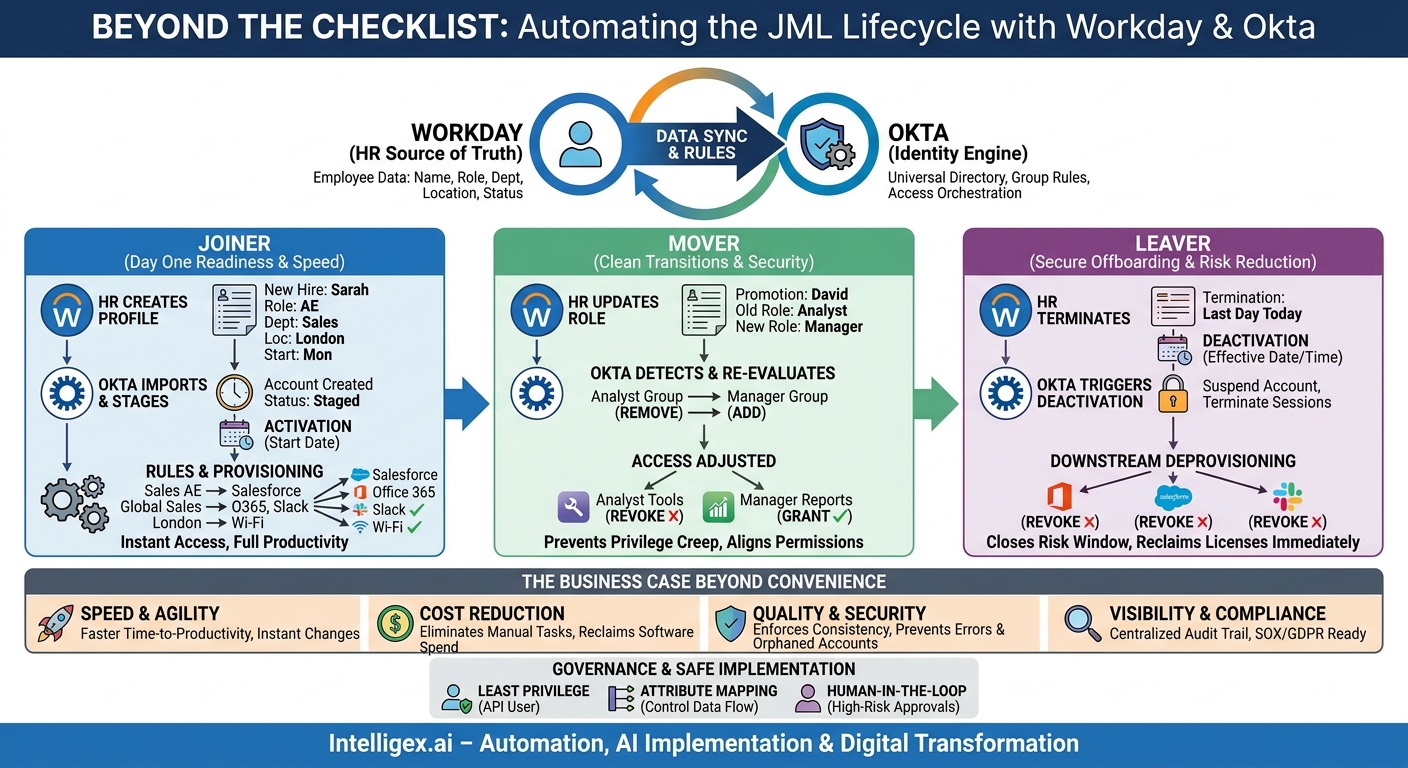
The manual churn of employee onboarding, role changes, and offboarding is more than just an administrative headache. It’s a silent tax on productivity, a hidden security risk, and a drag on growth. Every new hire waiting for system access, every transferred manager with the wrong permissions, and every former employee with a lingering active account represents a failure in the Joiner-Mover-Leaver (JML) process. These failures create friction for employees, increase helpdesk tickets for IT, and expose the business to unnecessary risk.
The solution lies not in hiring more people to manage checklists, but in creating a seamless, automated workflow between your system of record for people and your system of record for identity. For many modern organizations, this means integrating Workday as the HR source of truth with Okta as the identity and access management engine. This integration transforms JML from a reactive, manual task into a strategic, automated business process that delivers value across the entire organization.
Why Automate JML? The Business Case Beyond IT Convenience
Automating your JML lifecycle is not just about making IT’s job easier. It’s a fundamental business process improvement that delivers measurable gains in speed, cost, quality, and security. When HR processes in Workday directly and automatically drive identity and access changes in Okta, you create a powerful engine for operational excellence.
Speed and Agility
In a manual world, a new employee’s first day is often spent waiting. Waiting for a laptop, for an email account, for access to Salesforce or the financial system. This delay, known as “time to productivity,” directly impacts business outcomes. With an automated workflow, the moment HR finalizes a hire in Workday, Okta can begin creating the user’s identity and provisioning access to all necessary applications. The result is true Day One Readiness. The same applies to leavers. Access can be revoked automatically at the moment of termination, not hours or days later, drastically reducing the window of risk.
Cost Reduction
Consider the cumulative hours your IT, HR, and hiring managers spend on JML tasks. This includes filling out forms, sending emails, creating helpdesk tickets, and manually creating user accounts in dozens of different systems. Automation eliminates the vast majority of this low-value, repetitive work. This frees up skilled technical staff to focus on strategic projects instead of password resets and account administration. Furthermore, by instantly deprovisioning users, you can reclaim expensive software licenses immediately, preventing unnecessary software spend.
Quality and Security
Human error is inevitable in any manual process. A mistyped name, an incorrect permission level, or a forgotten deactivation step can lead to compliance issues, data breaches, or simple frustration. Automation enforces consistency. Every employee’s access is determined by rules based on their role, department, and location as defined in Workday. This eliminates guesswork and ensures that security policies are applied correctly every single time. For leavers, automated offboarding is a critical security control that closes the door on orphaned accounts, a common vector for data exfiltration.
Visibility and Compliance
Who has access to what, and why? Answering this question is a cornerstone of modern compliance standards like SOX, GDPR, and HIPAA. An integrated Workday and Okta system provides a centralized, auditable trail of every access change. When an auditor asks why a specific user has access to a financial application, you can point directly to their job title in Workday, the group rule in Okta that triggered the access, and the exact timestamp of the event. This level of visibility is nearly impossible to achieve with manual, ticket-based systems.
The Core Integration: How Workday and Okta Work Together
The power of this integration comes from a clear division of labor. Workday serves as the definitive source of truth for all employee information. Okta acts as the identity engine, consuming that information and orchestrating access to all downstream applications and resources.
The data flow is elegant and efficient:
- Change in Workday: An HR administrator creates a new employee, updates an existing employee’s title, or processes a termination. This is the trigger event.
- Data Sync to Okta: Using a pre-built connector, Okta periodically (or in near real-time) imports user data from Workday. You configure which employees to import (e.g., active employees and contractors) and which attributes are relevant (e.g., name, email, department, manager, location).
- Okta Applies Rules: Once the user data is in Okta’s Universal Directory, a powerful rules engine takes over. Based on the attributes imported from Workday, Okta automatically assigns the user to the correct groups. For example, an employee with `department = “Sales”` and `country = “USA”` might be added to the “US Sales Team” group.
- Access is Provisioned or Deprovisioned: Assignment to these groups automatically triggers actions. Adding a user to the “US Sales Team” group could, for example, provision a Salesforce account, a Slack channel membership, and access to a specific folder in SharePoint. Conversely, removing a user from the group would revoke that access.
This “attribute-based access control” model ensures that permissions are always aligned with an employee’s current role as defined by HR, creating a single, authoritative process for managing the entire identity lifecycle.
A Practical Look at the Joiner Workflow
Onboarding is a new hire’s first impression of your company’s operational maturity. A smooth, automated process signals efficiency and a focus on employee experience. Here is how the Workday-to-Okta integration enables a world-class onboarding experience.
Imagine a new Account Executive, Sarah, is starting in the London office next Monday. Here’s her automated onboarding journey:
- HR Creates Profile: On Thursday, the HR partner completes Sarah’s profile in Workday, entering her name, personal email, job title (“Account Executive”), department (“Sales”), manager, and office location (“London”). They set her hire date for the upcoming Monday.
- Okta Imports User: Within minutes, Okta’s scheduled import from Workday detects the new user profile. Because her hire date is in the future, Okta creates her account in a “staged” state.
- Account Activation: On Monday morning, Workday officially lists Sarah as an active employee. On the next sync, Okta sees this status change and moves her account from “staged” to “active.” This can trigger a welcome email to her personal address with a link to activate her Okta account and set her password.
- Group Rules Fire: Upon activation, Okta’s group rules evaluate her attributes:
- `jobTitle = “Account Executive”` places her in the “Sales AE” group.
- `department = “Sales”` places her in the “Global Sales” group.
- `officeLocation = “London”` places her in the “London Office” group.
- Automated Provisioning: These group memberships instantly grant her access. The “Global Sales” group gives her an Office 365 license and a Slack account. The “Sales AE” group provisions a Salesforce account and assigns the correct profile and territory. The “London Office” group gives her access to the London Wi-Fi network and printing system.
When Sarah arrives, her corporate identity is ready. She can log in, access all her core tools, and start learning and contributing immediately. The only manual steps involved were HR’s initial data entry. The key metric to track here is Time to Full Productivity, measuring the time from the official start date until the employee has access to all required systems.
Managing Movers: The Overlooked Complexity
The “Mover” part of JML is often the most challenging. Promotions, departmental transfers, and location changes are frequent, and each requires a precise adjustment of permissions. Manual mover processes are notorious for errors, leading to employees either lacking the access they need to do their new job or, more dangerously, retaining access to data from their old role. This is known as “privilege creep” and is a significant security risk.
Let’s consider an example: David, a Financial Analyst, is promoted to Finance Manager.
In a manual system, an IT administrator would receive a ticket and have to interpret the request. They might add David to the “Finance Managers” distribution list but forget to remove him from the “Financial Analysts” group. They might grant him access to the manager-level reporting dashboard but forget to revoke his access to a low-level data entry system. Each oversight creates risk or friction.
With an automated Workday-Okta workflow, the process is clean:
- HR Updates Workday: HR updates David’s `jobTitle` attribute in Workday from “Financial Analyst” to “Finance Manager.”
- Okta Detects Change: The next sync brings this attribute change into David’s Okta profile.
- Group Rules Re-evaluate: Okta’s rules engine re-evaluates his group memberships.
- His old rule, `IF user.jobTitle == “Financial Analyst” THEN ASSIGN to “Financial Analysts Group”`, no longer matches. He is automatically removed from that group.
- His new rule, `IF user.jobTitle == “Finance Manager” THEN ASSIGN to “Finance Managers Group”`, now matches. He is automatically added to this new group.
- Access is Adjusted: His removal from the old group deprovisions access to analyst-specific tools. His addition to the new group provisions access to manager-level systems and reporting tools. His access is perfectly realigned to his new role, with no manual intervention required.
Checklist for Mover Workflow Design:
- Map all roles to entitlements: Before automating, clearly define which applications and permission levels each job role requires.
- Plan for data preservation: When deprovisioning access, what should happen to the user’s data in that system? Should it be transferred to their new manager or archived? Define this policy for each key application.
- Use mutually exclusive groups: Design your group rules to prevent a user from being in conflicting groups simultaneously (e.g., both an analyst and a manager).
- Consider approval workflows: For moves into highly privileged roles, you can use Okta Workflows to insert a manual approval step (e.g., from the Head of Security) before final permissions are granted.
The Leaver Workflow: Securing the Digital Offboarding
Improperly handled offboarding is one of the most common and dangerous corporate security vulnerabilities. A single active account belonging to a former employee can provide a backdoor into your corporate network, customer data, and intellectual property. Automation is not just a convenience here; it is an essential security control.
When an employee’s termination is processed in Workday, the integrated offboarding workflow should be immediate and absolute.
Here’s the process:
- HR Sets Termination Date: An HR business partner enters the employee’s last day of employment into Workday.
- Workday Status Changes: On that specified date and time, Workday automatically changes the employee’s status from “Active” to “Terminated.”
- Okta Triggers Deactivation: The next sync with Workday detects this status change. Based on your configured rules, Okta immediately triggers a deactivation sequence for the user’s account.
- Sessions are Terminated: The first action is to suspend the user’s Okta account, which terminates all their active web sessions. This logs them out of every application they accessed via single sign-on.
- Downstream Deprovisioning: Okta then sends deprovisioning commands (via API) to all connected applications. This can be configured to “suspend” the user in those applications (preserving data) or to “delete” them entirely. Within minutes, their access to Office 365, Salesforce, Slack, and all other integrated apps is revoked.
The key metric for this process is Time to Deprovision. In a fully automated system, this should be measured in minutes, not days. This ensures that by the time an employee has left the building, their digital access has already been secured.
Governance and Safe Implementation
Integrating HR and identity systems involves handling sensitive Personally Identifiable Information (PII). A thoughtful approach to governance and security is not optional; it is a core requirement for a successful and safe implementation.
Principle of Least Privilege
The connection between Workday and Okta is made using a dedicated API user. This user should be configured in Workday with the absolute minimum permissions required. It only needs read-only access to the specific user attributes required for identity management (like name, email, department, manager). There is no reason for the integration to have access to sensitive data like salary, performance reviews, or home address. Do not import attributes into Okta that are not actively used in your group rules or application provisioning logic.
Attribute Mapping and Transformation
Be deliberate about the flow of data. Just because an attribute exists in Workday doesn’t mean it should be passed verbatim to every downstream application. Use Okta’s Universal Directory to control the schema. You can even create custom transformations. For example, you might combine a `firstName` and `lastName` attribute from Workday to create a `displayName` attribute in Okta that is then used consistently across all applications.
Human in the Loop for High-Risk Access
Full automation is the goal, but for certain high-risk scenarios, a “human in the loop” approval step provides an essential safeguard. For example, granting access to production servers, the corporate financial planning system, or customer databases could be configured to require approval. When a user is added to a high-privilege group, an Okta Workflow can be triggered to send a request to a manager or system owner via Slack or email. The automation only proceeds once that approval is logged.
Getting Started: Your Path to Automated JML
Embarking on a JML automation project can feel daunting, but a phased, methodical approach will ensure success. Instead of attempting a “big bang” implementation, follow a clear path from planning and piloting to a full rollout.
- Document Your Current State: Before you can automate a process, you must understand it. Map your existing JML workflows for at least three distinct roles (e.g., a salesperson, a developer, a finance analyst). Identify every manual step, every system involved, and every person responsible. Most importantly, pinpoint the most common points of failure or delay.
- Define and Cleanse Your Source of Truth: Automation is only as reliable as the data that drives it. Confirm that Workday is the undisputed source of truth for employee data in your organization. Then, conduct a data quality audit. Are job titles, departments, and manager fields used consistently? Inconsistent data will lead to unpredictable automation. Invest time in data cleansing before you connect the systems.
- Start with a Pilot Group: Choose a single, well-defined user group for your initial pilot. New hires in a specific department are an excellent choice. Build, test, and refine the complete Joiner workflow for this group first. This allows you to learn and iterate in a controlled environment before expanding.
- Create an Application Integration Roadmap: You don’t need to integrate every single application on day one. Prioritize your applications based on impact and ease of integration. Start with your most critical, universal applications like Office 365 or Google Workspace. Next, tackle major departmental SaaS platforms like Salesforce or ServiceNow. Build momentum with these high-value wins before moving on to more niche or complex systems.
- Engage a Partner for a Strategic View: While the technology is powerful, successful JML automation is as much about process re-engineering as it is about software configuration. Working with an integration partner who understands the nuances of both HR processes and identity management can help you avoid common pitfalls, accelerate your implementation, and ensure the solution is designed to scale with your business.
By transforming your JML lifecycle, you are not just solving an IT problem. You are building a more efficient, secure, and agile organization, ready to scale without the friction of manual administration.
Your Next Read:
Get a FREE
Proof of Concept
& Consultation
No Cost, No Commitment!
