

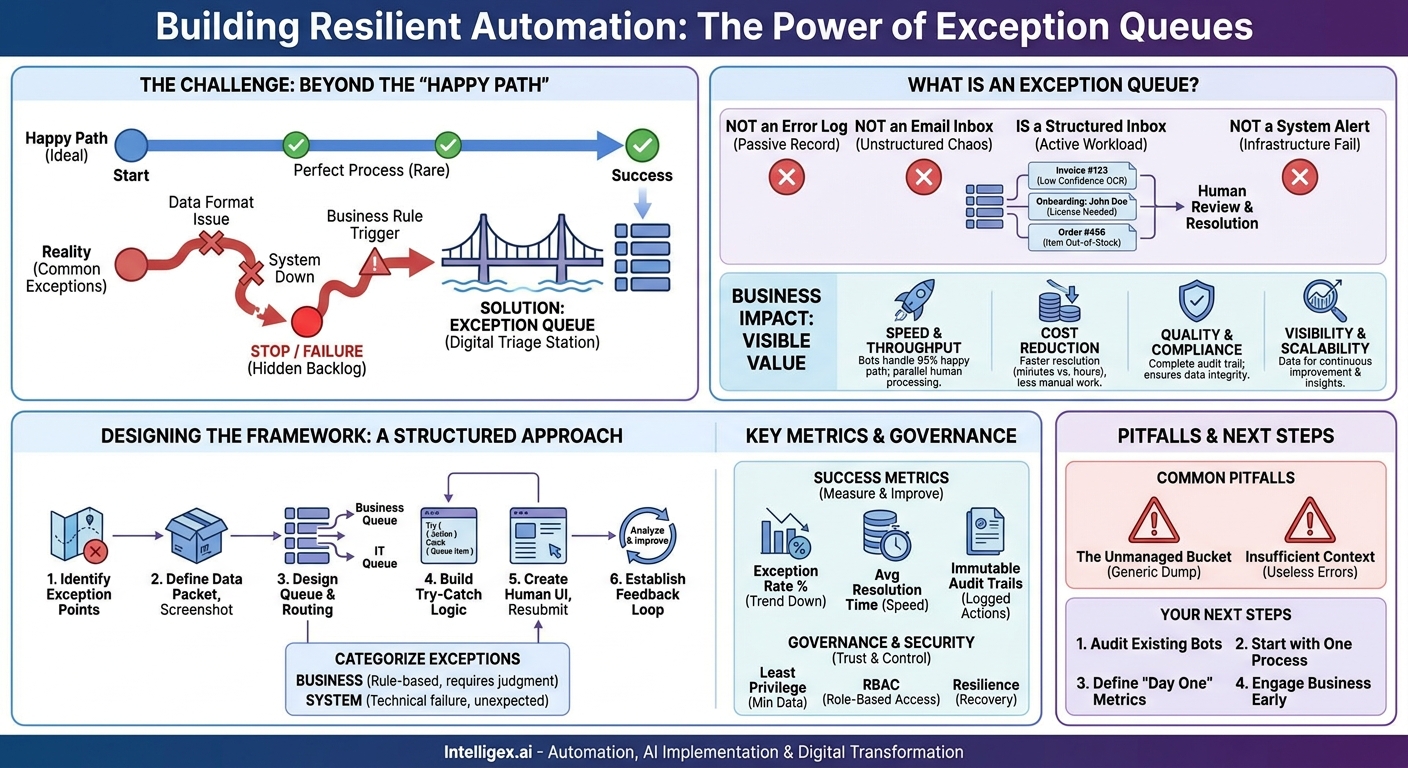
Your team just launched a new automation. It’s designed to process thousands of transactions a day, saving countless hours and eliminating tedious manual work. For the first few hours, everything is perfect. The digital workforce is humming along. Then, a transaction arrives with a slightly different data format, a system it needs to access is momentarily down, or a business rule is met that requires a manager’s approval. The automation stops. Or worse, it fails silently, and no one notices for hours, creating a backlog that erodes all the initial gains.
This scenario is the Achilles’ heel of many automation programs. We focus so heavily on the “happy path” where everything works perfectly that we treat exceptions as an afterthought. But in reality, exceptions are not failures; they are inevitable, predictable variations in a process. The difference between a brittle, high-maintenance automation and a resilient, scalable one is how it handles these variations. This is where exception queues become a critical component of your operational toolkit.
What is an Exception Queue (And What Isn’t It?)
At its core, an exception queue is a dedicated, structured inbox for automated tasks that cannot be completed without human intervention. When a bot encounters a problem it can’t solve, it doesn’t just stop or log an obscure error. Instead, it packages up all the relevant information about the task, labels it clearly, and places it in a queue for a designated person or team to review and resolve.
Think of it as a digital triage station for your automated processes. Instead of a failed task creating a fire drill for your IT team, it becomes a neatly organized case file waiting for the right business expert.
It’s important to distinguish what an exception queue is not:
- It is not an error log. A log is a passive, chronological record of events, often cryptic and designed for developers. A queue is an active, manageable workload of tasks, designed for business users.
- It is not an email inbox. Sending exceptions to a shared inbox is a recipe for disaster. Emails get buried, ignored, have no clear ownership, and lack the structure needed for tracking and reporting.
- It is not a system failure alert. While a system outage might cause exceptions, the queue itself manages the business transactions affected by the outage, not the underlying infrastructure issue.
A well-designed exception queue turns a disruptive problem into a manageable business-as-usual task. It provides the context, data, and tools a human needs to make a quick decision and keep the overall process moving.
The Business Impact: From Hidden Costs to Visible Value
Implementing a formal exception handling strategy might seem like extra work, but it pays dividends across several key business areas. It shifts the focus from reactive firefighting to proactive management, directly impacting your bottom line.
Speed and Throughput
When an automation stops due to an exception, the entire process can grind to a halt. By shunting exceptions to a queue, the bot can continue processing the 95% of transactions that are valid. This decoupling is crucial for high-volume processes. It allows work to happen in parallel: your digital workforce continues to handle the straight-through cases while your human experts resolve the outliers. The result is a much higher overall throughput and a more resilient process that isn’t derailed by a single problematic case.
Cost Reduction
Silent failures are expensive. An automation that stops working without anyone noticing forces a panicked, high-cost manual effort to catch up. Exception queues make every failure visible and accountable. Furthermore, they reduce the cost of resolution. Instead of a developer spending an hour digging through logs to understand a data entry error, a business user can see the problem, the data, and a screenshot instantly. This allows them to resolve the issue in minutes, freeing up expensive technical resources to work on building new value, not just maintaining the old.
Quality and Compliance
A structured queue creates a complete, unbreachable audit trail. Every exception is logged, tracked from creation to resolution, with a record of who did what and when. This is invaluable for regulated industries where process integrity is non-negotiable. It prevents data from being partially processed, which can lead to corruption in downstream systems. By ensuring every transaction is either successfully completed or formally handled as an exception, you maintain a much higher level of data quality and operational control.
Visibility and Scalability
Perhaps the greatest long-term benefit of an exception queue is the data it provides. The queue is a living dashboard of your process health. By analyzing exception trends, you gain powerful insights:
- Which suppliers consistently send invoices in a format that breaks the automation?
- Which product SKUs are most frequently entered incorrectly in orders?
- Is a specific system frequently timing out during a certain time of day?
This data is a roadmap for continuous improvement. It tells you exactly where to focus your efforts, whether it’s training a supplier, fixing a bug, or improving a user interface. This visibility is essential for scaling automation successfully. Without it, you are simply scaling your problems.
Real-World Scenarios: Where Exception Queues Shine
The concept of an exception queue is universal, but its application varies by department. Here are a few concrete examples of how they provide value across a business.
Finance (Accounts Payable): An automation extracts data from supplier invoices using OCR. An invoice arrives with a handwritten note on it, confusing the OCR software and resulting in a low confidence score for the invoice total. Instead of rejecting the invoice or processing it with potentially incorrect data, the bot creates a case in the AP exception queue. The case includes the supplier name, invoice number, the extracted data, and an image of the invoice with the low-confidence field highlighted. An AP clerk can quickly review the image, correct the single field, and approve the transaction for payment.
Human Resources (Employee Onboarding): A workflow to provision new employee accounts needs to create a user ID in five different systems. It succeeds in four but fails on the fifth because the system requires a license that needs manager approval. The automation places the employee’s onboarding case into an HR IT queue. It includes the employee’s name, their manager, and a clear message: “Account creation failed in System X due to license required.” An HR operations specialist can see the issue, obtain the necessary approval, and manually complete the final step, allowing the new hire to have a smooth first day.
Supply Chain (Order Management): A customer order is submitted through an online portal. The automation checks inventory levels and finds that one of the five items ordered is out of stock. Instead of failing the entire order, the bot processes the four available items and places the single backordered item into a “Customer Service” exception queue. The queue item contains the customer details, order number, and the out-of-stock SKU. A customer service representative can then proactively call the customer to ask if they want to substitute the item or wait for it to be restocked.
Designing an Effective Exception Handling Framework
Building a robust exception handling system requires a thoughtful, structured approach. It’s not just about creating a place for things to go; it’s about designing a process for resolution. A solid framework typically involves categorizing exceptions, defining the data needed for resolution, and establishing clear routing rules.
First, Categorize Your Exceptions
Not all exceptions are created equal. Broadly, they fall into two camps:
- Business Exceptions: These are predictable, rule-based events that require human judgment. For example, an insurance claim is over a certain value and requires manual review, a customer has exceeded their credit limit, or an application is missing a required document. These should be routed to business users.
- System Exceptions: These are unexpected technical failures. For example, an application crashes, a network connection is lost, or a website’s layout changes, breaking a screen-scraping robot. These should be routed to an IT support or automation development team.
Categorizing exceptions ensures the right problem gets to the right person quickly, dramatically reducing resolution time.
A Step-by-Step Guide to Implementation
Implementing your first exception queue can be straightforward if you follow a clear plan. Most modern automation platforms, such as UiPath, have built-in queue management capabilities that simplify this process.
- Identify Key Exception Points: Review your automated process map. For each step, ask, “What could go wrong here?” Mark every decision point, system interaction, and data validation step as a potential source of an exception.
- Define Exception Types and Data: For each point identified, classify the potential exception as a Business or System issue. Then, define the “data packet” a human would need to solve it. This must include more than just an error code. Essential data includes a unique transaction ID, all relevant input data, the step at which the process failed, and a clear, human-readable error message. Screenshots are incredibly valuable here.
- Design the Queue and Routing: Create the actual queue in your automation platform or case management tool. Define its structure (the data fields from the step above). Establish the routing rules. For example, all exceptions of type “Invoice OCR Confidence Low” should be assigned to the “AP Clerks” queue. All exceptions of type “Application Not Responding” should go to the “RPA Support” queue.
- Build the ‘Try-Catch’ Logic: In your automation script, this is the technical implementation. You wrap critical actions in what developers call a “try-catch” block. The “try” part is the happy path action. The “catch” block executes only if the “try” fails. This is where you will build the logic to package the exception data and add it to the correct queue.
- Create the Human User Interface: Your business users need a simple, intuitive way to work with the queue. This interface should allow them to view the queue, assign an item to themselves, see all the packaged data, and mark the item as resolved, often with options like “Resubmit to Bot” or “Complete Manually.”
- Establish a Feedback Loop: The goal of exception handling isn’t just to fix problems; it’s to prevent them. Your process must include a regular review of exception data to identify root causes. This analysis should feed back into improving the automation, the business process, or even the training of upstream teams.
Key Metrics: How to Measure Success
You can’t improve what you don’t measure. A well-managed exception queue generates a wealth of data that you can use to track the health and efficiency of your automation program. Focus on a few key metrics:
- Exception Rate: What percentage of total transactions end up in a queue? This is the most critical measure of your automation’s straight-through processing capability. Your goal is to see this trend downwards over time.
- Average Resolution Time: How long does it take, on average, for an exception to be resolved from the moment it enters the queue? This metric helps with staffing and highlights bottlenecks in your resolution process.
- Exception Volume by Type: Which types of exceptions are occurring most frequently? This tells you exactly where to focus your continuous improvement efforts. If “Invalid PO Number” is your top exception, you know you have a data quality issue at the source.
- Automation Resilience: How effectively does the automation recover from transient system issues? For example, if a system is down, the bot should be able to queue the affected items and resume processing other work, rather than stopping completely.
Handling Sensitive Data and Maintaining Governance
When an automation handles sensitive information like customer PII or financial data, the exception queue must be designed with security and governance at its core. Throwing sensitive data into an insecure queue is a significant compliance risk.
Principle of Least Privilege: The data packet sent to the queue should contain only the minimum information necessary to resolve the issue. For example, if an employee’s address needs verification, the queue item should contain the employee ID and the address, not their entire HR file. Redact or mask sensitive information in screenshots where possible.
Role-Based Access Control (RBAC): This is non-negotiable. The Finance team should not be able to see items in the HR queue, and vice-versa. Access to queues must be strictly controlled based on a user’s role and need-to-know. Modern platforms allow for granular permissions to be set for each queue.
Immutable Audit Trails: The system managing the queue must log every single action. Who viewed an item? Who edited it? Who resolved it? When did they do it? This detailed log is essential for security audits and demonstrating compliance with regulations like GDPR or SOX.
Common Pitfalls and How to Avoid Them
While powerful, exception queues can become part of the problem if not managed correctly. Watch out for these common traps:
- The Unmanaged Bucket: The biggest mistake is creating a single, generic queue for all exceptions with no clear ownership. This “miscellaneous” queue quickly becomes a digital dumping ground where issues go to be forgotten. Always create specific queues for specific teams with a named owner for each.
- Insufficient Context: An exception item that just says “Error in processing” is useless. It forces the user to start their investigation from scratch. A good exception includes who, what, where, when, and why. Provide the transaction ID, input data, a screenshot at the time of failure, and a clear error message.
- Ignoring the Analytics: Don’t just use your queue to fix today’s problems. Use its data to prevent tomorrow’s. Schedule a monthly or quarterly review of exception trends with process owners. This is one of the most valuable sources of insight for making your automations and your business processes better.
Your Next Steps: Building a Resilient Automation Program
Moving from a reactive to a proactive approach to automation exceptions is a journey, but you can start today. It’s about building resilience and visibility into the DNA of your automation program from the beginning.
Here’s a simple action plan:
- Audit Your Current Automations: For any existing bots, ask: “What happens when this fails?” If the answer involves digging through log files or relying on users to report a problem, you’ve found your first candidate for an exception queue.
- Start with One High-Value Process: You don’t need to boil the ocean. Pick one critical automation that is prone to data or system variations. Design and implement a simple exception queue just for that process.
- Define “Day One” Metrics: Before you launch, decide on the two or three metrics you will use to measure success. Exception Rate and Average Resolution Time are excellent starting points.
- Engage the Business Team Early: The people who will be working the queue are the most important stakeholders. Involve them in designing the queue’s data structure and the user interface. They know exactly what information they need to do their jobs effectively.
By treating exceptions as a core part of your automation design, not an afterthought, you build a program that is not only more efficient but also more robust, scalable, and trusted by the business.
Your Next Read:
Category:
Get a FREE
Proof of Concept
& Consultation
No Cost, No Commitment!
