

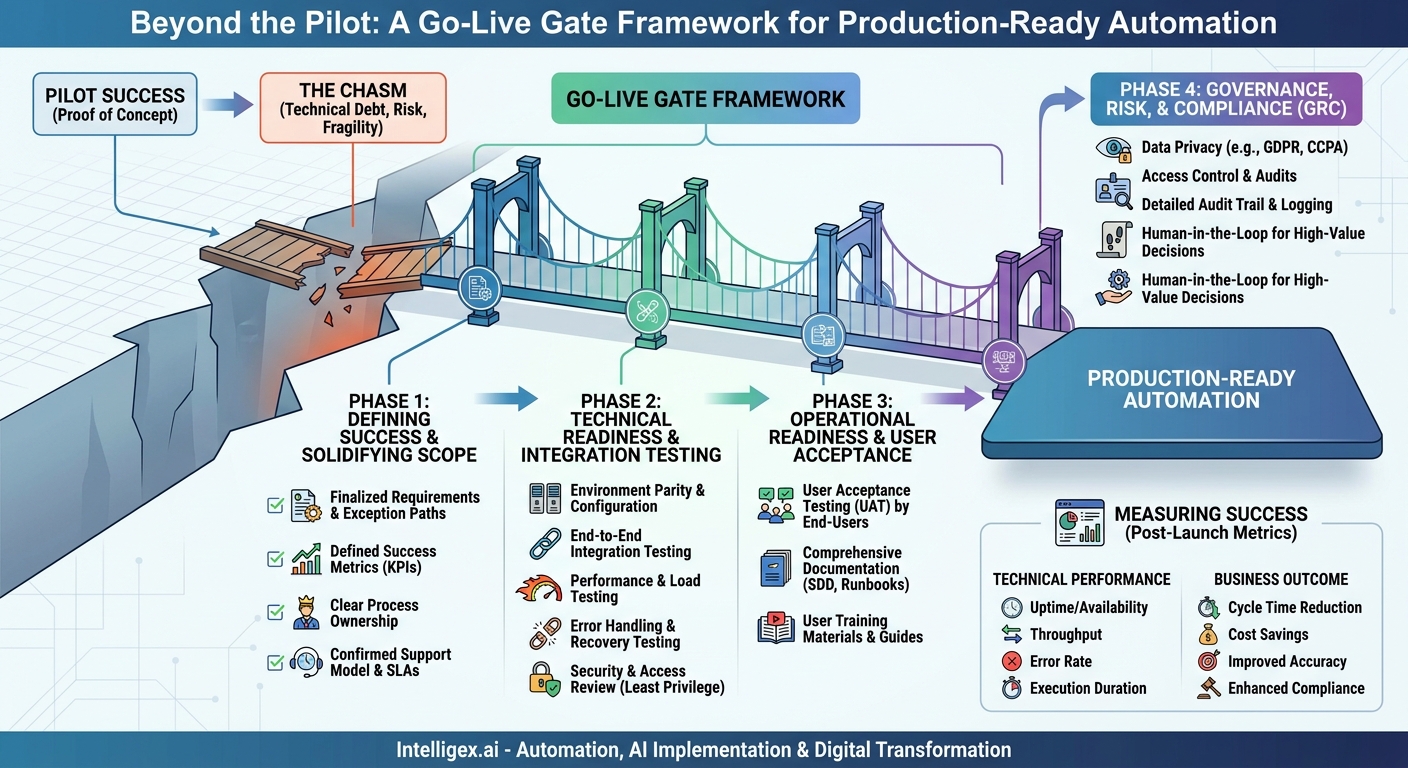
The pilot was a success. Your team built an automated workflow that untangled a stubborn manual process, and the demo wowed stakeholders. The potential is clear: reduced costs, faster cycle times, and happier employees. But the journey from a promising pilot to a resilient, production-grade automated workflow is where real business value is forged or forgotten. Crossing this chasm without a map leads to technical debt, compliance risks, and workflows that break under the slightest pressure.
This is where go-live gates come in. A go-live gate is not a bureaucratic hurdle. It is a structured quality control framework, a series of checkpoints that ensure an automated workflow is technically sound, operationally ready, and aligned with business objectives before it touches live data or customer-facing processes. Skipping these gates is like trying to launch a rocket without a pre-flight checklist. It might work, but the consequences of failure are severe.
Why a Go-Live Gate is Non-Negotiable for Automation
Deploying automation without rigorous checks introduces significant risk. A poorly configured workflow in a finance department could miscalculate tax liabilities or create duplicate payments. A fragile automation in a supply chain could fail during peak season, causing costly shipping delays. The initial excitement of a quick deployment quickly fades when the support team is overwhelmed with tickets and business leaders lose trust in the technology.
A formal go-live process transforms automation from a fragile project into a reliable business asset. The value is not just in avoiding disaster but in actively building a foundation for scale and continuous improvement.
Business value drivers for a gated process include:
- Quality and Reliability: Ensures the workflow performs as expected under real-world conditions, minimizing errors and downtime. This builds user trust and drives adoption.
- Cost Management: Catches expensive flaws, security vulnerabilities, and inefficient designs before they are deployed. The cost to fix a bug in production is exponentially higher than fixing it during development.
- Scalability: Confirms that the automation can handle projected increases in volume without performance degradation, ensuring it supports business growth rather than hindering it.
- Governance and Compliance: Provides a clear audit trail and confirms the workflow adheres to internal policies and external regulations like GDPR or SOX.
- Visibility and Control: Establishes clear ownership, support procedures, and performance metrics, turning a black box process into a transparent, manageable asset.
Phase 1: Defining Success and Solidifying Scope
The first gate stands between the successful pilot and the start of production development. The goal here is to transition from a proof-of-concept mindset to a production-ready specification. A pilot often succeeds with a narrow scope and a handful of ideal test cases. Production is messy. It must handle exceptions, edge cases, and the full spectrum of data quality found in your systems.
Before writing a single line of production code, stakeholders from business, IT, and compliance must align on what “done” looks like. This is where you translate the pilot’s potential into a concrete business case and technical plan.
Key decision points for this gate:
- Finalized Requirements: Has the initial process map been updated to include every exception path? For an HR onboarding workflow, what happens if a new hire is in a country with different background check requirements? For a sales quote-to-cash process, how does the automation handle custom contract terms or non-standard discounts?
- Success Metrics Defined: Move beyond vague goals like “improve efficiency.” Define specific, measurable KPIs. For example, “Reduce the average invoice processing time from 3 days to 4 hours,” or “Decrease the error rate in order entry from 2% to 0.1%.”
- Process Ownership: Who owns this automated workflow once it’s live? This person is responsible for its business performance, not just its technical uptime. It is typically a leader in the department that benefits from the automation, like a Controller for a finance process or a Director of Sales Operations for a CRM workflow.
- Support Model Confirmed: What is the escalation path when the workflow fails? Is it a Level 1 help desk ticket, or does it go directly to a specialized automation support team? Define Service Level Agreements (SLAs) for response and resolution times.
Phase 2: Technical Readiness and Integration Testing
Once the scope is locked, the development team can build the production-grade workflow. This phase is the most technical gate, focusing on the robustness, security, and performance of the solution itself. It ensures the automation is not a brittle script but a resilient piece of software.
This is a multi-step process that requires a dedicated testing environment separate from development and production.
- Environment Parity and Configuration: The testing or staging environment must mirror production as closely as possible. This includes system versions, access permissions, and network configurations. All configuration settings, like API keys or database connection strings, must be managed as variables, not hardcoded into the workflow. This allows for seamless promotion from test to production.
- End-to-End Integration Testing: This goes beyond testing the automation in isolation. It verifies the entire chain of events. For a marketing automation that syncs leads from a webinar platform to a CRM like Salesforce, an end-to-end test would simulate a user registering, verify the lead is created in the CRM with the correct data, and confirm it is assigned to the right sales queue.
- Performance and Load Testing: The workflow must be tested against expected peak volumes. If a supply chain automation processes shipping orders, can it handle the volume spike during Black Friday? Simulate this load in the test environment to identify bottlenecks. Measure transaction throughput and system resource usage (CPU, memory) on the servers running the automation.
- Error Handling and Recovery Testing: Intentionally try to break the workflow. What happens if a connected application’s API is unavailable? Does the workflow fail gracefully, log the error, and retry later? Or does it crash and lose data? For a financial reconciliation process, test what happens when an input file is malformed. The automation should quarantine the bad file and notify an administrator rather than processing corrupt data.
- Security and Access Review: The service account or user credentials the automation uses must follow the principle of least privilege. It should only have the minimum permissions required to perform its tasks. All sensitive credentials must be stored securely in a vault (like HashiCorp Vault or AWS Secrets Manager), not in plain text files or the code itself.
Phase 3: Operational Readiness and User Acceptance
A technically perfect workflow that the business team cannot use or does not trust is a failure. This gate focuses on the human element of automation. It’s about ensuring the people who will interact with, manage, and benefit from the process are prepared for the change.
The core of this phase is User Acceptance Testing (UAT), but it encompasses much more than just testing.
User Acceptance Testing (UAT) That Matters
UAT should be performed by the actual end-users, not the development team. They should test against real-world business scenarios, not just the “happy path.” Provide them with a UAT script that includes both common tasks and known edge cases.
Example: An accounts payable clerk tests an invoice automation workflow. The UAT script instructs them to process a standard invoice, an invoice with a missing PO number (testing the exception handling), and an invoice from a new, unrecognized vendor. The clerk’s feedback on the clarity of error messages and the ease of managing exceptions is critical.
Documentation and Training
Before go-live, the support team needs the tools to succeed. This means clear, comprehensive documentation.
- Solution Design Document (SDD): Explains what the automation does, which systems it connects to, and its high-level architecture.
- Runbook/SOP: Provides step-by-step instructions for common support tasks: how to restart the workflow, how to investigate a common error, how to manually re-process a failed transaction.
- User Training Materials: Simple guides or short videos showing end-users how their process has changed and how to interact with the new automated system, especially for handling exceptions.
Without this documentation, the original developer becomes the sole source of knowledge, creating a critical dependency and a support bottleneck.
Phase 4: Governance, Risk, and Compliance (GRC)
This gate is particularly critical for workflows that handle sensitive information, such as Personally Identifiable Information (PII), financial data, or protected health information. The GRC check ensures the automation complies with legal standards and internal corporate policies. Involving your security and compliance teams early in the process is essential.
Key considerations include:
- Data Privacy: Does the workflow access, process, or store PII? If so, it must comply with regulations like GDPR in Europe or CCPA in California. This involves ensuring data is encrypted, access is logged, and retention policies are followed.
- Access Control: Who can execute the workflow? Who can view its logs? Who can modify its code? Access should be role-based and regularly audited.
- Audit Trail: The workflow must generate detailed logs of its actions. For a financial process, this means logging every transaction it processes, including what data was changed, which user account performed the action (even if it’s a service account), and a timestamp. This is non-negotiable for SOX compliance.
The Human-in-the-Loop Imperative
Not all decisions should be fully automated, especially when dealing with high-value transactions or ambiguous data. A human-in-the-loop design builds checkpoints into the workflow where human judgment is required.
For example, an AI-powered system that analyzes incoming contracts can automate the extraction of key terms like renewal dates and payment amounts. However, it should not automatically execute the contract. Instead, it should flag non-standard or risky clauses and route them to the legal team for review and approval. This combines the speed of machine processing with the critical thinking of a human expert.
Measuring Post-Launch Success: From Output to Outcome
The final step of the go-live process is to confirm that your monitoring and measurement plan is in place. You cannot prove the value of your automation if you are not measuring its impact. The metrics you track should directly correlate to the success criteria defined in Phase 1.
What to Measure
Your measurements should cover both technical performance and business impact.
- Technical Performance Metrics:
- Uptime/Availability: What percentage of the time is the workflow operational?
- Throughput: How many transactions can it process per hour or day?
- Error Rate: What percentage of transactions result in a technical or business exception?
- Execution Duration: How long does the workflow take to complete a single transaction?
- Business Outcome Metrics:
- Cycle Time Reduction: The end-to-end time saved in the business process.
- Cost Savings: Calculated from hours of manual work saved or reduction in operational costs (e.g., late payment fees).
- Improved Accuracy: A reduction in costly human errors, measured through quality checks or audit findings.
- Enhanced Compliance: A perfect audit trail is a metric in itself.
These metrics should be captured in a dashboard accessible to both the business owner and the IT support team. This provides a shared, data-driven view of the automation’s health and value, facilitating conversations about future enhancements and demonstrating ROI.
Getting Started: Your Next Steps
Implementing a formal go-live process for your automated workflows might seem like it slows things down, but it is an investment that pays dividends in reliability, scalability, and trust. It replaces the anxiety of a risky deployment with the confidence of a well-engineered launch.
You can start small and build momentum. Here is a simple action plan:
- Select a Candidate Workflow: Identify one automation pilot that is currently being considered for production. Choose one with clear business impact but manageable complexity.
- Assemble the Go-Live Team: Schedule a meeting with the business process owner, a representative from your IT/security team, and the lead developer. Introduce the concept of a gated go-live process.
- Build Your First Checklist: Use the phases outlined above as a template. Work with the team to create a simple, one-page go-live checklist tailored to your organization. Start with the basics: signed-off requirements, a documented support plan, successful UAT, and a security review.
- Execute and Iterate: Walk your chosen workflow through your new process. Note what works well and where the friction is. After the launch, hold a brief retrospective to refine your checklist for the next project.
By formalizing your path from pilot to production, you create a repeatable, high-quality “automation factory” that consistently delivers robust solutions and tangible business value.
Your Next Read:
Category:
Get a FREE
Proof of Concept
& Consultation
No Cost, No Commitment!
