

When a new employee joins your team, their first few days set the tone for their entire experience. A smooth start, with immediate access to the tools they need, signals an efficient and well-run organization. A bumpy start, filled with helpdesk tickets and waiting for access, creates friction and delays productivity. The gap between these two scenarios is often filled with manual, repetitive tasks that drain time from your IT and HR teams. Automating employee provisioning by integrating your HR system with your productivity suite is one of the most impactful digital transformation projects a growing business can undertake.
By connecting BambooHR as your single source of truth for employee data to Google Workspace, you can eliminate these manual bottlenecks. When HR marks a candidate as “hired,” a powerful, automated workflow can instantly create their user account, assign them to the correct groups, and grant access to the right files. This isn’t just about convenience. It’s a strategic move that enhances security, reduces operational costs, and ensures every employee, from day one to their last, has exactly the access they need, exactly when they need it.
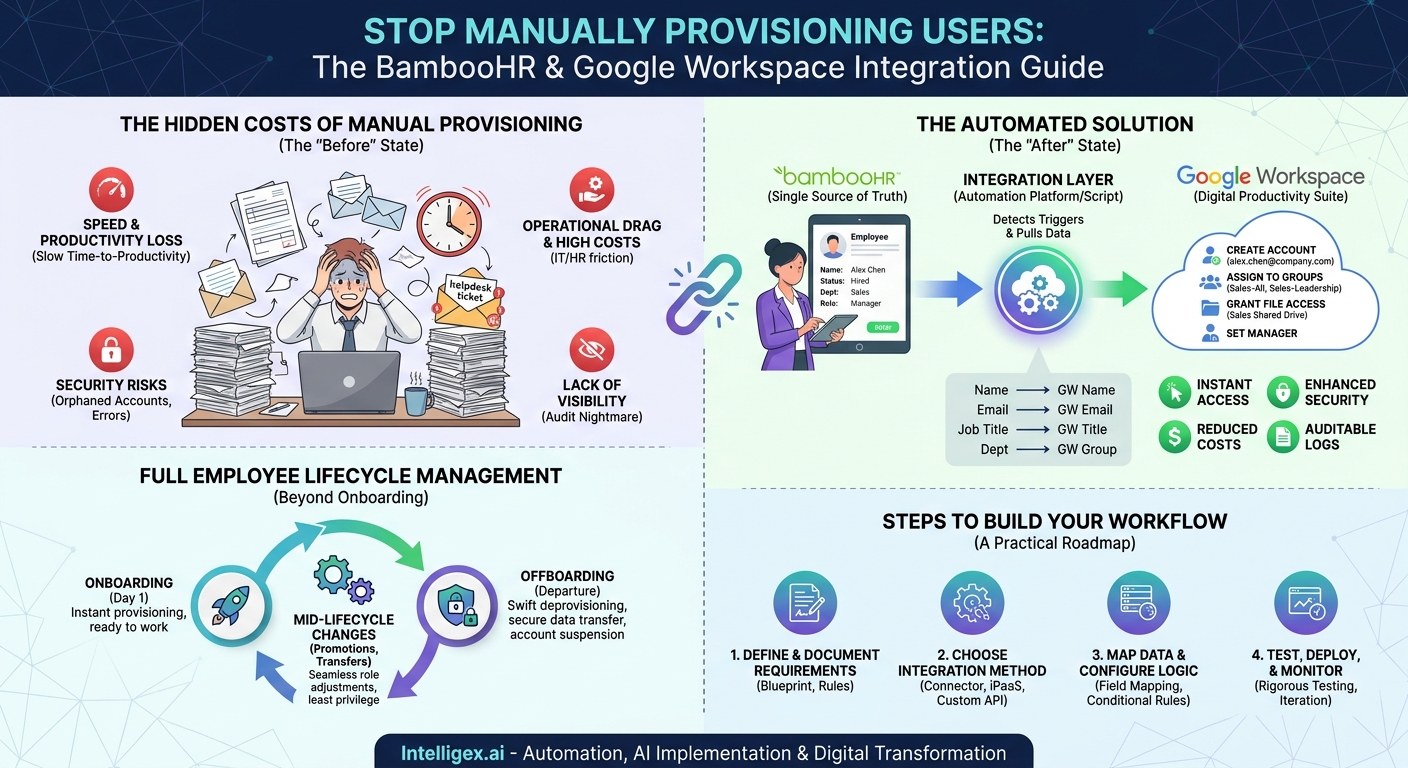
The Hidden Costs of Manual User Provisioning
On the surface, creating a new user account seems simple. But the reality for most organizations is a tangled web of emails, spreadsheets, and manual checklists. This manual approach carries significant and often overlooked costs that extend far beyond the time it takes an IT administrator to click a few buttons.
Speed and Productivity Loss: Every hour a new hire waits for their email address or access to a critical shared drive is an hour of lost productivity. This delay has a ripple effect. Their manager can’t assign tasks, team members can’t collaborate with them, and the new employee feels disconnected. A key metric to consider is Time to Productivity, which measures how long it takes for a new team member to become a contributing part of the organization. Manual provisioning directly and negatively impacts this metric.
Operational Drag and High Costs: Manual processes are expensive. Consider the total time investment across departments. HR sends an email to IT. IT creates a ticket. A technician provisions the account. They then email the manager to ask which distribution lists and shared folders are needed. The manager replies. The technician updates the permissions. This back-and-forth for a single employee can consume hours of valuable time that could be spent on strategic initiatives. Multiply this by the number of people you hire, transfer, or offboard each year, and the cost becomes substantial.
Security and Compliance Risks: Human error is inevitable in repetitive manual tasks. An employee might be added to the wrong email group, gaining access to sensitive financial data. Worse, when an employee leaves, their account might not be properly deprovisioned. This oversight, known as an “orphaned account,” is a major security vulnerability. It leaves a door open for unauthorized access to company data long after the employee is gone. Automated deprovisioning, triggered directly by the HR system, closes this gap securely and instantly.
Lack of Visibility and Auditability: With a manual process, it’s difficult to answer a simple question: “Who has access to what?” Access rights are often managed in an ad-hoc manner, making security audits a nightmare. A well-designed automation creates a clear, auditable log of every action. You can see exactly when an account was created, what permissions were granted, and when it was suspended, all tied back to the authoritative record in your HR system.
How the BambooHR and Google Workspace Integration Works
The core principle behind this automation is establishing BambooHR as the Single Source of Truth (SSoT) for all employee identity information. Any change made in BambooHR, whether it’s a new hire, a promotion, or a termination, acts as a trigger for a corresponding action in Google Workspace. This creates a direct, cause-and-effect relationship between your HR records and your digital infrastructure.
The flow of information is straightforward:
- The Trigger Event: An authorized user in the HR department updates an employee’s record in BambooHR. The most common trigger is changing an employee’s status from “Hired” to “Active.” Other triggers can include changes to their job title, department, or manager.
- The Integration Layer: A piece of software, known as an integration platform or a custom script, constantly monitors BambooHR for these specific changes. When it detects a trigger event, it securely pulls the relevant employee data.
- The Action: The integration platform then uses the Google Workspace API (Application Programming Interface) to perform a series of pre-defined actions. For a new hire, this could include creating a user account, assigning a temporary password, and adding the user to specific Google Groups.
Key data fields are mapped from BambooHR to Google Workspace to ensure consistency and enable role-based logic. The mapping often looks like this:
- BambooHR First Name + Last Name → Google Workspace User’s Name
- BambooHR Work Email → Google Workspace Primary Email Address
- BambooHR Job Title → Google Workspace User’s Title
- BambooHR Department → Used to add user to a department-specific Google Group (e.g., `[email protected]`)
- BambooHR Manager → Used to set the user’s manager in the Google Workspace directory
By relying on the data already managed by HR, you ensure that the information used to build a user’s digital identity is accurate and up-to-date. This eliminates data entry errors and ensures that permissions are always aligned with an employee’s current role within the company.
Step-by-Step: Building Your Provisioning Workflow
Creating a robust and reliable provisioning workflow requires careful planning before you write a single line of code or configure any tool. A thoughtful approach ensures your automation meets the needs of every department and scales as your organization grows. Follow these steps to design and implement your integration.
-
Define and Document Your Requirements
Before automating anything, you must understand your current process and define your ideal future state. Get stakeholders from HR, IT, and a few key departments in a room (or a virtual meeting). Ask critical questions: What is our standard email address format? What baseline permissions should every employee receive? How do we handle access for different roles, like sales versus engineering? Document the answers to create a clear blueprint.
Your requirements document should include:
- Email alias convention (e.g., `[email protected]`).
- Default Google Groups for all new hires (e.g., `[email protected]`).
- Role-based rules for group membership (e.g., if Department is “Finance,” add to `[email protected]`).
- Rules for Shared Drive access based on department or job title.
- The process for handling exceptions or special access requests.
-
Choose Your Integration Method
You have several options for connecting the two systems. You can use a pre-built connector if one is available, leverage a third-party integration platform as a service (iPaaS) like Zapier or Workato, or develop a custom solution using the APIs provided by BambooHR and Google. The best choice depends on your team’s technical expertise, budget, and the complexity of your workflow. iPaaS tools are often the fastest way to get started and offer visual builders that make it easier to create and manage workflows without extensive coding knowledge.
-
Map Data Fields and Configure Logic
This is where you translate your requirements into a technical plan. Create a clear mapping of which fields in BambooHR will populate which fields and settings in Google Workspace. Then, build the conditional logic that drives your role-based permissions. For example:
IF Department in BambooHR is “Sales” AND Job Title contains “Manager,” THEN:
- Add user to Google Group: `[email protected]`
- Add user to Google Group: `[email protected]`
- Grant “Content manager” access to Shared Drive: “Sales & Marketing Collateral”
This granular control ensures that employees get precisely the access they need, based on the authoritative data in your HR system.
-
Test, Test, and Test Again
Never deploy an automation that manages user accounts without rigorous testing. Use a test organizational unit (OU) in Google Workspace and create dummy employee profiles in BambooHR. Run through every scenario you documented: a new hire in marketing, a promotion in engineering, a department transfer, and a termination. Verify that accounts are created correctly, permissions are assigned as expected, and deprovisioning actions execute flawlessly. Involve the stakeholders from your requirements phase to help validate the outcomes.
-
Deploy, Monitor, and Iterate
Once you are confident in your testing, you can deploy the automation. But the work doesn’t stop there. Monitor the execution logs, especially in the first few weeks, to catch any edge cases you may have missed. Set up alerts to notify your IT team of any failures in the workflow. As your organization evolves, your provisioning needs will change. Plan to review and update your automation rules quarterly or semi-annually to ensure they continue to meet the needs of the business.
Beyond Onboarding: Full Employee Lifecycle Management
A truly effective automation strategy doesn’t just handle new hires. It manages the entire employee lifecycle, from their first day to their last, including all the changes that happen in between. This is where the real value in terms of security and operational efficiency is unlocked.
Automated Deprovisioning: Your Security Safety Net
When an employee resigns or is terminated, a swift and thorough offboarding process is critical for security. Integrating BambooHR with Google Workspace allows you to automate this process with precision. When an employee’s status is updated to “Terminated” in BambooHR, a workflow can trigger a sequence of events.
A sample offboarding checklist could include:
- Immediate Action: Suspend the user’s Google Workspace account to instantly block all access to email, calendar, and Drive.
- Immediate Action: Sign the user out of all active sessions.
- Within 24 Hours: Initiate the transfer of their Google Drive ownership to their manager.
- Within 24 Hours: Set up an email forwarder or auto-responder according to company policy.
- After 30-90 Days: Delete the user account to free up the license and permanently remove the data, per your data retention policy.
This automation ensures that no step is forgotten, drastically reducing the risk of orphaned accounts and potential data breaches.
Handling Mid-Lifecycle Changes Seamlessly
Employees get promoted, change roles, and move between departments. Each of these events requires changes to their access rights. A manual process can be slow and prone to error, leaving employees without the access they need for their new role or, worse, with lingering access from their old one.
With an integrated system, a change in the “Department” field in BambooHR can automatically trigger the following:
- Remove the user from their old department’s Google Group (e.g., `[email protected]`).
- Add them to their new department’s Google Group (e.g., `[email protected]`).
- Adjust their Shared Drive permissions accordingly.
This ensures that permissions are always in sync with an employee’s current responsibilities, adhering to the security principle of least privilege.
Data Governance and Safe Implementation
Automating processes that handle sensitive employee data requires a strong focus on governance and security. While automation reduces manual errors, a poorly configured workflow can create systemic risks. Building a safe and compliant system requires a thoughtful approach from the start.
Embrace the Principle of Least Privilege: Your automation should be designed to grant only the minimum level of access required for an employee to perform their job. Avoid the temptation to assign broad, default permissions. Instead, use the rich data from BambooHR, such as department, location, and job title, to assign granular access rights. This minimizes the potential impact of a compromised account.
Secure Your Connections: The link between your HR system and your productivity suite is a critical piece of infrastructure. Ensure you are using secure methods for authentication, such as OAuth 2.0 or service accounts with tightly restricted permissions. API keys and other credentials should be stored in a secure vault, never hard-coded into scripts or configuration files. Regularly rotate these credentials to further enhance security.
Maintain a Human in the Loop (Where Necessary): For highly sensitive roles, such as finance executives or system administrators, consider implementing a “human in the loop” step. The automation can prepare the user account and permission changes but stage them for a final review and approval by an IT manager. This provides a crucial layer of oversight for high-stakes provisioning actions. Furthermore, all automated actions should be logged in an immutable format, creating a clear audit trail that can be reviewed by security and compliance teams.
Respect Data Privacy: Be mindful of the data you are syncing between systems. Only transfer the Personally Identifiable Information (PII) that is absolutely necessary for the provisioning process to function. Avoid syncing sensitive data like home addresses or social security numbers unless there is a clear and compelling business need.
Your Next Steps to Automated Provisioning
Moving from a manual, reactive process to an automated, proactive one is a journey. But by taking deliberate, incremental steps, you can achieve a significant return on your investment in speed, security, and efficiency. Here is a practical action plan to get you started.
- Audit Your Current Process: The first step is to understand what you do today. Document every task, email, and approval involved in your onboarding, offboarding, and role change processes. Identify the biggest bottlenecks and points of failure. This audit will form the business case for your automation project.
- Define Your Ideal State: Based on your audit, map out the perfect workflow. What should happen, in what order, when a new employee is hired? Who needs to be notified? Use this as your blueprint for the automation logic you will build.
- Start Small and Prove Value: Don’t try to automate everything at once. Pick a single, high-impact piece of the puzzle to start with. A great first project is automatically creating the Google Workspace user and adding them to the “All Staff” email group. This is a quick win that demonstrates the value of the integration and builds momentum for more complex workflows.
- Engage Your Stakeholders: This is not just an IT project. It’s a business process transformation. Involve HR, department heads, and compliance teams from the beginning. Their input is crucial for designing a system that works for everyone, and their buy-in is essential for a successful rollout.
By connecting your core business systems, you are building a more agile, secure, and efficient organization. The result is a better experience for your employees, a lighter load for your administrative teams, and a stronger foundation for future growth.
Your Next Read:
Get a FREE
Proof of Concept
& Consultation
No Cost, No Commitment!
