

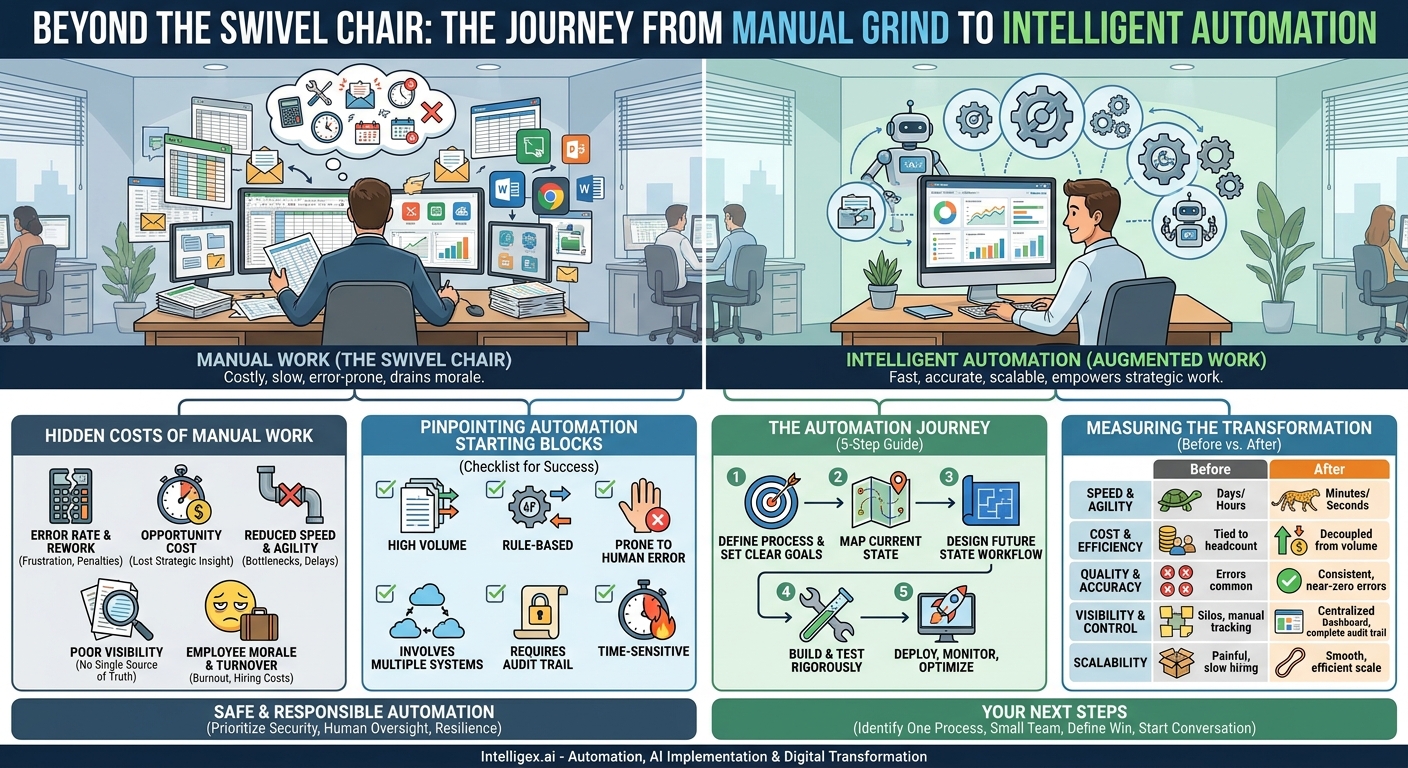
In countless offices, a familiar ritual unfolds every day. An employee opens a spreadsheet, then an email, then a separate software application. They meticulously copy a value from one window and paste it into another, repeating the process dozens, or even hundreds, of times. This “swivel chair integration” is the silent, grinding engine of many business operations. It feels productive, but it’s a costly illusion. Manual processes are not just slow; they are a hidden drain on your resources, a cap on your growth, and a source of unmanaged risk.
Moving from manual effort to intelligent automation is not about replacing people. It is about augmenting them. It’s about redirecting human ingenuity away from repetitive, low-value tasks and toward the strategic work that drives innovation and customer value. This transition transforms how work gets done, creating a clear “before and after” picture in every key area of the business, from operational speed to financial performance.
The True Cost of “Doing it by Hand”
When we think about the cost of a manual process, we often stop at the most obvious expense: the employee’s salary for the time spent on the task. This calculation, however, barely scratches the surface. The real costs are far greater and more insidious, affecting your bottom line, your team’s morale, and your ability to compete.
Consider the full spectrum of hidden costs:
- Error Rate and Rework: Humans make mistakes, especially when performing repetitive tasks. A single misplaced decimal in a financial report or a typo in a customer order can trigger a cascade of expensive rework. Correcting these errors consumes more time, frustrates customers, and can even lead to financial penalties or compliance issues.
- Opportunity Cost: Every hour a skilled analyst spends manually compiling data for a report is an hour they are not spending on analyzing trends, identifying opportunities, or developing business strategy. The true cost isn’t just their wage for that hour; it’s the value of the strategic insight you lost.
- Reduced Speed and Agility: Manual processes create bottlenecks. A sales quote that takes two days to approve, an invoice that waits a week for processing, or a new employee who waits days for system access all represent delays that slow down the entire business. In a fast-moving market, this lack of agility means missed opportunities and a competitive disadvantage.
- Poor Visibility: When processes rely on emails, spreadsheets, and sticky notes, there is no single source of truth. It becomes nearly impossible for a manager to know the real-time status of a task. This leads to time wasted chasing updates and making decisions based on outdated or incomplete information.
- Employee Morale and Turnover: Highly skilled professionals did not join your company to be data entry clerks. Forcing them to perform tedious, mind-numbing work is a direct path to disengagement, burnout, and eventual turnover. The cost of recruiting, hiring, and training their replacement is significant.
A classic example is manual accounts payable processing. An invoice arrives via email, is printed, hand-keyed into an accounting system, physically routed for approval, and finally scheduled for payment. This chain is slow, prone to data entry errors, and makes it difficult to track payment status, often resulting in late fees or strained vendor relationships. The cost is not just the clerk’s time, but the late fees, the manager’s time chasing approvals, and the lack of cash flow visibility for the CFO.
Pinpointing Your Automation Starting Blocks
The thought of automating business processes can feel overwhelming. The key is to start small, target the right opportunities, and build momentum with early wins. Not every process is a good candidate for automation. The best starting points are typically tasks that are highly structured, repetitive, and rule-based. These are the processes that cause the most friction with the least strategic value.
Use this checklist to identify strong candidates for your first automation project:
- High Volume: Does this task happen many times per day or per week? Automating a task that occurs 100 times a day delivers a much higher return than one that happens twice a month.
- Rule-Based: Does the task follow a clear set of “if-then” rules? For example, “If the invoice amount is under $5,000 and the purchase order matches, then approve it.” Processes requiring subjective judgment, creativity, or complex negotiation are poor initial candidates.
- Prone to Human Error: Are mistakes common in this process? Tasks involving data transfer, calculations, or detailed formatting are prime examples where machines outperform humans in consistency and accuracy.
- Involves Multiple Systems: Does an employee need to log in to two, three, or more different applications to complete the task? Automation is exceptionally good at bridging these system gaps.
- Requires an Audit Trail: Is it critical to have a perfect, unchangeable record of every action taken? Automated systems can log every step, providing a robust and reliable audit trail for compliance and security.
- Time-Sensitive: Does the value of the task decrease significantly with time? Examples include responding to new sales leads, processing customer support tickets, or flagging potentially fraudulent transactions.
You can find these processes in every department. In HR, it might be screening resumes for basic qualifications or managing the paperwork for new hire onboarding. In Marketing, it’s often the task of cleaning and uploading lead lists into the CRM. For IT, it’s the repetitive process of provisioning or de-provisioning user accounts. By focusing on these friction points first, you can deliver tangible value quickly and build a strong business case for further investment.
The Automation Journey: A Step-by-Step Guide
Implementing your first automation project is a structured process. Rushing into development without proper planning is a common pitfall that leads to solutions that don’t solve the right problem or are difficult to maintain. By following a methodical approach, you can ensure your project is aligned with business goals and delivers a measurable return on investment.
Here is a five-step framework for a successful automation implementation:
- Define the Process and Set Clear Goals: The first step is to be crystal clear about what you are automating and why. Document the business problem you are trying to solve. Is it to reduce the time it takes to close the books? To improve the accuracy of customer data? To accelerate the sales quoting process? Define a specific, measurable success metric. For example, “Reduce the average invoice processing time from 5 days to less than 24 hours” is a much better goal than “make accounting more efficient.”
- Map the Current State: You cannot automate a process you do not fully understand. Work with the people who perform the task today to map out every single step, decision point, and exception. Use flowcharts or simple documents to visualize the workflow. What triggers the process? What data is used? What systems are involved? What happens when something goes wrong? This detailed map will become the blueprint for your automated solution and often reveals hidden inefficiencies that can be fixed even before automation begins.
- Design the Future State Workflow: With a clear understanding of the current process, you can now design the new, automated workflow. This involves selecting the right tools for the job. The solution could be an API integration between two cloud applications using a platform like Zapier, a Robotic Process Automation (RPA) bot to mimic human actions on a legacy system, or a simple script. The design should focus on efficiency, reliability, and maintainability. Crucially, define the role of the human. The goal is often to have the automation handle 80% of cases, flagging the complex 20% for human review.
- Build and Test Rigorously: This is the development phase where the automated solution is built according to the design. It is critical to build in a separate, non-production environment to avoid disrupting live operations. Testing should be comprehensive. Test for the “happy path” where everything works perfectly, but more importantly, test for exceptions. What happens if the input data is missing? What if a system is temporarily offline? A robust automation must be able to handle errors gracefully, either by retrying, pausing, or alerting a human operator.
- Deploy, Monitor, and Optimize: Once the solution has been thoroughly tested, it can be deployed into the live environment. The journey doesn’t end here. Monitor the automation’s performance against the goals you set in Step 1. Track metrics like processing volume, speed, and error rates. Gather feedback from the team that uses the new process. Automation is not a one-time fix; it’s an ongoing process of optimization. Use the performance data to identify further improvements and refine the workflow over time.
Measuring the Transformation: From Effort to Impact
The true success of an automation initiative is measured by its business impact. Moving from a manual “before” to an automated “after” produces dramatic, quantifiable improvements across five key pillars of business value. Tracking these metrics is essential for demonstrating ROI and building the case for scaling your efforts.
Speed and Agility
Before: Processes are measured in days or hours. A customer order might take 48 hours to be entered into the system. Financial reports are available only a week after the month ends.
After: Process cycle times are measured in minutes or seconds. The same customer order is processed in under a minute. Financial dashboards update in near real-time, enabling faster, more informed decisions.
What to measure: Average process cycle time, order-to-cash duration, lead response time.
Cost and Efficiency
Before: Costs are tied directly to headcount and labor hours. To process twice the number of invoices, you need to hire twice the number of clerks. Work is often duplicated across departments.
After: Costs are de-coupled from volume. An automated system can handle a 10x spike in transactions with minimal to no increase in operational cost. Employees are freed from repetitive tasks, allowing them to focus on higher-value activities.
What to measure: Cost per transaction (e.g., cost per invoice processed), employee hours reclaimed per week, operational overhead reduction.
Quality and Accuracy
Before: Manual data entry and copy-paste operations are major sources of errors. This leads to incorrect reports, billing mistakes, and shipping the wrong products. The quality of work can be inconsistent from person to person.
After: Automation eliminates data entry errors by integrating systems directly. Rules are applied consistently every single time, ensuring a dramatic increase in data quality and process reliability. The error rate approaches zero.
What to measure: Data error rate (%), number of rework tickets, customer complaint frequency related to data accuracy.
Visibility and Control
Before: Getting the status of a process requires sending an email or making a phone call. Audit trails are a patchwork of email chains and spreadsheet notes, making compliance checks a nightmare.
After: Centralized dashboards provide real-time visibility into every step of the process. Every action taken by the automation is logged automatically, creating a complete, searchable audit trail that simplifies compliance and troubleshooting.
What to measure: Time to generate status reports, audit preparation time, compliance adherence rate.
Scalability
Before: Growth is painful. A successful marketing campaign that doubles your sales leads can overwhelm your manual sales operations process, leading to lost opportunities. Scaling requires a slow and expensive hiring process.
After: Growth is an opportunity, not a crisis. The automated system can easily handle surges in demand without a drop in performance or quality, allowing your business to scale smoothly and efficiently.
What to measure: Maximum transaction throughput, system performance under peak load, time to onboard new business units.
A Note on Safe and Responsible Automation
As you introduce automation and AI into your business processes, especially those involving sensitive information, it is crucial to build on a foundation of trust and security. Rushing implementation without considering governance can expose your organization to unnecessary risks. A responsible approach is not a barrier to progress; it is an enabler of sustainable, long-term success.
Focus on three core principles for safe implementation:
1. Prioritize Data Privacy and Security. Automation often requires access to different systems and data sets, including customer information, financial records, and employee data. Ensure that any automated solution adheres to strict access control protocols. Use the principle of least privilege, granting the automation only the minimum permissions it needs to perform its task. When dealing with personally identifiable information (PII), confirm that your processes remain compliant with regulations like GDPR or CCPA.
2. Maintain Human Oversight. Automation is not about ceding all control to machines. For critical processes, especially those with financial or legal implications, implement a “human-in-the-loop” design. This means the automation handles the routine processing but flags exceptions, high-value transactions, or ambiguous cases for a human expert to review and approve. This blended approach combines the speed and consistency of machines with the judgment and ethical reasoning of people.
3. Build for Resilience and Transparency. An automation is a business-critical asset, and it should be treated as such. Ensure you have clear documentation for how it works. Implement robust logging and monitoring so you can quickly diagnose and fix issues when they arise. Plan for failure scenarios. What happens if a connected application’s API changes or an external service goes down? A resilient automation should be able to handle these events gracefully without causing a major disruption to the business.
Your Next Steps Toward Automation
Understanding the vast difference between manual and automated processes is the first step. The next is to take targeted action. You do not need a massive, company-wide initiative to get started. The most successful transformations begin with a single, well-chosen project that solves a real pain point and demonstrates clear value.
Here’s a simple action plan to begin your journey:
- Identify One High-Impact Process: Using the criteria from the “Pinpointing Your Automation Starting Blocks” section, identify one process in your department that is repetitive, time-consuming, and a constant source of frustration. Choose a process where the “before and after” impact will be obvious to everyone.
- Assemble a Small, Focused Team: You don’t need a large committee. Bring together one person who knows the process inside and out (the subject matter expert) and one person with the technical skills to map out a solution. Their mission is to scope out a small pilot project.
- Define the “Win”: Work with the team to define what a successful pilot looks like. Set a single, clear metric, such as “Reduce the time to generate the weekly sales report from four hours to five minutes.”
- Start the Conversation: Share this goal with your leadership. Frame it not as a request for a major technology investment, but as a small experiment designed to prove a new way of working. The data from a successful pilot will be your most powerful tool for securing the resources to scale your efforts.
The transition from manual to automated is a journey, not a single event. But by starting today with one small, strategic step, you can begin to unlock the speed, quality, and scalability that will define the future of your business.
Your Next Read:
Category:
Get a FREE
Proof of Concept
& Consultation
No Cost, No Commitment!
