

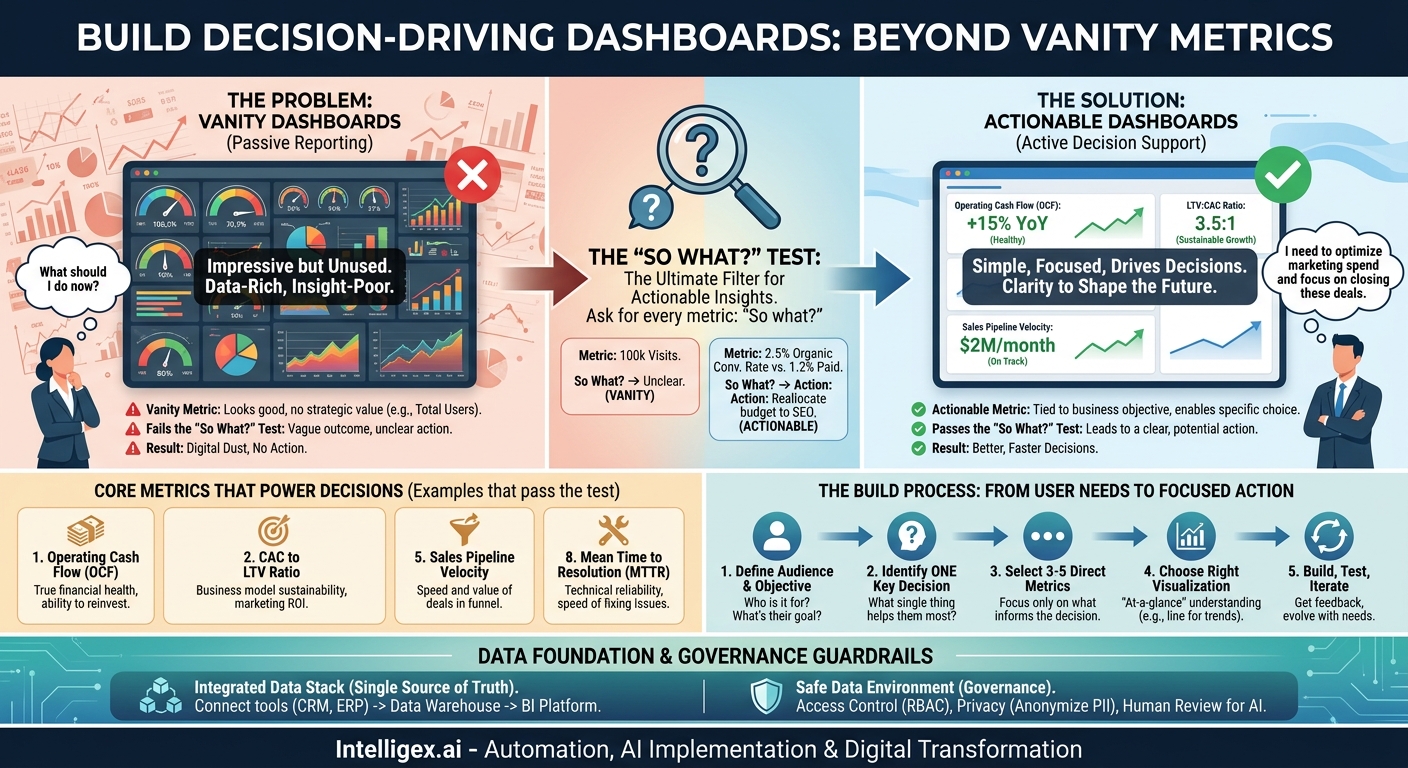
A great dashboard is not a work of art. It’s a tool. Too often, companies invest in beautiful, complex dashboards that display dozens of metrics in a dazzling array of colors. They look impressive on a conference room screen, but they sit unused, gathering digital dust. Why? Because they are data-rich but insight-poor. They present numbers without context, failing to answer the one question that matters to any business leader: “What should I do now?”
The most effective dashboards are simple, focused, and built around the specific decisions people need to make. They trade vanity metrics, like total site visits or social media followers, for operational metrics that directly impact speed, cost, and quality. They don’t just report the past; they provide the clarity needed to shape the future. This shift from passive data reporting to active decision support is the core of a successful digital transformation. It’s about building tools that drive action, not just admiration.
Moving Beyond Vanity Metrics: The “So What?” Test
The first step in creating a useful dashboard is learning to distinguish between a vanity metric and an actionable metric. A vanity metric is a number that looks good on paper but doesn’t help you understand business performance or make strategic choices. A classic example is “total registered users.” It’s a big, satisfying number that always goes up, but it tells you nothing about user engagement, satisfaction, or the health of your business model.
An actionable metric, in contrast, is tied directly to a business objective and helps you make a specific decision. Instead of total users, an actionable metric might be “percentage of users active in the last 30 days” or “new user to paid subscriber conversion rate.” These numbers provide real feedback on your product and marketing efforts.
To separate the two, apply the “So What?” test to every metric on your dashboard. Look at a number and ask yourself, “So what?” If the answer is vague or doesn’t lead to a potential action, it’s likely a vanity metric. Let’s see it in practice.
- Metric: We got 100,000 website visits last month. So what?
- Problem: The “so what” is unclear. Is that good or bad? Where did they come from? Did they do anything? This number alone doesn’t suggest an action.
- Better Metric: Conversion rate from organic search traffic was 2.5%, while conversion rate from paid ads was 1.2%. So what?
- Action: The organic traffic is more effective. We should analyze our SEO strategy to see what’s working and consider reallocating some of our paid ad budget to content marketing or SEO improvements.
This simple test ruthlessly cuts through the noise. It forces you to justify every pixel on your dashboard, ensuring that each chart and number serves a distinct purpose: to help a human make a better, faster decision.
Eight Core Metrics That Power Decisions
While the perfect dashboard is unique to its user and their goals, certain metrics consistently provide high-value insights across different business functions. They connect daily activities to strategic outcomes, giving teams a clear view of their impact. Here are eight examples that pass the “So What?” test with flying colors.
1. Operating Cash Flow (OCF)
For: Finance, Executive Leadership
Revenue is an indicator of demand, but cash flow is the lifeblood of the business. OCF measures the cash generated by regular business operations. Unlike net income, it is not affected by non-cash accounting expenses like depreciation. A positive and growing OCF shows a company can pay its bills, reinvest in the business, and weather economic downturns without relying on outside financing. A dashboard showing a revenue trend line next to an OCF trend line provides a powerful, immediate view of the company’s true financial health.
2. Customer Acquisition Cost (CAC) to Lifetime Value (LTV) Ratio
For: Marketing, Sales, Strategy
This ratio is the ultimate measure of the sustainability of a business model. It answers a simple question: Are we spending more to acquire customers than they are worth to us over time? A healthy LTV:CAC ratio (often cited as 3:1 or higher) indicates that your sales and marketing efforts are generating a positive return on investment. Displaying this ratio on a dashboard allows leaders to make informed decisions about marketing budgets, pricing strategies, and customer retention initiatives.
3. Order-to-Cash (O2C) Cycle Time
For: Operations, Supply Chain, Finance
This metric measures the number of days it takes from the moment a customer places an order to the moment the company receives payment. A long O2C cycle ties up working capital and can signal inefficiencies in inventory management, order fulfillment, invoicing, or collections. Tracking this metric on a dashboard, perhaps broken down by product line or region, helps operations teams pinpoint and resolve bottlenecks, directly improving cash flow and customer satisfaction.
4. First Contact Resolution (FCR)
For: Customer Support, Operations
When a customer has a problem, they want it solved quickly and on the first try. FCR measures the percentage of customer issues that are resolved during the initial interaction, without needing a callback or follow-up. A high FCR is a strong indicator of both customer satisfaction and operational efficiency. It means your support agents are well-trained and empowered, and your processes are effective. Dashboards that track FCR alongside ticket volume and customer satisfaction scores give support managers a complete view of their team’s performance.
5. Sales Pipeline Velocity
For: Sales
Sales pipeline velocity measures how quickly deals are moving through your sales funnel and how much value they represent. The formula is typically: (Number of Opportunities x Average Deal Size x Win Rate) / Length of Sales Cycle. A higher velocity means more revenue, faster. A dashboard that visualizes this metric can alert sales leaders to slowdowns in the sales cycle or issues with lead quality, allowing them to intervene with coaching or process adjustments before a quarter is missed.
6. MQL to SQL Conversion Rate
For: Marketing, Sales
This metric is a critical health indicator for sales and marketing alignment. It measures the percentage of Marketing Qualified Leads (leads that marketing deems ready for sales) that the sales team accepts as Sales Qualified Leads (leads they are actively working). A low conversion rate is a red flag. It suggests marketing is sending over poor-quality leads, or sales isn’t following up effectively. Tracking this on a shared dashboard forces both teams to have a conversation about lead definition and handoff processes, eliminating finger-pointing and improving overall revenue generation.
7. Employee Attrition Rate (by department)
For: Human Resources, Executive Leadership
Employee attrition, or turnover, is a powerful indicator of organizational health. High attrition is costly, both in terms of recruitment expenses and lost productivity. More importantly, it can signal problems with management, compensation, or company culture. A dashboard that displays attrition rate, especially when segmented by department, manager, or tenure, gives HR and leadership teams the data they need to identify problem areas and take proactive steps to improve employee retention.
8. Mean Time to Resolution (MTTR)
For: IT, Engineering
When a critical system goes down, every second counts. MTTR measures the average time it takes to resolve an issue, from the moment it’s reported until it’s fixed. This is a key metric for any IT or DevOps team responsible for maintaining business-critical applications or infrastructure. A low MTTR demonstrates a team’s ability to react quickly and effectively, minimizing disruption to customers and internal users. Dashboards tracking MTTR, along with system uptime and the number of critical incidents, are essential for managing technical reliability and scalability.
How to Build a Dashboard That Actually Gets Used
A successful dashboard is born from a clear understanding of its user’s needs, not from the technical capabilities of a business intelligence tool. The goal is to deliver the right information, in the right context, to support a specific decision. This requires a user-centric approach, not a data-centric one. Follow this process to avoid building a dashboard that no one looks at.
- Define the Audience and Their Primary Objective. Before you connect to a single data source, answer these questions: Who is this for? Is it a sales manager, a financial analyst, or a CEO? What is the most important part of their job? A sales manager’s primary objective is to hit the team’s quarterly quota. A supply chain analyst’s objective is to maintain inventory levels without overstocking. Be specific.
- Identify the One Key Decision. Ask your user, “If you could only know one thing to do your job better, what would it be?” This question helps you zero in on their most critical decision point. For the sales manager, it might be, “Which deals are at risk of not closing this month?” For the supply chain analyst, “Which products are at risk of a stockout in the next 7 days?” The dashboard should be designed to answer this single, powerful question at a glance.
- Select 3 to 5 Metrics That Directly Inform That Decision. Resist the urge to add more. Every metric you add dilutes the focus of the others. For the sales manager, the key metrics might be Pipeline Velocity, Win Rate by Rep, and Deals with No Activity in 14 Days. Each of these directly helps identify at-risk deals. Anything else is noise.
- Choose the Right Visualization. The way you display data is as important as the data itself. Don’t use a pie chart to show a trend over time. Use a line chart. Don’t use a table with 50 rows to show a comparison. Use a simple bar chart. The goal is “at-a-glance” understanding. If a user has to study a chart for more than five seconds to understand it, the visualization has failed.
- Build, Test, and Iterate. Build a simple prototype and put it in front of the intended user. Watch them use it. Ask them, “Based on this, what would you do next?” Their answer (or lack thereof) is the ultimate test. Listen to their feedback, make adjustments, and repeat the process. A great dashboard is never truly “finished.” It evolves as business priorities and user needs change.
Connecting the Dots: From Raw Data to Actionable Insights
Actionable dashboards are powered by clean, reliable, and integrated data. A metric like “Order-to-Cash Cycle Time” requires pulling information from multiple systems: your CRM (like Salesforce) for the order date, your ERP for the shipping date, and your accounting system for the payment date. Without a solid data foundation, your dashboard will be, at best, inaccurate and, at worst, dangerously misleading.
This is where a modern data stack comes in. Tools for data integration (like Fivetran or MuleSoft) pull data from various sources into a central repository, often a cloud data warehouse like Snowflake or Amazon Redshift. From there, business intelligence (BI) platforms like Microsoft Power BI or Tableau can be used to model, analyze, and visualize the data.
The business value of this integration is immense. It provides a single source of truth, eliminating the wasted time and endless arguments that come from different departments using different data and different spreadsheets. It creates visibility across the entire organization, allowing a sales leader to see how a marketing campaign is impacting lead quality or an operations manager to understand how supply chain delays are affecting sales. This cross-functional visibility accelerates decision-making and breaks down the silos that hinder growth and efficiency.
The Governance Guardrail: Using Data and AI Safely
As dashboards become more powerful and incorporate sensitive information or even AI-driven predictions, governance becomes critical. Making data widely accessible is a key goal, but it must be done responsibly to protect privacy, ensure security, and maintain trust in the data. A lack of governance can lead to data breaches, compliance failures, or bad decisions based on flawed or misinterpreted information.
Implementing a safe data environment isn’t about locking everything down. It’s about providing the right people with the right level of access to the right data. For example, an HR dashboard showing employee attrition rates should be accessible to senior leadership, but the underlying data with individual employee names must be restricted to a very small, authorized group within HR. This is often managed through Role-Based Access Control (RBAC), where permissions are tied to an individual’s job function.
When incorporating predictive analytics or AI, the need for human oversight is even greater. An AI model might flag a sales deal as “at risk,” but a human sales manager must still review the context, talk to the sales rep, and make the final call. The dashboard is a tool to augment human intelligence, not replace it.
Before you launch any new company-wide dashboard, run through this simple governance checklist:
- Access Control: Is access to the dashboard and its underlying data strictly limited to those who have a business need?
- Data Privacy: Is personally identifiable information (PII) or other sensitive data masked, anonymized, or aggregated where appropriate?
- Data Provenance: Are the data sources clearly documented and trusted? Can a user understand where a metric is coming from?
- Human Review: Is there a clear process for a user to question a metric or verify an AI-driven insight?
By building these guardrails, you create a trusted environment where people feel confident using data to make important decisions.
Your Next Steps: From Data Overload to Focused Action
Transforming your organization’s use of data doesn’t happen overnight, and it doesn’t require a massive, multi-year project. It starts with a simple shift in mindset: from displaying data to driving decisions. The most powerful dashboards are often the simplest, focusing on a handful of metrics that directly answer a critical business question. They are tools, not trophies.
Ready to move from passive reporting to active decision support? Here is a simple plan to get started:
- Audit one of your existing dashboards. Pick one dashboard that is widely used (or supposed to be). For every single chart and number, apply the “So What?” test. If you can’t articulate a clear action that could be taken based on that metric, mark it for removal.
- Interview one stakeholder. Schedule 30 minutes with a key decision-maker in your organization, for example, a marketing lead or an operations manager. Don’t ask them what they want on a dashboard. Instead, ask them about their biggest challenge and the single most important decision they have to make each week.
- Sketch a “one-decision” dashboard. Based on that conversation, grab a pen and paper (or a simple design tool) and sketch a dashboard with just 3 to 5 metrics that would help them make that one decision. Show it to them and ask for feedback. This simple exercise will do more to build an effective dashboard than weeks spent exploring data on your own.
By taking these small, practical steps, you can begin to build a culture where data is not just seen, but used. A culture where every dashboard is a clear, compelling call to action.
Your Next Read:
Category:
Get a FREE
Proof of Concept
& Consultation
No Cost, No Commitment!
