

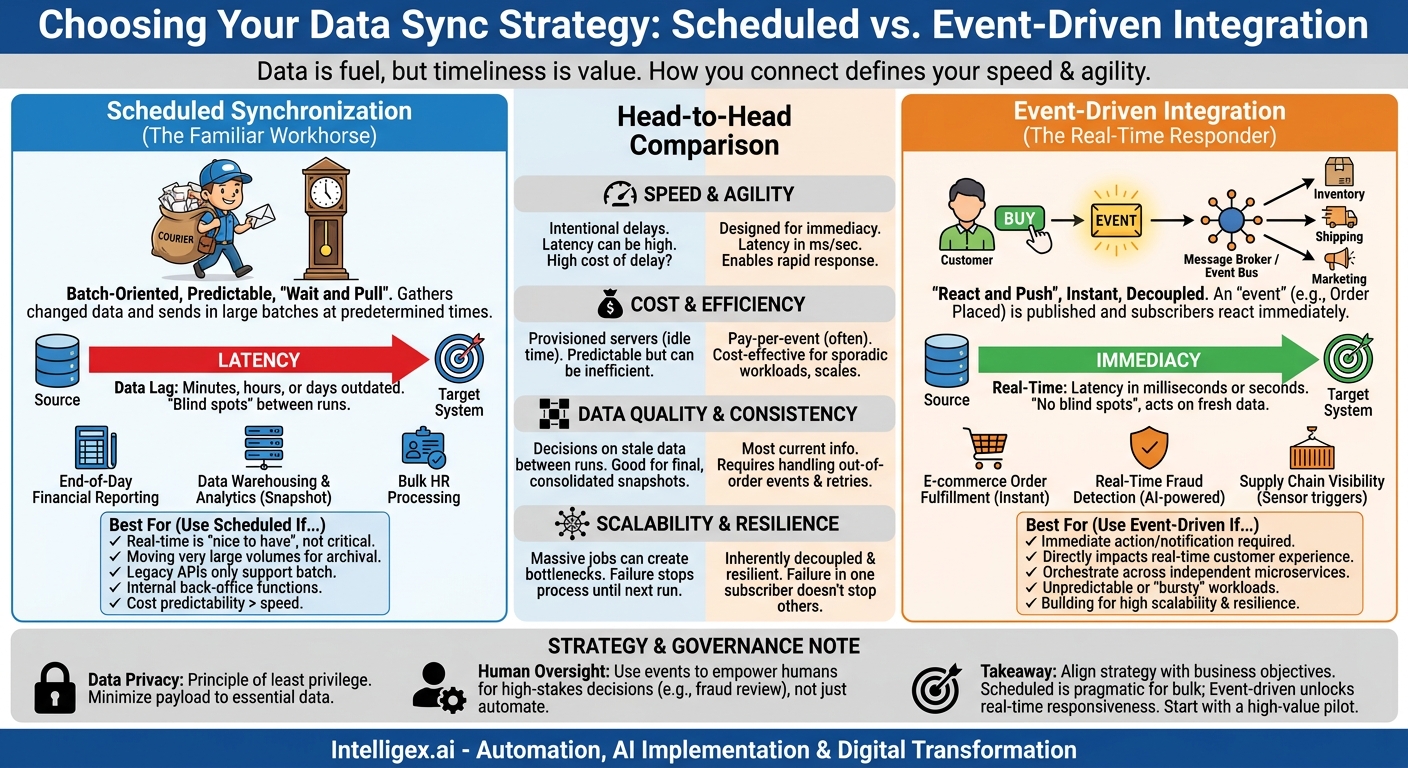
In today’s digital landscape, data is the fuel for every business decision, customer interaction, and operational process. But having data isn’t enough. Its value depends on its timeliness. An inventory count that’s 24 hours old can lead to a stockout. A customer support agent looking at an outdated order status creates frustration. The core challenge isn’t just about connecting systems; it’s about connecting them in a way that reflects the speed of your business. How you synchronize information between applications like your CRM, ERP, and marketing platforms directly impacts your efficiency, customer satisfaction, and bottom line.
Two dominant approaches exist for this critical task: the traditional scheduled, or batch, synchronization and the modern, real-time event-driven architecture. Choosing the right one isn’t just a technical decision. It’s a strategic one that defines how agile, responsive, and scalable your operations can be. Understanding the practical differences, business implications, and ideal use cases for each is the first step toward building a truly connected and intelligent enterprise.
What is Scheduled Synchronization? The Familiar Workhorse
Scheduled synchronization is the most common and easily understood method of data integration. It works like a recurring calendar appointment. At a predetermined time, whether it’s every five minutes, every hour, or once a day at midnight, a process wakes up, gathers all the data that has changed since the last run, and sends it in a single, large batch to the destination system. Think of it as the digital equivalent of a mail courier who picks up and delivers all the day’s letters at 5:00 PM sharp.
This batch-oriented approach has been the backbone of enterprise IT for decades because it is straightforward, predictable, and relatively simple to implement. It excels at moving large volumes of data in a controlled manner, making it a reliable choice for many back-office functions.
When Scheduled Sync Makes Business Sense
While often seen as the “legacy” option, scheduled sync remains the right tool for many jobs. Its strength lies in processes where immediacy is not a primary business driver.
- End-of-Day Financial Reporting: A finance team doesn’t need every single transaction to be reflected in their general ledger in real time. A daily batch job that reconciles all sales from a platform like Salesforce with the accounting system is perfectly sufficient and ensures a clean, consolidated update.
- Data Warehousing and Analytics: When loading data into a warehouse for business intelligence, you typically want a complete, consistent snapshot of the day’s activity. Running a large extract, transform, and load (ETL) job overnight prepares the data for analysts the next morning without disrupting operational systems during business hours.
- Bulk HR Payroll Processing: Employee timesheet data doesn’t need to flow to the payroll system with every clock-in and clock-out. A weekly or bi-weekly batch process that gathers all hours worked is the most efficient way to manage payroll calculations.
The Downsides: Where Latency Creates Problems
The primary drawback of scheduled sync is data latency. The information in your target system is only as fresh as the last batch run. If your sync happens daily, your data could be up to 24 hours out of date. This “data lag” can have significant business consequences:
- Poor Customer Experience: A customer places an order online and immediately calls support with a question. If the order data hasn’t been synced from the e-commerce platform to the CRM yet, the support agent has no record of the purchase.
- Operational Inefficiency: A warehouse team packs an order based on an inventory list that was updated an hour ago. In that time, another online order claimed the last unit of a popular item, leading to a stockout and a backorder situation.
- Wasted Resources: Scheduled jobs often run and process large files even if only a few records have changed, consuming unnecessary computing power and network bandwidth.
Understanding Event-Driven Architecture: The Real-Time Responder
Event-driven architecture (EDA) represents a fundamental shift from the “wait and pull” model of scheduled syncs to a “react and push” model. Instead of asking a system “what’s new?” at a set time, an event-driven system announces “something just happened!” the moment it occurs. An “event” is a small, lightweight notification that represents a significant change in state. For example, an event could be an “Order Placed,” a “Customer Address Updated,” or an “Inventory Level Low” signal.
These events are published to a central message broker or event bus, which acts like a digital post office. Other systems, known as subscribers or consumers, listen for specific events they care about and react accordingly, all in near real-time. This decouples systems from one another; the e-commerce platform doesn’t need to know anything about the shipping system, it just needs to announce that an order was placed. The shipping system, in turn, knows to listen for that announcement.
Real-World Scenarios Powered by Events
EDA is the engine behind most modern digital experiences that require speed and responsiveness.
- E-commerce Order Fulfillment: When a customer clicks “buy,” an “OrderCreated” event is published. Instantly, the inventory system can subscribe to this event to decrement stock, the shipping department can create a fulfillment request, and the marketing system can remove that customer from a “cart abandonment” email sequence.
- Real-Time Fraud Detection: A “PaymentAttempted” event can be sent to an AI-powered fraud detection model. The model analyzes the event data (amount, location, time) in milliseconds and can publish a “FraudRiskHigh” event to block the transaction before it’s even completed.
- Supply Chain Visibility: A sensor on a shipping container can publish a “ContainerArrivedAtPort” event. This event can automatically trigger customs paperwork processing, notify the logistics team to schedule ground transport, and update the customer’s tracking portal.
Head-to-Head Comparison: Choosing Your Integration Pattern
Selecting the right approach requires evaluating your specific business needs against four key pillars: speed, cost, data quality, and scalability.
Speed and Agility
This is the most obvious difference. Scheduled sync introduces intentional delays, with latency measured in minutes, hours, or even days. Event-driven architecture is designed for immediacy, with latency measured in milliseconds or seconds. The business question is: what is the cost of delay? For a weekly analytics report, the cost is zero. For an out-of-stock notification on a popular product, the cost could be thousands in lost sales and customer trust.
Cost and Efficiency
The cost models are very different. Scheduled jobs often run on provisioned servers that are idle between runs, leading to predictable but potentially inefficient spending. You pay for the capacity whether you use it or not. Event-driven systems, especially when built on cloud services like AWS EventBridge, often follow a pay-per-event model. This can be extremely cost-effective for sporadic workloads, as you only pay for compute resources when an event is actually being processed. However, for extremely high-volume, constant data streams, a well-optimized batch process might be more economical.
Data Quality and Consistency
Scheduled syncs create “blind spots” between runs where decisions are made on stale data. An event-driven approach ensures that all downstream systems are working with the most current information possible, drastically improving data integrity across your organization. However, EDA introduces new complexities, such as handling out-of-order events or ensuring a failed process can be retried without creating duplicate data. Proper design is crucial.
Scalability and Resilience
Batch processes can create performance bottlenecks. A massive, end-of-day job can slow down an operational database for all other users. Event-driven systems are inherently decoupled and more resilient. The failure of one subscriber (like the marketing system) doesn’t stop other subscribers (like the shipping system) from processing an order event. This decoupling also makes it easier to add new functionality. To add a new service, you simply have it subscribe to an existing event stream; you don’t have to modify the source application.
A Practical Guide: When to Use Each Approach
Making the right choice starts with asking the right questions about the business process you are trying to automate or improve. Your decision should be guided by business value, not technology for technology’s sake.
Checklist: Use Scheduled Sync If…
- Real-time data is a “nice to have,” not a critical business requirement.
- You are moving very large volumes of data for archival or reporting purposes.
- Your source or destination systems have legacy APIs that only support batch exports.
- The process is purely for internal, back-office functions with no direct, immediate customer impact.
- Cost predictability and implementation simplicity are your top priorities over speed.
Checklist: Use Event-Driven Architecture If…
- Immediate action or notification is required based on new information.
- The process directly impacts the real-time customer experience (e.g., order confirmations, shipping notices).
- You need to orchestrate actions across multiple, independent services or microservices.
- The workload is unpredictable or “bursty,” with periods of high activity followed by quiet.
- You are building a modern application designed for high scalability and resilience.
How to Plan Your First Event-Driven Integration
Transitioning to an event-driven model can feel daunting, but starting with a well-defined pilot project can build momentum and demonstrate value quickly. Follow these practical steps to get started.
- Identify a High-Value Business Event: Don’t start with a complex, multi-system process. Find a single, discrete event that has clear business impact. A great example is a “New Lead Created” event in your CRM. The latency in getting this lead to a sales representative can be directly tied to conversion rates.
- Define the Event “Payload”: The payload is the data contained within the event message. Be specific and minimal. For a “New Lead” event, you only need the Lead ID, the source, and maybe a priority score. You do not need to send the lead’s entire contact history. The subscribing system can use the ID to query for more details if needed. This keeps your events lightweight and fast.
- Choose Your Technology: Select a message broker to act as the central hub. Cloud platforms offer managed services that are easy to start with. This broker’s job is simply to receive events from publishers and route them reliably to the correct subscribers.
- Implement a Producer and a Consumer: The “producer” is the system that creates the event. Many modern SaaS platforms, like your CRM or an ERP such as NetSuite, can be configured to publish events via webhooks or native connectors. The “consumer” is the application that listens for the event. This could be a small, serverless function that sends a Slack notification to the sales team or adds the lead to a marketing automation sequence.
- Plan for Failure: What happens if your consumer application is down when an event is published? A well-designed event-driven system includes mechanisms for retries and a “dead-letter queue” (DLQ). A DLQ is a holding area for events that failed to be processed, allowing you to investigate and re-process them later without losing data.
- Monitor and Measure Key Metrics: You must be able to see what’s happening. Key metrics include event throughput (how many events per second), end-to-end latency (time from event creation to final processing), and the error rate or number of events sent to the DLQ.
The Governance Layer: Integrating Safely and Securely
As you adopt more responsive, real-time integrations, especially those that trigger automated actions or involve AI, establishing strong governance is not optional. The speed and autonomy of event-driven systems demand a thoughtful approach to security and oversight.
Data Privacy and Minimization
Events can easily carry personally identifiable information (PII) or other sensitive data across your network. Adhere to the principle of least privilege for data. The payload of an event should contain only the information essential for the consumer to act. For instance, an event telling the shipping system to prepare a package needs the shipping address, but it does not need the customer’s credit card information. This minimizes your risk exposure.
Access Control and Auditing
Your event broker is a critical piece of infrastructure. You must control who can publish events and who can subscribe to them. Implement strict identity and access management (IAM) policies. Not every application should be able to subscribe to “CustomerPIIUpdate” events. Furthermore, maintain a clear audit trail. You should be able to trace every event back to its source and see which consumers processed it, which is essential for compliance and troubleshooting.
Human Oversight for Automated Actions
Event-driven architecture is a powerful enabler for automation, including AI-driven decisions. However, not all automated actions should be final. For high-stakes decisions, use events to empower humans, not replace them. For example, an event indicating a potentially fraudulent, high-value transaction should not automatically block the customer’s account. Instead, it should trigger an alert and create a high-priority review task for a human fraud analyst. This human-in-the-loop approach balances speed with safety and accountability.
Key Takeaways and Your Next Steps
The choice between scheduled and event-driven integration is not a matter of one being universally better than the other. It’s about aligning your integration strategy with your business objectives. Scheduled sync remains a pragmatic and cost-effective choice for non-urgent, bulk data processes. Event-driven architecture is the key to unlocking the real-time responsiveness, scalability, and enhanced customer experience that define modern digital leaders.
To move forward, don’t aim for a complete organizational overhaul. Instead, take a targeted, value-driven approach.
- Audit and Identify Pain Points: Look at your current integrations. Where is data latency causing concrete business problems, such as lost sales, operational errors, or negative customer feedback?
- Quantify the Business Impact: Attach a number to that pain. What is the cost of a 4-hour delay in updating inventory online? How many support tickets are caused by agents having outdated information? This builds a clear business case.
- Launch a Pilot Project: Using the steps outlined above, select one low-risk, high-impact process to re-engineer with an event-driven approach. Proving the value on a small scale is the best way to gain buy-in for a broader strategy.
By thoughtfully applying the right synchronization pattern to the right business problem, you can build a more connected, efficient, and resilient organization prepared for the demands of a real-time world.
Your Next Read:
Get a FREE
Proof of Concept
& Consultation
No Cost, No Commitment!
