

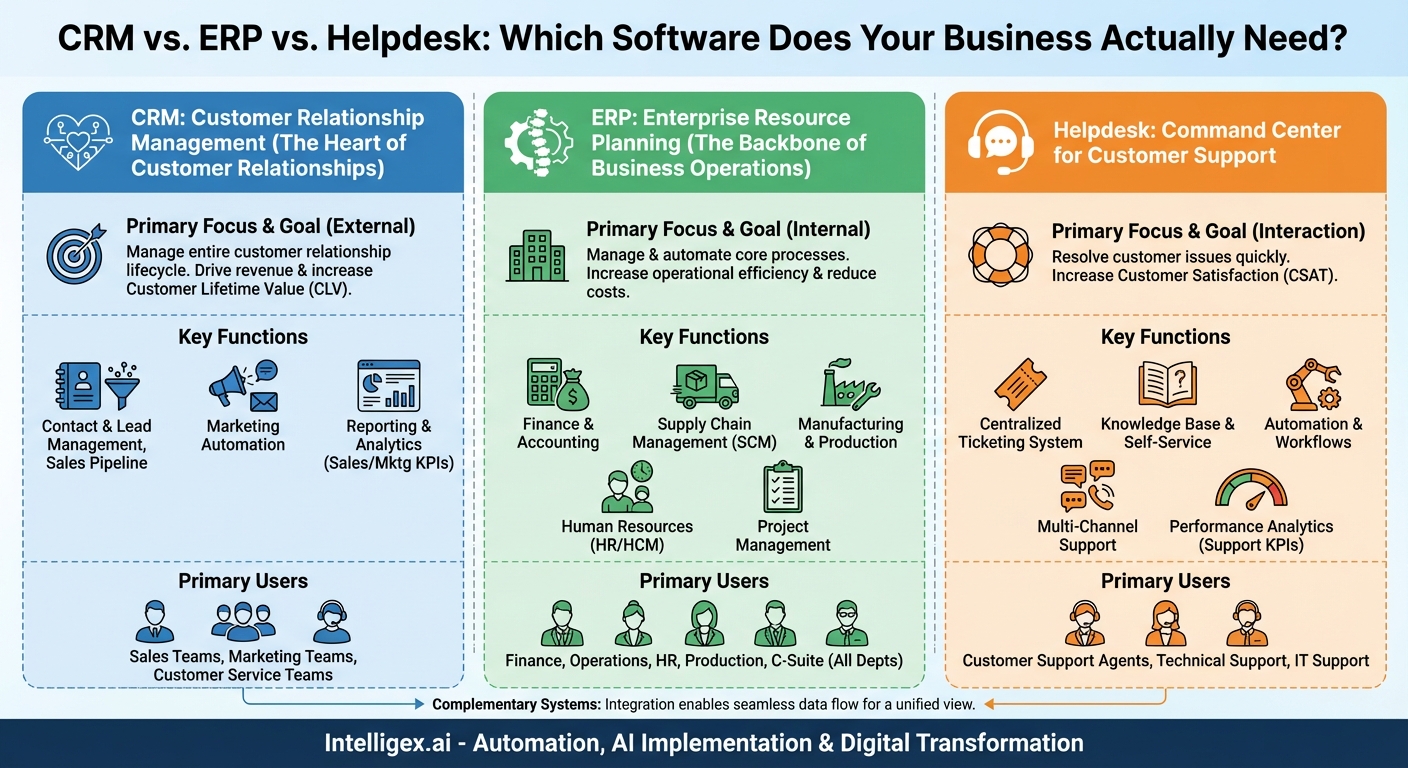
In the world of business software, an alphabet soup of acronyms can leave even the most seasoned professional feeling bewildered. CRM, ERP, Helpdesk—these terms are thrown around constantly, often interchangeably, creating a fog of confusion. Yet, understanding the distinct purpose of each system is crucial for building an efficient, scalable, and customer-centric organization. Choosing the right tool for the right job can be the difference between streamlined success and chaotic inefficiency. This guide will demystify these three foundational pillars of modern business technology. We’ll explore what each system does, who uses it, and how they work together to create a powerful engine for growth.
Decoding the CRM: The Heart of Customer Relationships
At its core, a Customer Relationship Management (CRM) system is all about one thing: the customer. It’s a technology for managing all your company’s relationships and interactions with both potential and existing customers. The goal is simple: improve business relationships to grow your business. A CRM system helps companies stay connected to customers, streamline processes, and improve profitability.
What Does a CRM Actually Do?
Think of a CRM as your business’s centralized command center for every customer-facing activity. It captures, stores, and analyzes a vast array of customer data from multiple channels—your website, email, telephone, social media, and more. This creates a unified, 360-degree view of every individual who interacts with your brand. This comprehensive profile allows sales, marketing, and service teams to make informed, personalized decisions.
Key functions of a modern CRM platform typically include:
- Contact and Lead Management: This is the foundational feature. A CRM stores detailed information about contacts, including their name, email, phone number, social media profiles, and a complete history of all interactions with your company—every email opened, every call made, every purchase completed.
- Sales Pipeline Management: For sales teams, this is invaluable. A CRM provides a visual representation of the sales funnel, allowing managers and reps to track leads as they progress from initial contact to a closed deal. It helps identify bottlenecks, forecast revenue, and prioritize efforts on the most promising opportunities.
- Marketing Automation: CRMs empower marketing teams to run targeted campaigns. They can segment customer lists based on behavior or demographics, automate email sequences, track campaign engagement, and measure the return on investment (ROI) of their marketing spend.
- Reporting and Analytics: A CRM transforms raw data into actionable insights. Customizable dashboards can visualize key performance indicators (KPIs) like sales performance, customer lifetime value (CLV), conversion rates, and marketing campaign effectiveness, enabling data-driven decision-making.
–
–
–
Who Uses a CRM?
While the entire organization can benefit from the data within a CRM, its primary users are the teams on the front lines of customer interaction:
- Sales Teams live in the CRM. They use it to manage their pipeline, track deals, log activities, and understand their customers’ needs.
- Marketing Teams leverage the CRM for lead generation, customer segmentation, email marketing, and analyzing campaign success.
- Customer Service Teams use it to access a customer’s full history, allowing them to provide more contextual and personalized support.
–
–
In essence, if your goal is to find, win, and keep customers, a CRM is your essential tool. It focuses externally, on the entire lifecycle of the relationship between your company and the people who buy from you.
Understanding ERP: The Backbone of Business Operations
If a CRM manages the external relationships of a business, an Enterprise Resource Planning (ERP) system manages its internal soul. An ERP is a massive, integrated system used to manage and automate core business processes in real-time. It acts as the company’s central nervous system, connecting disparate departments and ensuring that information flows seamlessly across the entire organization.
What Does an ERP Actually Do?
Imagine a business where the finance department has its own software, the inventory team uses a different one, and human resources operates on yet another. Data is siloed, communication is difficult, and getting a single, accurate view of the business’s health is nearly impossible. An ERP system solves this by integrating these functions into one cohesive platform with a single, shared database. This “single source of truth” is the ERP’s greatest strength.
ERPs are typically modular, meaning businesses can implement the specific components they need. Core modules often include:
- Finance and Accounting: This is the heart of most ERP systems. It manages the general ledger, accounts payable and receivable, budgeting, financial reporting, and compliance.
- Supply Chain Management (SCM): For businesses dealing with physical goods, this module is critical. It handles everything from procurement of raw materials and inventory management to order processing, warehouse logistics, and shipping.
- Manufacturing and Production: This module helps manage the complexities of the production floor, including production planning, bill of materials, shop floor control, and quality assurance.
- Human Resources (HR): Also known as Human Capital Management (HCM), this module centralizes employee data, payroll, benefits administration, time and attendance, and talent management.
- Project Management: For service-based or project-oriented companies, this module helps with resource planning, project costing, time tracking, and billing.
You might notice that some ERPs also offer a CRM module. While this can work for some businesses, an ERP’s CRM is typically less specialized and feature-rich than a best-in-class standalone CRM system.
Who Uses an ERP?
Because it touches every core function, an ERP is used by nearly every department within a company. Finance clerks, warehouse managers, HR professionals, production planners, and C-level executives all rely on the ERP to perform their daily tasks and make strategic decisions based on accurate, real-time data. Its focus is internal, aimed at optimizing processes, reducing costs, and increasing operational efficiency.
Introducing the Helpdesk: The Command Center for Customer Support
While a CRM manages the broad customer relationship, a Helpdesk system is a highly specialized tool designed for one specific, crucial part of that relationship: resolving customer issues. A helpdesk is a centralized software platform used by support teams to receive, process, manage, and respond to customer service requests efficiently and effectively.
What Does a Helpdesk Actually Do?
Without a helpdesk, customer support can quickly become a nightmare of missed emails, forgotten follow-ups, and frustrated customers. A helpdesk system brings order to this chaos by turning every customer query—whether it comes via email, phone, live chat, or social media—into a numbered “ticket.” This ticket becomes the single record for that specific issue, tracking all communication and actions until it is resolved.
Modern helpdesk platforms are packed with features designed to streamline the support process:
- Centralized Ticketing System: This is the core of any helpdesk. It consolidates all customer inquiries into a single, shared inbox, ensuring no request is lost and providing full visibility into the support workload.
- Knowledge Base and Self-Service: A great helpdesk empowers customers to help themselves. It allows companies to build a comprehensive knowledge base of FAQs and how-to articles, deflecting common questions and freeing up agents to focus on more complex issues.
- Automation and Workflows: Helpdesks use automation to eliminate repetitive tasks. They can automatically route tickets to the correct agent or department, send acknowledgments to customers, and escalate tickets that haven’t been resolved within a specific timeframe (defined by Service Level Agreements, or SLAs).
- Multi-Channel Support: Customers expect to be able to contact you on their preferred channel. A helpdesk integrates email, live chat, phone, and social media messaging into a unified agent interface, allowing for a consistent support experience.
- Performance Analytics: You can’t improve what you don’t measure. Helpdesks provide detailed reports on key support metrics like first response time, average resolution time, ticket volume, and customer satisfaction (CSAT) scores.
Who Uses a Helpdesk?
The primary users of a helpdesk are, unsurprisingly, customer-facing support teams. This includes:
- Customer Support Agents who use it daily to manage their queue of tickets.
- Technical Support Teams who handle more complex product or service issues.
- IT Support Teams who often use an internal helpdesk to manage employee tech requests.
- Customer Success Managers who monitor customer health and proactively address potential issues.
The helpdesk’s purpose is laser-focused: to provide fast, reliable, and scalable support that keeps customers happy and loyal.
Bringing It All Together: Overlaps and Key Distinctions
While CRM, ERP, and Helpdesk systems have distinct core functions, they don’t operate in a vacuum. Understanding their differences and how they can connect is key to building a truly effective tech stack.
Focus and Primary Goal
- CRM: Focuses on the customer relationship lifecycle. Its primary goal is to drive revenue and increase customer lifetime value.
- ERP: Focuses on the core business processes. Its primary goal is to increase operational efficiency and reduce costs.
- Helpdesk: Focuses on the customer support interaction. Its primary goal is to resolve issues quickly and increase customer satisfaction.
–
–
Data and Integration
The real power emerges when these systems talk to each other. For example, when a salesperson in the CRM closes a major deal, that information needs to flow to the ERP to trigger invoicing, inventory allocation, and financial reporting. Similarly, when a customer support agent in the Helpdesk is talking to an angry customer, they need to see that customer’s entire purchase history from the CRM and their latest shipping status from the ERP to provide a complete solution. This seamless flow of data prevents silos and ensures every employee has the context they need to do their job effectively.
Do You Need All Three?
The answer depends entirely on your business’s size, industry, and complexity.
- Startups and Small Businesses: Often, a powerful CRM is the first and most critical investment. Many modern CRMs have light helpdesk and project management features that can suffice in the early days. An ERP is typically overkill at this stage.
- Growing Mid-Sized Companies: As a company scales, the need for specialized tools becomes apparent. This is usually the point where a dedicated Helpdesk platform is added to handle the increasing volume of support requests. As operations become more complex, the business may adopt an ERP, starting with a core finance or inventory module.
- Large Enterprises: An enterprise-level organization almost certainly needs all three systems. The challenge here isn’t whether to have them, but how to integrate them deeply to ensure data integrity and a unified view of both the customer and the business operations.
–
–
In the end, CRM, ERP, and Helpdesk software are not competing solutions; they are complementary pieces of a larger puzzle. A CRM helps you win and nurture your customers. An ERP ensures your business runs like a well-oiled machine behind the scenes. And a Helpdesk ensures that when your customers need help, you’re there to provide outstanding support. By understanding the unique role of each, you can make smarter technology investments that fuel growth, boost efficiency, and build a loyal customer base that lasts a lifetime.
Your Next Read:
Get a FREE
Proof of Concept
& Consultation
No Cost, No Commitment!
