

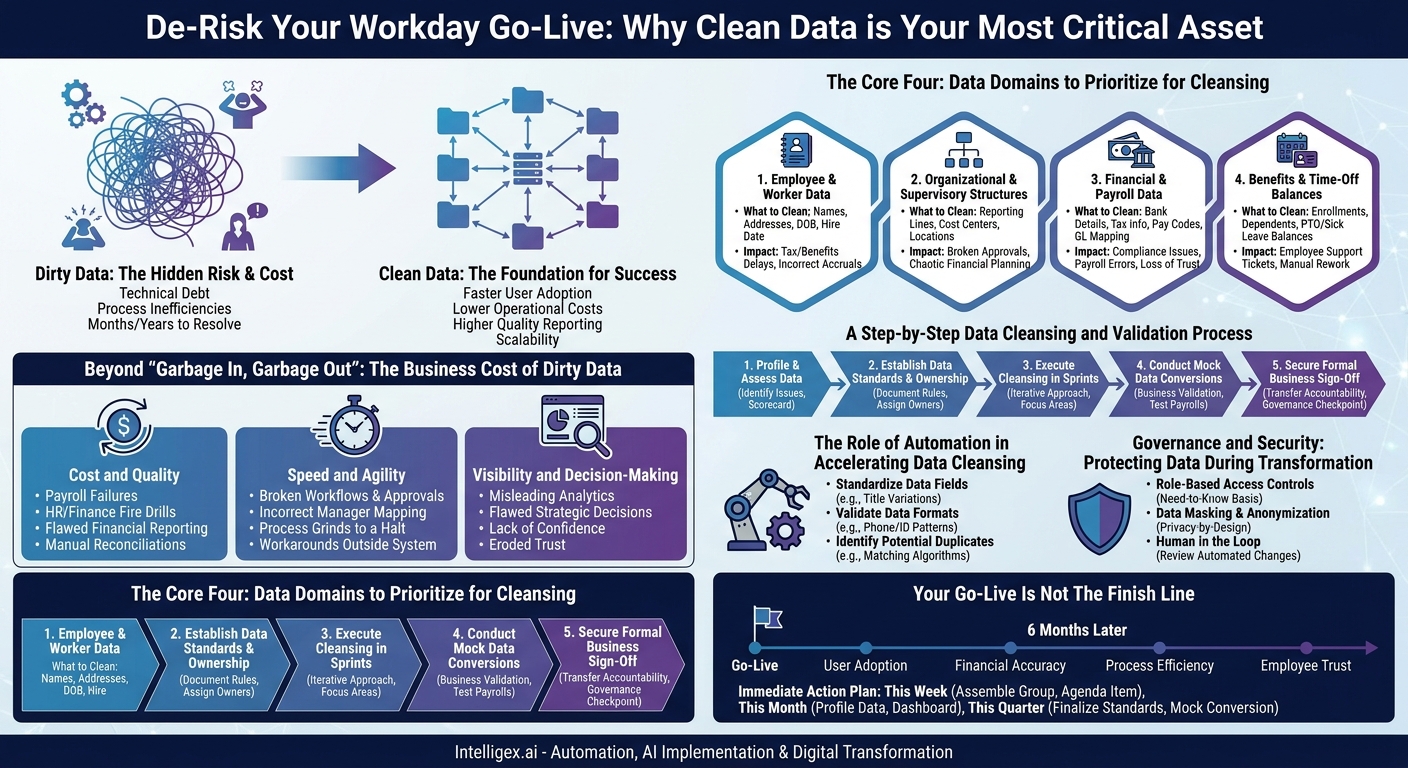
A Workday go-live is a landmark event in any organization’s digital transformation journey. It promises a unified, intelligent system for finance, HR, and planning. Yet, the final, frantic days of the cutover period are where the success of this massive investment is often decided. The difference between a smooth, celebrated launch and a chaotic, confidence-eroding rollout frequently hinges on one critical, and often underestimated, factor: the cleanliness of your legacy data. This isn’t just a technical task for the IT department. It’s a strategic imperative that directly impacts business value from day one.
Clean data is the foundation upon which your new Workday tenant is built. Getting it right ensures faster user adoption, lower operational costs, higher quality reporting, and the ability to scale. Getting it wrong means you carry forward the technical debt and process inefficiencies you sought to eliminate, creating a cascade of problems that can take months, or even years, to resolve.
Beyond “Garbage In, Garbage Out”: The True Business Cost of Dirty Data
The old adage “garbage in, garbage out” barely scratches the surface of the problem. In a highly integrated system like Workday, dirty data doesn’t just produce bad reports. It actively breaks core business processes, erodes trust, and creates immense friction across the organization. The consequences manifest as tangible business costs.
Consider the impact on key business value drivers:
- Cost and Quality: A single incorrect digit in a bank account number or an outdated employee address can lead to a failed payroll deposit. This doesn’t just create one support ticket. It creates a fire drill for HR, Payroll, and Finance, requiring hours of manual investigation and correction. Multiply this by hundreds or thousands of employees, and the operational cost skyrockets. Similarly, incorrect cost center assignments for employees lead to flawed financial reporting, forcing accounting teams into tedious manual reconciliations that undermine the very purpose of a unified ERP.
- Speed and Agility: Workday’s power lies in its automated workflows and approval chains. These processes rely entirely on a correct supervisory structure. If an employee is mapped to the wrong manager, their vacation request, expense report, or promotion approval is sent into a black hole. The process grinds to a halt, productivity suffers, and frustrated employees and managers develop workarounds outside the system, defeating the goal of standardization.
- Visibility and Decision-Making: Executives expect accurate, real-time dashboards on day one. But if your historical data for headcount, attrition, or compensation is riddled with inconsistencies, your analytics will be misleading. A leadership team trying to analyze compensation parity might make flawed decisions based on employees wrongly classified in job profiles. The promise of strategic insight is replaced by a lack of confidence in the system’s data integrity.
The Core Four: Data Domains to Prioritize for Cleansing
While every data element is important, you cannot boil the ocean. A successful cutover requires a ruthless prioritization of the data domains that form the bedrock of your Workday instance. Focus your cleansing efforts on these four areas first, as they have the most significant downstream impact on critical business processes.
1. Employee and Worker Data
This is the master record for every person in your organization. Errors here affect everything from identity and access management to compensation and personal communication. It’s the data that makes the system human-centric.
- What to Clean: Legal names (vs. preferred names), home addresses, national IDs, contact information (email, phone), and emergency contacts. Pay special attention to dates, such as date of birth and hire date, as they drive eligibility for benefits and other programs.
- Common Pitfall: Inconsistent name formats (e.g., “O’Malley, John” vs. “John O’Malley” vs. “J. O’Malley”) can create duplicate records or cause integration failures with downstream systems.
- Business Impact: Incorrect addresses can delay tax documents and benefits information. An wrong hire date can lead to incorrect vacation accrual, causing immediate employee dissatisfaction.
2. Organizational and Supervisory Structures
This is the architectural blueprint of your company within Workday. It defines how work flows, who reports to whom, and how financial data is aggregated. If the structure is wrong, the entire system behaves incorrectly.
- What to Clean: Supervisory organization assignments (who each employee reports to), cost center and department hierarchies, and location structures. Ensure every single worker has one, and only one, active, correct manager.
- What to Measure: Track the percentage of “unlinked” employees, or employees reporting to a terminated manager. This metric should be at zero before cutover.
- Business Impact: A broken supervisory hierarchy means approvals for everything from purchasing to performance reviews will fail. Incorrect cost center assignments throw financial planning and analysis into chaos.
3. Financial and Payroll Data
For most employees, the ultimate test of the new system is simple: “Did I get paid correctly and on time?” This data is non-negotiable and has zero tolerance for error. It is a primary driver of trust in the new platform.
- What to Clean: Bank account details (routing and account numbers), tax withholding information (federal and state/local), pay components and allowances, and general ledger (GL) mapping for payroll expenses.
- Common Pitfall: Legacy systems often have dozens of custom pay codes for things like bonuses or stipends. These must be carefully mapped and rationalized to Workday’s standardized structure. Failure to do so is a leading cause of payroll calculation errors.
- Business Impact: Errors in financial data can lead to serious compliance issues, financial restatements, and, most critically, a massive loss of employee trust if payroll is incorrect.
4. Benefits and Time-Off Balances
After payroll, questions about benefits and time-off balances are the most common source of HR service center inquiries following a Workday launch. These balances are highly visible and personally important to every employee.
- What to Clean: Current benefit plan enrollments, dependent information, and, most importantly, accurate opening balances for leave accruals like paid time off (PTO), sick leave, and vacation time.
- Common Pitfall: Miscalculating PTO balances during the final data conversion. If an employee expects to see 120 hours of accrued vacation and the system shows 80, you have an immediate and urgent problem to solve.
- Business Impact: Incorrect data here leads to a surge in employee support tickets, erodes morale, and creates significant manual rework for the HR and benefits teams who are already stretched thin during a go-live.
A Step-by-Step Data Cleansing and Validation Process
Cleaning your data isn’t a single event; it’s a structured process that should run in parallel with your overall Workday implementation project. Involving business users at every stage is essential for success. This is not an IT-only exercise.
- Profile and Assess Your Data: Before you can clean anything, you must understand the scope of the problem. Use data profiling tools, or even advanced spreadsheet functions, to analyze your legacy data sources. Identify key issues like missing values (e.g., employees without addresses), inconsistent formats (e.g., phone numbers with and without country codes), and duplicate records. The output of this step is a data quality scorecard that guides your efforts.
- Establish Data Standards and Ownership: Formally document the rules for your data in Workday. For example, create a standard for job titles or a rule that all US addresses must be validated against the USPS database. Crucially, assign clear ownership. A data steward from Finance should be the final arbiter for cost center data, while an HR leader owns the job catalog. Accountability is key.
- Execute Cleansing in Sprints: Do not attempt a “big bang” data cleansing effort a month before go-live. Break the work into manageable sprints, aligning with your data priorities. Dedicate one sprint to cleaning all manager assignments, another to validating payroll data. This iterative approach makes the task less daunting and allows for continuous progress.
- Conduct Mock Data Conversions: This is the most critical step. Your implementation team will perform several mock data loads from your legacy systems into a Workday test tenant. These are not just technical tests. Business stakeholders from HR, Finance, and Payroll must participate in validating the results. They need to run test payrolls, review organizational charts, and pull reports to confirm the data looks and behaves as expected.
- Secure Formal Business Sign-Off: Before the final cutover weekend, present the final, clean data files to the designated data owners for a formal sign-off. This act of sign-off transfers accountability from the project team to the business, reinforcing that the data is fit for purpose. It is a critical governance checkpoint that prevents last-minute surprises.
The Role of Automation in Accelerating Data Cleansing
Manually reviewing and correcting hundreds of thousands or even millions of data records is not feasible. This is where targeted automation can dramatically accelerate your timeline and improve accuracy. This isn’t about generic “AI hype,” but rather the practical application of technology to solve specific, high-volume problems.
For instance, simple scripts and rules-based automation can be used to:
- Standardize Data Fields: Automatically convert variations like “Senior Manager,” “Sr. Manager,” and “Sr Mgr” into a single, approved “Senior Manager” title. This is impossible to do consistently by hand across thousands of records.
- Validate Data Formats: Programmatically check that all national IDs, phone numbers, or postal codes adhere to a predefined format, flagging any exceptions for human review.
- Identify Potential Duplicates: Use matching algorithms to flag records that are likely duplicates, such as two employees with very similar names and the same date of birth. This allows data stewards to focus their attention on investigating the exceptions rather than searching for them.
By automating the repetitive, low-judgment tasks, you free up your business experts to focus on the complex, high-impact data issues that require their specific domain knowledge.
Governance and Security: Protecting Data During Transformation
During the data cleansing and migration process, you will be handling large extracts of your company’s most sensitive information, including personally identifiable information (PII) and financial data. Protecting this data is paramount and requires a deliberate governance strategy.
First, implement strict role-based access controls. Not everyone on the project team needs to see raw payroll files or employee social security numbers. Limit access to sensitive data files on a need-to-know basis, even in staging and test environments.
Second, use data masking or anonymization techniques whenever possible, especially when providing data to partners or for use in training and testing environments. There are robust tools available that can replace real sensitive data with realistic but fake data, preserving the data format without exposing the underlying information. This is a core principle of privacy-by-design, as outlined in regulations like GDPR.
Finally, ensure a “human in the loop” for all critical, automated changes. While a script can propose a fix for thousands of address records, a data steward should review a summary of those changes before they are committed. For highly sensitive fields like compensation or bank details, automated changes should always require explicit human approval. This combination of automation for scale and human oversight for safety is the cornerstone of responsible data governance.
Your Go-Live Is Not The Finish Line
The success of your Workday implementation is not measured on the day you go live. It’s measured six months later by user adoption rates, the accuracy of your financial reports, the efficiency of your business processes, and the trust your employees have in the system. All of these outcomes are directly determined by the quality of the data you feed into the platform during cutover.
Treating data cleansing as a strategic priority, not an administrative afterthought, is the single most effective way to de-risk your Workday launch and accelerate your time-to-value. The hard work you invest in cleaning your data now will pay dividends for years to come in the form of a more agile, data-driven, and efficient organization.
Your Immediate Action Plan
Don’t wait until the pressure of cutover is upon you. Begin taking structured action now to ensure your data is ready for the transition.
- This Week: Assemble a cross-functional data working group with named owners from HR, Finance, and IT. Make data quality a standing agenda item in your project steering committee meetings.
- This Month: Begin data profiling on your highest priority domains: employee records and supervisory structures. Create a data quality dashboard to track your progress.
- This Quarter: Finalize your data standards and execute your first mock data conversion. Engage your business users deeply in the validation process to build their confidence and catch issues early.
By taking these deliberate steps, you shift from a reactive, chaotic approach to a proactive, controlled process, setting your Workday implementation on the path to long-term success.
Your Next Read:
Category:
Get a FREE
Proof of Concept
& Consultation
No Cost, No Commitment!
